
1. Úvod
Děkuji za nákupasing the BOOM BASS L-22 Bluetooth Speaker. This manual provides essential information for the safe and efficient operation of your new speaker. Please read this manual thoroughly before use and retain it for future reference.
2. Konec produktuview
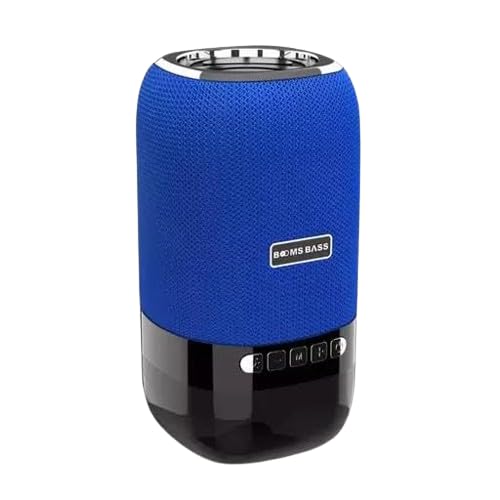
Image: The BOOM BASS L-22 Bluetooth Speaker, featuring a cylindrical design with a blue fabric mesh upper section and a black glossy base. The speaker has control buttons on the front of the black base and a silver ring at the top.
The BOOM BASS L-22 is a portable 5W Bluetooth speaker designed for wireless audio playback. It features a distinctive blue color and integrated LED lighting, enhancing your audio experience with visual effects. Its compact design makes it suitable for various environments.
3. Vlastnosti
- Bluetooth připojení: Bezproblémové bezdrátové streamování zvuku z kompatibilních zařízení.
- 5W zvukový výstup: Poskytuje čistý a silný zvuk.
- Blue Color Design: Stylish and vibrant blue finish.
- Integrované LED osvětlení: Features different LED light modes for an enhanced ambiance.
- Přenosný design: Compact dimensions (10D x 10W x 10H Centimeters) for easy transport.
- Vodotěsný: Designed to be resistant to water.
4. Co je v krabici
Po vybalení se prosím ujistěte, že jsou přítomny všechny níže uvedené položky:
- 1 x BOOM BASS L-22 Bluetooth Speaker
- 1 x Charging Cable (Note: Specific cable type not provided in product details, typically USB)
- 1 x User Manual (Tento dokument)
5. Nastavení
5.1 Nabíjení reproduktoru
- Najděte nabíjecí port na reproduktoru.
- Připojte dodaný nabíjecí kabel k nabíjecímu portu reproduktoru.
- Druhý konec nabíjecího kabelu připojte ke kompatibilnímu USB napájecímu adaptéru (není součástí balení) nebo k USB portu počítače.
- The LED indicator will typically show charging status (e.g., solid red while charging, off when fully charged).
- Před prvním použitím nechte reproduktor plně nabít, abyste zajistili optimální výdrž baterie.
5.2 Párování Bluetooth
- Zapnutí: Press and hold the Power button on the speaker until you hear an audible prompt or see the LED indicator light up.
- Vstupte do režimu párování: The speaker should automatically enter Bluetooth pairing mode, indicated by a flashing LED light (e.g., blue). If not, press the Bluetooth pairing button (if available).
- Povolte Bluetooth na svém zařízení: On your smartphone, tablet, or other Bluetooth-enabled device, go to the Bluetooth settings and turn Bluetooth ON.
- Vyberte reproduktor: In the list of available devices, look for "BOOM BASS L-22" or a similar name. Tap on it to connect.
- Potvrzení: Once successfully paired, the speaker will usually provide an audible confirmation, and the LED indicator will stop flashing and remain solid.
Note: If prompted for a password, enter "0000" (four zeros).
6. Návod k obsluze
6.1 Základní ovládací prvky
- Zapnutí/vypnutí: Stiskněte a podržte Moc tlačítko.
- Přehrát/pozastavit: Stiskněte tlačítko Přehrát/Pozastavit button to start or pause audio playback.
- Zvýšit hlasitost: Stiskněte tlačítko Hlasitost + tlačítko pro zvýšení hlasitosti.
- Snížit hlasitost: Stiskněte tlačítko Hlasitost - tlačítko pro snížení hlasitosti.
- Další skladba: Press and hold or double-press the Hlasitost + tlačítko (functionality may vary by model).
- Předchozí skladba: Press and hold or double-press the Hlasitost - tlačítko (functionality may vary by model).
- Tlačítko režimu (M): Press to switch between available modes (e.g., Bluetooth, AUX, TF Card, USB - if supported by the speaker).
- Ovládání světla LED: Some models may have a dedicated button or a long press on another button to change LED light patterns or turn them off.
6.2 Přehrávání zvuku
Once paired, audio from your connected device will automatically play through the speaker. Control playback (play, pause, skip) either from your device or using the speaker's control buttons.
7. Údržba
7.1 Čištění
- Před čištěním se ujistěte, že je reproduktor vypnutý a odpojený od jakéhokoli zdroje napájení.
- Vnější povrch otřete měkkým, suchým hadříkem, který nepouští vlákna.
- Na odolné skvrny lehceamphadřík vodou. Nepoužívejte agresivní chemikálie, čisticí rozpouštědla ani silné čisticí prostředky.
- Zabraňte vniknutí vlhkosti do jakýchkoli otvorů nebo portů.
7.2 Skladování
- Reproduktor skladujte na chladném a suchém místě mimo dosah přímého slunečního záření a extrémních teplot.
- If storing for an extended period, charge the battery to approximately 50% every few months to preserve battery health.
8. Řešení problémů
| Problém | Možná příčina | Řešení |
|---|---|---|
| Reproduktor se nezapne. | Baterie je vybitá. | Plně nabijte reproduktor. |
| Nelze spárovat se zařízením Bluetooth. | Bluetooth na zařízení je vypnutý; reproduktor není v režimu párování; zařízení je příliš daleko. | Ensure Bluetooth is enabled on your device. Put speaker in pairing mode. Move device closer to speaker (within 10 meters). Forget speaker from device's Bluetooth list and re-pair. |
| Žádný zvuk nebo nízká hlasitost. | Hlasitost reproduktoru nebo zařízení je příliš nízká; reproduktor není připojen. | Increase volume on both speaker and connected device. Ensure speaker is successfully paired and connected. |
| Zkreslení zvuku. | Příliš vysoká hlasitost; rušení; slabá baterie. | Snižte hlasitost. Přemístěte reproduktor dále od ostatních elektronických zařízení. Nabijte reproduktor. |
9. Specifikace
| Funkce | Detail |
|---|---|
| Značka | Obecný |
| Název modelu | L-22 (Speaker) |
| Technologie připojení | Bluetooth |
| Typ reproduktoru | Subwoofer |
| Výstupní výkon | 5W |
| Barva | Modrý |
| Rozměry produktu | 10H x 10Š x 10V centimetrů |
| Vodotěsný | Ano |
| Doporučená použití | Tablets, Smartphones |
10. Záruka a podpora
For warranty information and customer support, please refer to the documentation provided at the time of purchase or contact the retailer/manufacturer directly. Keep your purchase receipt as proof of purchase for warranty claims.
Manufacturer: Giga Traders