
1. Úvod
This manual provides comprehensive instructions for the safe and effective use of your DCH CS-ART822RX 6800mAh Lithium-ion Battery Replacement. Please read this manual thoroughly before installation and operation to ensure optimal performance and longevity of the battery.
2. Bezpečnostní informace
VAROVÁNÍ: To reduce the risk of fire or burns, read instructions in the operating guide before using the battery.
- Nepokoušejte se bateriový blok rozebírat, otevírat ani opravovat.
- Vyměňujte pouze za baterii určenou pro tento produkt.
- Nedrťte, nepropichujte, nezkratujte vnější kontakty a nevhazujte do ohně nebo vody.
- Neskladujte při teplotě nad 60 °C (140 °F).
- New battery packs must be fully charged before use.
POZOR: Warranty void if label is removed.

Image: The battery's warning label, indicating safety precautions and specifications. It shows "Model No.: CS-ART822RX", "Part No.: BPB044S, ARCT00830N", "Rating: 7.4VDC = 6800mAh / 50.32Wh", and "Lithium-ion Battery Pack".
3. Kompatibilita
This DCH battery replacement is designed for specific Arris cable modem models and battery part numbers. Please verify compatibility before installation.
Compatible Arris Modem Models:
- TM7, TM504G, TM822G, TM502H
- TG862G, TM602G, TM722G, TM608G
- TG16x2G, TM6, WBM760A, TM702G
- TM8, TM802G, TG862
Kompatibilní čísla dílů baterií:
- ARCT00830
- BPB044H
- BPB044S
- ARCT00830N
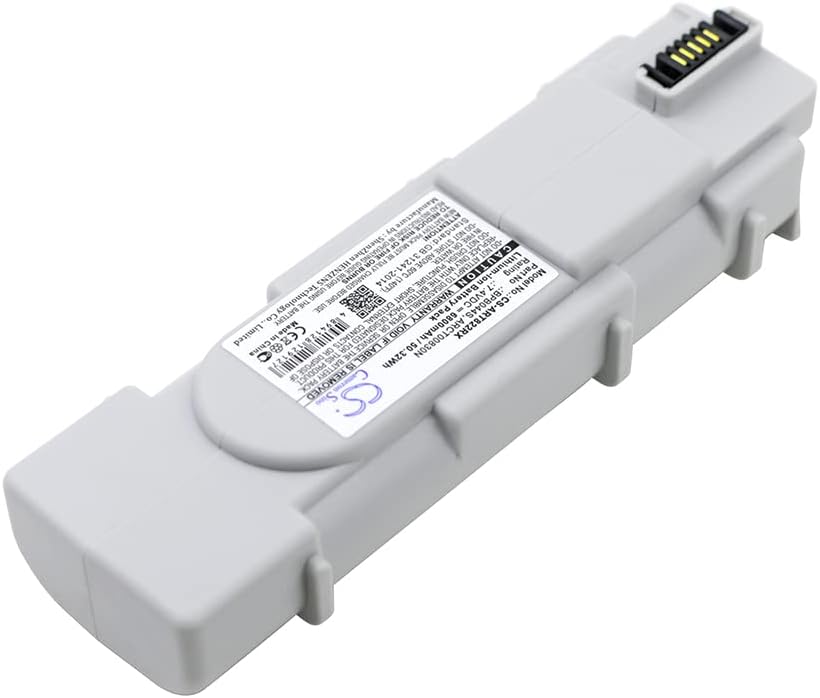
Image: The DCH CS-ART822RX battery replacement, illustrating its physical form factor and connector end.
4. Nastavení a instalace
Follow these steps to safely install the DCH CS-ART822RX battery replacement into your compatible Arris modem.
- Vypínací zařízení: Ensure your Arris modem is completely powered off and unplugged from the wall outlet.
- Najděte přihrádku na baterie: Identify the battery compartment on your Arris modem. This is typically on the bottom or back panel. Refer to your modem's original user manual if you cannot locate it.
- Vyjměte starou baterii: Open the battery compartment cover. Carefully disconnect the old battery's connector and remove the battery.
- Vložení nové baterie: Align the DCH CS-ART822RX battery replacement with the compartment. Ensure the connector is oriented correctly. Gently push the battery into place until it sits securely.
- Připojte baterii: Firmly connect the battery's cable to the modem's battery port.
- Zavřít přihrádku: Replace the battery compartment cover, ensuring it is securely latched or screwed into place.
- Počáteční poplatek: Plug your Arris modem back into the power outlet. Allow the new battery to fully charge before its first use. This may take several hours.

Obrázek: Vedlejší profesionálfile of the DCH CS-ART822RX battery, highlighting its design for secure fitment within a device.
5. Návod k obsluze
Once installed and fully charged, the DCH CS-ART822RX battery provides backup power to your Arris modem during power outages.
- Normální provoz: When the modem is connected to AC power, the battery will remain charged and ready.
- Power Outage: In the event of a power failure, the modem will automatically switch to battery power, allowing continued operation for a limited time.
- Indikátor baterie: Refer to your Arris modem's indicator lights for battery status (e.g., charging, fully charged, low battery).

Image: An alternative side view of the DCH CS-ART822RX battery, providing a complete visual understanding of its form.
6. Údržba
Proper maintenance ensures the longevity and reliability of your battery.
- Pravidelné nabíjení: Keep the modem plugged into AC power to ensure the battery remains fully charged.
- Vyhněte se extrémním teplotám: Do not expose the battery or modem to extreme heat or cold, as this can degrade battery performance.
- Skladování: If storing the battery for an extended period, ensure it is partially charged (around 50%) and stored in a cool, dry place. Recharge every 3-6 months to prevent deep discharge.
- Čištění: Keep the battery and its contacts clean and free from dust. Use a dry, soft cloth for cleaning.
Likvidace: Dispose of old batteries responsibly according to local regulations. Do not dispose of in household waste or fire.
7. Řešení problémů
| Problém | Možná příčina | Řešení |
|---|---|---|
| Baterie se nenabíjí | Battery not properly connected; Modem not receiving AC power; Faulty battery or modem. | Check battery connection; Verify modem is plugged in and receiving power; Contact support if issue persists. |
| Krátká doba zálohování | Baterie není plně nabitá; Časem se zhoršuje stav baterie. | Ensure battery is fully charged; Consider replacing battery if it's old and capacity has significantly reduced. |
| Modem not turning on with battery power | Battery not installed correctly; Battery completely discharged; Incompatible battery. | Re-install battery, ensuring secure connection; Charge battery fully; Verify battery model compatibility. |
8. Specifikace
- Číslo modelu: CS-ART822RX
- Čísla dílů: ARCT00830, BPB044H, BPB044S, ARCT00830N
- Typ baterie: Lithium-iontová
- Kapacita: 6800 XNUMX mAh
- Watt-hodiny (Wh): 50.32 Wh
- svtage: 7.4V
- Rozměry: 144.6 x 46.65 x 30.76mm (5.69 x 1.84 x 1.21 palce)
- Hmotnost: 395.3 g (0.87 lb)
- Výrobce: DCH
Poznámka: Specifikace se mohou změnit bez předchozího upozornění.
9. Záruka a podpora
This DCH battery replacement comes with a manufacturer's warranty. Please refer to the product packaging or contact your retailer for specific warranty terms and conditions.
For technical assistance or inquiries, please contact DCH customer support. When contacting support, please have your product model number (CS-ART822RX) and purchase information available.
Výrobce: DCH
Výrobce: Shenzhen HENZENS Technology Co., Limited
Webmísto: www.cameronsino.com
GTIN/UPC: 768718804043