
M6 Pro (M200S-M700S Series)
User Manual: Car Stereo Radio
Model: M6 Pro (M200S-M700S Series) for Peugeot 407 (2004-2008)
1. Konec produktuview
This manual provides detailed instructions for the installation, operation, and maintenance of your new Car Stereo Radio, designed specifically for Peugeot 407 models manufactured between 2004 and 2008. This advanced system features an 8-core CPU, 4GB RAM, and 64GB ROM, ensuring enhanced fluency, compatibility, and privacy. The large 13.1-inch display offers an intuitive interface for controlling various functions.
The package includes the car stereo radio unit and necessary accessories for installation. No additional accessories are required for basic functionality.

Obrázek 1.1: Přední strana view of the car stereo radio display, showing navigation, music, and app icons.

Obrázek 1.2: Přesview of the M6 Pro model's key specifications including 1280x720 QLED display, 8-Core CPU, 4GB RAM, 64GB ROM, 4G LTE, WiFi, Qualcomm BT5.1, DSP (36EQ), DTS, RDS, CarPlay, and Android Auto.
2. Bezpečnostní informace
Před instalací a provozem si pečlivě přečtěte všechny bezpečnostní pokyny. Nedodržení těchto pokynů může vést ke zranění, poškození zařízení nebo poškození vašeho vozidla.
- Před zahájením instalace se ujistěte, že je vypnuté zapalování vozidla a odpojená baterie, abyste předešli elektrickému zkratu.
- Pokud si nejste jisti některou částí instalačního procesu, poraďte se s odborníkem.
- Neobsluhujte zařízení způsobem, který by vás rozptyloval od řízení. Vždy upřednostňujte bezpečnost silničního provozu.
- Nevystavujte zařízení extrémním teplotám, delšímu přímému slunečnímu záření nebo nadměrné vlhkosti.
- Use only specified power cables and connectors.
3. Nastavení a instalace
This section guides you through the physical installation and initial setup of your car stereo radio.
3.1. Pre-Installation Comparison
Observe the difference in your car's dashboard before and after the installation of the new stereo unit.

Figure 3.1: Comparison showing the original car stereo setup (top) and the new 13.1-inch car stereo radio installed (bottom) in a Peugeot 407 dashboard.
3.2. Schéma zapojení
Refer to the diagram below for proper connection of all cables to the back of the host device. Ensure all connections are secure.

Figure 3.2: Detailed wiring diagram for the back of the car stereo unit, showing connections for GPS, 5G WiFi, Radio, 4G Antenna, USB, RCA cables, and various power and signal wires. Note the cooling fan and specific connections for M500S/M600S/M700S models.
3.3. Initial Setup Steps (AMP and Cooling Fan)
After physical installation, follow these steps to configure the amplifier and ensure the cooling fan is active:
- Připojte k zařízení všechny potřebné kabely.
- Přejděte na Nastavení > Zařízení > Zvuk.
- In the Sound settings, locate and turn ON a AMP ON/OFF volba.
- Jednou AMP is enabled, the cooling fan will automatically start working to maintain optimal device temperature.

Figure 3.3: Visual guide for enabling the ampživější (AMP) and activating the cooling fan through the device's settings menu.
3.4. DVR Software Installation (Optional)
If you wish to use a DVR with your unit, follow these steps to install the necessary software:
- Connect the DVR via a USB cable to the car stereo unit.
- Otevřete FileManažer application on the device.
- Navigate to the USB storage and locate the DVR installation file (e.g., uCarDvr.apk).
- Install the software. A confirmation message "HD DVR App installed." will appear upon successful installation.

Figure 3.4: Step-by-step visual guide for installing DVR software from a USB drive using the File Manažer.
3.5. Dodávané příslušenství
The following accessories are typically included with your car stereo radio, depending on the specific model (M200S, M300S, M400S, M500S, M600S, M700S).
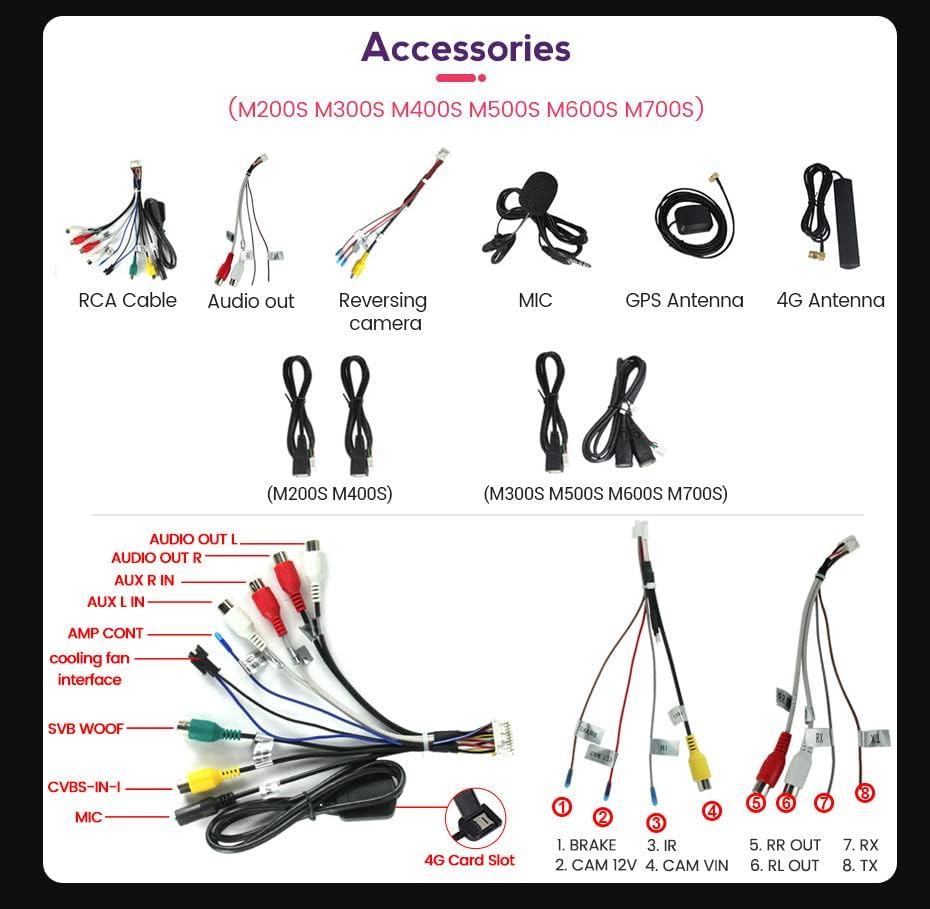
Figure 3.5: A visual representation of the various accessories included, such as RCA cables, audio out cables, reversing camera cable, microphone, GPS antenna, 4G antenna, and specific wiring harnesses for different models.
4. Návod k obsluze
Your car stereo radio operates on an Android system, providing a familiar and intuitive user experience. It supports various connectivity options and features.
4.1. Základní navigace a ovládání
The unit features a 13.1-inch touchscreen display for primary interaction, supplemented by physical buttons for essential functions. The interface is designed for easy access to navigation, media playback, and communication features.
4.2. Konektivita
- Bluetooth: Připojte svůj smartphone pro handsfree volání a streamování hudby.
- Wi-Fi: Connect to a Wi-Fi hotspot for internet access, app downloads, and online services.
- USB: Use USB ports for media playback, charging devices, or connecting accessories like DVRs.
- 4G LTE: (If applicable to your model) Provides cellular data connectivity for online features.
4.3. CarPlay a Android Auto
The unit comes with built-in CarPlay and Android Auto functionality, eliminating the need for additional accessories. This allows seamless integration with your smartphone for navigation, music, messages, and more.
Wireless CarPlay (iOS System)
- Connect your iPhone via Bluetooth.
- On the car stereo, tap the "Car Link" icon.
- Wait for the connection to establish. CarPlay can also be connected via USB cable.
Wired Android Auto (Android System)
- Připojte telefon Android k autorádiu pomocí kabelu USB.
- On the car stereo, tap the "Car Link" icon.
- Počkejte na navázání připojení.

Figure 4.1: Visual guide demonstrating the built-in CarPlay and Android Auto interfaces, along with connection steps for both wireless CarPlay and wired Android Auto.
4.4. Zvuk a multimédia
The unit supports various audio and video formats. It features a Stereo audio output mode and advanced sound processing (DSP with 36-band equalizer, DTS, RDS) for an optimized listening experience.
4.5. Navigace
The system includes satellite map type functionality, allowing for precise navigation. Ensure GPS antenna is properly connected for optimal performance.
5. Údržba
Proper maintenance ensures the longevity and optimal performance of your car stereo radio.
- Čištění: K čištění obrazovky a vnějšího povrchu použijte měkký, suchý hadřík. V případě odolných skvrn lehceampOtřete hadřík vodou nebo čisticím prostředkem vhodným pro obrazovky. Vyhněte se abrazivním materiálům nebo agresivním chemikáliím.
- Teplota: Avoid leaving the device in direct sunlight or extreme temperatures for extended periods, as this can affect performance and lifespan.
- Aktualizace softwaru: Periodically check for software updates to ensure the system runs efficiently and has the latest features and security patches.
- Spojení: Občas zkontrolujte všechna kabelová připojení, abyste se ujistili, že jsou bezpečná a bez koroze.
6. Řešení problémů
If you encounter issues with your car stereo radio, refer to the following common problems and solutions.
- Bez napájení:
- Zkontrolujte všechna napájecí připojení a pojistky.
- Ujistěte se, že je baterie vozidla nabitá.
- Žádný zvuk:
- Ověřte připojení reproduktorů.
- Check volume levels and ensure the AMP is turned ON in settings (refer to Section 3.3).
- Ensure audio source is selected correctly.
- Ztráta signálu GPS:
- Ujistěte se, že je GPS anténa správně nainstalována a má volný view z nebe.
- Check antenna cable connection.
- Problémy s připojením Bluetooth/Wi-Fi:
- Ensure Bluetooth/Wi-Fi is enabled on both the stereo and your device.
- Zkuste restartovat obě zařízení.
- Forget and re-pair Bluetooth devices.
- System Freezes/Slow Performance:
- Restartujte jednotku.
- Zavřete nepotřebné aplikace na pozadí.
- Zvažte obnovení továrního nastavení (poznámka: tím se vymažou všechna uživatelská data a nastavení.
7. Specifikace
| Funkce | Specifikace |
|---|---|
| Kompatibilita modelu | Peugeot 407 (2004-2008) |
| CPU | 8 jádro |
| BERAN | 4 GB |
| ROM | 64 GB |
| Velikost obrazovky | 13.1 palců |
| Rozlišení displeje | 1280*720 (QLED) |
| Operační systém | Android |
| Konektivita | Bluetooth, Wi-Fi, USB, 4G LTE |
| Speciální funkce | Bluetooth, CarPlay, Android Auto, DSP (36EQ), DTS, RDS |
| Typ mapy | Satelit |
| Režim zvukového výstupu | Stereo |
| Vstup lidského rozhraní | Tlačítka, Dotyková obrazovka |
| Typ služby vozidla | Auto |
| Výrobce | Obecný |
| Země původu | Čína |
8. Záruka a podpora
Informace o záruce a technickou podporu naleznete v dokumentaci dodané při nákupu nebo se obraťte na svého prodejce. Uschovejte si doklad o koupi pro případné reklamace.
Ask a question about this manual
Ask about setup, troubleshooting, compatibility, parts, safety, or missing instructions. Manuals+ will review the question and use this page’s manual context to help answer it.