
Zavedení
Thank you for choosing the Vieta Pro Karaoke Party Microphone. This device combines a high-quality microphone with an integrated speaker, designed for an engaging karaoke experience. It features True Wireless technology, allowing two microphones to connect to a single device, and offers various sound modes and connectivity options.
Obsah balení
- Vieta Pro Karaoke Party Microphone with Integrated Speaker
- Nabíjecí kabel (USB-C)
- Uživatelská příručka

Image: The retail box of the Vieta Pro Karaoke Party Microphone, showing the product and its features.
Konec produktuview
Familiarize yourself with the main components and controls of your Vieta Pro Karaoke Party Microphone.

Obrázek: Přední strana view of the Vieta Pro Karaoke Party Microphone, highlighting the control buttons for power, volume, mode, and Bluetooth.
Ovládací prvky a porty:
- Vypínač: Stisknutím a podržením zapnete/vypnete. Krátkým stisknutím přepnete režimy.
- Tlačítka hlasitosti (+/-): Upravte hlasitost reproduktoru.
- Tlačítko režimu (M): Cycle through sound effects or modes.
- Tlačítko Bluetooth: Zahajte párování Bluetooth.
- Port USB-C: Pro nabíjení zařízení.
- 3.5mm Audio Jack (Input): Připojte externí zdroje zvuku.
- 3.5mm Audio Jack (Output): Připojte sluchátka nebo externí reproduktory.
- Tlačítko světelného režimu: Change or turn off LED lighting effects.
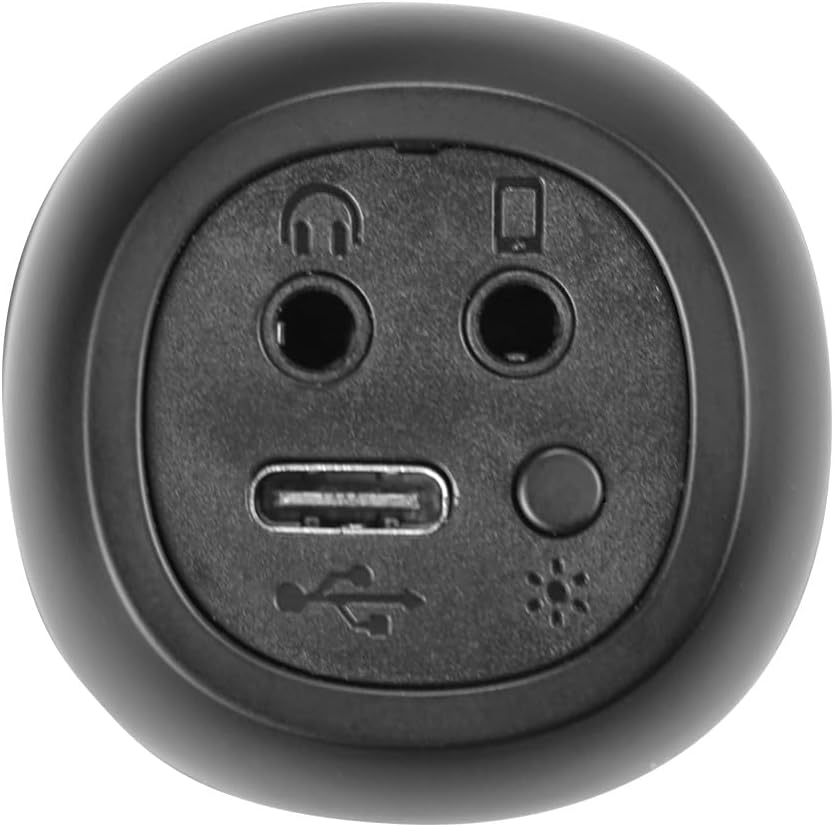
Obrázek: Detail view of the bottom of the microphone, showing the USB-C charging port, 3.5mm audio input/output jacks, and the light mode button.
Nastavení a připojení
1. Nabíjení mikrofonu
Before first use, fully charge the microphone. Connect the provided USB-C cable to the microphone's USB-C port and the other end to a USB power adapter (not included) or a computer's USB port. The battery indicator light will show charging status.
2. Zapnutí/vypnutí
Stiskněte a podržte Tlačítko napájení for approximately 3 seconds to turn the microphone on or off. A sound prompt will indicate the power status.
3. Párování Bluetooth
- Turn on the microphone. It will automatically enter Bluetooth pairing mode, indicated by a flashing Bluetooth light.
- Na smartphonu, tabletu nebo počítači povolte Bluetooth a vyhledejte dostupná zařízení.
- Select "Vieta Pro Karaoke Party" from the list of devices.
- Once connected, a sound prompt will confirm successful pairing, and the Bluetooth light will stop flashing.
4. True Wireless Connection (Connecting Two Microphones)
To use two Vieta Pro Karaoke Party microphones simultaneously with one device:
- Ujistěte se, že oba mikrofony jsou zapnuté a nejsou připojeny k žádnému jinému zařízení Bluetooth.
- On one microphone (this will be the primary), double-press the Tlačítko Bluetooth. It will enter True Wireless pairing mode.
- The primary microphone will search for the second microphone. Once connected, a sound prompt will confirm the True Wireless connection.
- Now, connect the primary microphone to your device via Bluetooth as described in step 3. Both microphones will now output audio from your device.

Image: Two individuals holding and using Vieta Pro Karaoke Party Microphones, demonstrating the True Wireless feature.
5. Drátové připojení (AUX)
Connect an external audio source (e.g., MP3 player) to the microphone using a 3.5mm audio cable (not included) plugged into the 3.5mm audio input jack.
Návod k obsluze
1. Nastavení hlasitosti
Použijte Hlasitost + a Hlasitost - buttons on the microphone to adjust the speaker output volume. You can also control the volume from your connected device.
2. Changing Sound Modes/Effects
Stiskněte tlačítko Tlačítko režimu (M) repeatedly to cycle through the four available sound configuration modes or voice effects. Experiment to find your preferred sound.
3. Voice Reduction Feature
This feature allows you to reduce the vocal track of a song, making it easier to sing along. To activate or deactivate this feature, refer to the specific instructions in the full manual or experiment with the Tlačítko režimu (M) or a dedicated button if present (not explicitly detailed in provided data, but mentioned as a feature).
4. Nahrávání
The microphone supports one-touch recording. Connect the microphone to a compatible recording device (e.g., smartphone with a recording app) via Bluetooth or the 3.5mm output jack. Press the dedicated Tlačítko nahrávání (if available, or refer to the full manual for specific button assignment) to start and stop recording.
5. LED světelné efekty
Stiskněte tlačítko Tlačítko světelného režimu (located near the ports at the bottom) to change the LED lighting patterns or turn them off.

Image: Close-up of the Vieta Pro Karaoke Party Microphone's speaker grille, showing the integrated LED lighting effects.
Údržba
- Čištění: Use a soft, dry cloth to clean the microphone's surface. Do not use abrasive cleaners or solvents.
- Skladování: Mikrofon skladujte na chladném a suchém místě mimo dosah přímého slunečního záření a extrémních teplot.
- Péče o baterie: Chcete-li prodloužit životnost baterie, vyvarujte se častého úplného vybíjení. Zařízení pravidelně nabíjejte, i když jej delší dobu nepoužíváte.
- Vystavení vodě: Toto zařízení není vodotěsné. Zabraňte vystavení vodě nebo vysoké vlhkosti.
Odstraňování problémů
| Problém | Možná příčina | Řešení |
|---|---|---|
| Žádná síla | Baterie je vybitá. | Nabijte mikrofon pomocí kabelu USB-C. |
| Nelze se připojit přes Bluetooth | Bluetooth is off on the device; microphone is already connected to another device; microphone is out of range. | Ensure Bluetooth is enabled on your device. Disconnect from other devices. Move microphone closer to your device (within 10 meters). Restart both devices. |
| Žádný zvukový výstup | Volume is too low; microphone is muted; incorrect input source. | Increase volume on both the microphone and your connected device. Check if the microphone is in the correct operating mode. |
| True Wireless connection fails | One or both microphones are already paired; microphones are too far apart. | Ensure both microphones are unpaired from other devices. Place them close to each other during True Wireless pairing. Follow True Wireless pairing steps carefully. |
Specifikace
| Funkce | Detail |
|---|---|
| Název modelu | Karaoke Party |
| Značka | Vieta Pro |
| Technologie připojení | Skutečně bezdrátové, Bluetooth |
| Typ konektoru | USB-C, 3.5 mm Jack |
| Výkon | 18 W |
| Životnost baterie | Až 10 hodin |
| Typ baterie | 1 lithium-iontová (součástí balení) |
| Frekvenční rozsah | 50 až 15,000 Hz |
| Impedance | 600 ohmů |
| Polární vzor | Jednosměrný |
| Kompatibilní zařízení | Osobní počítač, smartphone |
| Speciální funkce | Volume Control, 1-Touch Recording, Lighting Modes, Battery Indicator, Radio |
| Hmotnost | 337 gramů |
| Materiál | Plast |
Záruka a podpora
For warranty information and technical support, please contact the manufacturer, FRAMASON AUDIO SA, or your local retailer. Keep your proof of purchase for any warranty claims.
Manufacturer: FRAMASON AUDIO SA