
1. Konec produktuview
The OSALO 82MS II is a scientific calculator designed for a wide range of mathematical and scientific computations. It features a 2-line display and 240 functions, making it suitable for students and professionals in various fields including mathematics, science, algebra, trigonometry, and statistics.
Mezi klíčové vlastnosti patří:
- 240 functions for comprehensive calculations.
- 2-line large LCD display for simultaneous viewing of input and results.
- Support for basic, scientific, memory, and statistical calculations.
- Solar and battery dual power supply for reliable operation.
- Sensitive keys and an ergonomically designed hard sliding cover for protection.

Figure 1: OSALO 82MS II Scientific Calculator
2. Nastavení a první použití
2.1. Napájení
The OSALO 82MS II calculator operates on a dual power system: solar energy and an LR44 battery. The solar panel provides power in well-lit environments, while the LR44 battery ensures continuous operation in low-light conditions or when solar power is insufficient. The battery is pre-installed.
2.2. Zapnutí a vypnutí
- Chcete-li zapnout kalkulačku, stiskněte tlačítko ON klíč.
- Chcete-li kalkulačku vypnout, stiskněte POSUN následuje AC klíč.
2.3. Keypad Layout
Familiarize yourself with the calculator's keypad layout. The main keys include numerical inputs, basic arithmetic operations, scientific functions, and mode selection keys.
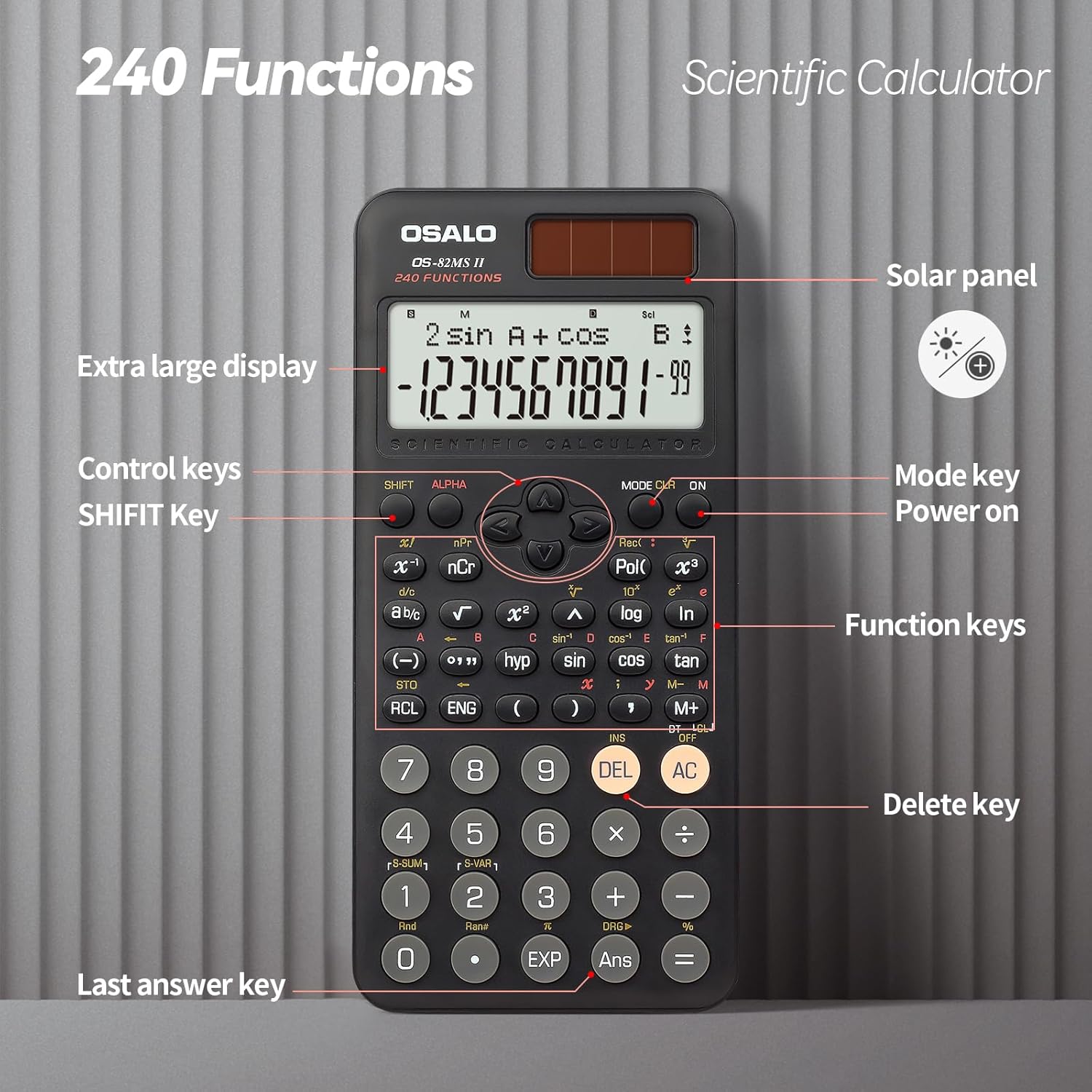
Figure 2: Keypad Layout and Components
3. Návod k obsluze
3.1. Základní výpočty
To perform basic arithmetic operations, simply input the numbers and operators in sequence. Press = aby se dosáhlo výsledku.
- Přidání: [Number] + [Number] =
- Odčítání: [Number] - [Number] =
- Násobení: [Number] × [Number] =
- Divize: [Number] ÷ [Number] =
3.2. Vědecké funkce
The calculator supports 240 scientific functions. Many functions are accessed by pressing the POSUN key before the desired function key (indicated by text above the key).
- Goniometrické funkce: Použití hřích, cos, opálení. For inverse functions, press POSUN then the respective key (e.g., POSUN + hřích for sin-1).
- Logaritmické funkce: Použití log (základ 10) a ln (přirozený logaritmus).
- Síly a kořeny: Použití x², x³, √ (square root). For other roots or powers, use POSUN with relevant keys.
- Angle Units: Stiskněte MODE multiple times to cycle through angle units (Degrees, Radians, Gradians).

Figure 3: Displaying Input and Output
3.3. Memory Calculations
The calculator includes 9 variable memories (A-F, X, Y, M) for storing and recalling values.
- Obchod: Input a value, then press STO followed by the desired memory key (e.g., A).
- Odvolání: Stiskněte RCL followed by the desired memory key to recall the stored value.
- Memory Plus/Minus: Použití M+ to add the displayed value to memory M, and POSUN + M+ (M-) to subtract.
3.4. Statistical Calculations
Pro vstup do statistického režimu stiskněte MODE and select the STAT option. Follow the on-screen prompts to input data and perform calculations such as standard deviation and regression analysis.
3.5. Nastavení jasu displeje
The calculator features a brightness adjustment function to optimize visibility in different lighting conditions and reduce eye strain.

Figure 4: Brightness Adjustment Function
Refer to the full instruction manual for specific key combinations to adjust display brightness.
4. Údržba
4.1. Čištění
To clean the calculator, wipe it gently with a soft, dry cloth. Do not use abrasive cleaners, solvents, or spray directly onto the calculator, as this may damage the surface or internal components.
4.2. Skladování
Store the calculator in a cool, dry place away from direct sunlight and extreme temperatures. Always use the provided hard sliding cover to protect the display and keys from scratches and impacts when not in use.

Figure 5: Calculator with Protective Cover
4.3. Výměna baterie
When the display becomes dim or the calculator functions erratically, it may be time to replace the LR44 battery. Carefully open the battery compartment on the back of the calculator, replace the old battery with a new LR44 battery, ensuring correct polarity, and close the compartment securely.
5. Řešení problémů
- Kalkulačka se nezapne:
- Ensure there is sufficient light for the solar panel.
- Check if the LR44 battery needs replacement.
- Stiskněte tlačítko ON key firmly.
- Displej je tmavý nebo prázdný:
- Increase ambient light for solar power.
- Vyměňte baterii LR44.
- Adjust display brightness settings (refer to section 3.5).
- Nesprávné výsledky výpočtu:
- Verify the input values and operators.
- Check the current calculation mode (e.g., DEG/RAD/GRA for angles).
- Clear all memory and reset the calculator by pressing POSUN + CLR (Režim 3).
- Klávesy nereagují:
- Ujistěte se, že se pod klávesami nenacházejí žádné nečistoty.
- Clean the calculator surface.
6. Specifikace
| Značka | OSALO |
| Model | OS-82MS II |
| Funkce | 240 |
| Typ zobrazení | 2řádkový LCD |
| Velikost obrazovky | 6 centimetrů |
| Zdroj napájení | Solar & Battery Supply (LR44) |
| Materiál | Plast |
| Rozměry produktu | 16.4 x 8 x 0.1 cm |
| Hmotnost položky | 190 g |
7. Záruka a podpora
For information regarding warranty coverage, technical support, or service, please contact OSALO customer service or refer to the official OSALO webwebu. Uschovejte si účtenku jako doklad o koupi.