
ÚTOČNÝ ŽRALOK AK820
ATTACK SHARK X Ajazz AK820 Mechanical Keyboard User Manual
Model: AK820
Značka: ATTACK SHARK
Konec produktuview
The ATTACK SHARK X Ajazz AK820 is a 75% layout hot-swappable mechanical keyboard designed for gaming and everyday use. It features an 82-key layout, a multi-function rotary knob, gasket-mounted design for enhanced typing feel, and customizable LED backlighting. This keyboard is compatible with both Windows and Mac operating systems and connects via USB-C wired connection.
Klíčové vlastnosti
- 75% Percent Layout (82 keys) for space efficiency while retaining essential keys.
- N-Key Rollover (NKRO) ensures all simultaneous key presses are registered accurately.
- Multi-Function Metal Knob for independent volume control and mute functionality.
- Gasket Mounted Design with 5 layers of sound insulation (Poron sandwich cotton, IXPE under-axis pad, PET premium sound pad, bottom cotton) for a softer, more elastic typing experience and reduced noise.
- Hot-Swappable PCB (3/5-pin) allows for easy switch replacement without soldering.
- Pre-lubed AS Red Switches (linear) with a 50 million keystroke lifespan, ideal for gaming and office use.
- 20 LED Backlight Effects (white light) with 5 brightness levels and 5 lighting speeds.
- Durable PBT Keycaps with wear-resistant, waterproof properties and high light transmittance.
- Ergonomic Design with OEM keycaps for comfortable typing.
Obsah balení
- ATTACK SHARK X Ajazz AK820 Mechanical Keyboard
- USB kabel
- 2-in-1 Key Extractor (Keycap Puller)
Rozložení klávesnice

Obrázek 1: Přesview of the AK820 keyboard layout.

Figure 2: Visual representation of the AK820's key features.
Nastavení
Připojení klávesnice
- Locate the USB-C port on the back or side of the keyboard.
- Připojte dodaný kabel USB-C k portu USB-C na klávesnici.
- Zapojte druhý konec kabelu USB do volného portu USB na vašem počítači (PC nebo Mac).
- Klávesnice je plug-and-play a váš operační systém by ji měl automaticky rozpoznat.

Figure 3: The compact design and USB-C connection point.
Návod k obsluze
Multimedia Knob Functionality
The metal rotary knob located on the top right of the keyboard provides convenient multimedia control:
- Střídat: Turn the knob clockwise to increase volume, and counter-clockwise to decrease volume.
- Stiskněte: Press the knob to mute or unmute the audio.
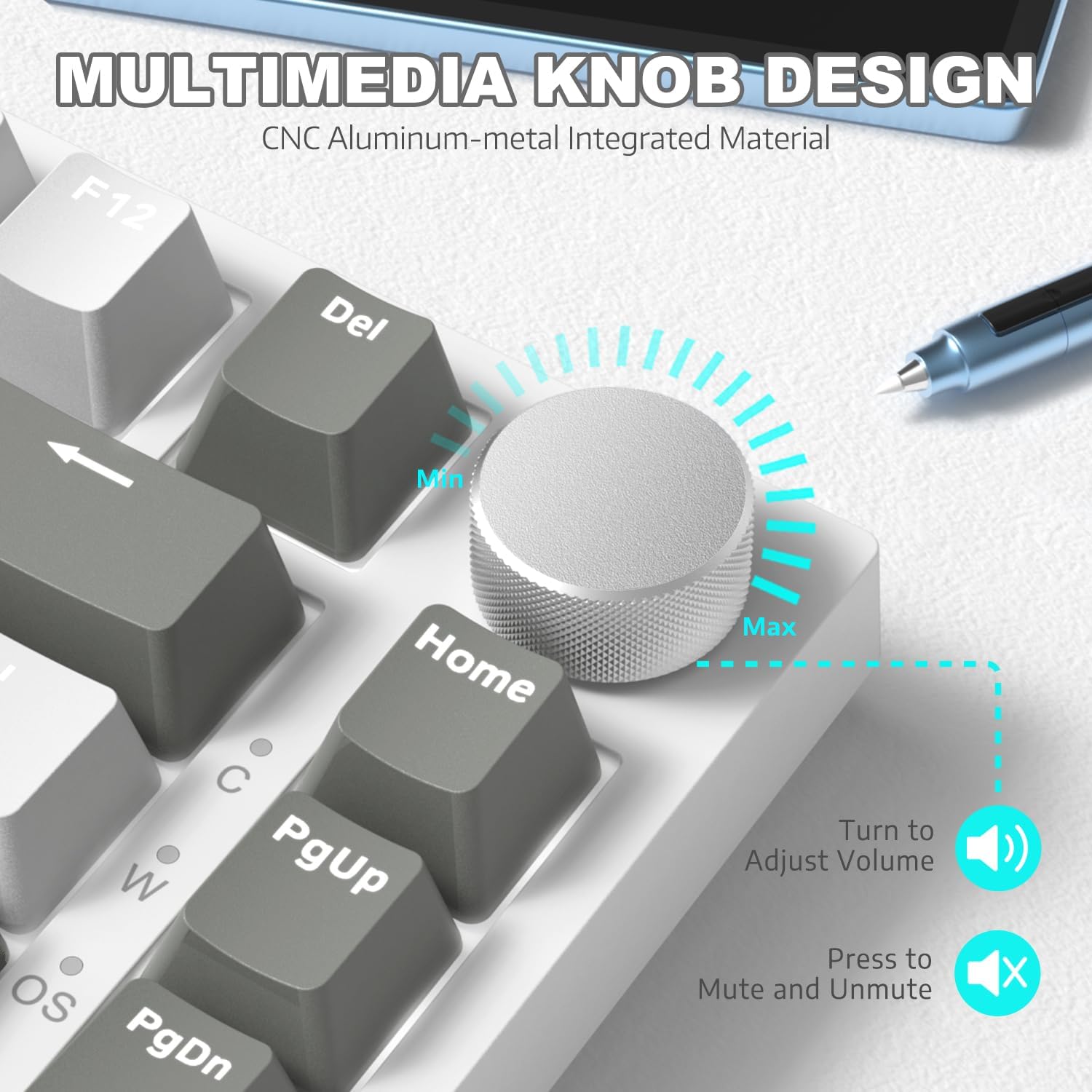
Obrázek 4: Detailní view of the multimedia knob and its functions.
Ovládání podsvícení
The AK820 features 20 white LED backlight effects. You can customize the lighting to suit your preference:
- Změna světelných efektů: Stiskněte FN + | to cycle through the 20 available backlight effects.
- Upravit jas: Use specific key combinations (refer to keyboard legends or software) to adjust between 5 brightness levels.
- Upravit rychlost: Use specific key combinations (refer to keyboard legends or software) to adjust between 5 lighting speeds.
- Custom Gaming Lighting: Stiskněte FN + 1! / 2@ / 3# to access and customize 3 sets of gaming lighting effects. Choose the light recording mode and save your lighting profiles.

Obrázek 5: Zobrazení klávesniceasing its LED backlight effects.
Přepínače vyměnitelné za provozu
The AK820's high-quality PCB supports 3/5-pin hot-swap switches, allowing you to easily change switches without soldering. This feature enables customization of your typing experience.
- Use the included 2-in-1 key extractor to carefully remove keycaps and switches.
- Align the pins of the new switch with the sockets on the PCB and gently press down until it clicks into place.
- Vyměňte krytku kláves.
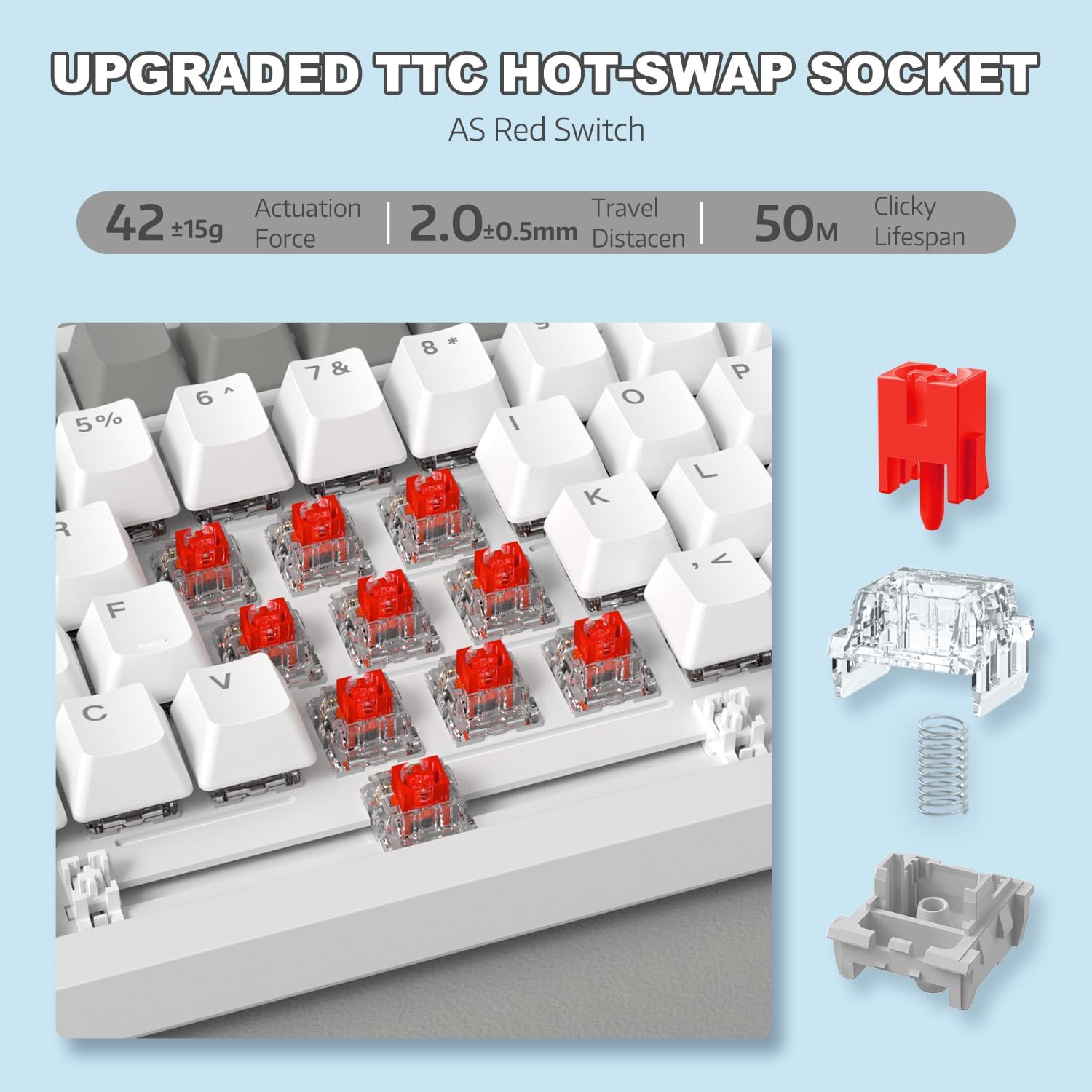
Obrázek 6: Ilustrace mechanismu přepínače s možností výměny za provozu.
Video 1: Demonstrating the unboxing, features, and sound test of the ATTACK SHARK AK820 mechanical keyboard, including its hot-swappable switches and rotary knob.
N-Key Rollover (NKRO)
The AK820 supports N-Key Rollover, meaning that every key press is registered independently, even when multiple keys are pressed simultaneously. This is crucial for fast-paced gaming and accurate typing, preventing
Ask a question about this manual
Ask about setup, troubleshooting, compatibility, parts, safety, or missing instructions. Manuals+ will review the question and use this page’s manual context to help answer it.