
hosabely SK80
Uživatelská příručka k audio rozhraní hosabely SK80
Model: SK80
1. Úvod
Thank you for choosing the hosabely SK80 Audio Interface. This device is designed to enhance your audio experience for live streaming, podcasting, recording, and gaming. It features 48V phantom power, noise reduction, customizable sound pads, and various audio effects. Please read this manual carefully to understand the product's functions and ensure proper operation.

Obrázek 1: Přední strana view of the hosabely SK80 Audio Interface.
2. Obsah balení
Ověřte, zda jsou v balení přítomny všechny položky:
- 1 x hosabely SK80 Live Sound Card (Audio Interface)
- 1 x USB nabíjecí kabel
- 2 x audio kabely
- 1 x Uživatelská příručka v angličtině (tento dokument)
Note: Microphone is not included. The device is not compatible with USB microphones.
3. Konec produktuview
3.1. Rozložení ovládacího panelu

Obrázek 2: Detailní view of the SK80 Audio Interface control panel.
The SK80 features a comprehensive control panel with various knobs and buttons for audio adjustment and effect activation. Key areas include:
- Ovládání hlasitosti mikrofonu: Separate knobs for high, middle, and low frequencies, plus overall microphone volume.
- Tone Volume & Recording Controls: Adjust tone and recording levels.
- Line Volume & Instrumental Volume: Controls for line input and instrument input.
- Sound Effects Pads: Buttons for various live sound effects and customizable pads.
- Reverb & Voice Changer Controls: Knobs and buttons for reverb modes and voice modulation.
- 48V tlačítko fantomového napájení: Aktivuje fantomové napájení pro kondenzátorové mikrofony.
- Tlačítko pro redukci šumu: Engages the noise reduction feature.
- Bluetooth (BT) On/Off: Přepíná připojení Bluetooth.
3.2. Porty připojení
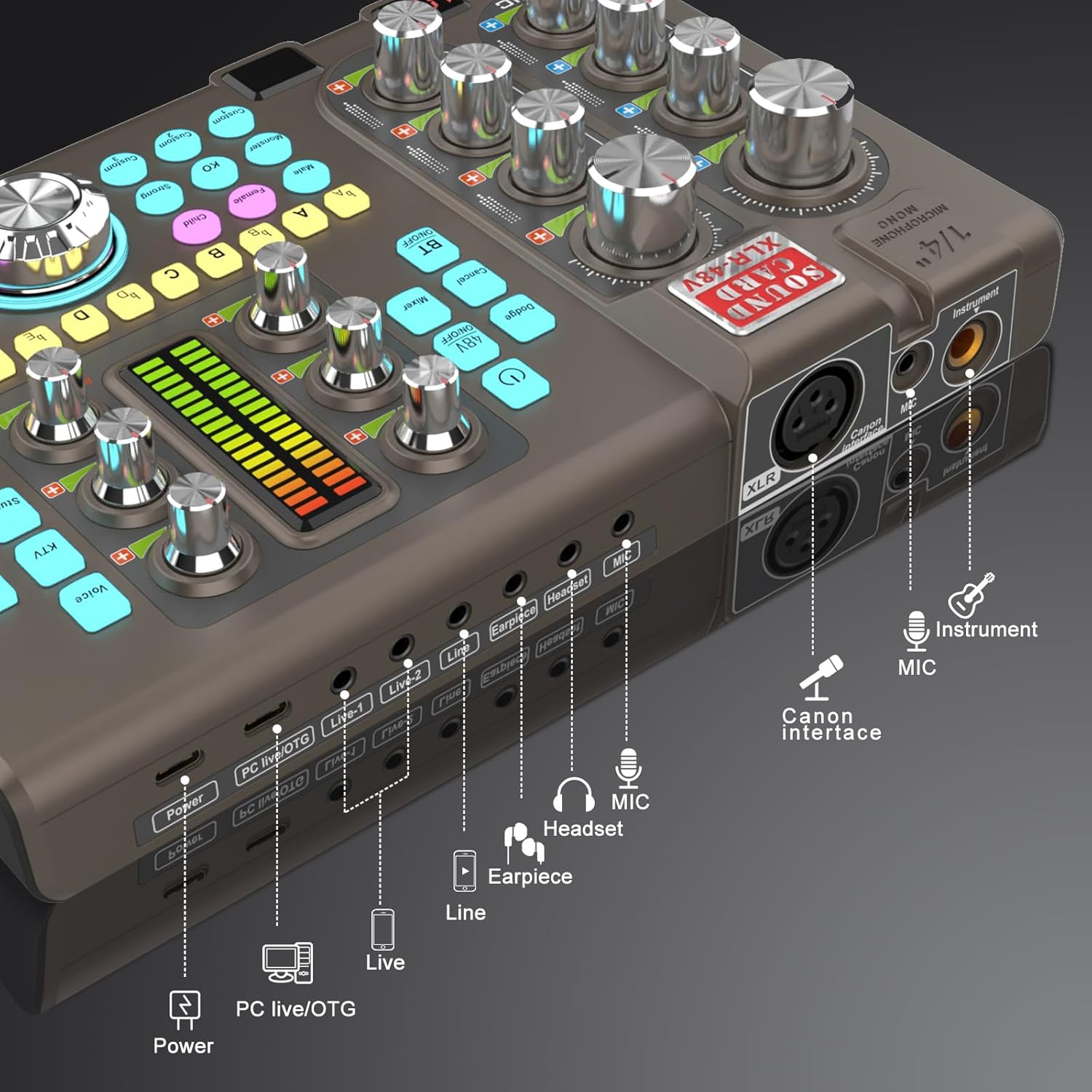
Figure 3: Labeled input and output ports on the SK80 Audio Interface.
The rear panel provides essential connection points:
- Napájecí port: USB-C for power supply.
- PC Live/OTG Port: USB-C for connection to a computer or OTG-compatible smartphone/tablet.
- Live 1, Live 2, Line-1, Line-2 Ports: 3.5mm audio output ports for connecting to streaming devices or other audio equipment.
- Earpiece Port: 3.5mm output for monitoring audio with an earpiece.
- Port pro sluchátka: 3.5mm output for connecting a headset.
- Port mikrofonu: 3.5mm vstup pro mikrofon.
- XLR-48V Interface: XLR input for condenser microphones requiring 48V phantom power.
- Instrument Port: 1/4" (6.35mm) input for connecting instruments like guitars.
4. Nastavení
4.1. Zapnutí zařízení
- Connect the USB Charging Cable to the Moc port on the SK80 and to a USB power adapter (not included) or a computer USB port.
- Press and hold the power button on the control panel to turn on the device.
4.2. Připojení mikrofonů

Figure 4: XLR-48V and Instrument input ports.
- For Condenser Microphones (requiring 48V Phantom Power): Connect your XLR microphone cable to the XLR-48V Interface port. Press the 48V ON/OFF button on the control panel to activate phantom power. (Note: 48V is off by default to conserve battery. A light indicator will confirm activation.)
- For Dynamic Microphones or Microphones with 3.5mm Jack: Připojte svůj mikrofon k MIC portu pomocí 3.5mm audio kabelu.
4.3. Připojení nástrojů
Připojte svůj nástroj (např. kytaru) k Nástroj port using a 1/4" (6.35mm) cable.
4.4. Connecting to a Computer or Smartphone
- Přes USB: Use the USB Charging Cable to connect the PC Live/OTG port to your computer. The device will be recognized as an audio input/output device.
- Přes Bluetooth: Stiskněte tlačítko BT ON/OFF button on the control panel. On your smartphone or tablet, search for and connect to the SK80 via Bluetooth settings.
4.5. Connecting Monitoring Devices
- Připojte sluchátka k Sluchátka port for monitoring your audio.
- Connect an earpiece to the Sluchátko port for discreet monitoring.
5. Návod k obsluze
5.1. Nastavení úrovní zvuku

Figure 5: Audio adjustment knobs.
- Použijte MIC VOL knobs (High, Middle, Low) to fine-tune your microphone's equalization.
- Upravte Tone Vol knob for overall microphone tone.
- Control the output level with the Záznam knoflík.
- Upravte Vol for line input sources and Instrumental Vol for connected instruments.
- The Monitor Vol knob controls the volume of your monitoring headphones/earpiece.
5.2. Using Reverb Effects
The SK80 offers 6 reverb modes: VOICE, KTV, STUDIO, CONCERT, CORRECT, and MC. Select your desired mode using the dedicated buttons. Adjust the reverb depth and width using the corresponding knobs.
5.3. Customizing Sound Pads

Figure 6: Customizable sound pads.
The SK80 features 3 customizable sound pads. Each pad can record up to 30 seconds of audio. To record:
- Stiskněte a podržte jedno z Zvyk buttons (Custom 1, 2, or 3) until it starts blinking.
- Record your desired audio (e.g., from a microphone, connected device, or Bluetooth input).
- Stiskněte totéž Zvyk button again to stop recording. The button will stop blinking.
- Stiskněte tlačítko Zvyk button once to play the recorded sound. You can adjust the volume of each pad.
5.4. Voice Changer Functions
Transform your voice using the Měnič hlasu feature. Select from Male, Female, Child, or Monster voices. Adjust the ZMĚNA HLASU knob to modify the pitch and create various vocal effects.
5.5. Redukce šumu

Figure 7: Noise reduction display.
Aktivujte Redukce šumu button to minimize environmental background noise. The device features a 15-level noise reduction system. The display shows the current noise reduction level.
5.6. Live Sound Effects
The SK80 includes 11 dynamic live sound effects (e.g., Dodge, Muffled, Play In, Laughter, Kiss, Gunfire). Press the corresponding buttons to trigger these effects during your live stream or recording. Each effect typically lasts for approximately 4 seconds.
6. Údržba
- Udržujte zařízení čisté otíráním měkkým, suchým hadříkem. Nepoužívejte tekuté čisticí prostředky ani rozpouštědla.
- Přístroj skladujte na chladném a suchém místě mimo dosah přímého slunečního záření a extrémních teplot.
- Zabraňte pádu zařízení nebo jeho vystavení silným nárazům.
- The built-in 3000mAh battery provides approximately 3-5 hours of operation. Recharge the device when the battery indicator is low.
7. Řešení problémů
- Žádný zvukový výstup:
- Check all cable connections (microphone, headphones, output to PC/streaming device).
- Ensure volume knobs (MIC VOL, Recording, Monitor Vol) are turned up.
- Verify that the correct audio input/output device is selected on your computer or streaming software.
- Mikrofon nefunguje:
- If using a condenser microphone, ensure 48V phantom power is activated.
- Check microphone cable integrity.
- Confirm the microphone is properly connected to the correct input port (XLR or 3.5mm MIC).
- Static or Noise in Audio:
- Activate the Noise Reduction feature.
- Zkontrolujte, zda nejsou uvolněné kabelové spoje.
- Ujistěte se, že v blízkosti nejsou žádné silné zdroje elektromagnetického rušení.
- Adjust input gain levels to avoid clipping.
- Problémy s připojením Bluetooth:
- Ensure the BT ON/OFF button is activated.
- Make sure the SK80 is discoverable and within range of your device.
- Zkuste zařízení zrušit a znovu spárovat.
8. Specifikace
| Číslo modelu položky | 80 SK |
| Značka | hosabely |
| Technologie připojení | Bluetooth, USB |
| Počet kanálů | 4 |
| Hmotnost položky | 1.67 libry (0.76 kg) |
| Rozměry balení | 12.28 x 7.56 x 2.36 palce |
| Typ baterie | Lithium Polymer (3000mAh) |
| Kompatibilní zařízení | Smartphone, PC, Guitar |
| Podpora operačního systému | Linux, Windows, macOS |
| Podporovaný software | Ableton Live, FL Studio, Pro Tools, Logic Pro, Cubase (and others) |
9. Záruka a podpora
For any questions or issues regarding your hosabely SK80 Audio Interface, please refer to the seller's contact information provided at the point of purchase. Please retain your proof of purchase for warranty claims.
Ask a question about this manual
Ask about setup, troubleshooting, compatibility, parts, safety, or missing instructions. Manuals+ will review the question and use this page’s manual context to help answer it.