
1. Úvod a konecview
This manual provides essential instructions for the safe and efficient use of your Maxcom MM135L Basic Mobile Phone. The MM135L is designed for straightforward communication, featuring a user-friendly interface, large keys, and a 1.77-inch screen. It supports 2G networks and includes dual SIM capability, an SOS button for emergencies, and convenient USB-C charging. Please read this manual thoroughly before operating the device.
2. Obsah balení
Ověřte, zda jsou v balení přítomny všechny položky:
- Maxcom MM135L Mobile Phone
- Battery (Lithium-Ion, 600 mAh)
- USB kabel
- Vysunutí zásobníku SIM
- Uživatelská příručka (tento dokument)
3. Uspořádání zařízení
Familiarize yourself with the physical components of your Maxcom MM135L phone.
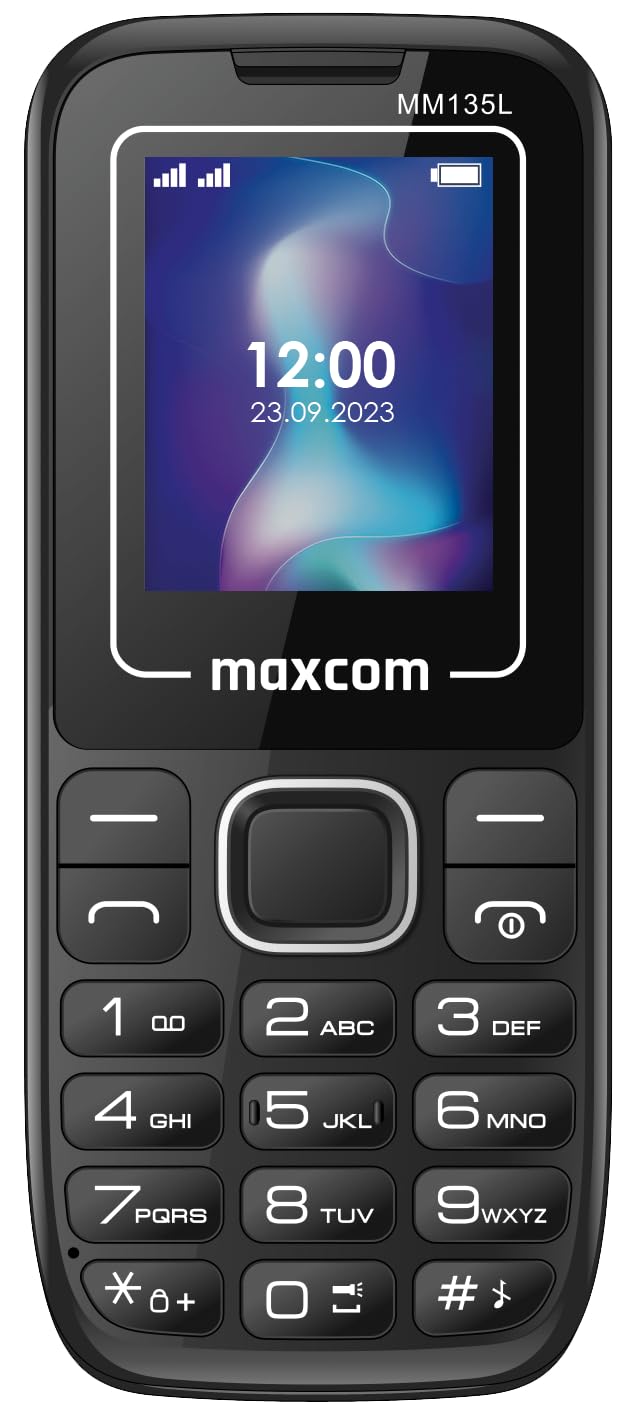
Obrázek 3.1: Zadní view of the Maxcom MM135L phone, showing the blue textured back cover, Maxcom logo, and speaker grille at the top.

Obrázek 3.2: Přední strana view of the Maxcom MM135L phone, displaying the screen, large numeric keypad, and call/end buttons.

Figure 3.3: Bottom edge of the phone, featuring the USB-C charging port and a 3.5mm headphone jack.

Figure 3.4: Top edge of the phone, highlighting the integrated flashlight.
Klíčové komponenty:
- Displej: 1.77-inch LCD for clear text and call information.
- Numerická klávesnice: Large, tactile buttons for easy dialing and texting.
- Tlačítka pro volání/ukončení: Dedicated buttons for managing calls.
- Navigační klávesy: Pro navigaci v menu.
- SOS tlačítko: Located on the rear for emergency calls (refer to Figure 3.1).
- Svítilna: Integrated at the top of the device (refer to Figure 3.4).
- Port USB-C: For charging the device (refer to Figure 3.3).
- Sluchátkový jack: 3.5mm port for audio accessories (refer to Figure 3.3).
4. Nastavení
4.1 Instalace baterie
- Opatrně sejměte zadní kryt telefonu.
- Zarovnejte kontakty baterie s vývody uvnitř přihrádky na baterie.
- Gently press the battery into place.
- Nasaďte zpět zadní kryt a ujistěte se, že bezpečně zacvakne.
4.2 Instalace SIM karty
The Maxcom MM135L supports dual SIM cards.
- With the phone powered off and the back cover removed, locate the SIM card slots.
- Insert your SIM card(s) into the designated slot(s) with the gold contacts facing down, following the orientation indicated on the phone.
- Ujistěte se, že jsou SIM karty zcela zasunuty.
- Replace the back cover and battery.
4.3 Nabíjení telefonu
The phone uses a USB-C port for charging.
- Connect the USB-C cable to the charging port at the bottom of the phone (refer to Figure 3.3).
- Připojte druhý konec kabelu USB ke kompatibilnímu napájecímu adaptéru USB nebo k portu USB počítače.
- Indikátor baterie na obrazovce bude zobrazovat stav nabíjení.
- Jakmile je baterie plně nabitá, odpojte nabíječku.
Poznámka: For optimal battery life, fully charge the phone before first use.
5. Návod k obsluze
5.1 Zapnutí/vypnutí
- Zapnutí: Stiskněte a podržte Call/Power dokud se obrazovka nerozsvítí.
- Vypnutí: Stiskněte a podržte Konec/Napájení tlačítko, dokud se nezobrazí možnosti vypnutí, a poté potvrďte.
5.2 Uskutečňování a přijímání hovorů
- Chcete-li zavolat: Zadejte telefonní číslo pomocí klávesnice a stiskněte Volání tlačítko.
- Chcete-li přijmout hovor: Stiskněte tlačítko Volání tlačítko, když telefon zvoní.
- Ukončení hovoru: Stiskněte tlačítko Konec tlačítko.
5.3 Odesílání a přijímání zpráv
- Navigate to the "Messages" menu using the navigation keys.
- Select "Create New Message" to compose an SMS.
- Zadejte číslo příjemce a vaši zprávu a poté ji odešlete.
- Received messages will appear in the "Inbox".
5.4 Používání tlačítka SOS
The SOS button is located on the rear of the phone. It is designed for emergency situations.
- Aktivovat: Press and hold the SOS button for several seconds.
- The phone will automatically sound an alarm and send emergency SMS messages to pre-set contacts.
- It will then automatically call the saved emergency contacts in a loop until a call is answered.
- Ujistěte se, že jsou v nastavení telefonu správně nakonfigurovány nouzové kontakty.
5.5 Funkce svítilny
The built-in flashlight can be activated for convenience.
- Refer to the phone's specific settings or a dedicated side button for flashlight activation. Typically, a long press on a designated key or a side switch controls it.
6. Údržba
- Čištění: K čištění povrchu telefonu používejte měkký, suchý hadřík. Nepoužívejte tekuté čisticí prostředky.
- Péče o baterie: Nevystavujte baterii extrémním teplotám. Vyhněte se častému úplnému vybíjení baterie.
- Skladování: Pokud telefon delší dobu nepoužíváte, skladujte jej na chladném a suchém místě.
- Voděodolnost: Tento telefon není voděodolný. Zabraňte kontaktu s tekutinami.
7. Řešení problémů
| Problém | Možné řešení |
|---|---|
| Telefon se nezapne. | Ujistěte se, že je baterie správně nainstalována a nabitá. Připojte nabíječku a zkuste to znovu. |
| Nelze uskutečňovat ani přijímat hovory. | Check if the SIM card is properly inserted and activated. Verify network signal strength. Contact your service provider if issues persist. |
| Baterie se nenabíjí. | Ensure the USB-C cable and charger are securely connected and functional. Try a different charging cable or adapter. |
| Tlačítko SOS nefunguje. | Verify that emergency contacts are saved in the phone's settings. Ensure the phone has network coverage. |
| Špatná kvalita hovoru. | Move to an area with better network reception. Check the speaker and microphone for obstructions. |
8. Specifikace
| Funkce | Detail |
|---|---|
| Název modelu | MM135L |
| Velikost obrazovky | 1.77 palce |
| Typ zobrazení | LCD |
| Rezoluce | 128 x 160 |
| Buněčná technologie | 2G |
| Podpora SIM | Duální SIM |
| Typ baterie | Lithium-Ion |
| Kapacita baterie | 600 XNUMX mAh |
| Nabíjecí port | USB-C |
| Rozměry (D x Š x V) | 7 x 14 x 3.5 cm |
| Hmotnost | 60 g |
| Speciální funkce | SOS Button, Flashlight, Expandable Memory, Fast Charging Support |
9. Záruka a podpora
For warranty information, technical support, or service inquiries, please refer to the warranty card included with your product or contact Maxcom customer service directly. Keep your proof of purchase for warranty claims.