
1. Konec produktuview
The Irfora SZ305 is a professional digital multimeter designed for accurate and rapid measurement of various electrical parameters. It features a high-definition backlit LCD display for clear readings in diverse environments and a retractable stand for convenient use.
Mezi klíčové funkce patří:
- AC/DC Voltage a Měření proudu
- Diode, Resistance, and Capacitance testing
- Měření frekvence
- Buzzer continuity test
- hFE Triode testing for NPN/PNP transistors
- Bezkontaktní svtage (NCV) detekce
- Battery detection (1.5V, 3V, 9V, 12V)

Image 1.1: The Irfora SZ305 Digital Multimeter highlighting its various measurement functions including AC/DC voltage/current, diode, capacitance, frequency, buzzer, resistance, NCV induction, hFE, and battery detection.
2. Bezpečnostní informace
Please read and understand all safety instructions before operating the multimeter. Failure to follow these instructions may result in electric shock, fire, or damage to the device.
- Před provedením jakéhokoli měření se vždy ujistěte, že je multimetr nastaven na správnou funkci a rozsah.
- Nepokoušejte se měřit objemtages or currents exceeding the maximum specified limits for the device.
- Při práci s obvody pod napětím buďte mimořádně opatrní. Vysoké napětítages může být nebezpečný.
- Před každým použitím zkontrolujte měřicí kabely, zda nejsou poškozené. Nepoužívejte, pokud je izolace prasklá nebo poškozená.
- Nepoužívejte multimetr, pokud se jeví poškozený nebo nefunguje správně.
- Nepoužívejte multimetr ve vlhkém prostředí nebo během bouřek.
- Pro zajištění přesných údajů vyměňte baterie ihned po zobrazení indikátoru slabé baterie.
- Před změnou funkcí nebo rozsahů vždy odpojte měřicí kabely od obvodu.
3. Nastavení a první použití
3.1 Instalace baterie
Multimetr vyžaduje k provozu baterie. Instalace nebo výměna baterií:
- Ujistěte se, že je multimetr vypnutý a měřicí vodiče odpojené.
- Vyhledejte kryt přihrádky na baterie na zadní straně zařízení.
- K otevření přihrádky použijte šroubovák.
- Vložte nové baterie a dbejte na správnou polaritu (+ a -).
- Nasaďte kryt prostoru pro baterie a zajistěte jej šroubem.
3.2 Using the Retractable Support Stand
The multimeter is equipped with a retractable stand on its back for convenient viewběhem měření.
- To deploy the stand, gently pull it outwards from the back of the device until it locks into position.
- Place the multimeter on a flat surface.
- To retract the stand, push it back into its original position until it is flush with the device body.
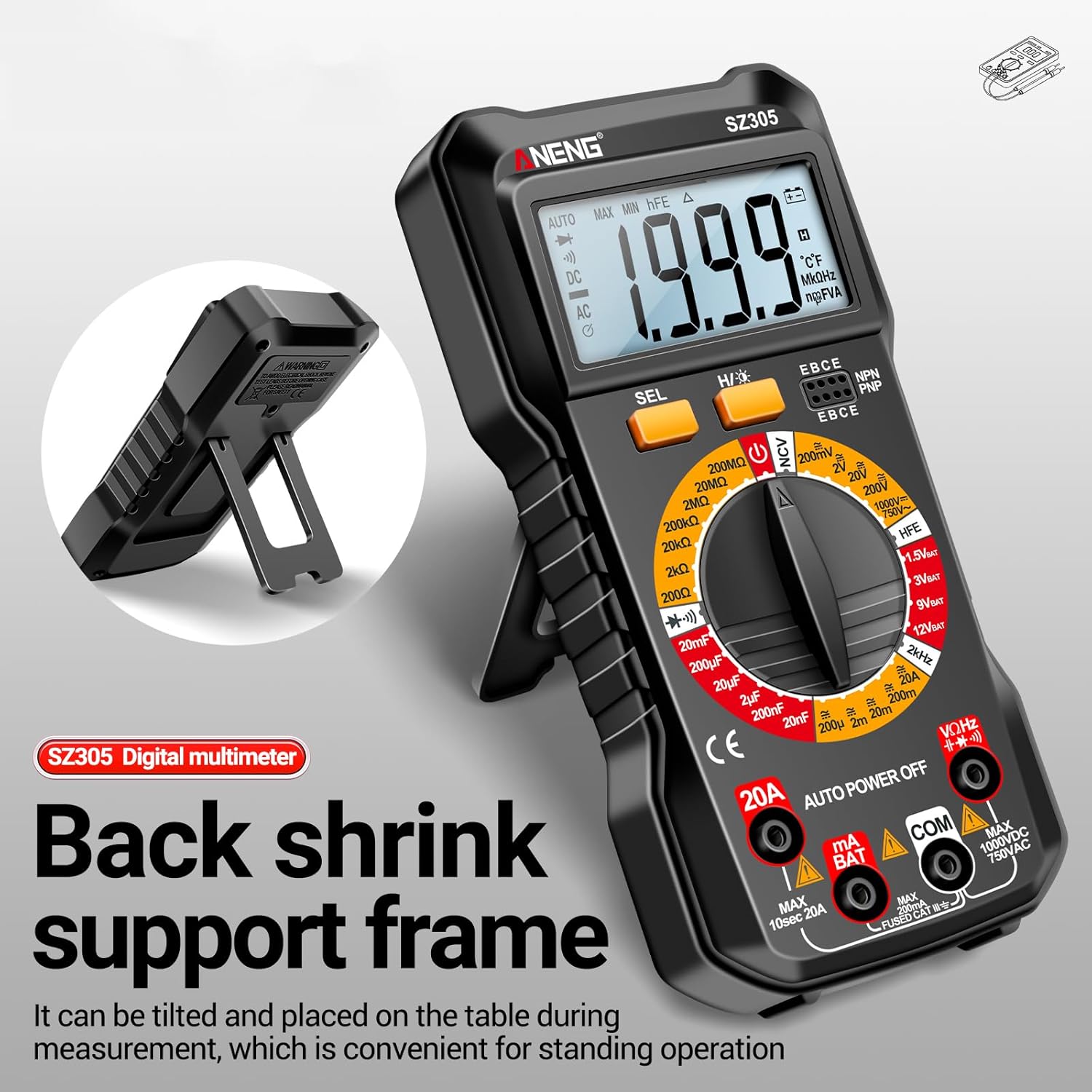
Image 3.1: The Irfora SZ305 Digital Multimeter demonstrating its retractable back support frame for angled viewing on a table.
4. Návod k obsluze
This section details how to perform various measurements with your Irfora SZ305 Digital Multimeter.
4.1 Zapnutí/vypnutí a podsvícení
- To power on the device, rotate the rotary switch from "AUTO POWER OFF" to any desired measurement function.
- To power off, rotate the switch back to "AUTO POWER OFF". The device also features an auto-power-off function after a period of inactivity.
- To activate the LCD backlight, press and hold the "H/☝" button. The backlight will illuminate, improving visibility in dark environments. Press and hold again to turn off.

Image 4.1: The Irfora SZ305 Digital Multimeter displaying its high-definition backlit LCD screen, enhancing readability in low-light conditions.
4.2 AC/DC Voltage Měření
- Insert the red test lead into the "VHz" jack and the black test lead into the "COM" jack.
- Rotate the rotary switch to the "V~" (AC Voltage) nebo "V=" (DC hlasitosttage) dosah.
- Připojte měřicí sondy k měřenému obvodu nebo součástce.
- Přečtěte si svtage hodnota zobrazená na LCD obrazovce.
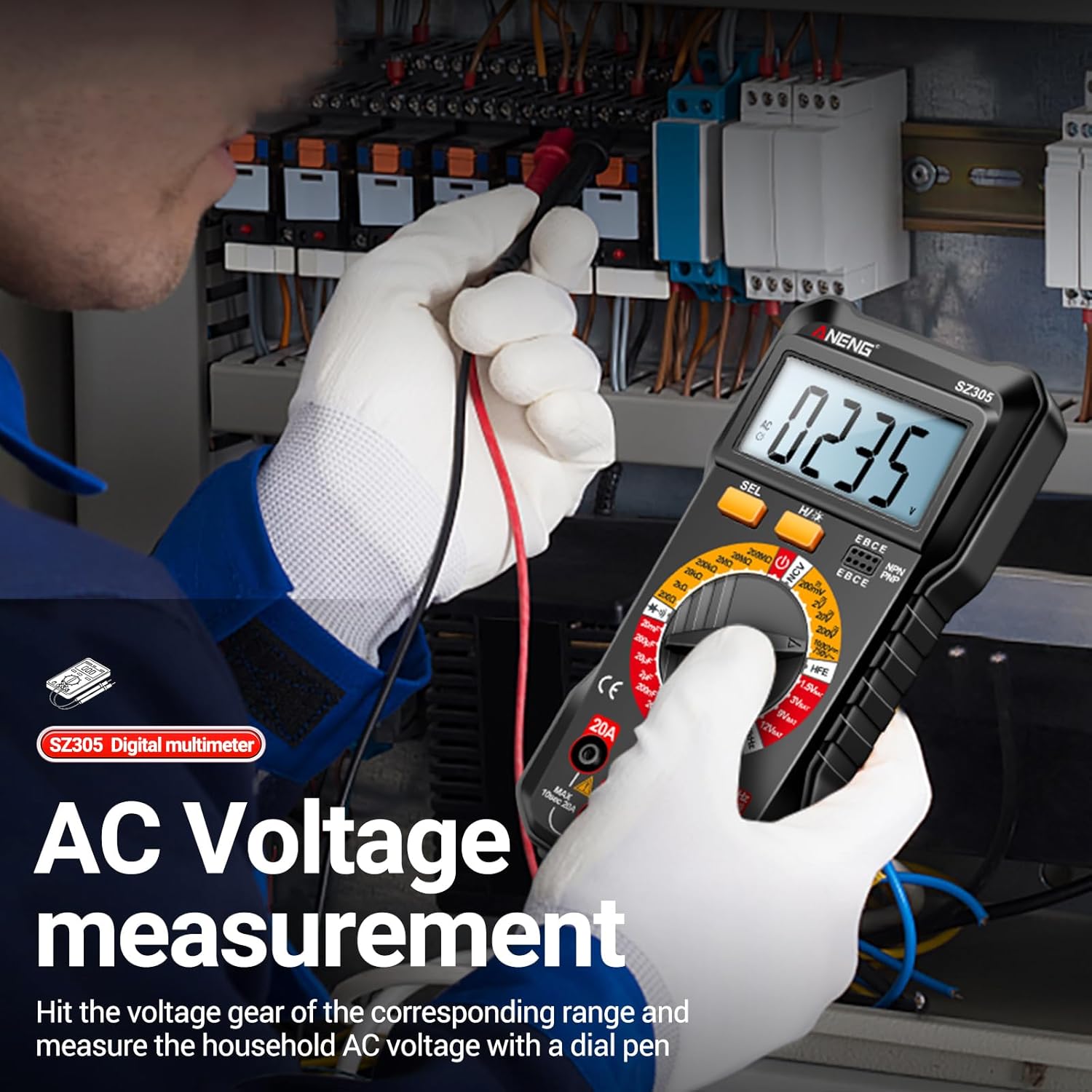
Image 4.2: A user measuring AC voltage with the Irfora SZ305 Digital Multimeter in an electrical panel, demonstrating proper probe placement.
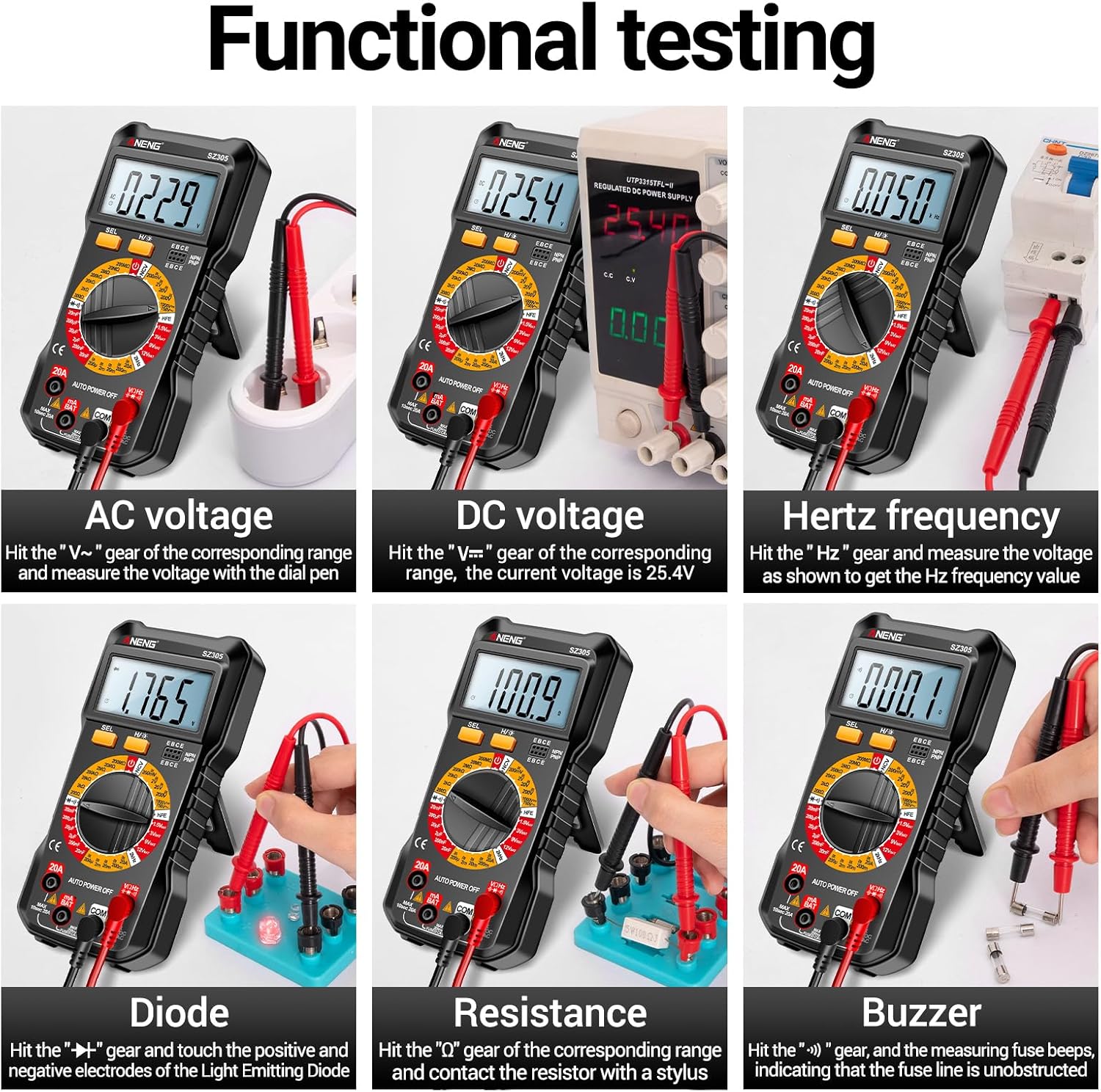
Obrázek 4.3: Příkladamples of functional testing with the Irfora SZ305, showing measurements for AC voltage, DC svtage, Hertz frequency, diode, resistance, and continuity (buzzer).
4.3 Měření střídavého/stejnosměrného proudu
Pozor: Ensure the circuit is de-energized before connecting the multimeter in series for current measurement. Incorrect connection can blow the fuse or damage the meter.
- Insert the red test lead into the "mA" or "20A" jack (depending on expected current) and the black test lead into the "COM" jack.
- Rotate the rotary switch to the appropriate "mA~" / "mA=" or "20A~" / "20A=" range.
- Otevřete obvod, kde má být měřen proud, a zapojte multimetr sériově.
- Zapněte obvod a odečtěte hodnotu proudu.

Obrázek 4.4: Příkladamples of functional testing with the Irfora SZ305, showing measurements for 9V, 3V, 1.5V, and 12V batteries, hFE, capacitance, AC current, and DC current.
4.4 Měření odporu
- Insert the red test lead into the "VHz" jack and the black test lead into the "COM" jack.
- Rotate the rotary switch to the "Ω" (Resistance) range.
- Ensure the component to be measured is de-energized. Connect the test probes across the component.
- Odečtěte hodnotu odporu.
4.5 Měření kapacity
- Insert the red test lead into the "VHz" jack and the black test lead into the "COM" jack.
- Rotate the rotary switch to the "F" (Capacitance) range.
- Před měřením se ujistěte, že je kondenzátor zcela vybitý, aby nedošlo k poškození měřicího přístroje.
- Připojte měřicí sondy na svorky kondenzátoru.
- Odečtěte hodnotu kapacity.
4.6 Diode Test and Continuity (Buzzer)
- Insert the red test lead into the "VHz" jack and the black test lead into the "COM" jack.
- Rotate the rotary switch to the "Diode/Buzzer" symbol.
- Pro test diod: Připojte červenou sondu k anodě a černou sondu ke katodě diody. Přímý proudtage drop will be displayed. Reverse the probes; an open circuit ("OL") should be displayed.
- Pro test kontinuity: Connect the probes across the circuit or component. If resistance is below a certain threshold, the buzzer will sound, indicating continuity.
4.7 Měření frekvence (Hz)
- Insert the red test lead into the "VHz" jack and the black test lead into the "COM" jack.
- Rotate the rotary switch to the "Hz" range.
- Připojte měřicí sondy ke zdroji signálu.
- Read the frequency value displayed.
4.8 Test triody hFE
This function measures the DC current gain (hFE) of transistors.
- Rotate the rotary switch to the "hFE" position.
- Identify whether the transistor is NPN or PNP type.
- Insert the transistor leads (Emitter, Base, Collector) into the corresponding sockets on the multimeter's hFE test port.
- Read the hFE value displayed on the screen.

Image 4.5: The Irfora SZ305 Digital Multimeter conducting an hFE test, showing a transistor inserted into the dedicated test socket.
4.9 Nekontaktní svtage (NCV) Detekce
Funkce NCV umožňuje detekci objemu střídavého proudutagbez přímého kontaktu, což zvyšuje bezpečnost.
- Rotate the rotary switch to the "NCV" position.
- Bring the top front part of the multimeter close to the suspected AC voltage source (e.g., a live wire, outlet).
- The multimeter will emit an audible alarm and the NCV indicator will flash. The closer the device is to the voltage source, the more urgent the alarm will be.

Image 4.6: The Irfora SZ305 Digital Multimeter demonstrating its Non-Contact Voltage (NCV) detection feature near an electrical outlet, indicating the presence of AC voltage.
4.10 Battery Detection (1.5V, 3V, 9V, 12V)
The multimeter can test common battery voltages.
- Rotate the rotary switch to the desired battery voltage range (e.g., "1.5V BAT", "3V BAT", "9V BAT", "12V BAT").
- Připojte červený měřicí vodič ke kladnému pólu baterie a černý měřicí vodič k zápornému pólu.
- Přečtěte si svtage zobrazené na obrazovce.
5. Údržba
5.1 Čištění
Chcete-li multimetr vyčistit, otřete jeho pouzdro čisticím prostředkem.amp hadříkem a jemným čisticím prostředkem. Nepoužívejte abrazivní prostředky ani rozpouštědla. Před čištěním se ujistěte, že je zařízení vypnuté a odpojené od všech obvodů.
5.2 Výměna baterie
Refer to section 3.1 for instructions on battery installation and replacement. Replace batteries when the low battery indicator appears on the display to maintain measurement accuracy.
5.3 Výměna pojistky
If the current measurement function fails, the fuse may need replacement. This typically requires opening the back casing of the multimeter. Refer to the specifications for the correct fuse type and rating. If unsure, consult a qualified technician.
6. Řešení problémů
- Žádný displej nebo slabý displej:
- Zkontrolujte nabití baterie. Pokud je baterie slabá, vyměňte ji.
- Ensure the multimeter is powered on by rotating the switch from "AUTO POWER OFF".
- Nesprávné hodnoty:
- Ensure the correct function and range are selected for the measurement.
- Check test leads for proper connection and damage.
- Verify battery charge. Low batteries can affect accuracy.
- Ensure the circuit or component is properly prepared (e.g., capacitor discharged).
- Měření proudu nefunguje:
- Check if the fuse is blown. Replace if necessary (refer to section 5.3).
- Ensure test leads are connected to the correct current jacks ("mA" or "20A").
- Verify the multimeter is connected in series with the circuit.
- NCV function not responding:
- Ensure the rotary switch is set to "NCV".
- Confirm there is an AC voltage source present.
7. Specifikace
| Funkce | Detail |
|---|---|
| Model | SZ305 |
| Značka | Irfora |
| Zobrazit | 1999 číslic, podsvícený LCD displej |
| Funkce | AC/DC Voltage, AC/DC Current, Resistance, Capacitance, Frequency, Diode, Continuity, hFE, NCV, Battery Test |
| Automatické vypnutí | Ano |
| Barva | Černý |
| Reference výrobce | TYHDEE24863B |
Note: Detailed measurement ranges and accuracies are typically found in the full product datasheet.