
1. Úvod
This manual provides essential information for the installation, operation, and maintenance of your SYLVOX 43-inch Outdoor Signage TV (Model SS43A0KAGD). Please read this manual thoroughly before using the product to ensure proper function and safety. This television is designed for commercial outdoor use, offering high brightness and robust weather protection.
2. Bezpečnostní informace
Dodržujte následující bezpečnostní opatření, abyste zabránili poškození výrobku a zajistili bezpečnost uživatele:
- Napájení: Ujistěte se, že zdroj napájení odpovídá objtage požadavky uvedené na štítku výrobku.
- Voda a vlhkost: While the TV is IP55 waterproof, avoid direct high-pressure water jets. Ensure all port covers are securely closed when not in use.
- Větrání: Neblokujte větrací otvory. Dostatečné proudění vzduchu je nezbytné k zabránění přehřátí.
- Montáž: Use appropriate mounting hardware and follow VESA standards (400 x 200 mm) for secure installation. Professional installation is recommended for outdoor environments.
- Čištění: Před čištěním odpojte napájení. Použijte měkký,amp tkanina. Vyhněte se agresivním chemikáliím.
- Teplota: Operate the TV within the specified temperature range (-4°F to 113°F).
3. Obsah balení
Ověřte, zda jsou v balení přítomny všechny položky:
- SYLVOX 43-inch Outdoor Signage TV
- Dálkové ovládání (2 baterie AAA součástí balení)
- Napájecí kabel
- Uživatelská příručka
- Záruční list
- Screws for mounting (BM8X14MM for full motion cantilever mount, BM8X28MM & Gasket for fixed wall mount)

Figure 3.1: Included accessories with the SYLVOX 43-inch Outdoor Signage TV.
4. Konec produktuview
4.1 Klíčové vlastnosti
- Zobrazit: 43-inch 4K UHD (3840x2160) LED display with 1000 nits brightness and 1.07 Billion Colors.
- Trvanlivost: IP55 waterproof rating, corrosion-resistant and scratch-resistant metal casing. Designed for 7x24 hour operation with temperature protection.
- Operační systém: Linux-based system with pre-installed applications (Netflix, Pandora, Facebook, YouTube, Twitter). Note: Signage 1.0 series does not support downloading additional apps.
- Konektivita: Built-in ATSC & NTSC tuners, Bluetooth, 2.4G WiFi.
- Zvuk: Vestavěné reproduktory.

Figure 4.1: SYLVOX 43-inch Outdoor Signage TV in a commercial setting, showcasing its bright 4K display.

Figure 4.2: The TV's IP55 waterproof and wide temperature range capabilities.

Figure 4.3: Visual representation of 4K UHD picture quality and color depth.

Obrázek 4.4: Přesview of the Linux system and integrated features.
4.2 Porty a připojení
The TV offers a variety of input and output ports for versatile connectivity:
- RS232
- USB Input x 2 (USB 1.0, USB 2.0, USB 3.0 compatible)
- RJ45 (Ethernet)
- HDMI x 3
- Optický výstup
- Audio L/R In
- YPbPr In
- Antenna In (ATSC/NTSC Tuner)
- Výstup pro sluchátka
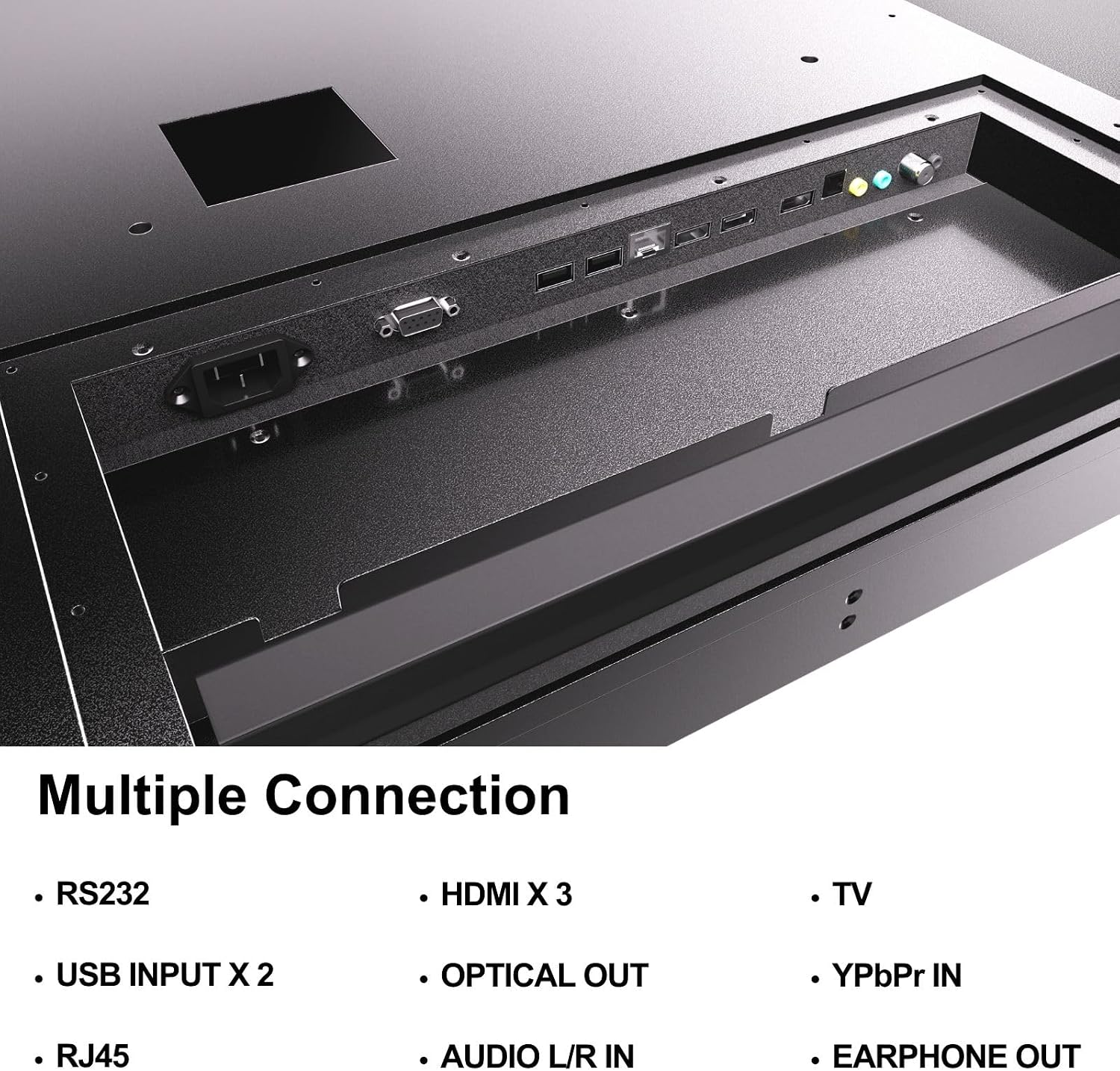
Figure 4.5: Rear panel connections of the SYLVOX Outdoor Signage TV.
5. Nastavení
5.1 Montáž televizoru
The SYLVOX Outdoor Signage TV supports wall mounting. Ensure the mounting surface is sturdy enough to support the TV's weight and is suitable for outdoor conditions.
- Vyberte umístění: Vyberte si místo, které poskytuje optimální viewing and protection from extreme weather, even with the TV's waterproof rating.
- Instalace nástěnného držáku: Attach a VESA-compatible wall mount (400 x 200 mm) to the desired location according to the mount manufacturer's instructions. Use the provided screws (BM8X14MM for full motion, BM8X28MM with gasket for fixed mount).
- Attach TV to Mount: Carefully lift the TV and secure it to the installed wall mount. Ensure all connections are tight and secure.
5.2 Počáteční zapnutí
- Připojte napájení: Plug the power cord into the TV's power input and then into a grounded outdoor-rated power outlet.
- Vložte baterie: Otevřete přihrádku na baterie v dálkovém ovladači a vložte dvě baterie AAA, přičemž dbejte na správnou polaritu.
- Zapnutí: Stiskněte tlačítko napájení na dálkovém ovladači nebo na televizoru.
- Průvodce počátečním nastavením: Follow the on-screen instructions to select language, time zone, and perform initial channel scanning.
5.3 Síťové připojení
To access smart TV features and streaming applications, connect the TV to your network.
- Wi-Fi připojení: Navigate to the TV's settings menu, select 'Network', then 'Wi-Fi'. Choose your network from the list and enter the password.
- Ethernetové připojení: Connect an Ethernet cable from your router to the RJ45 port on the TV. The TV will automatically detect the wired connection.
- Bluetooth: For connecting audio devices, go to the Bluetooth settings, enable Bluetooth, and pair with your desired device.
6. Návod k obsluze
6.1 Základní funkce televizoru
- Moc: Stiskněte tlačítko Moc button on the remote to turn the TV on or off.
- Vstupní zdroj: Stiskněte tlačítko Vstup button to cycle through available input sources (HDMI 1/2/3, TV, YPbPr, USB).
- Objem: Použijte Svazek +/- tlačítky pro nastavení úrovně zvuku.
- Kanál: Použijte Kanál +/- buttons to change channels when using the built-in tuner.
- Navigace: Použijte směrové šipky a OK tlačítko pro navigaci v nabídkách.
6.2 Funkce chytré televize
The TV runs on a Linux operating system and comes with several pre-installed applications:
- Access the home screen to view and launch applications like Netflix, Pandora, Facebook, YouTube, and Twitter.
- Use the remote control's dedicated app buttons (if available) for quick access.
- Note that the Signage 1.0 series does not support downloading additional applications.
6.3 Screencasting (Android Only)
The TV supports screencasting from Android mobile phones:
- Ensure your Android device and the TV are connected to the same Wi-Fi network.
- On your Android phone, enable the screen mirroring or screencasting feature (names may vary by device, e.g., 'Smart View', 'Cast', 'Wireless Display').
- Select your SYLVOX TV from the list of available devices.
6.4 Vertical/Horizontal Display
The TV can be installed and operated in both horizontal (landscape) and vertical (portrait) orientations. When using the screen vertically, the display direction is adjusted by the input device or content source.
7. Údržba
Proper maintenance ensures the longevity and performance of your outdoor TV:
- Čištění obrazovky: Jemně otřete obrazovku měkkým hadříkem, který nepouští vlákna. V případě odolných skvrn lehceampen the cloth with water. Do not spray cleaners directly onto the screen.
- Čištění Casing: Použijte měkký, damp cloth to clean the metal casing. Vyhněte se abrazivním čisticím prostředkům nebo rozpouštědlům.
- Kryty portů: Regularly check that all unused port covers are securely sealed to maintain the IP55 waterproof rating.
- Kontroly vlivů na životní prostředí: Periodically inspect the TV and mounting hardware for any signs of wear, corrosion, or damage, especially after severe weather conditions.
- Aktualizace softwaru: Check for available software updates through the TV's settings menu to ensure optimal performance and security.
8. Řešení problémů
If you encounter issues with your SYLVOX Outdoor Signage TV, refer to the following common problems and solutions:
| Problém | Možná příčina | Řešení |
|---|---|---|
| Žádná síla | Power cord disconnected; no power from outlet; remote batteries dead. | Check power cord connection; test outlet; replace remote batteries. |
| Žádný obraz, ale zvuk je přítomný | Vybrán nesprávný vstupní zdroj; problém s externím zařízením. | Press 'Input' button to select correct source; check external device connections. |
| Žádný zvuk, ale obraz je přítomen | Hlasitost je ztlumená nebo příliš nízká; problém s externím zvukovým zařízením. | Unmute volume or increase level; check audio cables for external devices. |
| Wi-Fi connection unstable or disconnected | Router issue; TV too far from router; incorrect password. | Restart router; move TV closer or use a Wi-Fi extender; re-enter Wi-Fi password. |
| Dálkové ovládání nefunguje | Vybité nebo nesprávně vložené baterie; překážka mezi dálkovým ovladačem a televizorem. | Vyměňte baterie; zajistěte nerušený výhled na infračervený přijímač televizoru. |
If the problem persists after trying these solutions, please contact SYLVOX customer support.
9. Specifikace
| Název modelu | SS43A0KAGD |
| Velikost obrazovky | 43 palce |
| Technologie displeje | LED |
| Rezoluce | 4K (3840x2160) |
| Obnovovací frekvence | 60 Hz |
| Maximum Display Brightness | 1000 Nit |
| Kontrastní poměr | 3000:1 |
| Doba odezvy | 8 milisekund |
| Hodnocení voděodolnosti | IP55 |
| Operační systém | Linux |
| Technologie připojení | Wireless (Bluetooth, Wi-Fi), Wired (HDMI, USB, RJ45, RS232) |
| Zvukový vstup | HDMI, Optical, USB, Audio L/R In |
| Formát signálu | ATSC, NTSC |
| Total Number of HDMI Ports | 3 |
| Celkový počet portů USB | 2 |
| Rozměry produktu (D x Š x V) | 3.4"H x 38.6"Š x 22.4"V |
| Standardní držák VESA | 400 x 200 mm |
| Wattage | 120 watthodin |
| Výrobce | Kontech Electronics Co., Ltd. |
| UPC | 810079224838 |
10. Záruka a podpora
10.1 Informace o záruce
SYLVOX provides a 2letá záruka výrobce for this product. This warranty covers defects in materials and workmanship under normal use. Please retain your proof of purchase for warranty claims.
10.2 Zákaznická podpora
If you require assistance with installation, operation, troubleshooting, or warranty service, please contact SYLVOX customer support. We recommend checking the product upon receipt to ensure it is in good condition and functions normally.
For further support, please visit the official SYLVOX webnebo se podívejte na kontaktní informace uvedené na záručním listu.