
IPEVO CDCU-06IP
Uživatelská příručka IPEVO VC-Z4K UHD 4K PTZ kamera
Model: CDCU-06IP
Značka: IPEVO
1. Úvod
This user manual provides comprehensive instructions for the setup, operation, and maintenance of your IPEVO VC-Z4K UHD 4K PTZ Camera. The VC-Z4K is designed to enhance educational and worship spaces with its 4K UHD resolution and 8.29-MP Sony CMOS sensor. It features advanced pan-tilt-zoom capabilities, AI auto-tracking, and a powerful 12X Optical + 15X Digital Zoom, making it ideal for capturing detailed and engaging remote sessions. Its AI functionality helps minimize the need for additional personnel, and its easy setup allows seamless integration with popular platforms like YouTube, OBS, and Zoom.
2. Bezpečnostní informace
Please read and understand all safety instructions before using the IPEVO VC-Z4K camera to prevent injury or damage to the device. Keep this manual for future reference.
- Zdroj napájení: Use only the provided power adapter. Ensure the power outlet meets the camera's voltage požadavky.
- Větrání: Neblokujte větrací otvory. Zajistěte dostatečné proudění vzduchu kolem kamery, abyste zabránili přehřátí.
- Prostředí: Avoid exposing the camera to water, moisture, extreme temperatures, or direct sunlight. Operate in a clean, dry environment.
- Zacházení: S fotoaparátem zacházejte opatrně. Nenechte ho upustit ani nevystavujte silným vibracím.
- Čištění: Před čištěním odpojte napájení. Použijte měkký, suchý hadřík. Nepoužívejte tekuté ani aerosolové čisticí prostředky.
- Servis: Nepokoušejte se fotoaparát rozebírat ani opravovat sami. Veškerý servis svěřte kvalifikovanému personálu.
3. Obsah balení
Ověřte, zda jsou v balení obsaženy všechny níže uvedené položky:
- IPEVO VC-Z4K Camera
- Power adapter (8.2 ft / 2.5 m)
- USB 3.0 cable (4.9 ft / 1.5 m)
- RS232 cable (6.5 ft / 2 m)
- Dálkové ovládání (baterie není součástí balení)
- Uživatelská příručka (tento dokument)
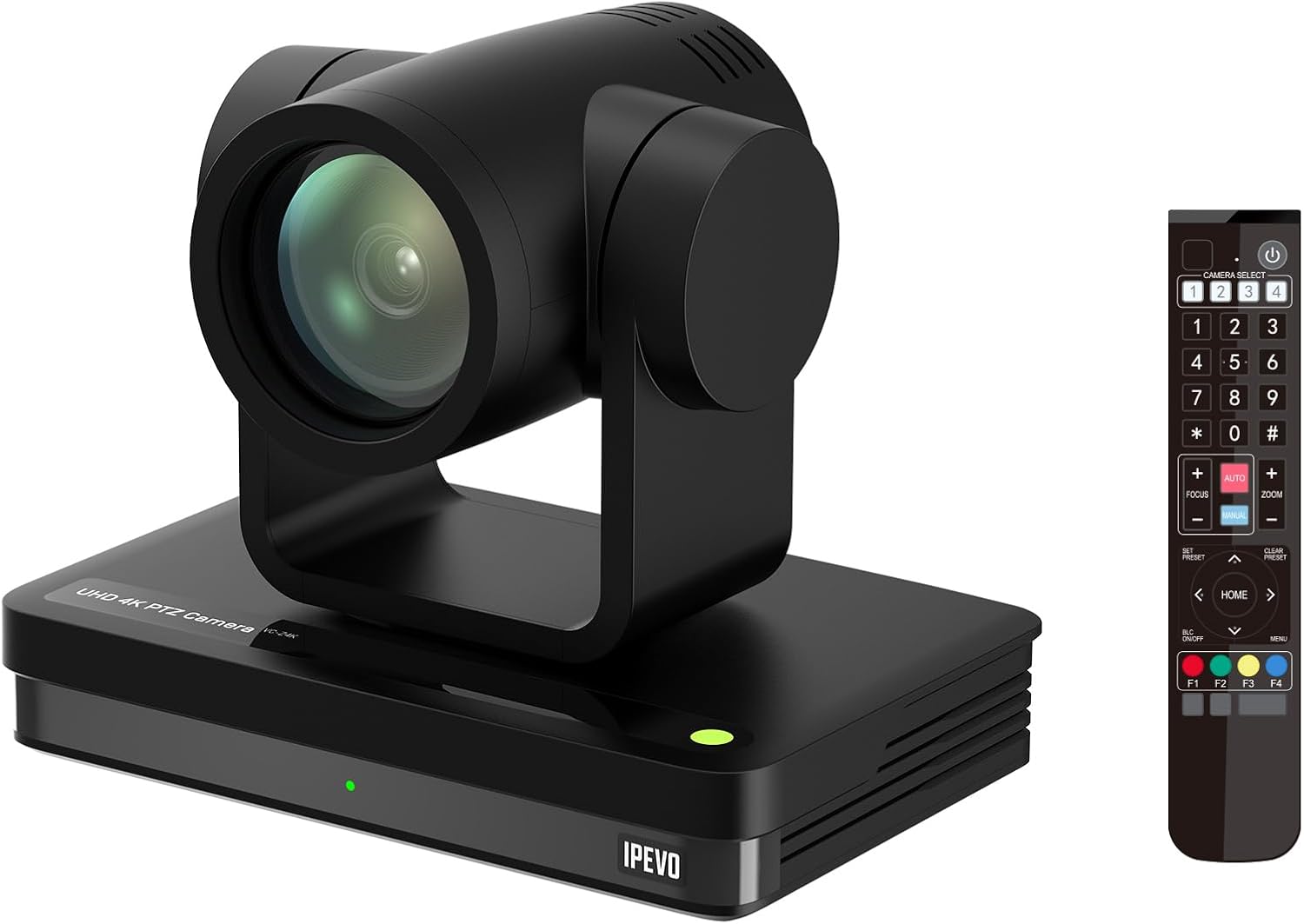
Image: The IPEVO VC-Z4K camera unit shown alongside its remote control, illustrating the main components included in the package.
4. Konec produktuview
4.1 Klíčové vlastnosti
- Rozlišení 4K Ultra HD: Equipped with a 1/2.8" HD CMOS sensor for stunning 4K video output.
- 12násobný optický zoom: Provides clear, detailed close-ups without loss of quality.
- Automatické sledování s umělou inteligencí: Automatically follows speakers or presenters, ensuring they remain in frame.
- Flexibilní konektivita: Features HDMI, USB-C, LAN (PoE), and SDI outputs for versatile integration.
- Wide Pan and Tilt Range: Offers 340° pan and 120° tilt for comprehensive room coverage.
- Pokročilá redukce šumu: 2D/3D noise reduction ensures clear video in various lighting conditions.
4.2 Camera Components and Ports

Obrázek: Zadní view of the IPEVO VC-Z4K camera showing its various connectivity ports including USB 3.0, HDMI, SDI, LAN (PoE), and power input.
The VC-Z4K camera features a range of ports for diverse connectivity options:
- HDMI výstup: For high-definition video output to displays or capture devices.
- Port USB-C: For direct connection to computers for video and control.
- LAN (PoE) port: For network connectivity and Power over Ethernet, simplifying installation.
- SDI výstup: For professional video workflows requiring longer cable runs.
- Port RS232: For serial control via external control systems.
- Příkon: Pro připojení dodaného napájecího adaptéru.
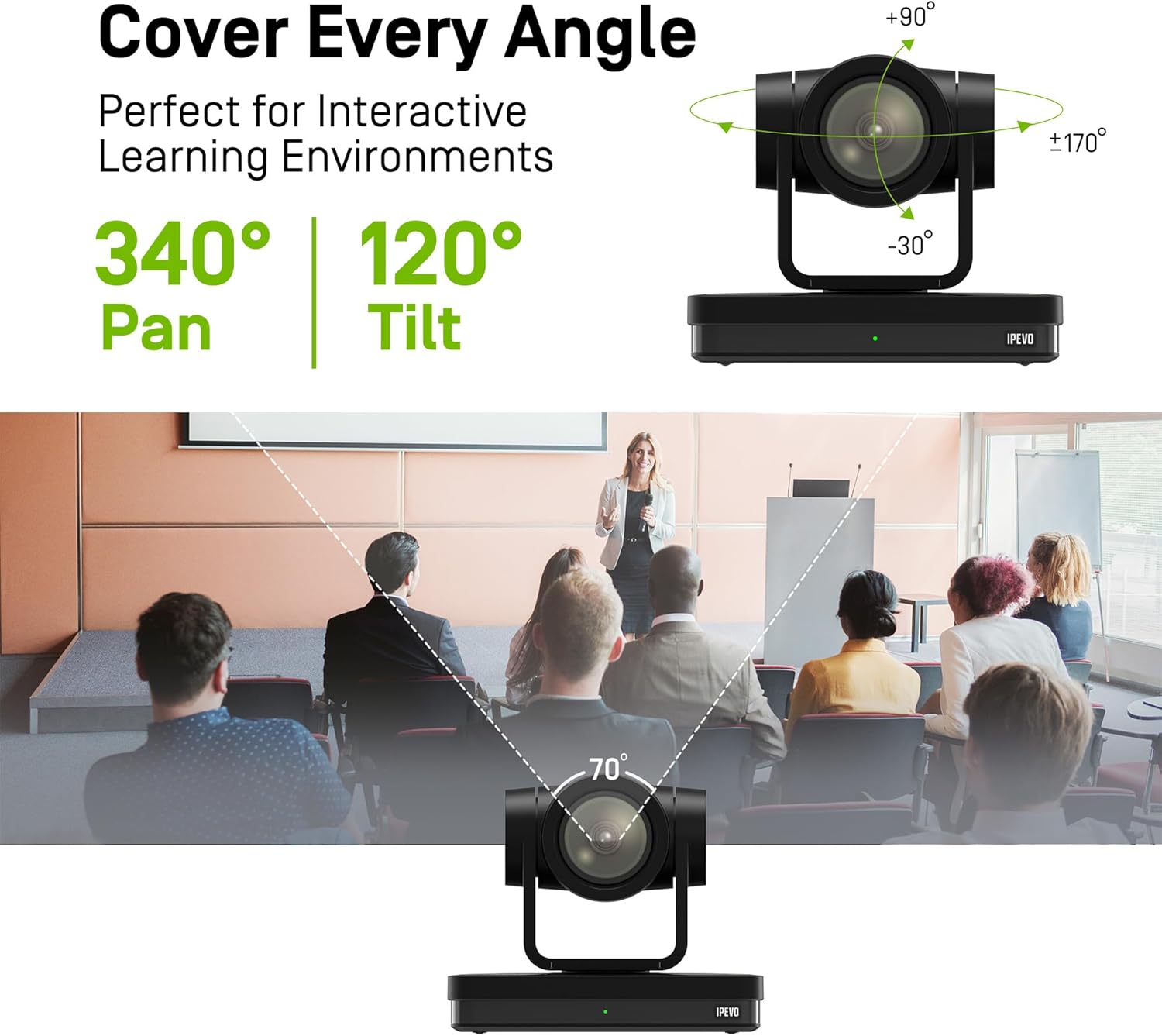
Image: Diagram illustrating the IPEVO VC-Z4K camera's pan (340°) and tilt (120°) ranges, highlighting its ability to cover a wide area.
The camera's motorized head allows for precise pan and tilt movements, enabling comprehensive coverage of your space. The pan range is 340 degrees, and the tilt range is 120 degrees (-30° to +90°).
5. Nastavení
Follow these steps for the initial setup of your IPEVO VC-Z4K camera:
- Umístění: Choose a stable surface or mount the camera securely in your desired location. Ensure it has a clear line of sight to the area you wish to capture.
- Připojení napájení:
- Použití napájecího adaptéru: Connect the provided power adapter to the camera's power input port and then plug it into a wall outlet.
- Použití PoE (napájení přes Ethernet): If your network switch supports PoE, connect an Ethernet cable from the PoE-enabled switch to the camera's LAN (PoE) port. This will provide both power and network connectivity.
- Video Output Connection (Choose one or more):
- HDMI: Connect an HDMI cable from the camera's HDMI output to a display, projector, or video capture card.
- USB-C: Connect the USB 3.0 cable from the camera's USB-C port to a USB 3.0 port on your computer. This enables the camera as a webkamera pro videokonferenční aplikace.
- LAN: Connect an Ethernet cable from the camera's LAN port to your network router or switch for IP streaming and control.
- SDI: Connect an SDI cable from the camera's SDI output to a professional video switcher or recorder.
- Nastavení dálkového ovládání: Insert two AAA batteries (not included) into the remote control. The remote control is essential for initial configuration and operation.
- Zapnutí: Once all connections are secure, power on the camera. The indicator light will illuminate.
6. Návod k obsluze
6.1 Basic Camera Control (via Remote Control)
- Pan/Tilt: Use the directional arrows on the remote control to move the camera horizontally (pan) and vertically (tilt).
- Lupa: Use the 'ZOOM +' and 'ZOOM -' buttons to adjust the optical zoom.
- Soustředit: Press 'AUTO FOCUS' for automatic focus. Use 'FOCUS +' and 'FOCUS -' for manual adjustment if needed.
- Předvolby: The camera supports up to 255 presets. You can save and recall up to 10 presets directly from the remote control using the number buttons (0-9). To save a preset, position the camera, then press 'PRESET' followed by a number (e.g., '1'). To recall, press the number button.

Image: The IPEVO VC-Z4K camera demonstrating its 12X optical zoom capability, highlighting its 8.29-MP Sony CMOS sensor for high-quality video.
6.2 Automatické sledování pomocí umělé inteligence
The VC-Z4K features advanced AI auto-tracking to keep a presenter or subject automatically in frame.
- Enabling Tracking: Refer to the remote control or camera's web interface for specific buttons or settings to activate AI tracking.
- Zone Tracking: Configure specific zones within the camera's view where tracking should occur.
- Sledování prezentujícího: The camera can identify and follow a designated presenter as they move within the defined area.

Image: A visual representation of the IPEVO VC-Z4K's AI auto-tracking and auto-focus features, showing how it maintains focus on a moving subject in a classroom setting.
6.3 Integration with Platforms
The VC-Z4K seamlessly integrates with various video conferencing and streaming platforms:
- USB připojení: When connected via USB-C, the camera will be recognized as a standard webcam by applications like Zoom, OBS Studio, Microsoft Teams, Google Meet, GoTo Meeting, and Skype. Select "IPEVO VC-Z4K" as your video input device within the application settings.
- LAN/IP Streaming: For advanced streaming setups, use the LAN connection to stream video via RTSP/RTMP protocols to platforms like YouTube Live or OBS Studio. Refer to the camera's web interface for IP configuration and streaming settings.
7. Údržba
Proper maintenance ensures the longevity and optimal performance of your IPEVO VC-Z4K camera.
- Čištění objektivu: Používejte měkký hadřík bez žmolků, speciálně určený pro optické čočky. Jemně otřete čočku, abyste odstranili prach nebo šmouhy. Nepoužívejte abrazivní materiály ani agresivní chemikálie.
- Čištění těla: Tělo fotoaparátu otřete měkkým, suchým hadříkem. V případě odolných nečistot lehceampen the cloth with water, then wipe dry immediately. Do not allow liquids to enter the camera.
- Skladování: Pokud fotoaparát delší dobu nepoužíváte, skladujte jej na chladném a suchém místě, mimo dosah přímého slunečního záření a extrémních teplot.
- Aktualizace firmwaru: Periodically check the IPEVO official website for firmware updates. Keeping your camera's firmware up-to-date can improve performance and add new features.
8. Řešení problémů
If you encounter issues with your IPEVO VC-Z4K camera, refer to the following common problems and solutions:
| Problém | Možná příčina | Řešení |
|---|---|---|
| Žádné napájení/Fotoaparát se nezapíná | Power adapter not connected or faulty; no PoE connection. | Ensure power adapter is securely connected and plugged into a working outlet. If using PoE, verify the network switch is PoE-enabled and the Ethernet cable is functional. |
| Žádný video výstup | Incorrect cable connection; wrong input selected on display; software issue. | Check HDMI, USB-C, LAN, or SDI cable connections. Ensure the display is set to the correct input source. Restart the computer/application if connected via USB. |
| Dálkové ovládání nefunguje | Batteries are dead or inserted incorrectly; IR sensor blocked. | Replace batteries (AAA). Ensure batteries are inserted with correct polarity. Point the remote directly at the camera's IR receiver. |
| AI tracking not functioning | Tracking feature not enabled; subject out of tracking range; poor lighting. | Activate AI tracking via remote or web interface. Ensure the subject is within the optimal tracking area. Improve lighting conditions if too dark. |
| Poor video quality (blurry, noisy) | Lens is dirty; focus issue; low light conditions; network bandwidth. | Clean the lens. Adjust focus manually or use auto-focus. Ensure adequate lighting. For IP streaming, check network bandwidth and camera's streaming settings. |
9. Specifikace
Detailed technical specifications for the IPEVO VC-Z4K UHD 4K PTZ Camera:
| Rozměry produktu | 7.1 x 5.9 x 4.5 palce |
| Hmotnost položky | 2.64 libry |
| Číslo modelu položky | CDCU-06IP |
| Technologie fotosenzoru | CMOS (1/2.8" HD CMOS Sensor) |
| Rozlišení záznamu videa | 4K UHD |
| Optický zoom | 12X |
| Digitální zoom | 15X |
| Maximální clona | 2.8 milimetrů |
| Technologie připojení | USB, HDMI, LAN (PoE), SDI, RS232 |
| Speciální funkce | AI Tracking and Auto Focus, Low Noise and High SNR, Multiple Presets (up to 255) |
| Barva | Černý |
| Výrobce | IPEVO |
10. Záruka a podpora
IPEVO products are designed for reliability and performance. For warranty information, technical support, or service inquiries, please visit the official IPEVO webwebu nebo se obraťte přímo na jejich zákaznickou podporu. Uschovejte si účtenku jako doklad o koupi pro případ reklamace.
Další pomoc naleznete na adrese: www.ipevo.com
Ask a question about this manual
Ask about setup, troubleshooting, compatibility, parts, safety, or missing instructions. Manuals+ will review the question and use this page’s manual context to help answer it.