
Y512F Y512FA
Návod k použití
Replacement Remote Control for Projector/AC/TV/AV - Model Y512F Y512FA
1. Úvod
This manual provides essential information for the proper use and maintenance of your replacement remote control. Designed to operate various devices including air conditioners, televisions, and other audio/video equipment, this remote offers a convenient solution for lost or broken original controls. Please read this manual thoroughly before use to ensure optimal performance and longevity of the product.
2. Konec produktuview
The replacement remote control is designed for ease of use with a clear button layout and an ergonomic design. It features dedicated buttons for power, mode selection, temperature/volume adjustment, and specific functions like fan speed and swing for air conditioning units.
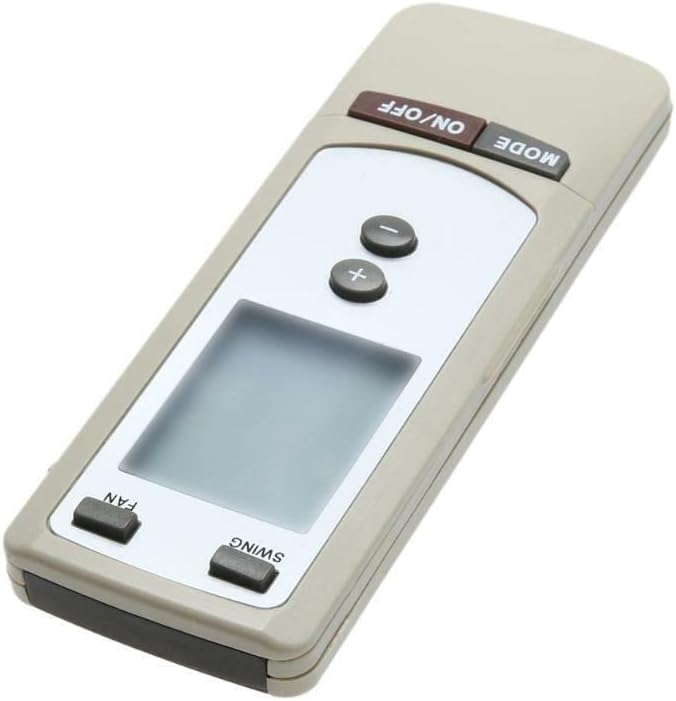
Obrázek 2.1: Úhlové view of the remote control. This image displays the overall shape and the primary control buttons, including the power and mode buttons at the top, temperature controls in the middle, and fan/swing controls at the bottom, along with the LCD screen.
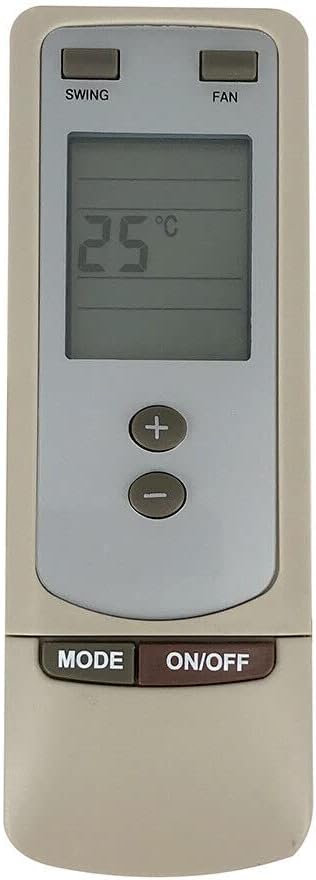
Obrázek 2.2: Přední view of the remote control. This image provides a clear, straight-on view of the remote, highlighting the digital display which shows '25°C', and the arrangement of all functional buttons for easy identification.
3. Nastavení
3.1 Instalace baterie
- Najděte přihrádku na baterie na zadní straně dálkového ovladače.
- Vysuňte kryt přihrádky na baterie.
- Insert two (2) new AAA batteries (not included), ensuring the correct polarity (+ and -) as indicated inside the compartment.
- Bezpečně zavřete kryt bateriového prostoru.
Důležitá poznámka: This replacement remote control typically requires no programming or complex setup. Once batteries are inserted correctly, it should be ready for immediate use with compatible devices.
4. Návod k obsluze
This remote control is designed to operate various devices. While its appearance and specific buttons are highly indicative of an air conditioner remote, it is also listed as compatible with Set Top Boxes, Televisions, Stereo Systems, DVD/Blu-ray Players, and Home Theater systems. Functionality may vary depending on the specific device being controlled.
4.1 Basic Functions (Typical for AC Units)
- Tlačítko ON/OFF: Press to power on or power off the connected device.
- Tlačítko MODE: Cycles through various operating modes (e.g., Cool, Heat, Fan, Dry, Auto for AC units).
- +/- tlačítka: Adjusts temperature settings (for AC units) or volume levels (for audio/video devices).
- Tlačítko FAN: Adjusts the fan speed (e.g., Low, Medium, High, Auto for AC units).
- Tlačítko SWING: Aktivuje nebo deaktivuje funkci automatického natáčení lamel klimatizační jednotky.
For other compatible devices (TV, DVD, etc.), the ON/OFF and +/- buttons (for volume/channel) are generally universal. Specific functions like 'MODE', 'FAN', and 'SWING' may not be applicable or may control different features depending on the device's original remote mapping.
5. Údržba
5.1 Výměna baterie
Replace batteries when the remote's response becomes sluggish or it stops functioning. Always replace both batteries simultaneously with new ones of the same type (AAA). Do not mix old and new batteries, or different types of batteries.
5.2 Čištění
To clean the remote control, wipe it gently with a soft, dry cloth. For stubborn dirt, a slightly damp Lze použít hadřík a poté suchý hadřík. Nepoužívejte abrazivní čisticí prostředky, rozpouštědla ani chemické spreje, protože by mohly poškodit povrch dálkového ovladače nebo jeho vnitřní součásti.
6. Řešení problémů
- Dálkové ovládání nereaguje:
- Zkontrolujte, zda jsou baterie vloženy správně se správnou polaritou.
- Vyměňte staré baterie za nové.
- Ujistěte se, že mezi dálkovým ovladačem a senzorem zařízení nejsou žádné překážky.
- Ujistěte se, že se nacházíte v efektivním provozním dosahu zařízení.
- Některé funkce nefungují:
- This is a replacement remote control and may not support all functions of your original device's remote. Refer to your device's original manual for specific functions.
- Verify that the remote model (Y512F Y512FA) is compatible with your specific device model.
7. Specifikace
| Funkce | Detail |
|---|---|
| ASIN | B0CPLH6Q19 |
| Datum první dostupnosti | 6. prosince 2023 |
| Výrobce | Obecný |
| Značka | Obecný |
| Speciální funkce | Ergonomický |
| Barva | Černá nebo bílá |
| Maximální počet podporovaných zařízení | 2 |
| Kompatibilní zařízení | Set Top Box, Television, Stereo System, DVD/Blu-ray Player, Home Theater |
8. Záruka a podpora
Specific warranty information for this replacement remote control is not provided in the product details. For any warranty claims, technical support, or further inquiries, please contact the seller or manufacturer directly through your purchase platform. Keep your purchase receipt as proof of purchase.
Ask a question about this manual
Ask about setup, troubleshooting, compatibility, parts, safety, or missing instructions. Manuals+ will review the question and use this page’s manual context to help answer it.