
X68
VGN X68 Mechanical Gaming Keyboard User Manual
Model: X68 | Značka: Generic
1. Úvod
Thank you for choosing the VGN X68 Mechanical Gaming Keyboard. This user manual provides detailed instructions on setting up, operating, and maintaining your new keyboard. The VGN X68 is a versatile mechanical keyboard designed for gaming and productivity, featuring three connectivity modes (wired, 2.4G wireless, and Bluetooth 5.0), vibrant RGB backlighting, and hot-swappable switches for personalized customization.

Image: The VGN X68 Mechanical Gaming Keyboard with its retail packaging, showcasinjeho design a RGB osvětlení.
2. Obsah balení
Ověřte prosím, zda jsou ve vašem balení obsaženy všechny níže uvedené položky:
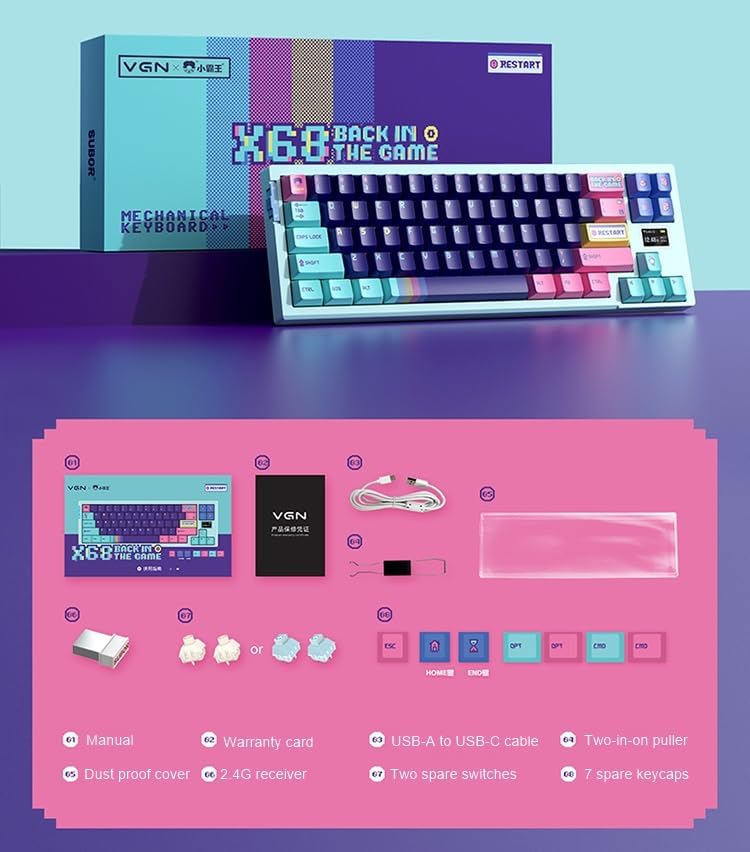
Image: A visual representation of all items included in the VGN X68 keyboard package.
- VGN X68 Mechanical Gaming Keyboard
- Uživatelská příručka
- Záruční list
- Kabel USB-A na USB-C
- Two-in-one Puller (for keycaps and switches)
- Prachotěsný kryt
- 2.4G bezdrátový přijímač
- Two Spare Switches
- Seven Spare Keycaps
3. Nastavení
3.1 Počáteční nabíjení
Before first use, it is recommended to fully charge the keyboard. Connect the provided USB-A to USB-C cable to the keyboard's Type-C port and a USB power source (e.g., computer USB port, wall adapter). The charging indicator will show the charging status.
3.2 Připojení klávesnice
The VGN X68 supports three connection modes: Wired, 2.4G Wireless, and Bluetooth 5.0. Use the switch located on the keyboard to select your desired mode.

Obrázek: Podrobný view of the physical switch on the keyboard used to toggle between 2.4G wireless, wired, and Bluetooth modes.
3.2.1 Drátový režim
- Set the mode switch to 'Wired' (usually indicated by a cable icon or 'USB').
- Připojte konec kabelu s konektorem USB-C ke klávesnici a konec s konektorem USB-A k počítači.
- The keyboard will be automatically recognized by your operating system (e.g., Windows 10) and ready for use.
3.2.2 Bezdrátový režim 2.4G
- Set the mode switch to '2.4G' (usually indicated by a wireless icon).
- Zapojte bezdrátový 2.4G přijímač do volného USB portu na vašem počítači.
- The keyboard should connect automatically. If not, press Fn + R (or a similar key combination indicated in the manual) to initiate pairing.
3.2.3 Režim Bluetooth
- Set the mode switch to 'BT' (Bluetooth).
- V počítači nebo zařízení povolte Bluetooth a vyhledejte nová zařízení.
- The keyboard will appear as 'VGN X68' or similar. Select it to pair.
- You may need to press Fn + 1/2/3 to select a Bluetooth profile if the keyboard supports multiple Bluetooth connections.
4. Návod k obsluze
4.1 Klíčové funkce a rozvržení
The VGN X68 is a 61-key mechanical keyboard. Many functions are accessed via the 'Fn' key in combination with other keys. Refer to the keycap legends for specific shortcuts.
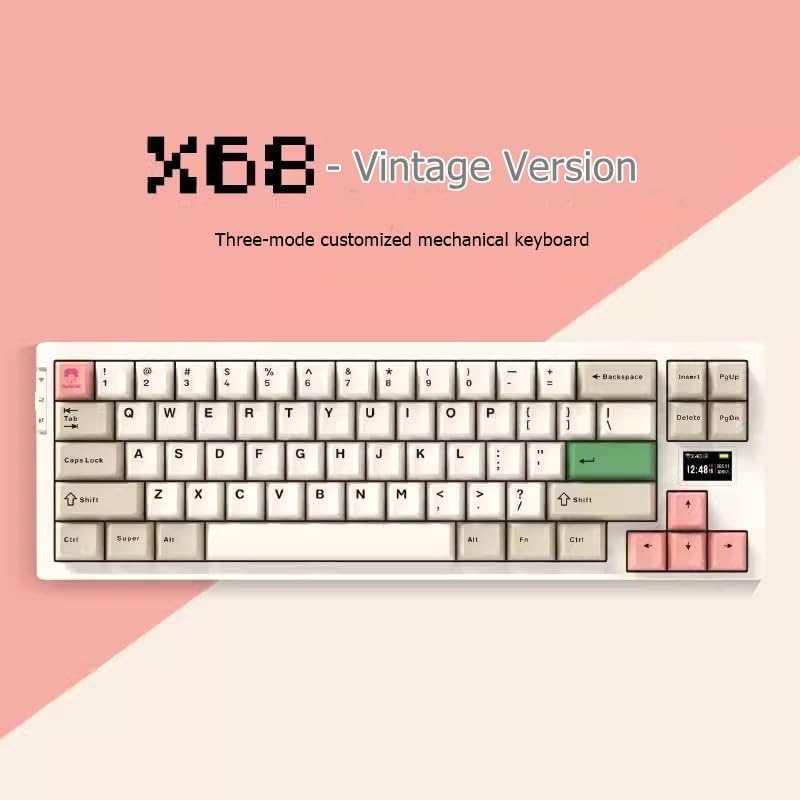
Image: The VGN X68 keyboard, showcasinjeho kompaktní uspořádání a design kláves.
4.2 Ovládání RGB podsvícení
The keyboard features multicolor RGB backlighting. Use the following key combinations to control the lighting effects:
- Fn + \|: Přepínání mezi různými režimy RGB osvětlení.
- Fn + ↑/↓: Upravte jas podsvícení.
- Fn + ←/→: Upravte rychlost nebo směr světelného efektu.
- Fn + Del: Změna barvy podsvícení (pro statické režimy).
4.3 Screen Display Functions
The VGN X68 features a small screen display that provides useful information at a glance:
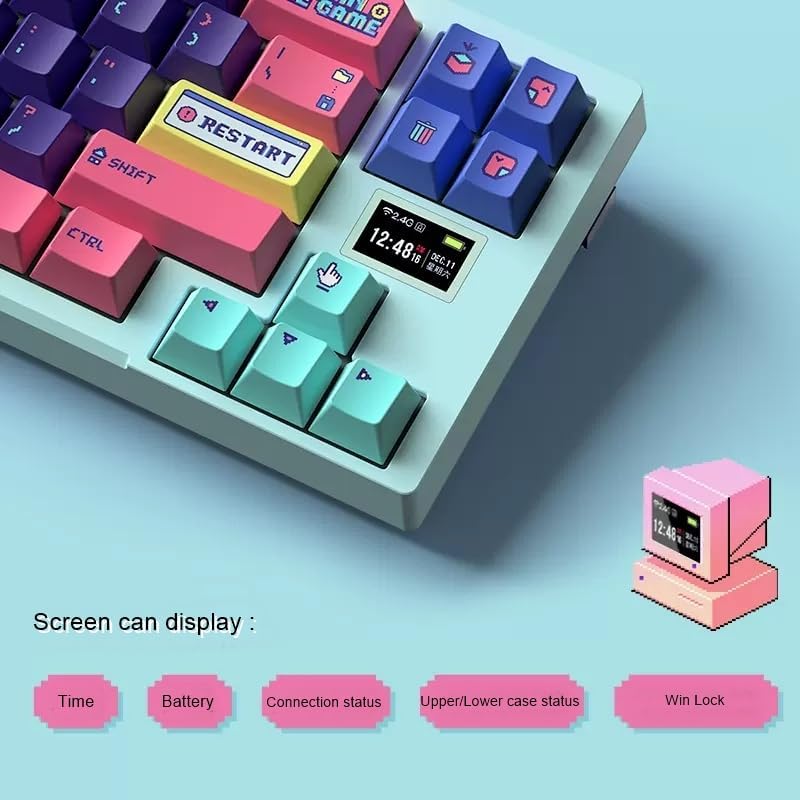
Image: A close-up of the keyboard's integrated screen, displaying icons for time, battery level, connection status, case status, and Win Lock.
- Čas: Zobrazuje aktuální čas.
- Baterie: Zobrazuje aktuální stav baterie.
- Stav připojení: Indicates the active connection mode (Wired, 2.4G, or Bluetooth).
- Upper/Lower Case Status: Shows if Caps Lock is enabled.
- Win Lock: Indicates if the Windows key is locked (to prevent accidental presses during gaming).
5. Údržba
5.1 Čištění
Pro zachování výkonu a vzhledu klávesnice:
- Před čištěním odpojte klávesnici od počítače.
- Pomocí měkkého kartáče nebo stlačeného vzduchu odstraňte prach a nečistoty z prostoru mezi klávesami.
- Otřete klávesy a povrch klávesnice jemným hadříkem.amp, hadřík, který nepouští vlákna. Zabraňte nadměrné vlhkosti.
- Use the provided dust proof cover when the keyboard is not in use to prevent dust accumulation.
5.2 Výměna kláves a spínačů
The VGN X68 features hot-swappable switches, allowing you to easily change switches without soldering. Use the provided two-in-one puller for both keycaps and switches.
- To remove a keycap: Use the keycap puller end of the tool to gently pull the keycap straight up.
- Postup demontáže přepínače: Use the switch puller end of the tool to grasp the switch from its top and bottom clips, then gently pull it straight up.
- Instalace přepínače: Zarovnejte piny nového spínače s otvory na desce plošných spojů a pevně zatlačte, dokud nezacvakne. Ujistěte se, že piny nejsou ohnuté.
- To install a keycap: Zarovnejte krytku kláves s dříkem spínače a pevně zatlačte dolů.
6. Řešení problémů
If you encounter issues with your VGN X68 keyboard, please refer to the following common solutions:
- Klávesnice nereaguje: Ensure the keyboard is charged. Check the connection mode switch (Wired, 2.4G, Bluetooth) and ensure it matches your connection method. For wired, try a different USB port. For wireless, ensure the receiver is properly plugged in or Bluetooth is paired.
- Klíče se neregistrují: Check if any keycaps or switches are loose. Re-seat them if necessary. Test on another device to rule out software issues.
- Backlight not working/flickering: Ensure the keyboard is charged. Try cycling through backlight modes (Fn + \|) or adjusting brightness (Fn + ↑/↓).
- Nestabilní připojení Bluetooth: Ensure no other devices are interfering with the Bluetooth signal. Try re-pairing the keyboard. Ensure your device's Bluetooth drivers are up to date.
- 2.4G wireless lag: Ensure the receiver is not too far from the keyboard. Avoid placing the receiver near other wireless devices that might cause interference.
If problems persist, please refer to the Warranty and Support section.
7. Specifikace
| Funkce | Specifikace |
|---|---|
| Značka | Obecný |
| Model | X68 |
| Výrobce | Džin |
| Barva | azurová |
| Kompatibilita operačního systému | Windows 10 |
| Technologie připojení | Bluetooth 5.0, 2.4G bezdrátové, kabel typu C |
| Popis klávesnice | Mechanické |
| Doporučená použití | Hraní |
| Speciální funkce | Podsvícený |
| Počet klíčů | 61 |
| Keyboard Backlight Color Support | RGB (červená, zelená, modrá) |
| Styl | Moderní |
| Tisk kláves | Dvojitý záběr |
| Materiál krytky klíče | Plast PBT |
| Přepínače vyměnitelné za provozu | Ano |
| Switch Manufacturer | Kaih |
| Značka karoserie Axis | Kailh Box |
| Full-size Keyboard | Žádný |
| Wrist Rest Support | Žádný |
8. Záruka a podpora
Your VGN X68 Mechanical Gaming Keyboard comes with a manufacturer's warranty. For any product issues, including damaged or incorrect items, please do not hesitate to contact our support team. We are committed to providing prompt assistance and will respond to your inquiries within 24 hours.
Konkrétní podmínky naleznete v záruční kartě, která je součástí balení.
Ask a question about this manual
Ask about setup, troubleshooting, compatibility, parts, safety, or missing instructions. Manuals+ will review the question and use this page’s manual context to help answer it.