
1. Úvod
This manual provides detailed instructions for the setup, operation, maintenance, and troubleshooting of your Cleer ARC II Open Ear Headphones. Please read this manual thoroughly before using the product to ensure proper function and longevity.
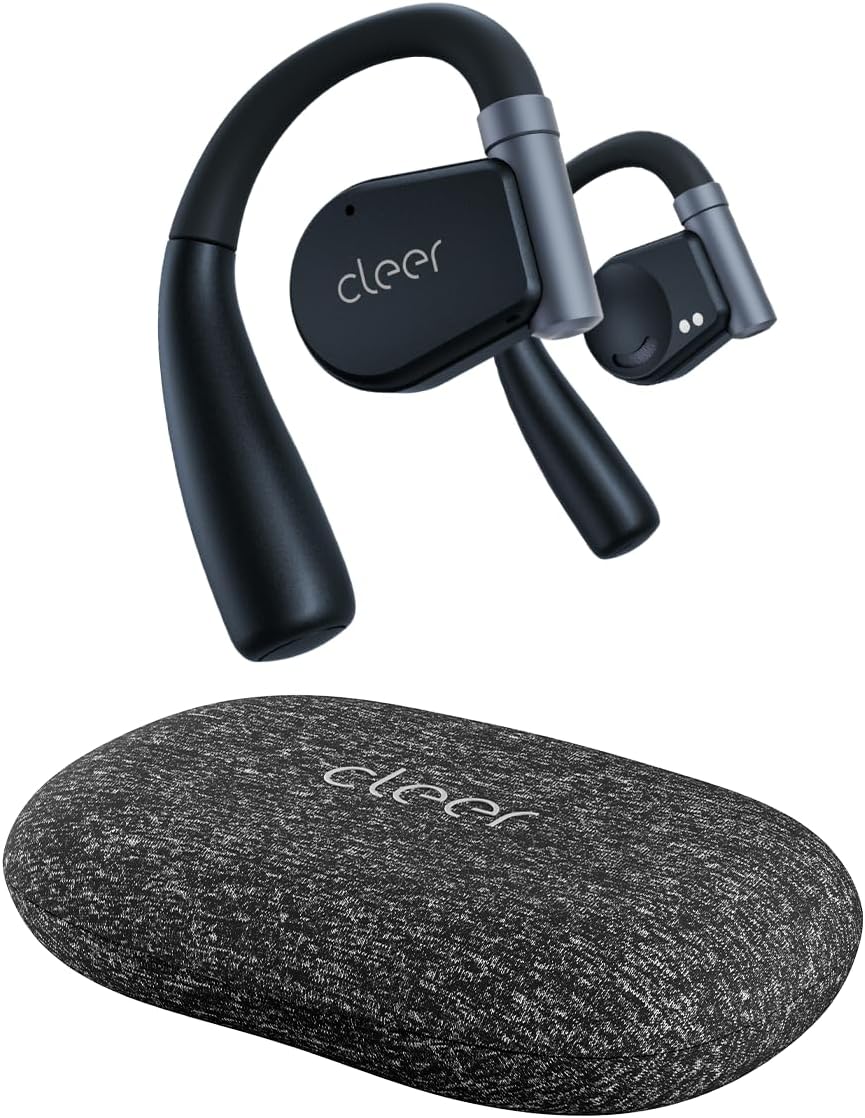
Image: Cleer ARC II Open Ear Headphones and their charging case. The headphones feature an open-ear design with ear hooks, and the case is a compact, textured grey oval.
2. Obsah balení
Ujistěte se, že v balení jsou přítomny všechny položky:
- Cleer ARC II Open-Ear Headphones
- Charging Case with Built-in Fast Charging
- Nabíjecí kabel USB-C na USB-A
- Uživatelská příručka (tento dokument)
3. Konec produktuview
The Cleer ARC II headphones are designed for comfort and awareness, featuring an open-ear design that allows you to hear your surroundings while enjoying audio. Key features include:
- Design s otevřeným uchem: Allows ambient sound awareness.
- Ergonomický střih: Ultra-lightweight with flexible ear hooks for secure and comfortable wear.
- Bluetooth 5.3: Pro stabilní a efektivní bezdrátové připojení.
- Vícebodové připojení: Bezproblémové přepínání mezi dvěma spárovanými zařízeními.
- Prodloužená hrací doba: Up to 8 hours per charge, with an additional 27 hours from the charging case (total 35 hours).
- IPX5 Sweat Resistance: Vhodné pro cvičení a venkovní aktivity.
- Prémiový zvuk: Equipped with 16.2mm dynamic drivers for clear audio.
- Vymazat hovory: Dual microphones with cVc (Clear Voice Capture) technology for enhanced voice clarity.
- Přizpůsobitelný EQ: Úprava zvukufiles via the Cleer+ App.
- Intuitivní ovládání: Touch controls and optional head motion controls for playback, calls, and volume.

Image: A man wearing the Cleer ARC II headphones, highlighting the open-ear design that allows for environmental awareness.
4. Nastavení a první použití
4.1. Nabíjení sluchátek a pouzdra
Před prvním použitím sluchátka a nabíjecí pouzdro plně nabijte.
- Vložte obě sluchátka do nabíjecího pouzdra.
- Připojte nabíjecí kabel USB-C k nabíjecímu portu na pouzdře a druhý konec k napájecímu zdroji USB (např. k počítači, síťovému adaptéru).
- LED indikátory na pouzdře budou zobrazovat stav nabíjení. Plné nabití trvá přibližně 2 hodiny.

Image: The Cleer ARC II headphones and charging case, visually representing the total battery life of 35 hours (8 hours from earbuds + 27 hours from case).
4.2. Fitting the Headphones
Proper fit ensures optimal sound and comfort.
- Krok 1: Adjust the ear hook to fit your ear's contour.
- Krok 2: Place the earbud above your ear, ensuring the speaker rests near your ear canal.
- Krok 3: Rotate the earbud backward along the auricle until it sits comfortably and securely in position.
- Krok 4: Verify the correct fitting position for both earbuds.

Image: A four-step diagram illustrating how to correctly adjust and wear the Cleer ARC II open-ear headphones for a secure and comfortable fit.
4.3. Párování Bluetooth
Pair your Cleer ARC II headphones with your device using one of the following methods:

Image: A diagram detailing three different methods for Bluetooth pairing the Cleer ARC II headphones with a mobile device.
- Option 1 (Initial Pairing):
- Open the charging case for the first time. The LEDs on the earbuds will start flashing red and white, indicating automatic pairing mode.
- On your mobile device, select "Cleer ARC II" from the Bluetooth pairing list.
- Option 2 (Manual Pairing - Earbuds Out of Case):
- If the earbuds are out of the charging case, tap either the left or right earbud 5 times to activate pairing mode.
- On your mobile device, select "Cleer ARC II" from the Bluetooth pairing list.
- Option 3 (Manual Pairing - Earbuds in Case):
- When both earbuds are in the charging case, long-press the Multi-Function Button (MFB) on the case until the LEDs of the earbuds start flashing red and white to signal pairing mode.
- On your mobile device, select "Cleer ARC II" from the Bluetooth pairing list.
4.4. Cleer+ App Installation
For full customization and firmware updates, download the free Cleer+ App from the Apple App Store or Google Play Store.

Image: Screenshots of the Cleer+ App interface, showing options for equalizer adjustments and general control of the Cleer ARC II headphones.
5. Návod k obsluze
5.1. Dotykové ovládání sluchátek
The earbuds feature touch-sensitive areas for controlling playback, calls, and volume. These controls can be customized via the Cleer+ App.

Image: A diagram illustrating the touch control functions on the Cleer ARC II earbuds for managing music playback, calls, and volume adjustments.
| Akce | Funkce (hudba) | Function (Call) | Function (Volume) |
|---|---|---|---|
| Single tap (x1) | Přehrát/Pozastavit | - | - |
| Dvojité klepnutí (x2) | Další skladba | Přijmout/zavěsit hovor | Right earbud: Volume up continuously Left earbud: Volume down continuously (hold on 2nd tap) |
| Trojité klepnutí (x3) | Předchozí skladba | - | - |
| Klepněte a podržte | Trigger default voice assistant | Odmítnout hovor | - |
5.2. Head Motion Control
The ARC II supports head motion controls for music and calls. This function is deactivated by default and can be activated in the Cleer+ App.

Image: A diagram illustrating various head movements and their corresponding control functions for music and calls on the Cleer ARC II headphones.
- Nod (x2): Přijměte hovor
- Shake head (x2): Hang up/Reject call
- Turn head left (x1): Předchozí skladba
- Turn head right (x1): Další skladba
5.3. Vícebodové připojení
The Cleer ARC II headphones can connect to two Bluetooth devices simultaneously. This allows you to seamlessly switch between audio sources, for examptedy z telefonu do notebooku.
- Spárujte sluchátka s prvním zařízením.
- Put the headphones into pairing mode again (refer to Section 4.3).
- Spárujte sluchátka s druhým zařízením.
- The headphones will now be connected to both devices. Audio will automatically switch to the device playing content or receiving a call.
6. Údržba a péče
To ensure the longevity and optimal performance of your Cleer ARC II headphones, follow these maintenance guidelines:
- Čištění: Pravidelně otírejte sluchátka a nabíjecí pouzdro měkkým, suchým hadříkem, který nepouští vlákna. Nepoužívejte abrazivní materiály ani agresivní chemikálie.
- Odolnost proti potu: While IPX5 rated for sweat and water resistance, avoid submerging the headphones in water. After intense workouts, gently wipe away sweat before placing them back in the charging case.
- Skladování: Pokud sluchátka nepoužíváte, uložte je do nabíjecího pouzdra, aby byly chráněny před prachem a poškozením. Skladujte na chladném a suchém místě mimo dosah přímého slunečního záření a extrémních teplot.
- Péče o baterie:
- Vyhněte se častému úplnému vybíjení baterie.
- Sluchátka pravidelně nabíjejte, i když je delší dobu nepoužíváte, aby se zachovala jejich životnost.
- Nevystavujte baterii nadměrnému teplu nebo chladu.
7. Řešení problémů
If you encounter issues with your Cleer ARC II headphones, refer to the following common solutions:
| Problém | Možná příčina | Řešení |
|---|---|---|
| Sluchátka se nespárují | Není v režimu párování; Bluetooth na zařízení je vypnutý; dříve spárované zařízení ruší. |
|
| Žádný zvuk nebo nízká hlasitost | Volume too low; headphones not selected as audio output; earbud fit. |
|
| Intermittent connection/audio dropouts | Vzdálenost od zařízení; rušení; slabá baterie. |
|
| Problémy s nabíjením | Cable/charger fault; dirty charging contacts; earbuds not seated correctly. |
|
| Head motion control not working | Feature disabled; app not configured. |
|
7.1. Obnovení továrního nastavení
If problems persist, a factory reset may resolve the issue. Consult the Cleer+ App or the official Cleer support website for specific factory reset instructions for your model.
8. Specifikace
| Funkce | Detail |
|---|---|
| Název modelu | ARC II |
| Technologie připojení | Bezdrátové připojení (Bluetooth 5.3) |
| Dosah Bluetooth | 10 metrů |
| Typ zvukového ovladače | Dynamický ovladač |
| Velikost zvukového ovladače | 16.2 milimetrů |
| Frekvenční rozsah | 20 Hz - 20,000 XNUMX Hz |
| Impedance | 16 Ohmy |
| Výdrž baterie (sluchátka) | Až 8 hodin |
| Výdrž baterie (s nabíjecím pouzdrem) | Celkem až 35 hodin |
| Doba nabíjení | Přibližně 2 hodiny |
| Úroveň odolnosti proti vodě | IPX5 (odolnost proti potu) |
| Hmotnost položky (sluchátka) | Not specified individually, total item weight 4.8 ounces |
| Hmotnost přepravního pouzdra | 136 gramů |
| Kontrolní metoda | Touch, Head Motion (customizable via app) |
| Speciální funkce | Integrated Equalizer, Lightweight, Multipoint Pairing, Sweatproof, Volume Control, cVc Microphones |
| Zahrnuté komponenty | Cleer ARC II Open-Ear Headphones, Charging Case, USB-C to USB-A Charging Cable, User Manual |
9. Záruka a podpora
Cleer products are designed and manufactured to the highest quality standards. For detailed warranty information, please refer to the warranty card included with your product or visit the official Cleer webmísto.
Pro další pomoc, technickou podporu nebo view FAQs, please visit the official Cleer store or support page: