
ZK-1002
ZK-1002 HiFi Digital Amplifier Uživatelská příručka
Model: ZK-1002 | Brand: Generic
Zavedení
This user manual provides detailed instructions for the operation and maintenance of your ZK-1002 HiFi 100WX2 TPA3116 Bluetooth 5.0 High Power Digital Amplifier Stereo Board. Please read this manual thoroughly before using the product to ensure proper functionality and safety.
Bezpečnostní informace
- Zajistěte napájení objtage je v daném rozsahu (5–27 V DC).
- Nevystavujte zařízení vlhkosti, dešti ani extrémním teplotám.
- Vyhněte se umístění ampUmístěte přístroj na přímé sluneční světlo nebo do blízkosti zdrojů tepla.
- Nerozebírejte ani neupravujte ampVeškerý servis svěřte kvalifikovanému personálu.
- Uchovávejte mimo dosah dětí.
- Zajistěte správné větrání, aby nedošlo k přehřátí.
Konec produktuview
The ZK-1002 is a compact and powerful digital amplifier board designed for home theater and audio projects. It features Bluetooth 5.0 connectivity and an AUX input, delivering 100W x 2 channels of high-fidelity stereo sound.

Přední view of the ZK-1002 HiFi Digital Amplifier Board, showing the volume knob, input switch, and power/speaker terminals.
Obsah balení
Zkontrolujte prosím balení, zda neobsahuje následující položky:
- 1 x ZK-1002 Digital Amplifikační deska
- 1 x napájecí kabel stejnosměrného proudu
- 1 x Small Screwdriver (for terminal connections)
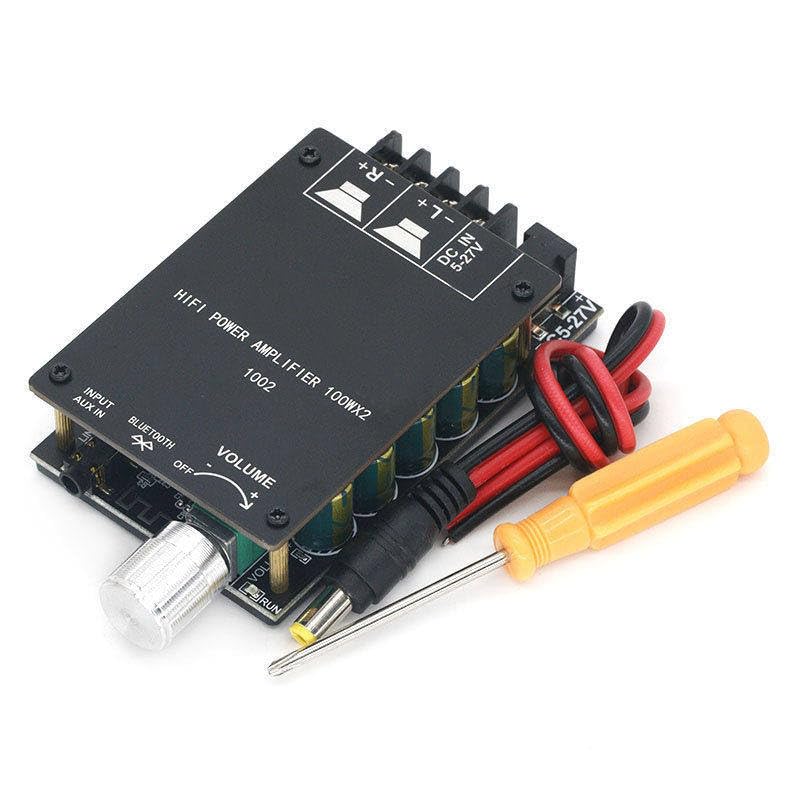
The ZK-1002 amplifier board shown with its included DC power cable and a small screwdriver for easy terminal connections.
Nastavení
1. Připojení napájení
Connect a DC power supply (5-27V) to the "DC IN 5-27V" terminal. Ensure correct polarity (+ and -).
2. Připojení reproduktoru
Connect your passive speakers to the speaker output terminals. The board supports stereo output (Left and Right channels). Ensure correct polarity for each speaker (+ and -).
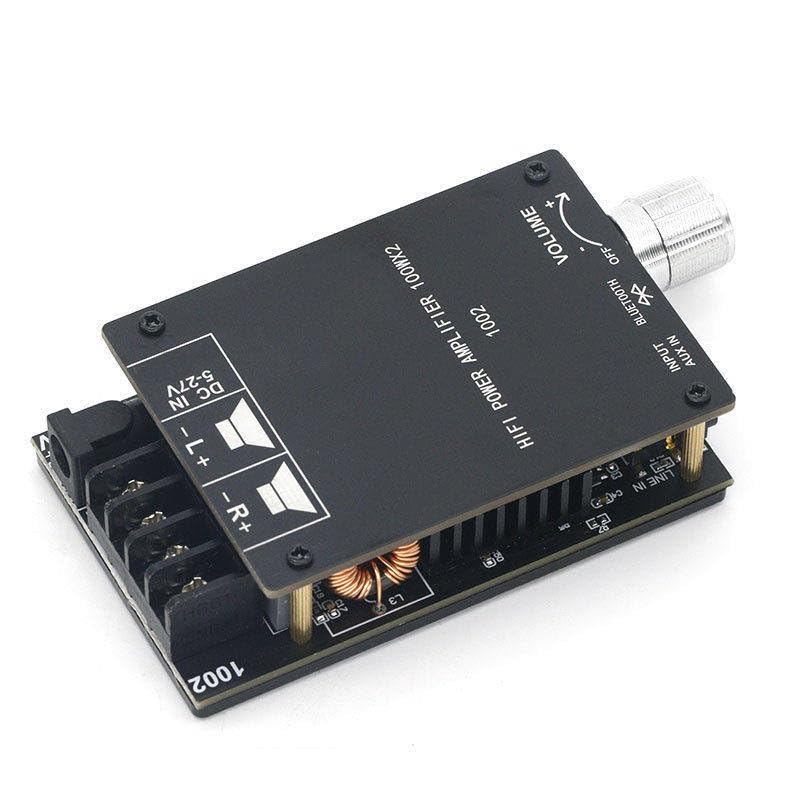
Detailní view of the ZK-1002 amplifier board, highlighting the DC power input and speaker output terminals for proper wiring.
3. Připojení zvukového vstupu
The amplifier supports two audio input methods: Bluetooth and AUX IN.
- Bluetooth: Switch the input selector to "Bluetooth". The device will enter pairing mode.
- AUX IN: Connect an audio source (e.g., smartphone, MP3 player) to the "AUX IN" jack using a 3.5mm audio cable. Switch the input selector to "AUX IN".
Návod k obsluze
Zapnutí/vypnutí
The amplifier powers on automatically when a DC power supply is connected. To turn off, disconnect the power supply.
Ovládání hlasitosti
Rotate the "VOLUME" knob clockwise to increase volume and counter-clockwise to decrease volume.
Výběr vstupu
Use the "INPUT" switch to select between "Bluetooth" and "AUX IN" audio sources.
Párování pomocí Bluetooth
- Switch the input selector to "Bluetooth".
- On your audio device (e.g., smartphone), enable Bluetooth and search for available devices.
- Select "ZK-1002" from the list of devices to pair.
- Po spárování můžete bezdrátově streamovat zvuk do ampživější.
Údržba
- Vyčistěte amplifier board with a soft, dry cloth. Do not use liquid cleaners or solvents.
- Zajistěte amplifier is disconnected from power before cleaning.
- Keep the ventilation areas clear of dust and debris to maintain optimal performance.
Odstraňování problémů
| Problém | Možná příčina | Řešení |
|---|---|---|
| Žádný zvukový výstup |
|
|
| Bluetooth není párování |
|
|
| Zkreslený zvuk |
|
|
Specifikace
| Funkce | Detail |
|---|---|
| Číslo modelu | ZK-1002 |
| Značka | Obecný |
| Typ montáže | Povrchová montáž |
| Počet kanálů | 2 |
| Výkon | 100W x 2 |
| Verze Bluetooth | 5.0 |
| Vstupní objemtage | DC 5-27V |
| Rozměry (cca) | 84mm x 72mm x 24mm (D x Š x H) |
| Hmotnost (přibližně) | 137 g |
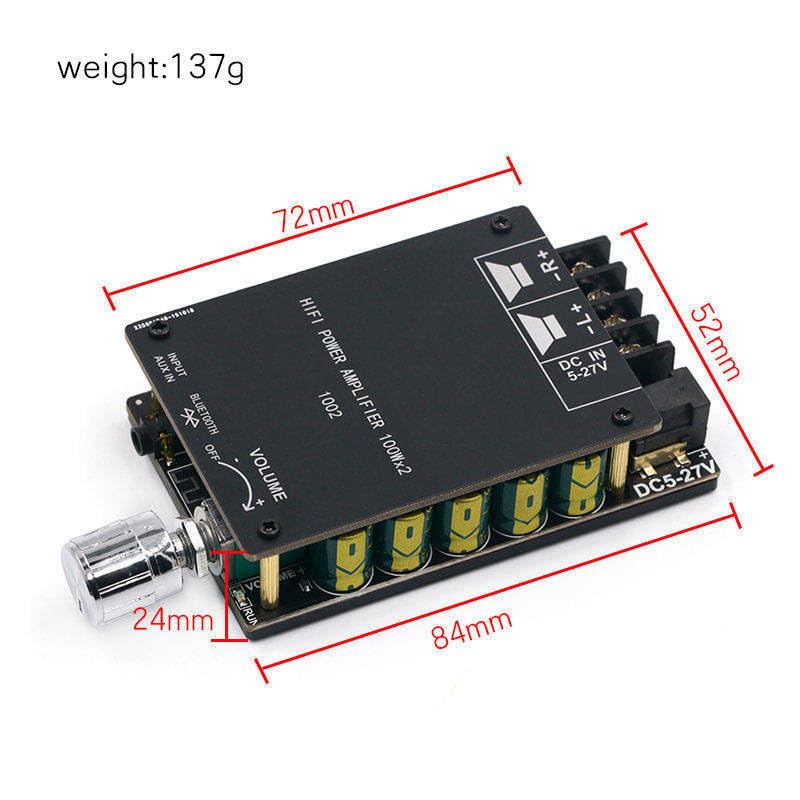
The ZK-1002 amplifier board with approximate dimensions indicated, showing its compact size.
Záruka a podpora
This product is covered by a standard manufacturer's warranty. For warranty claims or technical support, please contact your retailer or the manufacturer directly. Please refer to your purchase documentation for specific warranty terms and contact information.
Pro další pomoc můžete také navštívit stránku produktu na Amazon.com: https://www.amazon.com/dp/B0CPCZJCFC
Ask a question about this manual
Ask about setup, troubleshooting, compatibility, parts, safety, or missing instructions. Manuals+ will review the question and use this page’s manual context to help answer it.