
1. Úvod
This manual provides essential information for the safe and efficient operation of your Devoko 0428-1822 Height Adjustable Electric Standing Desk. This desk is designed to promote healthy working habits by allowing seamless transitions between sitting and standing positions. It features a spacious 180 x 80 cm desktop, integrated USB A charging ports, and a cable management system for an organized workspace. Please read this manual thoroughly before assembly and use, and retain it for future reference.

Image 1.1: The Devoko Electric Standing Desk in a typical office setup, showcasing its large surface area and integrated features.
2. Bezpečnostní pokyny
- Před použitím se ujistěte, že jsou všechny součásti bezpečně upevněny.
- Během práce držte děti a domácí zvířata v dostatečné vzdálenosti od stolu, abyste předešli zranění.
- Do not overload the desk. Refer to the specifications for weight limits.
- Neumisťujte tekutiny přímo na ovládací panel nebo do blízkosti elektrických součástí.
- Před čištěním nebo prováděním jakékoli údržby odpojte napájení.
- Do not attempt to modify the desk's electrical or mechanical components. Contact support for assistance.
- The desk is equipped with an anti-collision system. Ensure the area around the desk is clear during height adjustments to prevent damage or injury.
3. Obsah balení
Před zahájením montáže se prosím ujistěte, že jsou všechny součásti přítomny a nepoškozené. Pokud některé součásti chybí nebo jsou poškozené, kontaktujte zákaznickou podporu.
- Desktop sections (typically 3 pieces for this model)
- Desk frame (legs, crossbar)
- Electric motor and control box
- Control panel with USB A charging ports
- Zásobník pro správu kabelů
- 360° Swivel Wheels (pre-installed or to be attached)
- Háček na sluchátka
- Assembly hardware (screws, bolts, Allen wrenches)
- Napájecí adaptér a kabel
- Uživatelská příručka
4. Nastavení a montáž
Assembly typically takes approximately 30 minutes. Tools required for assembly are included. An electric screwdriver may expedite the process for attaching the desktop sections.
- Rozbalte komponenty: Opatrně vyjměte všechny díly z obalu a položte je na čistý, měkký povrch, abyste zabránili poškrábání.
- Sestavení rámu stolu: Follow the included assembly diagram to connect the desk legs to the crossbar and motor assembly. Ensure all bolts are tightened securely.
- Připojit plochu: Place the desktop sections onto the assembled frame. Align the pre-drilled holes and secure the desktop to the frame using the provided screws.
- Instalace ovládacího panelu: Mount the control panel to the underside of the desktop in a convenient location. Connect the control panel cable to the motor control box.
- Instalace kabelového žlabu: Attach the cable management tray to the underside of the desk to organize power strips and cables.
- Připojení háčku pro sluchátka: Secure the headphone hook to the desired location on the desk frame.
- Připojte napájení: Zapojte napájecí adaptér do ovládací jednotky a poté do zásuvky ve zdi.

Image 4.1: An illustration of the desk frame assembly, highlighting the ease of installation with included tools.

Image 4.2: The integrated cable management tray, designed to keep power cords and adapters neatly organized beneath the desktop.
5. Návod k obsluze
5.1. Nastavení výšky
Použijte Up (▲) a Dolů (▼) buttons on the control panel to adjust the desk height. The desk can be adjusted smoothly and quietly within a range of 72 cm to 118 cm.
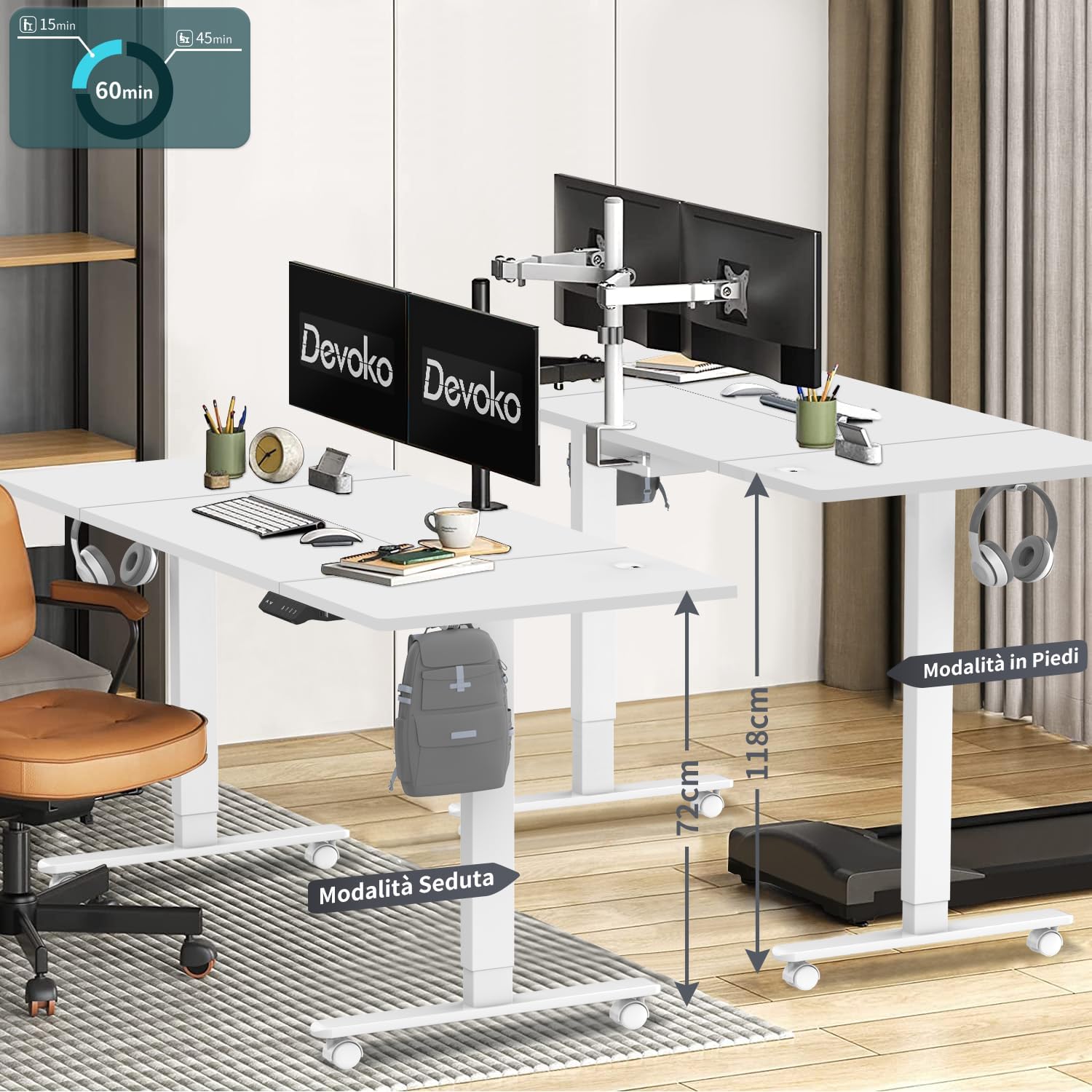
Image 5.1: The desk illustrating its adjustable height range, suitable for both sitting (72 cm) and standing (118 cm) positions.
5.2. Předvolby paměti
The control panel features three memory keys (1, 2, 3) to save your preferred sitting and standing heights.
- Uložení výšky: Adjust the desk to your desired height. Press the „S“ button, then press one of the number buttons (1, 2, or 3) within 3 seconds. The display will confirm the setting.
- Použití uložené výšky: Stiskněte odpovídající číselné tlačítko (1, 2 nebo 3). Stůl se automaticky přesune do uložené výšky.
5.3. USB A Charging Ports
The control panel includes integrated USB A charging ports for convenient charging of mobile devices. Simply connect your device's USB cable to the port. Note: While the product description specifies USB A, some visual representations of the control panel may show a USB-C port. Please refer to your specific product's control panel.
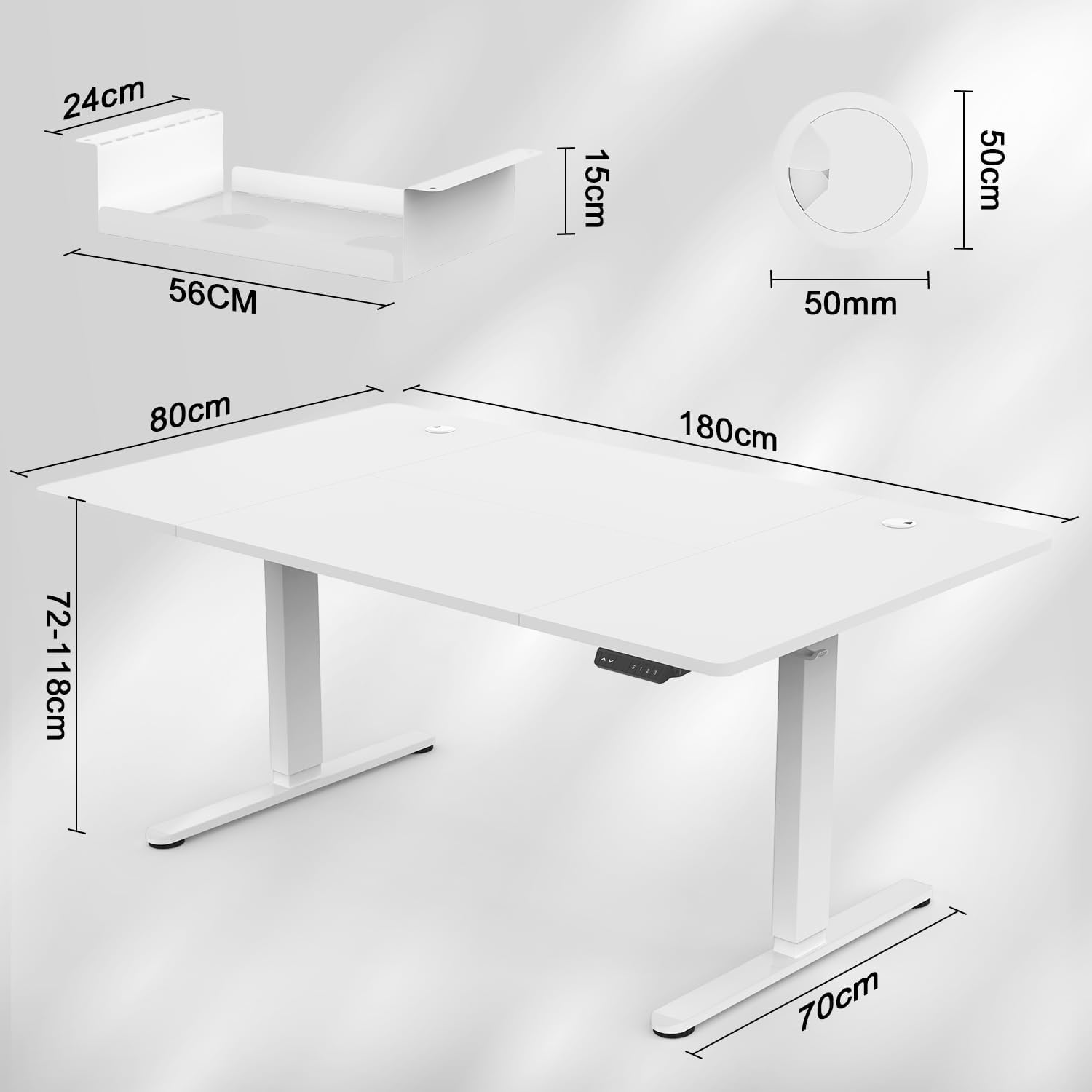
Image 5.2: The intelligent multifunction control panel, featuring memory presets, up/down controls, and a charging port (shown here as USB-C, but product features USB-A).
5.4. Protikolizní systém
The desk is equipped with a sensitive anti-collision system that detects reaction forces. If the desk encounters an obstruction during height adjustment, it will automatically stop and reverse slightly to prevent damage or injury. Ensure the area around the desk is clear during operation for optimal safety.
5.5. 360° Wheels
The desk is fitted with 360° swivel wheels, allowing for easy mobility and repositioning within your workspace. Lock the wheels when the desk is in its desired position to ensure stability.
6. Údržba
- Čištění: Otřete pracovní plochu a rám měkkým hadříkemamp hadříkem. Nepoužívejte abrazivní čisticí prostředky ani agresivní chemikálie.
- Inspekce: Pravidelně kontrolujte všechny šrouby a vruty, zda jsou pevně utažené. V případě potřeby je dotáhněte.
- Správa kabelů: Regularly inspect cables for wear or damage. Ensure cables are neatly organized within the cable management tray to prevent snagging.
7. Řešení problémů
| Problém | Možná příčina | Řešení |
|---|---|---|
| Stůl se nehýbe. | Power cable disconnected; control panel cable loose; motor error. | Check power connections. Ensure control panel cable is securely plugged in. Unplug the desk for 10 seconds and plug it back in to reset. |
| Stůl se pohybuje nerovnoměrně nebo vydává neobvyklé zvuky. | Nerovnoměrné zatížení; uvolněné spoje; ucpání. | Ensure weight is evenly distributed. Check all assembly screws. Clear any obstructions. |
| Anti-collision system frequently activates. | Překážka v dráze pohybu. | Ensure the area around the desk is clear of objects during height adjustment. |
| Nabíjecí port USB nefunguje. | Device not compatible; cable issue; power issue. | Try a different device or cable. Ensure the desk is powered on. |
If you encounter issues not listed here or require further assistance, please contact Devoko customer support.
8. Specifikace

Image 8.1: Detailed dimensions of the desk, including desktop size (180x80 cm) and height range (72-118 cm).

Obrázek 8.2: Režie view confirming the 180 cm by 80 cm desktop dimensions.
- Model: 0428-1822
- Značka: Devoko
- Rozměry pracovní plochy: 180 cm (délka) x 80 cm (šířka)
- Tloušťka plochy: 15 mm
- Výškový rozsah: 72 cm až 118 cm
- Zvedací mechanismus: Elektrický
- Rychlost zvedání: 20 mm/s
- Hladina hluku: Méně než 45 dB
- certifikace: TÜV, CE
- Zahrnuté funkce: USB A Charging Ports, Cable Management Tray, 360° Wheels, Headphone Hook, Anti-Collision System, 3 Height Memory Keys
- Materiál rámu: Kov
- Hmotnost položky: 35 kg
- Požadovaná montáž: Ano
9. Záruka a podpora
Záruka: The Devoko 0428-1822 Electric Standing Desk comes with a 5-year warranty on the motor and table frame, ensuring long-term reliability and performance.
Vrácení: A 30-day unconditional return policy is provided.
Zákaznická podpora: For any installation issues, operational questions, or warranty claims, please contact Devoko customer support through the Amazon platform. Our team is committed to responding within 24 hours to assist you.