
1. Úvod
This manual provides detailed instructions for the installation, operation, and maintenance of your EVTSCAN Digital Thermoregulator. This device is designed to precisely control heating equipment, such as wall-mounted boilers and gas boilers, ensuring a stable and energy-efficient temperature environment. Please read this manual thoroughly before installation and use to ensure proper function and safety.
2. Bezpečnostní informace
Vždy dodržujte následující bezpečnostní opatření, abyste předešli poškození zařízení nebo zranění osob:
- Před instalací nebo údržbou se ujistěte, že je odpojeno napájení.
- Pokud si nejste jisti elektrickým zapojením, měl by instalaci provést kvalifikovaný odborník.
- Nevystavujte zařízení vodě ani nadměrné vlhkosti.
- Use only the specified battery type (2 AA batteries) and ensure correct polarity.
- Udržujte zařízení mimo dosah hořlavých materiálů.
3. Konec produktuview
The EVTSCAN Digital Thermoregulator features a clear LCD display for easy monitoring and a simple interface for temperature control. Its compact design allows for discreet integration into your living space.

Obrázek 3.1: Přední strana view of the Digital Thermoregulator. The LCD screen displays current settings and room temperature, with a rotary knob below for adjustments.
Klíčové komponenty:
- LCD displej: Shows set temperature, room temperature, time, and operational icons.
- Control Knob/Button: Používá se pro navigaci v menu a úpravu nastavení.
- Přihrádka na baterie: Located on the rear or side for 2 AA batteries.
- Kabelové svorky: For connection to the heating system.
4. Specifikace
| Funkce | Specifikace |
|---|---|
| Model | EVTSCANok0g9ct2zq |
| Režim napájení | 2 AA baterie (nejsou součástí balení) |
| Screen Accuracy | 0.5 ℃ |
| Senzor sondy | NTC (10 1) XNUMX % |
| Kontaktní kapacita | Greater than 30-230 V DC working voltage, lower current. Reference: 5 A 30 V (HF relay) or 2 A 30 V (NEC relay) |
| Rozsah zobrazení teploty | 1 až 40 ℃ |
| Default Temperature Adjustment Range | 5 až 35 ℃ |
| Rozsah provozních teplot | 0 až 50 ℃ |
| Běžící program | Set once a week |
| Výstup | Spínací relé |
| Materiál | Polykarbonát zpomalující hoření |
| Hmotnost | 170 g |
5. Nastavení a instalace
The EVTSCAN Digital Thermoregulator is designed for simple installation. Follow these steps carefully:
5.1. Vybalení a kontrola
Opatrně vyjměte všechny součásti z obalu. Zkontrolujte, zda jsou všechny položky uvedené v obsahu balení přítomny a nepoškozené.
- 1 Digital Temperature Controller
- 2 Šrouby
5.2. Instalace baterie
The device requires 2 AA batteries for operation. These are not included in the package.
- Locate the battery compartment on the back of the thermoregulator.
- Otevřete kryt bateriového prostoru.
- Vložte 2 baterie AA, dbejte na správnou polaritu (+/-).
- Bezpečně zavřete kryt bateriového prostoru.

Obrázek 5.1: Úhlové view of the thermoregulator, illustrating its compact size and potential location for battery access or mounting points.
5.3. Montáž a zapojení
The thermoregulator is designed for wall mounting. Ensure the power to your heating system is turned off before proceeding with wiring.
- Vyberte vhodné místo na vnitřní stěně, mimo dosah přímého slunečního záření, průvanu nebo zdrojů tepla, které by mohly ovlivnit naměřené teploty.
- Mount the backplate (if detachable) to the wall using the provided screws.
- Connect the thermoregulator to your boiler or heating system according to the wiring diagram provided with your boiler and the thermoregulator's terminal markings. This typically involves connecting the switching relay output to the boiler's control input.
- Secure the thermoregulator onto the mounted backplate.
Poznámka: For wiring, consult a qualified electrician if you are unfamiliar with electrical installations.
6. Návod k obsluze
The EVTSCAN Digital Thermoregulator uses a microcomputer control technology to maintain your desired temperature efficiently.
6.1. Powering On and Initial Display
Once batteries are installed, the LCD display will illuminate, showing the current room temperature, set temperature, and time.
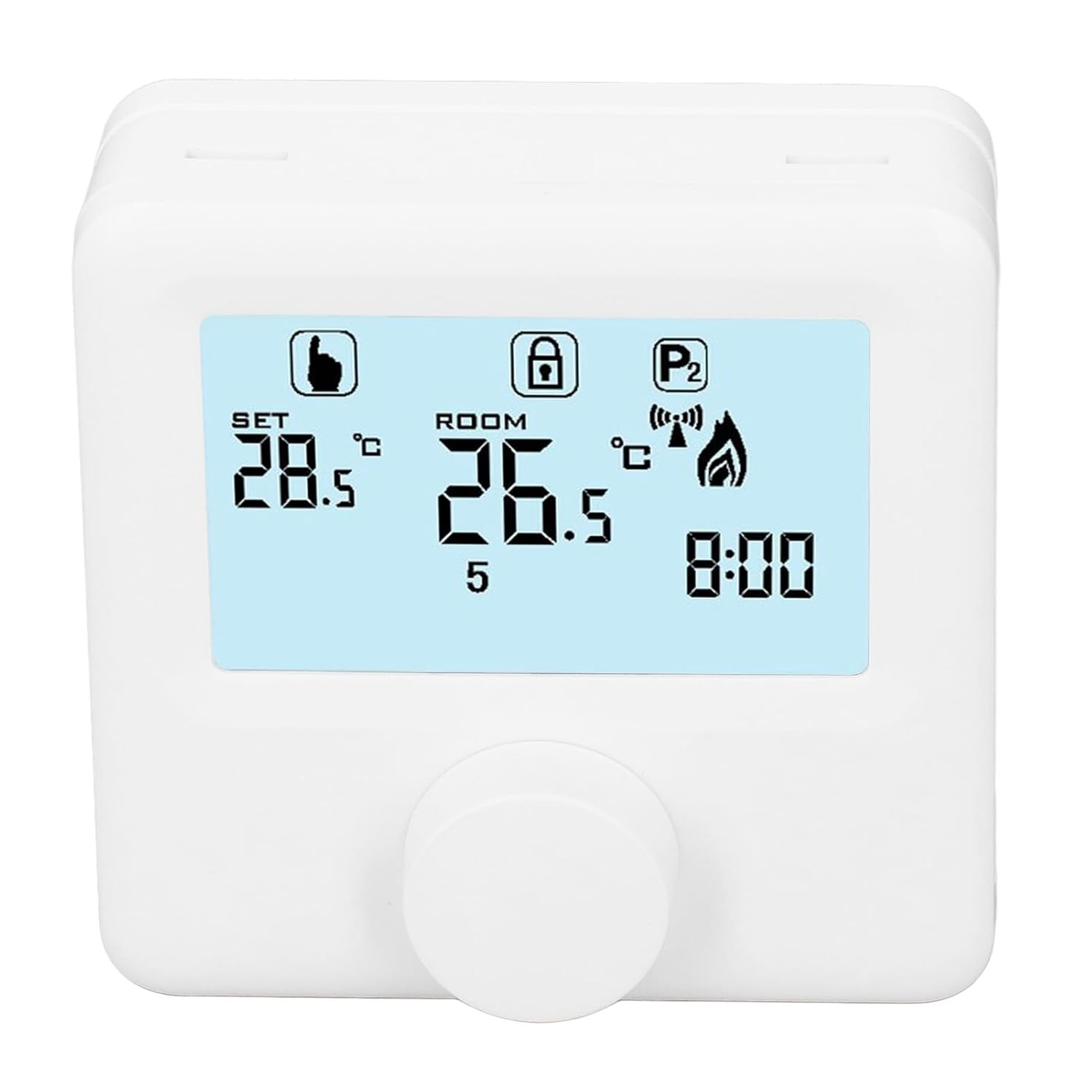
Obrázek 6.1: Detailní view of the LCD display. It shows the set temperature (SET), room temperature (ROOM), a lock icon, a program icon (P2), a signal icon, a flame icon indicating heating, and the current time.
6.2. Nastavení teploty
Chcete-li upravit požadovanou teplotu:
- Rotate the control knob to increase or decrease the set temperature. The "SET" value on the display will change accordingly.
- The device will automatically activate or deactivate the heating system to maintain the set temperature within the range of 1 to 40 ℃. The default adjustment range is 5 to 35 ℃.
6.3. Týdenní program
The thermoregulator supports a weekly programming schedule. This allows you to set different temperatures for various times of the day across the week.
- Press and hold the control knob (or a designated button, if available) to enter programming mode.
- Use the control knob to navigate through days of the week and time slots.
- Adjust the desired temperature for each programmed period.
- Confirm your settings to save the weekly program. The device will then operate according to this schedule.
6.4. Understanding Display Icons
- SOUBOR: Indicates the target temperature you have set.
- POKOJ: Zobrazuje aktuální teplotu okolí v místnosti.
- Ikona plamene: Svítí, když je topný systém aktivní.
- Ikona zámku: May indicate a keypad lock feature to prevent accidental changes.
- P1/P2 Icon: Indicates the current program mode (e.g., P1 for comfort, P2 for economy, or specific weekly program segments).
- Ikona signálu: May indicate wireless communication status if applicable.
7. Údržba
Regular maintenance ensures the longevity and optimal performance of your thermoregulator.
- Čištění: Zařízení otřete měkkým, suchým hadříkem. Nepoužívejte abrazivní čisticí prostředky ani rozpouštědla.
- Výměna baterie: Replace batteries when the low battery indicator appears on the display. Always replace both batteries simultaneously with new AA batteries.
- Plocha senzoru: Ensure the temperature sensor area (usually a small vent on the device) is free from dust and obstructions for accurate readings.
8. Řešení problémů
If you encounter issues with your EVTSCAN Digital Thermoregulator, refer to the following common problems and solutions:
- Displej je prázdný:
- Zkontrolujte, zda jsou baterie správně nainstalovány.
- Vyměňte staré baterie za nové.
- Topný systém nereaguje:
- Ensure the thermoregulator is powered on and the flame icon is displayed when heating is expected.
- Verify wiring connections to the boiler are secure and correct.
- Check the boiler's power supply and status.
- Ujistěte se, že nastavená teplota je vyšší než aktuální teplota v místnosti.
- Nepřesné údaje o teplotě:
- Ensure the device is not exposed to direct sunlight, drafts, or heat sources.
- Clean any dust or debris from the sensor area.
- Nelze změnit nastavení:
- Check if the lock icon is displayed. If so, refer to the operating instructions to unlock the keypad.
Pokud problém přetrvává, kontaktujte zákaznickou podporu.
9. Záruka a podpora
Specific warranty information for this product is not provided in the available data. Please refer to the product packaging or the retailer's webstránky pro podrobnosti o záruce.
For technical support or further assistance, please contact EVTSCAN customer service through their official channels or the retailer from whom you purchased the product.
You can visit the EVTSCAN store on Amazon for more information: EVTSCAN Store