
1. Úvod
This manual provides essential information for the safe and efficient use of your Amazon Basics 24 Inch FHD 100Hz Monitor. Please read these instructions carefully before operating the device and retain them for future reference.
The Amazon Basics 24 Inch Monitor features a 23.8-inch viewable IPS panel with Full HD (1080p) resolution and a maximum refresh rate of 100Hz. It includes built-in speakers and is VESA compatible for flexible mounting options. The monitor is designed for various uses, including office work, entertainment, and gaming.

Přední view of the Amazon Basics 24 Inch FHD 100Hz Monitor.
2. Obsah balení
Ověřte, zda jsou v balení přítomny všechny položky:
- Amazon Basics 24 Inch Monitor
- Základna stojanu
- Stoj na krku
- Napájecí adaptér
- HDMI kabel

Image showing the monitor's package contents: stand base, stand neck, power adapter, and HDMI cable.
3. Pokyny k nastavení
3.1 Připevnění stojanu
- Insert the stand neck into the stand base until it clicks securely into place.
- Align the assembled stand with the mounting slot on the back of the monitor. Push the stand into the slot until it locks. Ensure it is firmly attached.
3.2 Propojovací kabely
The monitor features multiple input ports for connectivity:
- DP 1.2: DisplayPort input for high-resolution video and audio.
- HDMI 1.4: HDMI input for video and audio from compatible devices.
- VGA: VGA input for analog video signals.
- AUDIO VSTUP: 3.5mm audio input for external audio sources.
- AUDIO VÝSTUP: 3.5mm audio výstup pro sluchátka nebo externí reproduktory.
- Connect the provided HDMI cable from your computer's video output port to the HDMI input port on the monitor. Alternatively, use a DisplayPort or VGA cable if your device supports those connections.
- Connect the power adapter to the monitor's power input port, then plug the power adapter into a wall outlet.
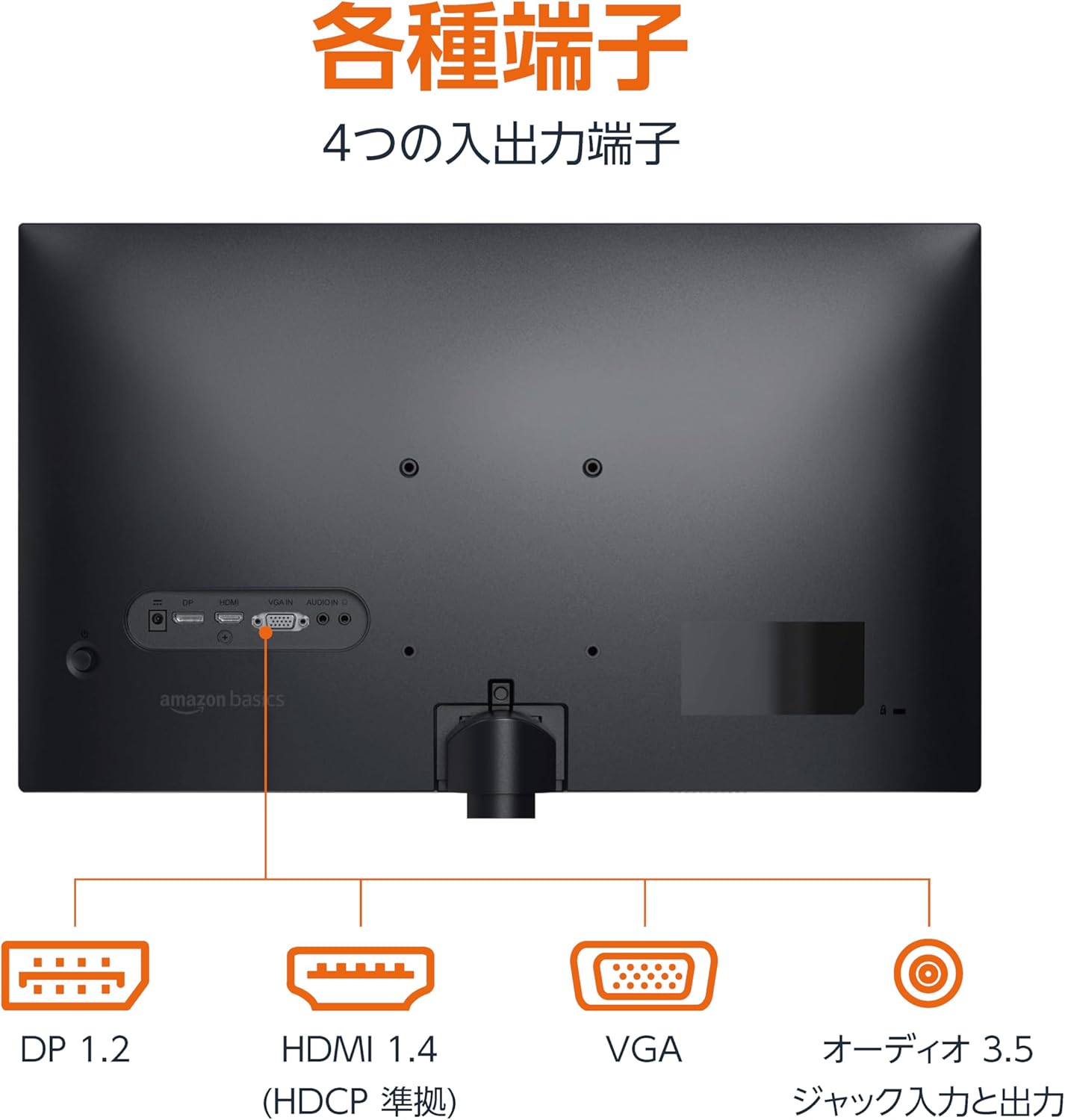
Zadní view of the monitor displaying various input and output ports.
3.3 Zapnutí
Press the power button located on the back or bottom of the monitor to turn it on. The monitor will automatically detect the active input signal.
3.4 Nastavení sklonu
The monitor allows for tilt adjustment to achieve an optimal viewing angle. Gently hold the top and bottom edges of the monitor and tilt it forward or backward. The tilt range is approximately -5° to 20°.

Monitor demonstrating its tilt adjustment capability.
3.5 Optional: VESA Mounting and Cable Lock
The monitor is VESA compatible, allowing it to be mounted on a wall or an adjustable arm (mounting hardware sold separately). Refer to the VESA mount's instructions for installation.
An optional cable lock slot is available on the rear of the monitor to secure it to a stable object, preventing theft.
3.6 Videoprůvodce nastavením
For a visual guide on setting up your Amazon Basics monitor, please watch the video below:
This video demonstrates the assembly of the stand, connecting cables, and basic adjustments for the Amazon Basics monitor.
4. Návod k obsluze
4.1 Nabídka na obrazovce (OSD)
The monitor features an On-Screen Display (OSD) menu for adjusting various settings. Use the buttons located on the back or bottom of the monitor to navigate the menu. Common settings include:
- Jas/kontrast: Upravte úroveň jasu a kontrastu displeje.
- Nastavení barev: Upravte teplotu barev, odstín a sytost.
- Výběr vstupu: Manually switch between DP, HDMI, and VGA inputs.
- Zvuk: Nastavení hlasitosti vestavěných reproduktorů nebo připojených sluchátek.
- Režim obrazu: Select from preset display modes (e.g., Standard, Game, Movie).
4.2 Using Built-in Speakers
The monitor includes integrated speakers. Audio will be played through these speakers when connected via HDMI or DisplayPort. If using a VGA connection, ensure an audio cable is connected to the 'AUDIO IN' port on the monitor and your computer's audio output.
5. Specifikace
| Funkce | Specifikace |
|---|---|
| Značka | Základy Amazonu |
| Číslo modelu | 24M2020DJP |
| Velikost obrazovky | 24 Inches (23.8 inch viewschopný) |
| Typ panelu | IPS |
| Rezoluce | Full HD 1080p (1920 × 1080) |
| Obnovovací frekvence | Max 100 Hz |
| Poměr stran | 16:9 |
| Vestavěné reproduktory | Ano |
| Kompatibilita VESA | Ano |
| Vstupní porty | 1x DisplayPort 1.2, 1x HDMI 1.4, 1x VGA, 1x Audio In (3.5mm) |
| Výstupní porty | 1x Audio Out (3.5mm) |
| Hmotnost produktu | 2.8 kg |
| Tloušťka rámečku | 1.44 mm (slim bezel) |
| Záruka | 1 rok omezená záruka |
5.1 Rozměry
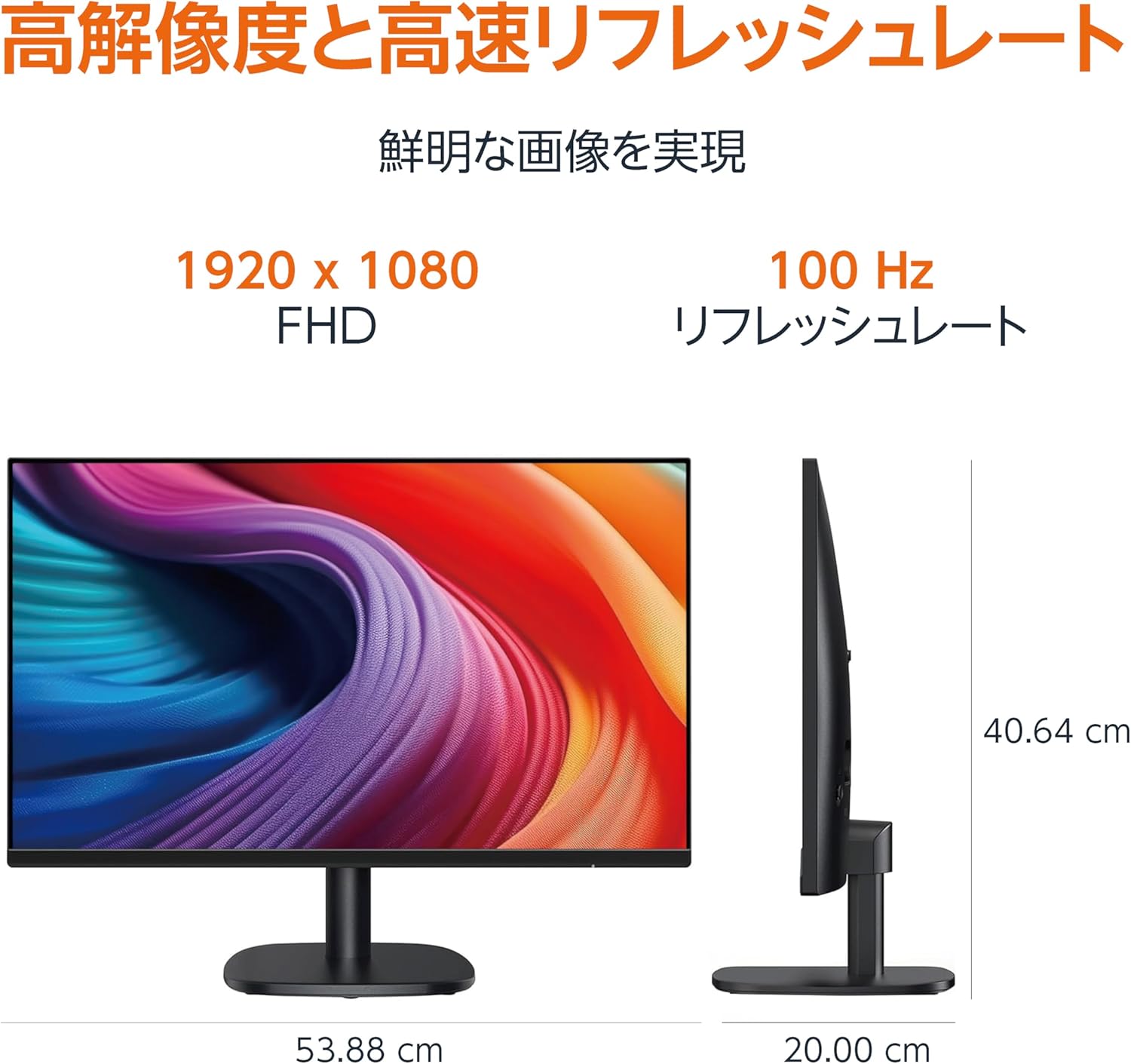
Diagram showing the monitor's dimensions (Width: 53.88 cm, Height: 40.64 cm, Depth: 20.00 cm).
5.2 Slim Bezel Design

Detail showing the monitor's slim bezel design, measuring 1.44 mm.
6. Řešení problémů
Pokud narazíte na problémy s monitorem, podívejte se na následující běžná řešení:
- Bez napájení: Ensure the power cable is securely connected to both the monitor and a working power outlet. Check if the power adapter's indicator light is on.
- Bez signálu: Verify that the video cable (HDMI, DP, or VGA) is firmly connected to both the monitor and your computer. Ensure the correct input source is selected in the monitor's OSD menu. Try restarting your computer.
- Blikající obrazovka: Check the video cable for damage or loose connections. Ensure your computer's graphics driver is up to date. Adjust the refresh rate in your computer's display settings.
- Žádný zvuk z reproduktorů: If using HDMI or DisplayPort, ensure the audio output is set to the monitor in your computer's sound settings. If using VGA, confirm the 3.5mm audio cable is connected. Check the volume level on both the monitor and your computer.
- Problémy s kvalitou obrázku: Adjust brightness, contrast, and color settings via the OSD menu. Ensure the display resolution on your computer matches the monitor's native resolution (1920 x 1080).
Pokud problém přetrvává i po vyzkoušení těchto kroků, kontaktujte zákaznickou podporu.
7. Údržba
Proper maintenance helps ensure the longevity and performance of your monitor:
- Čištění obrazovky: Jemně otřete obrazovku měkkým hadříkem, který nepouští vlákna. V případě odolných skvrn lehceampOtřete hadřík vodou nebo specializovaným čističem obrazovek. Nepoužívejte agresivní chemikálie, alkohol ani abrazivní materiály.
- Čištění Casing: K otření povrchu monitoru použijte měkký, suchý hadřík.asing.
- Větrání: Abyste zabránili přehřátí, ujistěte se, že ventilační otvory monitoru nejsou zablokované.
- Vypnutí, když se nepoužívá: Pokud monitor delší dobu nepoužíváte, vypněte jej, abyste ušetřili energii a prodloužili jeho životnost.
8. Záruka a podpora
This Amazon Basics monitor comes with a 1letá omezená záruka od data nákupu. Tato záruka se vztahuje na výrobní vady a vady zpracování při běžném používání.
For warranty claims, technical support, or further assistance, please refer to the Amazon Basics support page or contact Amazon customer service directly. Keep your proof of purchase for warranty validation.