
Zavedení
Thank you for choosing the Devoko 140x60cm RGB LED Gaming Desk. This manual provides detailed instructions for the assembly, operation, and maintenance of your new gaming desk. Please read this manual thoroughly before assembly and use to ensure proper function and safety.

Image: The Devoko 140x60cm RGB LED Gaming Desk, fully assembled and set up with gaming equipment, highlighting its design and LED features.
Bezpečnostní informace
VAROVÁNÍ:
- Do not exceed the recommended weight limit of 60 kg (132 lbs) on the desktop. Exceeding this limit may cause instability and damage.
- Ensure the desk is placed on a stable, level surface before use.
- Uchovávejte všechny malé díly a obalové materiály mimo dosah dětí, abyste předešli nebezpečí udušení.
- Nestůjte ani nesedejte na stůl.
- Nevystavujte stůl přímému slunečnímu záření nebo extrémním teplotám.
- Pravidelně kontrolujte všechny šrouby a spoje, abyste se ujistili, že jsou pevně utažené.
Obsah balení
Before beginning assembly, please verify that all components are present and undamaged. Refer to the detailed parts list provided in your physical manual. Typical components include:
- Desktop sections (carbon fiber surface)
- Z-shaped leg frames
- Crossbars and support beams
- LED light strips and controller
- Dálkové ovládání pro LED světla
- Háček na sluchátka
- Držák na pohár
- Montážní materiál (šrouby, matice, imbusový klíč)
- Klipy pro správu kabelů
Nastavení a montáž
Follow these steps carefully for proper assembly. It is recommended to assemble the desk with two people.
- Rozbalení a identifikace součástí: Lay out all components on a clean, soft surface to prevent scratches. Identify each part using the provided parts list.
- Assemble the Z-shaped Legs: Attach the horizontal support beams to the Z-shaped leg frames using the provided hardware. Ensure all connections are secure but do not fully tighten screws until the entire frame is assembled.
- Připojení sekcí plochy: Carefully place the carbon fiber desktop sections onto the assembled frame. Align the pre-drilled holes and secure the desktop to the frame using the appropriate screws. Once all desktop sections are in place, fully tighten all screws on the frame and desktop.
- Install LED Lights and Controller:
The LED light strips are pre-installed. Connect the manual controller to the desk frame using self-tapping screws. Connect the extension cable to the manual controller, then connect the other end of the extension cable to the LED strip. Secure all cables with the provided fasteners.
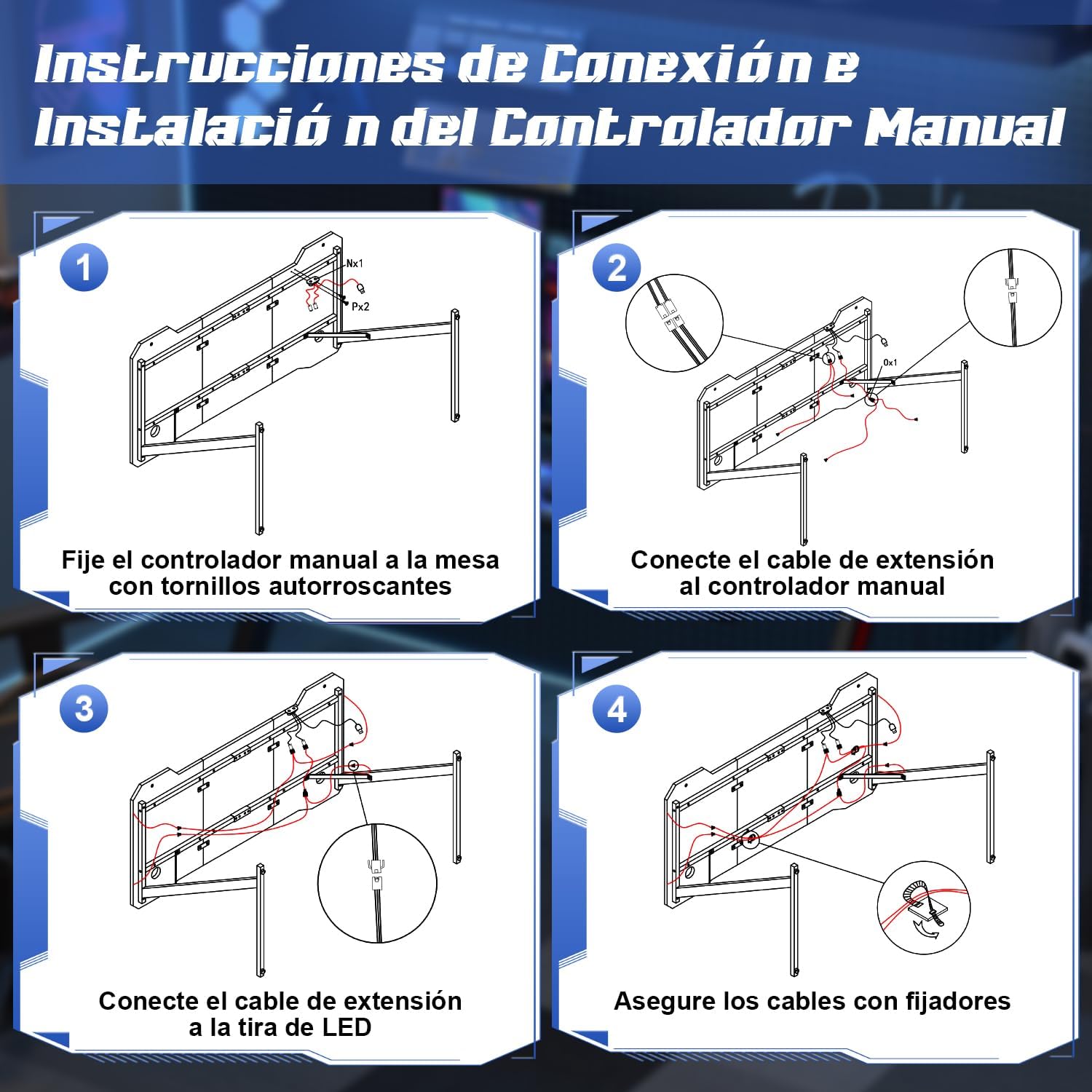
Image: Step-by-step diagram for connecting and installing the LED controller and cables.
- Připojit příslušenství: Install the cup holder and headphone hook to the designated locations on the desk. These are designed to keep your gaming area organized.
- Vyrovnejte stůl: The desk features adjustable feet. Adjust each foot individually to ensure the desk is stable and level on your floor.
Návod k obsluze
Systém LED osvětlení
Your Devoko gaming desk features integrated RGB LED lighting with multiple modes, controllable via a manual touch panel and a remote control.

Obrázek: Podrobný view of the manual LED control panel on the desk.
- Top Button (Touch Control): Controls the light modes. Offers 26 flash modes and 6 fixed color modes. Tap to cycle through modes.
- Bottom Button (Touch Control): Power switch and brightness regulator.
- Dlouhé stisknutí: Zapíná/vypíná LED světla.
- Krátký tisk: Adjusts brightness. Cycles through 8 levels of brightness.
- Dálkové ovládání: Use the provided remote control to adjust colors, modes, and brightness from a distance. Refer to the remote control's specific instructions for detailed functions.

Image: The LED remote control for adjusting light settings.
Používání příslušenství
- Držák poháru: Use the integrated cup holder to securely place your beverages, preventing spills on your desk surface.
- Háček na sluchátka: Hang your gaming headphones on the hook to keep them easily accessible and off the desktop, reducing clutter.
- Správa kabelů: Utilize the provided cable management clips to route and organize your cables, maintaining a tidy and safe workspace.

Image: Integrated cup holder and headphone hook for organized use.
Údržba
Proper care will extend the life and appearance of your Devoko gaming desk.
- Čištění pracovní plochy: The carbon fiber surface is waterproof, heat-resistant, and scratch-resistant, making it easy to clean. Use a soft, damp Povrch otřete hadříkem s jemným mýdlem a vodou. Nepoužívejte abrazivní čisticí prostředky ani agresivní chemikálie, které by mohly poškodit povrch.
- Údržba rámu: Kovový rám otřete suchým nebo lehce navlhčeným hadříkem.amp hadříkem k odstranění prachu.
- LED světla: Ensure the LED strips and controller are kept dry. Do not attempt to disassemble the LED components.
- Pravidelné kontroly: Pravidelně kontrolujte všechny šrouby a vruty, zda jsou pevně utažené. V případě potřeby je dotáhněte pro zachování stability.

Image: Demonstrating the scratch-resistant and easy-to-clean properties of the carbon fiber desktop.
Odstraňování problémů
| Problém | Možná příčina | Řešení |
|---|---|---|
| Stůl je vratký/nestabilní. | Nerovná podlaha; uvolněné šrouby. | Upravte vyrovnávací nožičky ve spodní části nohou. Zkontrolujte a utáhněte všechny montážní šrouby. |
| LED světla se nerozsvítí. | Power cable disconnected; remote battery dead; controller malfunction. | Ensure the power cable for the LED lights is securely connected. Check the remote control battery and replace if necessary. Verify all connections to the LED controller. |
| LED lights not responding to remote. | Remote battery low; obstruction between remote and receiver; remote not paired. | Replace remote battery. Ensure no objects block the signal path. Refer to the LED light manual for pairing instructions if applicable. |
| Obtížnost se sestavováním dílů. | Nesprávná orientace součástek; chybějící hardware. | Review the assembly instructions carefully, paying attention to part orientation. Verify all hardware is present. Contact customer support if parts are missing or damaged. |
Specifikace
- Značka: Devoko
- Číslo modelu: 0304
- Barva: Černý
- Rozměry produktu (D x Š x V): 140 cm x 60 cm x 75 cm (55.1 x 23.6 x 29.5 palce)
- Hmotnost: 15.6 kg (34.4 lb)
- Materiál: Metal (frame), Carbon Fiber (desktop surface)
- Nosnost: 60 kg (132 lb)
- Speciální vlastnosti: RGB LED lights with remote control, Z-shaped stable construction, integrated headphone hook, integrated cup holder, adjustable leveling feet.

Image: Dimensions of the Devoko 140x60cm RGB LED Gaming Desk, including an adjustable foot detail.
Záruka a podpora
For warranty information and customer support, please refer to the documentation included with your purchase or visit the official Devoko website. If you encounter any issues not covered in this manual, please contact Devoko customer service for assistance.
Kontaktní údaje: Please refer to your purchase receipt or the manufacturer's webstránky s nejaktuálnějšími kontaktními údaji.