
1. Úvod
Thank you for choosing the boAt Wave Flex Connect Smart Watch. This manual provides essential information for setting up, operating, and maintaining your device. Please read it carefully to ensure optimal performance and longevity of your smartwatch.
2. Co je v krabici
- boAt Wave Flex Connect Smart Watch
- Nabíjecí kabel
- Uživatelská příručka
- Záruční list
3. Nastavení
3.1 Počáteční nabíjení
Before first use, fully charge your boAt Wave Flex Connect Smart Watch. Connect the charging cable to the watch's charging port and plug the USB end into a compatible power adapter (not included) or a computer's USB port. The watch display will indicate charging status.

Image: The smartwatch screen showing 100% battery, indicating a full charge. This image highlights the impressive battery life of up to 10 days on normal use and 30 days on standby.
3.2 Párování s vaším smartphonem
- Download the "boAt Crest" app from your smartphone's app store (Google Play Store for Android or Apple App Store for iOS).
- Ujistěte se, že je na vašem smartphonu povoleno Bluetooth.
- Otevřete aplikaci boAt Crest a postupujte podle pokynů na obrazovce k vytvoření účtu nebo přihlášení.
- Select "Add Device" within the app and choose "Wave Flex Connect" from the list of available devices.
- Potvrďte požadavek na párování na smartphonu i na chytrých hodinkách.
4. Ovládání chytrých hodinek
4.1 Základní navigace
The boAt Wave Flex Connect features a responsive touch display and a physical button for navigation.
- Přejetí nahoru/dolů: Scroll through notifications, menus, or quick settings.
- Přejetí doleva/doprava: Access different widgets like activity tracking, heart rate, weather, or music control.
- Klepněte na: Vyberte položku nebo otevřete aplikaci.
- Zmáčkni tlačítko: Return to the home screen or wake the display.
4.2 Bluetooth volání
The Wave Flex Connect supports Bluetooth calling, allowing you to make and receive calls directly from your wrist when connected to your smartphone.

Image: The smartwatch screen showing an incoming call notification, demonstrating the Bluetooth calling feature. Users can accept or decline calls directly from the watch.
4.3 Funkce displeje
Experience clear visuals on the 1.83" HD Display with a resolution of 240 x 280. The 2.5D Curve Display and 550 Nits Brightness ensure excellent readability even in bright conditions. The Wake Gesture feature allows you to simply raise your wrist to activate the screen.

Image: A close-up of the smartwatch display, emphasizing its 1.83" HD screen, 240x280 resolution, 2.5D curve, and 550 Nits brightness for clear visibility.
4.4 Health & Wellness Monitoring
The boAt Wave Flex Connect helps you keep track of your health with various monitoring features:
- Monitorování srdeční frekvence: Neustále sledujte svou tepovou frekvenci po celý den.
- Monitorování krevního kyslíku (SpO2): Změřte si hladinu kyslíku v krvi.
- Monitorování spánku: Analyzujte své spánkové vzorce (hluboký spánek, lehký spánek, doba bdění).
- Upozornění na sedavé chování: Dostávejte připomenutí, abyste se po obdobích nečinnosti přesunuli.
4.5 Utility Features
Your smartwatch comes equipped with several convenient utility functions:
- Poplach: Nastavujte si budíky přímo z hodinek.
- Weather Update: Získejte informace o počasí v reálném čase.
- Ovládání hudby: Ovládejte přehrávání hudby na připojeném smartphonu.
- Ovládání kamery: Používejte hodinky jako dálkové ovládání fotoaparátu telefonu.
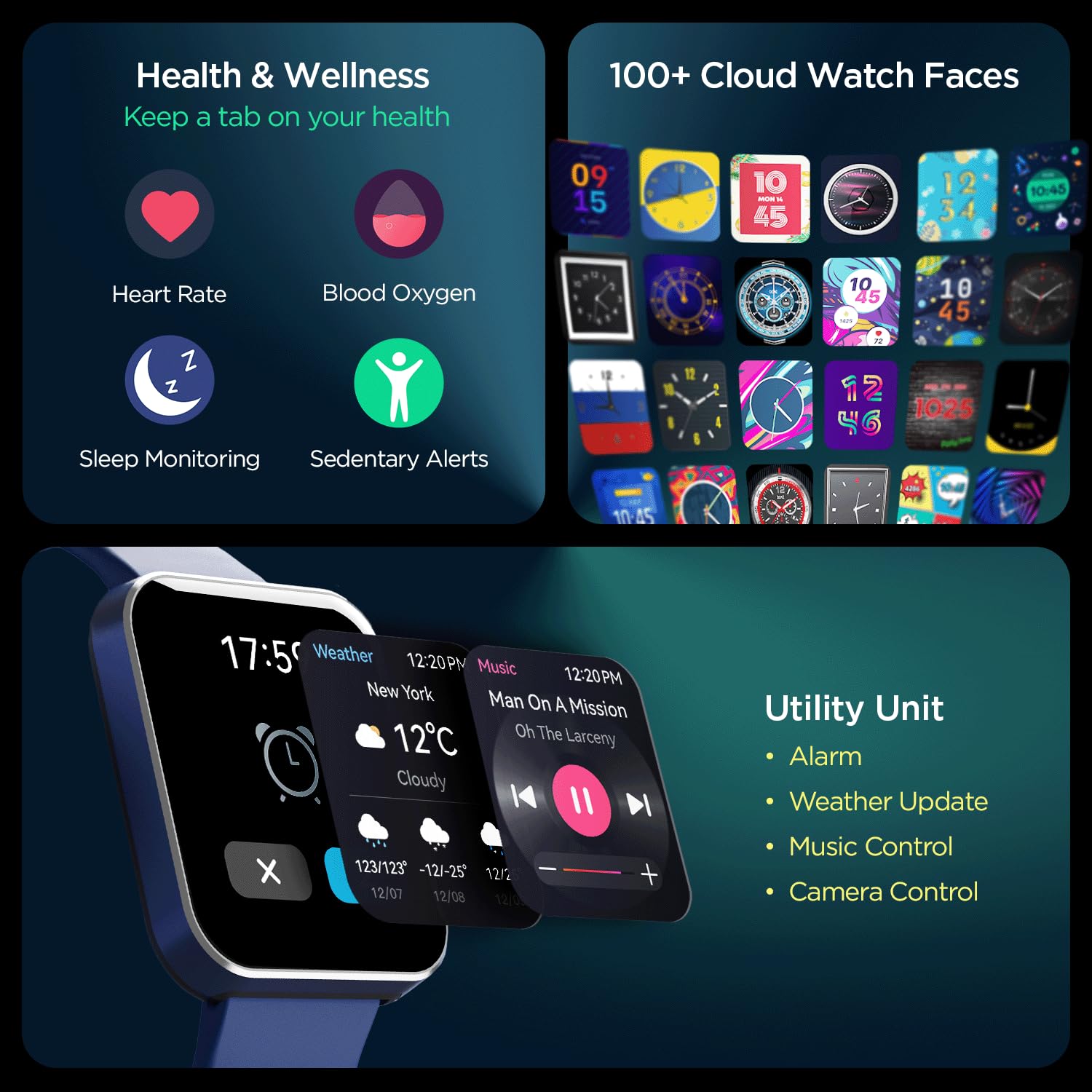
Obrázek: Komplexní view of the smartwatch's capabilities, including health tracking (heart rate, SpO2, sleep, sedentary alerts), a wide selection of watch faces, and practical utilities like weather, music, and camera control.
4.6 boAt Coins Integration
Earn rewards via boAt Coins on the boAt Crest App by engaging with your smartwatch and the ecosystem.

Image: The smartwatch paired with a smartphone showing the boAt Crest app interface, highlighting the boAt Coins reward system and available vouchers.
5. Údržba
- Čištění: Hodinky a řemínek pravidelně otírejte měkkým, suchým hadříkem. Na odolné nečistoty použijte lehceamp hadříkem a důkladně osušte.
- Voděodolnost: Refer to the product specifications for water resistance ratings. Avoid exposing the watch to hot water, steam, or high-pressure water jets.
- Nabíjení: Používejte pouze dodaný nabíjecí kabel. Nepoužívejte poškozené kabely nebo nabíječky.
- Skladování: Hodinky skladujte na chladném a suchém místě mimo dosah přímého slunečního záření a extrémních teplot.
6. Řešení problémů
6.1 Hodinky se nezapínají
- Ujistěte se, že jsou hodinky plně nabité. Připojte je k nabíječce alespoň na 30 minut.
- Stiskněte a podržte boční tlačítko po dobu 10–15 sekund pro pokus o nucený restart.
6.2 Problémy s párováním
- Ujistěte se, že máte na smartphonu i hodinkách povoleno Bluetooth.
- Ujistěte se, že hodinky jsou v dosahu Bluetooth vašeho telefonu (obvykle 10 metrů).
- Restartujte chytrý telefon i chytré hodinky.
- Forget the device in your phone's Bluetooth settings and try pairing again through the boAt Crest app.
6.3 Nepřesné zdravotní údaje
- Ujistěte se, že hodinky máte pevně nasazené na zápěstí, asi na šířku jednoho prstu nad zápěstní kostí.
- Udržujte senzor čistý a bez nečistot nebo potu.
- Upozorňujeme, že přesnost senzoru mohou ovlivnit faktory prostředí a individuální fyziologie.
7. Specifikace
| Funkce | Detail |
|---|---|
| Značka | loď |
| Název modelu | Wave Flex Connect |
| Velikost displeje | 1.83 palců |
| Rezoluce | 240 x 240 pixelů |
| Typ zobrazení | Digitální LCD |
| Jas | Až 5 000 nitů |
| Životnost baterie | Up to 10 days (normal use), 30 days (standby), 3 days (with Bluetooth Calling) |
| Typ baterie | Lithium Polymer |
| Konektivita | Bluetooth |
| Kompatibilní zařízení | Smartphone |
| Operační systém | Operační systém chytrých hodinek |
| Hmotnost položky | 51 g |
| Výrobce | Imagine Marketing Limited. |
8. Záruka a podpora
8.1 Informace o záruce
Your boAt Wave Flex Connect Smart Watch comes with a 1 rok záruka from the date of purchase. Please retain your purchase receipt and the warranty card for any warranty claims. The warranty covers manufacturing defects and does not cover damage caused by misuse, accidents, unauthorized repairs, or normal wear and tear.
8.2 Zákaznická podpora
For any queries, technical assistance, or warranty claims, please contact boAt customer support. You can find contact details on the official boAt webwebu nebo se podívejte na záruční list, který je součástí balení produktu.
Manufacturer: Imagine Marketing Limited., info@imaginemarketingindia.com