
Zavedení
Thank you for choosing MANKIW D06 Wireless Earbuds. This manual provides essential information for setting up, operating, and maintaining your earbuds to ensure optimal performance and longevity. Please read these instructions carefully before use.
Co je v krabici

Image: Contents of the MANKIW D06 Wireless Earbuds package.
The MANKIW D06 Wireless Earbuds package includes the following items:
- Bezdrátová sluchátka do uší (1 pár)
- Nabíjecí pouzdro (1 kus)
- Nabíjecí kabel typu C (1 kus)
- Uživatelský manuál (1 jednotka)
- Ear Tips (3 pairs: Small, Medium, Large)
Konec produktuview

Image: MANKIW D06 Wireless Earbuds and charging case.
The MANKIW D06 Wireless Earbuds are designed for a superior audio experience with convenience and durability. Key features include:
- Technologie Bluetooth 5.3: Ensures faster speed and more stable connections up to 10 meters.
- LED Digital Power Display: Shows the battery level of both the charging case and individual earbuds.
- Pohlcující stereo zvuk: Delivers enhanced bass and crystal-clear audio.
- Chytré dotykové ovládání: Intuitivní dotykové senzory pro správu přehrávání hudby, hovorů a hlasových asistentů.
- Dlouhá výdrž baterie: Up to 8 hours of continuous playback per charge, extending to 32 hours with the charging case.
- IPX5 voděodolnost: Protects against sweat and splashes, suitable for workouts and outdoor activities.
- Kompaktní a lehký design: Easy to carry and comfortable for extended wear.
- Vestavěný mikrofon: Pro čisté handsfree hovory.
Nastavení
1. Nabíjení sluchátek a pouzdra
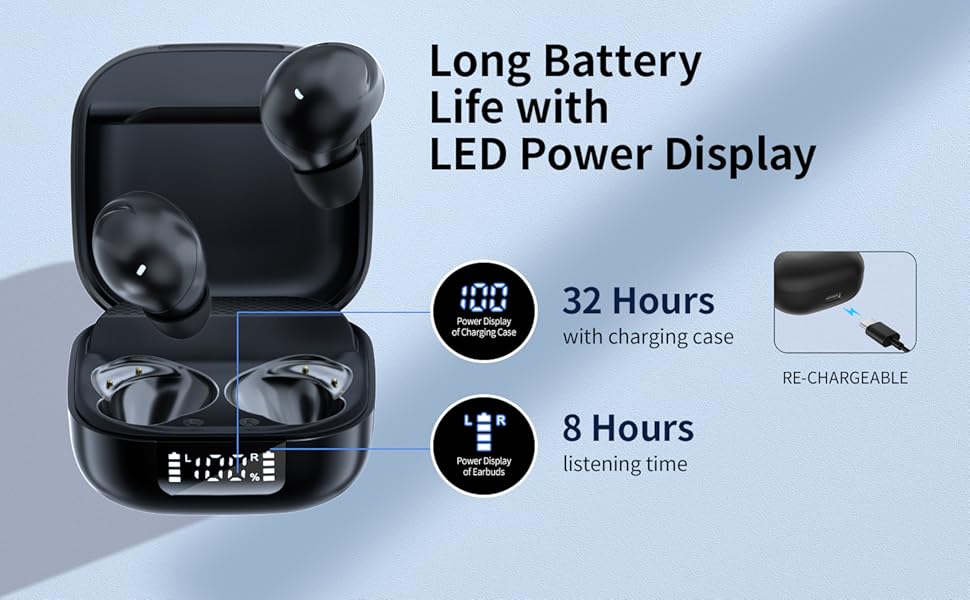
Image: Charging the earbuds and case.
- Před prvním použitím sluchátka a nabíjecí pouzdro plně nabijte.
- Vložte sluchátka do nabíjecího pouzdra. Ujistěte se, že jsou správně usazena.
- Connect the provided Type-C charging cable to the charging port on the case and plug the other end into a USB power source (e.g., wall adapter, computer).
- The LED digital display on the case will show the current battery percentagpouzdra a stav nabíjení každého sluchátka.
- Po plném nabití se na displeji zobrazí 100 %.
2. Párování s vaším zařízením (párování v jednom kroku)
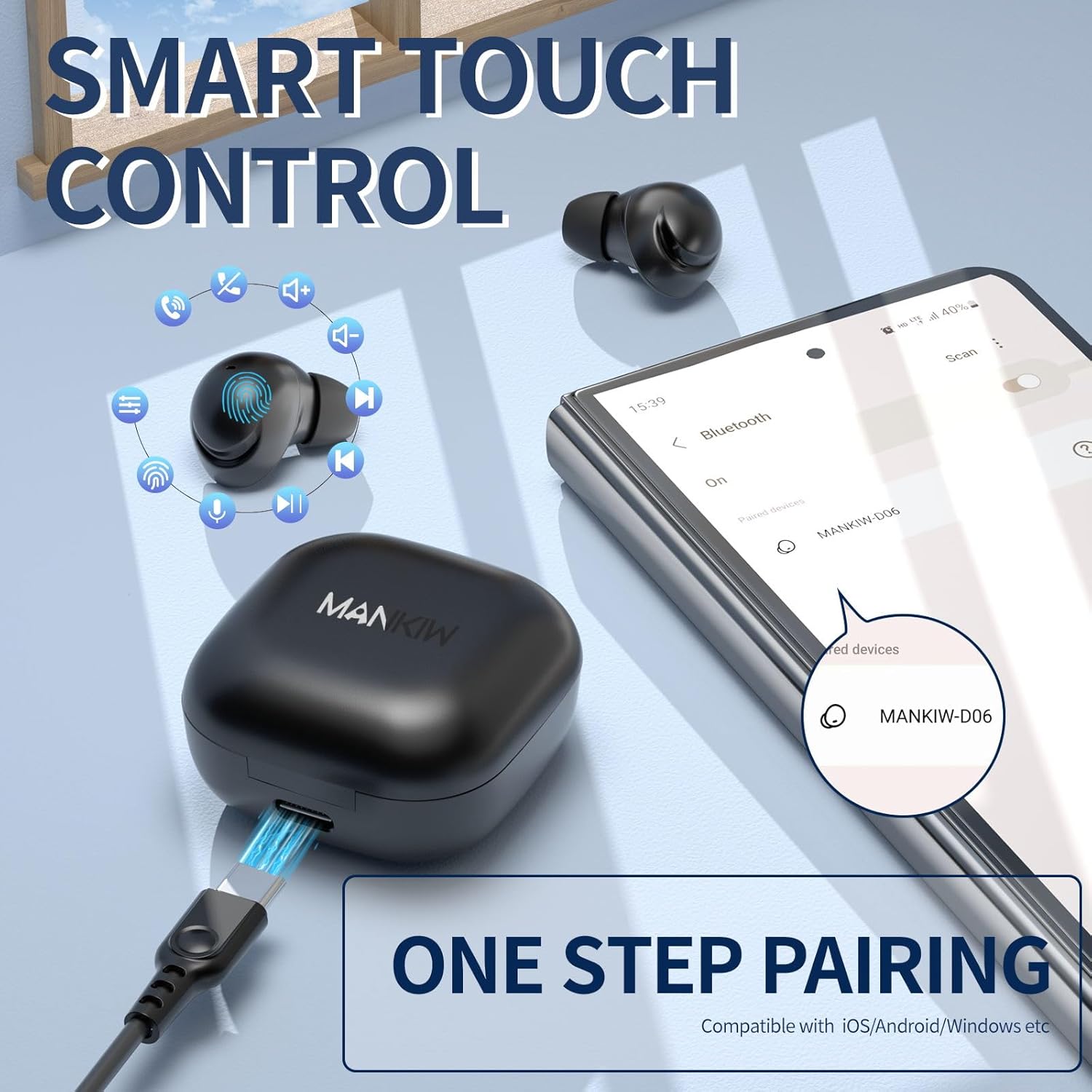
Obrázek: Jednokrokový proces párování.
The MANKIW D06 earbuds feature one-step automatic pairing:
- Otevřete nabíjecí pouzdro. Sluchátka se automaticky přepnou do režimu párování.
- On your device (smartphone, tablet, TV, computer), go to Bluetooth settings.
- Hledat available devices and select "MANKIW-D06" from the list.
- Po připojení uslyšíte potvrzovací tón a sluchátka budou připravena k použití.
- Sluchátka jsou kompatibilní se zařízeními se systémy iOS, Android a Windows.
3. Výběr správných ušních nástavců

Image: Selecting the correct ear tip size.
For optimal sound quality and comfort, choose the ear tips that best fit your ears. Three sizes (Small, Medium, Large) are provided. A snug fit helps with noise isolation and bass response.
Návod k obsluze
Dotykové ovládání

Image: MANKIW D06 Earbuds touch control guide.
| Funkce | Akce |
|---|---|
| Hlasitost + | Dotkněte se L (Left) earbud touch area twice in a row. |
| Hlasitost - | Dotkněte se R (Right) earbud touch area twice in a row. |
| Přehrát/Pozastavit | Dotkněte se L/R earbud touch area once. |
| Předchozí skladba | Dotkněte se L (Left) earbud touch area three times in a row. |
| Další stopa | Dotkněte se R (Right) earbud touch area three times in a row. |
| Přijmout hovor | Dotkněte se L (Left) earbud touch area twice in a row. |
| Zavěste hovor | Dotkněte se R (Right) earbud touch area twice in a row. |
| Call Siri / Voice Assistant | Stiskněte a podržte L button for 3 seconds when not in music mode. |
Single and Dual Earbud Mode
You can use both earbuds together for stereo sound or use a single earbud independently for mono audio. Simply remove one earbud from the case to use it in single mode. The other earbud can remain in the case or be used later.
Údržba
Čištění
- Pravidelně čistěte sluchátka a nabíjecí pouzdro měkkým, suchým hadříkem, který nepouští vlákna.
- Nepoužívejte agresivní chemikálie, čisticí rozpouštědla ani silné čisticí prostředky.
- Gently remove ear tips and clean them with water if necessary, ensuring they are completely dry before reattaching.
- Očistěte nabíjecí kontakty na sluchátkách i pouzdře suchým vatovým tamponem, abyste zajistili správné nabíjení.
Voděodolnost (IPX5)
The MANKIW D06 earbuds are IPX5 water-resistant, meaning they can withstand sweat and light splashes. They are not designed for swimming, showering, or submersion in water. Ensure the charging port is dry before charging.
Specifikace
| Funkce | Detail |
|---|---|
| Číslo modelu | D06 |
| Verze Bluetooth | 5.3 |
| Dosah Bluetooth | Až 10 metrů (33 stop) |
| Výdrž baterie (sluchátka) | Až 8 hodin nepřetržitého přehrávání |
| Celková doba přehrávání (s pouzdrem) | Až 32 hodin |
| Nabíjecí port | USB Type-C |
| Hodnocení odolnosti proti vodě | IPX5 (odolnost proti potu a vodě) |
| Kontrolní metoda | Dotykové ovládání |
| Vestavěný mikrofon | Ano |
| Kompatibilní zařízení | Smartphones, Tablets, TVs, Computers (iOS, Android, Windows) |
| Hmotnost položky | 2.89 unce |
| Rozměry balení | 4.09 x 2.76 x 1.46 palce |
Odstraňování problémů
If you encounter any issues with your MANKIW D06 Wireless Earbuds, please refer to the following common solutions:
- Sluchátka se nespárují nebo nepřipojují:
- Ujistěte se, že jsou obě sluchátka nabitá.
- Vypněte Bluetooth na zařízení a poté jej znovu zapněte.
- Delete "MANKIW-D06" from your device's Bluetooth list and attempt to re-pair.
- Place earbuds back in the charging case, close the lid, wait a few seconds, then open to re-initiate pairing mode.
- Funguje pouze jedno sluchátko:
- Ujistěte se, že jsou obě sluchátka nabitá.
- Zkuste obě sluchátka vložit zpět do nabíjecího pouzdra, zavřít víko a poté je znovu vyjmout.
- Reset the earbuds (refer to the full user manual for specific reset instructions if available).
- Nízká hlasitost nebo špatná kvalita zvuku:
- Upravte hlasitost na zařízení i na sluchátkách.
- Ensure the ear tips are clean and provide a snug fit in your ears.
- Vyčistěte reproduktory sluchátek od nečistot.
- Ujistěte se, že mezi zařízením a sluchátky nejsou žádné překážky.
- Problémy s nabíjením:
- Zkontrolujte nabíjecí kabel a adaptér, zda nejsou poškozené.
- Ujistěte se, že nabíjecí kontakty na sluchátkách a pouzdře jsou čisté a bez nečistot.
- Zkuste jiný zdroj napájení USB.
Oficiální video produktu
Video: MANKIW D06 Wireless Bluetooth Earbuds product overview. This video demonstrates the features and design of the earbuds.
Záruka a podpora
MANKIW products are designed with quality and reliability in mind. For specific warranty information, please refer to the documentation included with your purchase or visit the official MANKIW website. If you require further assistance or have questions not covered in this manual, please contact MANKIW customer support.
Pro více informací navštivte MANKIW Store on Amazon.