
OSALO OS 82ES 2nd Edition
Uživatelská příručka k vědecké kalkulačce OSALO
Značka: OSALO
Model: OS 82ES 2nd Edition
Zavedení
Thank you for choosing the OSALO Scientific Calculator. This manual provides detailed instructions on how to set up, operate, and maintain your calculator. Designed for students and professionals, this calculator offers 252 functions to support a wide range of mathematical and scientific calculations.
Please read this manual carefully to ensure proper use and to maximize the functionality of your device.
Klíčové vlastnosti
- Funkce 252: Comprehensive functions including fractions, matrix calculations, statistics, calculus, complex numbers, equations, standard deviation, vector calculations, permutations, and combinations.
- 2-Line Written Display: Input expressions and view results in a natural, textbook-like format.
- Nastavení jasu: Optimize display visibility for various lighting conditions and reduce eye fatigue.
- Duální zdroj napájení: Operates on both solar power and battery (LR44 included) for reliable, uninterruptible use.
- Multi-Replay Function: Easily recall and edit previously executed formulas.
- List-Based STAT-Data Editor: View and edit input data in list format for statistical analysis.
- Odolný design: Features ABS plastic keys with clear print and a curved edge for comfortable handling. Includes a slide-on hard case for protection.
- Lehký a přenosný: Kompaktní design pro snadné přenášení.

Obrázek: Overview of the OSALO Scientific Calculator highlighting its 252 functions, including multi-replay, combination and permutation, statistics, fraction calculation, 9 variable memories, and the included slide-on hard case.
Nastavení
Instalace baterie
Your OSALO Scientific Calculator comes with an LR44 battery pre-installed. The calculator also utilizes solar power for extended battery life and operation in well-lit environments.
- Ujistěte se, že je kalkulačka VYPNUTÁ.
- Vyhledejte přihrádku na baterie na zadní straně kalkulačky.
- Pomocí malého šroubováku otevřete kryt přihrádky na baterie.
- If replacing, remove the old LR44 battery.
- Vložte novou baterii LR44 kladným pólem (+) nahoru.
- Nasaďte kryt prostoru pro baterie a zajistěte jej šroubem.
Note: The solar panel assists in powering the calculator in sufficient light, reducing reliance on the battery.
Návod k obsluze
Calculator Layout

Image: Detailed diagram of the OSALO Scientific Calculator showing the solar panel, extra large display, control keys, SHIFT key, MODE key, Power ON button, function keys, DEL (Delete) key, and ANS (Last Answer) key.
- Tlačítko ZAPNUTO: Press to turn the calculator on.
- Tlačítko VYP: Stiskněte POSUN pak AC to turn the calculator off.
- Klíč AC: Clears all calculations and returns to the initial display.
- DEL Key: Deletes the last entered character.
- Klávesa SHIFT: Activates the secondary functions (indicated in yellow above the keys).
- ALPHA Key: Activates the alpha functions (indicated in red above the keys).
- MODE/SETUP Key: Changes the calculator's mode (e.g., COMP, STAT, TABLE) or settings.
Základní operace
Enter numbers and operations as you would write them. Press = aby se dosáhlo výsledku.
- Sčítání, odčítání, násobení, dělení: Použijte +, -, ×, ÷ klíče.
- zlomky: Použijte ab/c key to input fractions. For mixed numbers, input integer, then ab/c, then numerator, then ab/c, then denominator.
- Síly a kořeny: Použití x² pro čtverec, SHIFT x² for square root, x³ for cube, SHIFT x³ for cube root, and x■ for custom powers.
Written Display and Natural Input/Output
The calculator features a 2-line display that shows expressions as they are written in textbooks, making complex calculations easier to understand and verify.
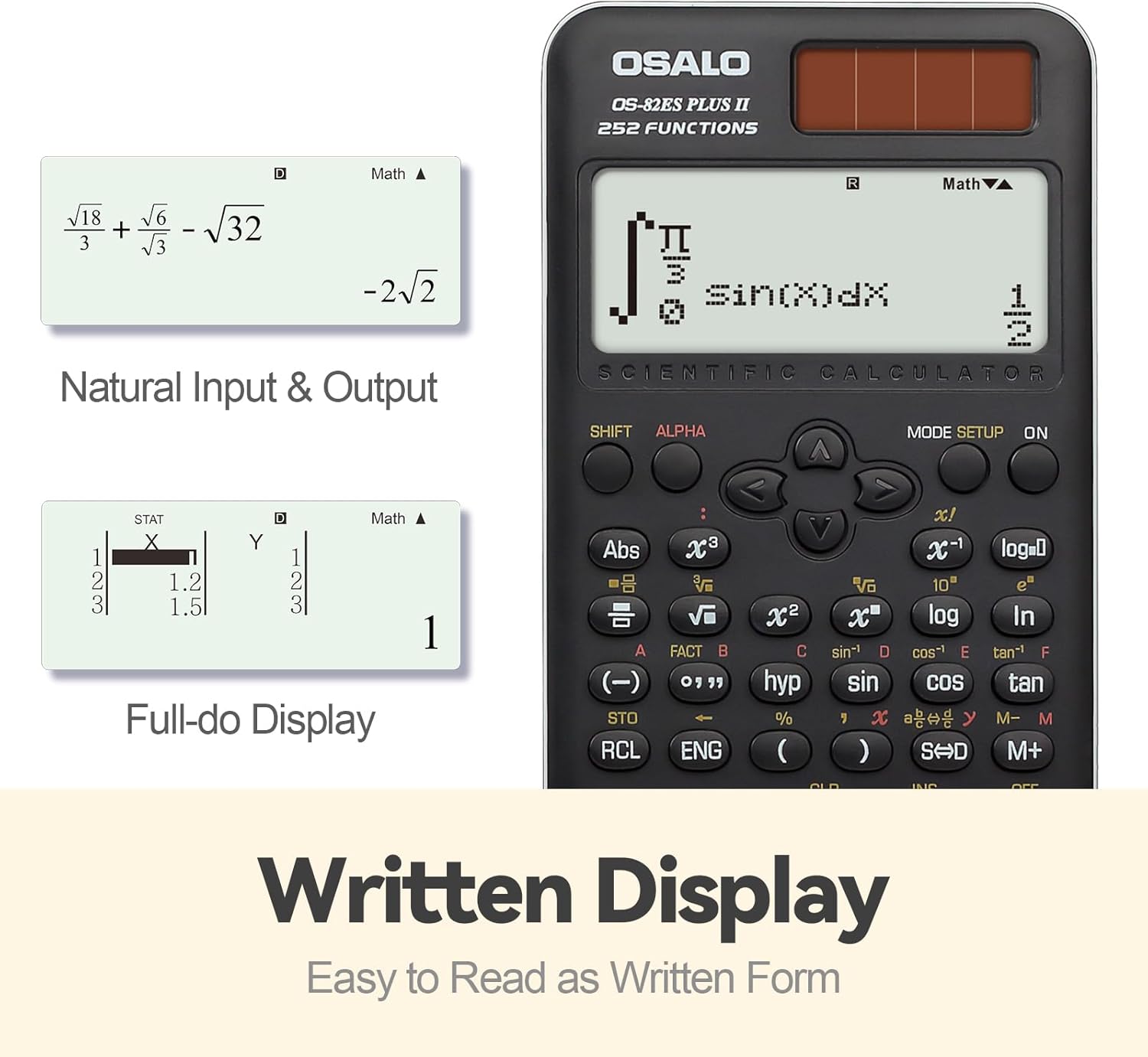
Image: Demonstrates the calculator's natural input and output display, showing complex expressions like integrals and square roots as they would appear in a textbook, along with a full-dot display for data entry.
Brightness Adjustment Function
You can adjust the screen brightness to suit your environment and reduce eye strain. Refer to the specific key combination for brightness adjustment, typically found in the SETUP menu or by pressing POSUN followed by a specific key (e.g., MODE/SETUP and then navigating options).

Image: Comparison of the calculator display in dark (relieving visual fatigue) and bright (clear and intuitive) settings, illustrating the brightness adjustment function.
Advanced Functions (252 Functions)
The OSALO Scientific Calculator offers a wide array of advanced functions. To access these, you will often use the POSUN key (for yellow functions) or the ALFA key (for red functions) before pressing the desired function key.
- Goniometrické funkce: hřích, cos, opálení a jejich inverzní funkce (SHIFT sin-1, atd.).
- Logaritmické funkce: log (základ 10) a ln (přirozený logaritmus).
- Statistické výpočty:
- Stiskněte MODE/SETUP and select STAT mode.
- Enter your data using the list-based editor.
- Perform calculations for mean, standard deviation, regression analysis, etc.
- Complex Number Calculations: Access this mode via MODE/SETUP.
- Equation Solving: Use the Equation mode to solve linear equations, quadratic equations, etc.
- Permutations and Combinations: Použití nPr a nCr funkcí.
- Funkce paměti: Store and recall values using STO a RCL keys. The calculator supports 9 variable memories.
For detailed instructions on each specific function, please refer to the comprehensive user guide provided with your calculator, which covers all 252 functions in detail.
Údržba
- Čištění: Wipe the calculator with a soft, dry cloth. For stubborn dirt, slightly dampOpláchněte hadřík vodou. Nepoužívejte agresivní chemikálie ani abrazivní čisticí prostředky.
- Skladování: Store the calculator in its slide-on hard case when not in use to protect it from dust, scratches, and impacts. Avoid exposing the calculator to extreme temperatures, humidity, or direct sunlight for prolonged periods.
- Péče o baterie: If the calculator will not be used for an extended period, it is recommended to remove the LR44 battery to prevent leakage.
Odstraňování problémů
| Problém | Možná příčina | Řešení |
|---|---|---|
| Kalkulačka se nezapne. | Low or dead battery; insufficient light for solar power. | Replace the LR44 battery. Ensure adequate lighting for solar operation. |
| Displej je tmavý nebo nečitelný. | Slabá baterie; nastavení jasu je příliš nízké. | Adjust display brightness using the brightness adjustment function. Replace battery if needed. |
| Nesprávné výsledky výpočtu. | Incorrect mode setting; input error; syntax error. | Check the current mode (e.g., DEG/RAD, COMP/STAT). Review your input. Clear the calculation and re-enter. |
| Calculator freezes or becomes unresponsive. | Dočasná softwarová závada. | Stiskněte tlačítko ON key. If unresponsive, remove the battery for a few seconds and reinsert it to perform a hard reset. Note that this may clear memory. |
If you encounter issues not listed here, please refer to the full user guide or contact customer support.
Specifikace
- Model: OS 82ES 2nd Edition
- Funkce: 252
- Zobrazit: 2-Line Written Display, 10-digit mantissa / 2-digit exponential
- Zdroj napájení: Solar and LR44 Battery (included)
- Materiál: ABS plast
- Rozměry: Přibližně 164 x 80 x 20 mm (6.46 x 3.15 x 0.79 palce)
- Hmotnost: Přibližně 141 g (4.93 oz)
- Dodávané příslušenství: Slide-on hard case, User Guide (Five Languages Version)

Image: Visual representation of the calculator's dimensions (0.79"/20mm thickness, 3.15"/80mm width, 6.46"/164mm length) and net weight (4.9oz/140g).
Záruka a podpora
For warranty information and customer support, please refer to the specific terms outlined in the full user guide included with your product. You may also visit the official OSALO website or contact their customer service directly for assistance with product inquiries, troubleshooting, or warranty claims.
Varování: Disassembly of the calculator should only be performed by qualified professionals.
Ask a question about this manual
Ask about setup, troubleshooting, compatibility, parts, safety, or missing instructions. Manuals+ will review the question and use this page’s manual context to help answer it.