
1. Úvod
This manual provides essential information for the safe and efficient operation of your NETUM PDA58-02 Portable Receipt Printer. Please read it thoroughly before using the device and keep it for future reference.
The NETUM PDA58-02 is a versatile portable terminal designed for various business applications. It integrates receipt printing, 1D barcode scanning, and supports multiple connectivity options including 3G, Wi-Fi, and Bluetooth 4.0. Running on Android 6.0, it offers a stable and user-friendly experience with its 5.5-inch IPS capacitive touch screen.
2. Bezpečnostní informace
- Nevystavujte zařízení extrémním teplotám, přímému slunečnímu záření nebo vysoké vlhkosti.
- Zabraňte pádu zařízení nebo jeho vystavení silným nárazům.
- Use only the original charger and accessories provided with the device.
- Nepokoušejte se zařízení rozebírat ani opravovat sami. Kontaktujte kvalifikovaný servisní personál.
- Udržujte zařízení mimo dosah vody a jiných kapalin.
- Ensure proper ventilation when charging to prevent overheating.
3. Obsah balení
Ověřte, zda jsou v balení přítomny všechny položky:
- NETUM PDA58-02 Portable Receipt Printer
- Charger Adapter (UK Plug)
- User Manual (English and Chinese)
- Thermal Printer Paper Roll (58 x 35mm)

Image: NETUM PDA58-02 printer and its accessories including charger, manual, and paper roll.
4. Konec produktuview
The NETUM PDA58-02 features a compact design with an integrated thermal printer and a large touch screen for easy interaction. It includes a built-in barcode scanner for efficient data capture.

Obrázek: Přední strana view of the NETUM PDA58-02 portable printer, showing the screen displaying time and date.

Image: NETUM PDA58-02 portable printer with the paper compartment open, showing a printed receipt.
5. Nastavení
5.1 Nabíjení zařízení
Before first use, fully charge the device. Connect the provided charger adapter to the DC charging port (12V 1.5A) on the device and plug it into a power outlet. The battery indicator will show charging status.
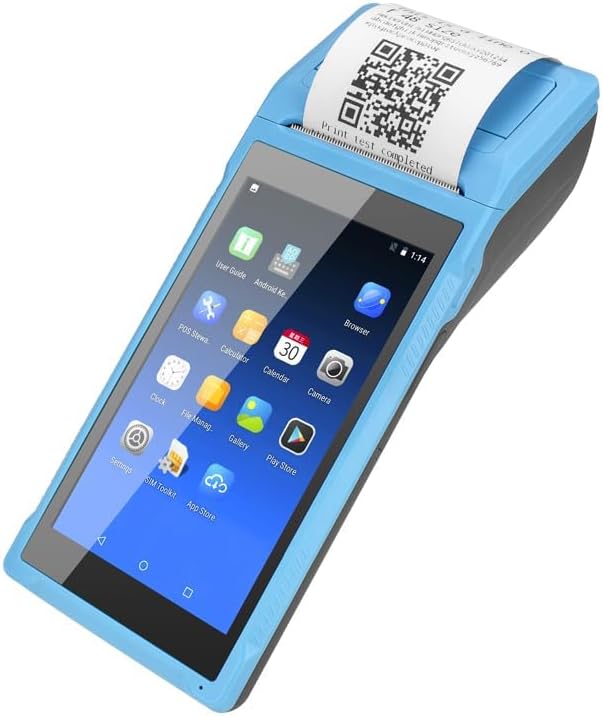
Image: Close-up of the charging port on the NETUM PDA58-02, with a charger cable connected, highlighting the 5000mAh rechargeable battery.
5.2 Vkládání termopapíru
- Open the printer cover by gently pushing the latch.
- Insert a 58 x 35mm thermal paper roll into the compartment, ensuring the printing side faces the print head.
- Vytáhněte malé množství papíru ven z řezačky.
- Pevně zavřete kryt tiskárny, dokud nezacvakne na místo.
5.3 Zapnutí/vypnutí
- To power on: Press and hold the power button until the screen lights up.
- To power off: Press and hold the power button, then select 'Power off' from the options on the screen.
6. Návod k obsluze
6.1 Základní navigace
The device runs on Android 6.0. Navigate the interface using the 5.5-inch capacitive touch screen. Swipe, tap, and use gestures similar to a standard Android smartphone.

Image: NETUM PDA58-02 portable printer displaying various Android application icons on its screen, indicating its smart functionality.
6.2 Konektivita
- Wi-Fi: Go to Settings > Wi-Fi to connect to available wireless networks (802.11 b/g/n).
- Bluetooth: Go to Settings > Bluetooth to pair with other Bluetooth 4.0 enabled devices.
- 3G: Insert a compatible SIM card (if applicable) and configure network settings under Settings > More > Mobile networks for 3G connectivity (GSM850/900/1800/1900, WCDMA B1).
- USB: Connect the device to a computer using the Micro USB 2.0 port for data transfer or charging.
6.3 Printing Receipts
The integrated thermal printer allows for fast receipt printing. Use compatible POS applications or built-in printing functions to generate receipts. Ensure paper is loaded correctly.
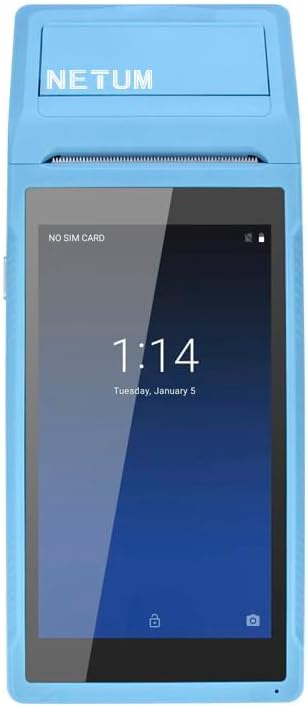
Image: NETUM PDA58-02 portable printer showing a receipt with a QR code being printed, demonstrating its receipt printing capability.
6.4 Skenování čárových kódů
The device supports 1D barcode scanning. Open the scanning application or a compatible POS application that utilizes the scanner. Point the scanner at the barcode to capture the data.
7. Údržba
7.1 Čištění zařízení
Wipe the exterior of the device with a soft, dry cloth. For stubborn dirt, use a slightly damp cloth and then dry immediately. Do not use harsh chemicals or abrasive cleaners.
7.2 Čištění tiskové hlavy
If print quality degrades, the thermal print head may need cleaning. Use a cotton swab lightly dampTiskovou hlavu jemně otřete isopropylalkoholem. Před použitím ji nechte zcela vyschnout.
7.3 Péče o baterii
To prolong battery life, avoid fully discharging the battery frequently. Charge the device regularly. If storing the device for an extended period, charge it to about 50% and store in a cool, dry place.
8. Řešení problémů
- Zařízení se nezapíná: Ujistěte se, že je baterie nabitá. Připojte nabíječku a zkuste to znovu. Pokud problém přetrvává, kontaktujte podporu.
- Tiskárna netiskne: Check if thermal paper is loaded correctly and if the printer cover is closed. Verify that the application is sending print commands.
- Špatná kvalita tisku: Clean the thermal print head as described in the Maintenance section. Ensure you are using suitable thermal paper.
- Problémy s připojením (Bluetooth/Wi-Fi): Ensure Bluetooth/Wi-Fi is enabled in settings. Check if the device is within range of the network/paired device. Restart the device and try reconnecting.
- Dotyková obrazovka nereaguje: Restart the device. If the problem continues, contact support.
9. Specifikace
| Funkce | Detail |
|---|---|
| Model | PDA58-02 |
| Barva | Modrý |
| Konfigurace | 3G + Camera |
| CPU | Quad-core 1.3GHz MT6580V/WA |
| BERAN | 1 GB |
| NAND Flash | 8 GB |
| Operační systém | Android 6.0 |
| Hlavní obrazovka | 5.5 inch IPS Capacitive Touch Screen 1280*720 |
| Komunikační metoda | 3G (supports all network types) |
| Zadní kamera | 8 MP |
| Baterie | 7.4V, 5000mAh |
| Nabíjecí rozhraní | DC Charging, 12V 1.5A |
| Rozhraní pro sluchátka | Standard 3.5mm Headphone |
| Podpora OTG | Ano |
| Rozhraní USB | Micro USB 2.0 x 1 |
| Audio systém | Built-in Speaker, Buzzer, Microphone |
| Wi-Fi | 802.11 b/g/n |
| GSM | 850/900/1800/1900 |
| WCDMA | B1 |
| Bluetooth | Bluetooth 4.0 |
| Technologie tisku | Termální tiskárna |
| Paper Roll Size | 58 x 35 mm (součástí balení) |
| Rozměry tiskárny (D x Š x V) | 21.5 x 8.6 x 5.3 cm / 8.46 x 3.39 x 2.1 palce |
| Hmotnost tiskárny | 462 g / 16.3 oz |
| Typ výstupu | Monochromatický |
| Max Mono Print Speed | 1 (unit not specified, likely pages/minute or lines/second) |
| Typ ovládání | Android, Touch |
| Typ média | Štítky |
| Typ skeneru | Přenosný |
| Typ zobrazení | LCD |
| Kompatibilní zařízení | chytré telefony |
| Další funkce tiskárny | Skenovat |
| Počet procesorů | 4 |
| Maximální velikost média | 5.5 x 8.5 palce |
| Oboustranný tisk | Žádný |
| Hardwarové rozhraní | USB, USB 2.0 |
| Celkový počet portů USB | 1 |
10. Informace o záruce
NETUM products are covered by a manufacturer's warranty. Please refer to the warranty card included in your package or visit the official NETUM webPodrobné záruční podmínky naleznete na webových stránkách. Uschovejte si účtenku jako doklad o koupi pro případ reklamace.
11. Podpora
For technical assistance, troubleshooting, or product inquiries, please contact NETUM customer support. Contact information can typically be found on the official NETUM webna webu nebo v záruční dokumentaci.
Online zdroje: Visit the NETUM official webweb s nejčastějšími dotazy, aktualizacemi softwaru a dalšími podpůrnými materiály.