
Zavedení
This manual provides detailed instructions for the setup, operation, maintenance, and troubleshooting of your Tera P161 Android 11 Barcode Scanner PDA. The P161 is a robust portable data terminal designed for various industrial and retail environments, featuring a Qualcomm processor, Android 11 operating system, and a high-performance Zebra SE4710 scan engine.
Mezi klíčové vlastnosti patří:
- Operační systém: Android 11 for enhanced data protection and application compatibility.
- Procesor: Qualcomm Octa-Core 2.0GHz for robust performance and stable connectivity.
- Skener: Integrated Zebra SE4710 1D/2D/QR scan engine for fast and accurate barcode capture.
- Baterie: 6700mAh hot-swappable battery with a 100mAh backup for continuous operation.
- Klávesnice: 37-key numeric keypad for easy operation, even with gloves.
- Trvanlivost: IP65 rated for water, dust, and drop resistance (up to 1.5 meters).
- Konektivita: Dual-band Wi-Fi (2.4G/5G), Bluetooth 5.0, GPS, and NFC.
Obsah balení
Po vybalení se prosím ujistěte, že jsou všechny níže uvedené položky přítomny a v dobrém stavu:
- 1 x Tera P161 Android 11 Barcode Scanner PDA
- 1 x Pistol Grip
- 1 x nabíjecí kolébka
- 1 x řemínek na ruku
- 1 x nabíjecí adaptér
- 1 x QC Adapter
- 1x Ochrana obrazovky
- 1 x Nástroj pro vysunutí SIM karty
- 1 x USB kabel
- 1 x Uživatelská příručka (tento dokument)
- 1 x SDK (Software Development Kit)

Image: The Tera P161 PDA shown with its included pistol grip and charging cradle, illustrating the main components of the package.
Nastavení
1. Instalace a nabíjení baterie
The Tera P161 is equipped with a 6700mAh removable battery and a 100mAh backup battery for hot-swapping. Before first use, fully charge the device.
- Locate the battery compartment on the back of the PDA.
- Insert the 6700mAh battery, ensuring proper alignment of the contacts.
- Place the PDA into the charging cradle or connect the USB cable directly to the device using the provided charging adapter.
- Rozsvítí se kontrolka nabíjení. Úplné nabití obvykle trvá přibližně 3.5 hodiny.

Image: The Tera P161 PDA securely placed in its charging cradle, indicating the charging process.
2. SIM Card and MicroSD Card Installation (Optional)
If you plan to use cellular data or expand storage, install a SIM card or MicroSD card.
- Vypněte zařízení.
- Use the SIM ejector tool to open the SIM/MicroSD card tray.
- Insert the SIM card and/or MicroSD card into the tray with the contacts facing down.
- Opatrně vložte zásobník zpět do zařízení.
3. Attaching the Pistol Grip and Hand Strap (Optional)
The pistol grip provides ergonomic handling for extended scanning tasks, and the hand strap offers additional security.
- To attach the pistol grip: Align the connectors on the grip with the corresponding ports on the bottom of the PDA and secure it firmly.
- To attach the hand strap: Thread the strap through the designated loops on the PDA.
Návod k obsluze
1. Zapnutí/vypnutí
- Zapnutí: Stiskněte a podržte tlačítko napájení na boku zařízení, dokud se obrazovka nerozsvítí.
- Vypnout: Stiskněte a podržte tlačítko Napájení a poté z možností zobrazených na obrazovce vyberte možnost „Vypnout“.
- Restartovat: Stiskněte a podržte tlačítko napájení a poté z možností vyberte „Restartovat“.
2. Skenování čárových kódů
The Tera P161 features a Zebra SE4710 2D scan engine for efficient barcode reading.
- Open a scanning application or a field that requires barcode input.
- Point the scanner window at the barcode.
- Press the scan button (typically located on the side or the pistol grip) to activate the scanner.
- Ensure the red aiming beam covers the entire barcode for optimal reading.
- Úspěšné skenování bude obvykle signalizováno zvukovým pípnutím a/nebo vizuálním potvrzením na obrazovce.
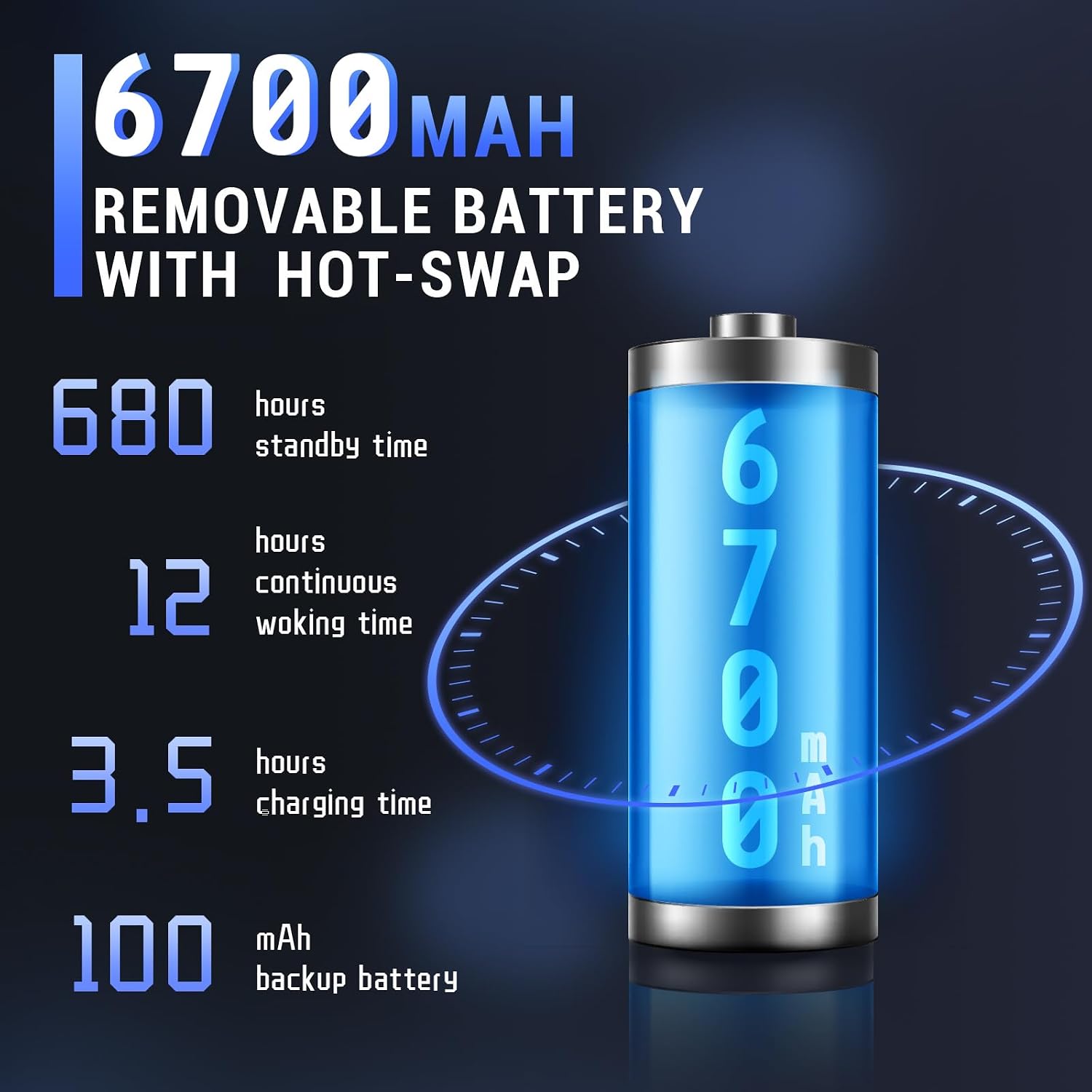
Image: The Tera P161 PDA actively scanning a barcode, demonstrating its primary function.
3. Keypad and Touchscreen Usage
The device combines a 4-inch touchscreen with a physical 37-key numeric keypad.
- Dotyková obrazovka: Navigate the Android interface by tapping, swiping, and pinching.
- Klávesnice: Use the physical keys for data entry, navigation, and quick access functions. The keypad is designed for use even with gloves.

Obrázek: Podrobný view of the Tera P161 PDA's 37-key physical keypad, highlighting its layout and design.
4. Konektivita
- Wi-Fi: Connect to available Wi-Fi networks via the Android settings menu. Supports 2.4G and 5G bands.
- Bluetooth: Pair with Bluetooth devices (e.g., headphones, printers) through the Bluetooth settings. The device uses Bluetooth 5.0 for faster data transfer.
- GPS: The integrated GPS module allows for location-based services and tracking.
- NFC: For Near Field Communication, ensure the pistol grip is removed for optimal performance. Access NFC settings in the Android menu.
Údržba
1. Čištění zařízení
Pro udržení optimálního výkonu a hygieny:
- Otřete obrazovku a tělo měkkým hadříkem, který nepouští vlákna.
- Pro odolnou špínu lehceampnavlhčete hadřík vodou nebo jemným neabrazivním čisticím prostředkem.
- Nepoužívejte agresivní chemikálie, rozpouštědla ani abrazivní materiály.
- Zajistěte, aby se do portů nebo otvorů nedostala žádná kapalina.
2. Péče o baterie
The 6700mAh battery is designed for long operational periods. The 100mAh backup battery allows for hot-swapping the main battery without losing data.
- Vyhněte se častému úplnému vybíjení baterie.
- Pokud zařízení delší dobu nepoužíváte, skladujte jej na chladném a suchém místě.
- If replacing the main battery, ensure the device is powered on and the backup battery is charged to facilitate a hot-swap.
3. Ohledy na životní prostředí
The Tera P161 has an IP65 rating, indicating resistance to dust and water jets, and can withstand drops up to 1.5 meters.
- While robust, avoid intentional exposure to extreme conditions.
- Ujistěte se, že všechny kryty portů jsou bezpečně uzavřeny, aby byla zajištěna odolnost proti vodě a prachu.
- Neponořujte zařízení do vody.

Image: The Tera P161 PDA being shown to withstand drops and splashes, illustrating its IP65 durability rating.
Odstraňování problémů
If you encounter issues with your Tera P161, refer to the following common problems and solutions:
| Problém | Možná příčina | Řešení |
|---|---|---|
| Zařízení se nezapne. | Slabá nebo vybitá baterie. | Connect the device to the charger and allow it to charge for at least 30 minutes before attempting to power on. |
| Barcode scanner not reading. | Barcode damaged, scanner window dirty, incorrect symbology settings, or scanner application not active. | Clean the scanner window. Ensure the barcode is clear and undamaged. Check scanner settings in the application. Verify the scanning application is open and active. |
| Problémy s připojením k Wi-Fi nebo Bluetooth. | Out of range, incorrect password, or interference. | Move closer to the Wi-Fi router or Bluetooth device. Re-enter the password. Restart the device and try again. |
| Zařízení je pomalé nebo nereaguje. | Too many applications running, low memory, or software glitch. | Close unnecessary applications. Restart the device. Clear cache if possible. |
| Forgotten PIN or password. | Security lock activated. | If you have forgotten your device PIN or password, you may need to perform a factory reset. Warning: A factory reset will erase all data on the device. Consult the online support resources or contact customer service for guidance before proceeding. |
If the problem persists after trying these solutions, please contact Tera customer support.
Specifikace
| Funkce | Detail |
|---|---|
| Číslo modelu | FUN-PDA-P161-EU |
| Operační systém | Android 11 |
| Procesor | Qualcomm Octa-Core 2.0GHz |
| Scanner Engine | Zebra SE4710 (1D/2D/QR) |
| Zobrazit | 4palcový dotykový displej |
| Paměť | 3GB RAM, 32GB ROM |
| Hlavní baterie | 6700mAh (Removable, Hot-swappable) |
| Záložní baterie | 100 XNUMX mAh |
| Doba nabíjení | Přibl. 3.5 hodin |
| Klávesnice | 37-key Numeric Keypad |
| Konektivita | Wi-Fi (2.4G/5G), Bluetooth 5.0, GPS, NFC |
| Hodnocení trvanlivosti | IP65 (Water, Dust, 1.5m Drop Resistance) |
| Zdroj napájení | Elektrický kabel |
Záruka a podpora
Tera is committed to providing high-quality products and excellent customer service.
- Zákaznická podpora: 24/7 customer support is available for any inquiries or assistance.
- Technická pomoc: Comprehensive technical support is provided to help with setup, operation, and troubleshooting.
- SDK and Customization: SDKs are provided, and customization services are available to meet specific business needs.
- Kontaktní údaje: For support, please refer to the contact details provided with your product documentation or visit the official Tera webmísto.
For more information about Tera products and services, you can visit the Tera Brand Store.