
1. Důležité bezpečnostní pokyny
Před použitím tohoto výrobku si prosím přečtěte a pochopte všechny bezpečnostní pokyny. Uschovejte si tento návod pro budoucí použití.
- Nevystavujte jednotku dešti, vlhkosti ani extrémním teplotám.
- Neumísťujte přístroj do blízkosti zdrojů tepla, jako jsou radiátory, topná tělesa, kamna nebo jiná zařízení produkující teplo.
- Používejte pouze nástavce/příslušenství určené výrobcem.
- Odpojte toto zařízení během bouřky s blesky nebo když se delší dobu nepoužívá.
- Veškerý servis svěřte kvalifikovanému servisnímu personálu. Je -li zařízení jakýmkoli způsobem poškozeno, je nutná údržba.
- Zajistěte dostatečné větrání kolem jednotky. Neblokujte žádné větrací otvory.
- Chraňte napájecí kabel před pošlapáním nebo přiskřípnutím.
2. Obsah balení
Ověřte, zda jsou v balení obsaženy všechny níže uvedené položky:
- 1x syitren PARON II Record Player
- 1x Uživatelská příručka
- 1x Protiprachový kryt
- 1x 12V AC Power Adapter

3. Konec produktuview
Familiarize yourself with the main components of your syitren PARON II Record Player.


4. Nastavení
- Rozbalte jednotku: Carefully remove the record player and all accessories from the packaging.
- Place the Dust Cover: Position the dust cover onto the hinges at the back of the unit.
- Připojte napájení: Plug the 12V AC power adapter into the DC IN port on the back of the record player, then plug the adapter into a wall outlet.
- Adjust Counterweight: The tonearm features an adjustable counterweight. Carefully balance the tonearm so it floats horizontally. Then, rotate the counterweight to the recommended tracking force (refer to cartridge specifications, typically around 2.5g for the AT3600L). This ensures optimal sound quality and prevents record damage.
- Úprava proti bruslení: The anti-skating system helps prevent the stylus from skipping. Adjust this setting according to the instructions provided with the cartridge or by testing with a blank record.

5. Návod k obsluze
5.1 Přehrávání vinylové desky
- Zapnutí: Otočením knoflíku napájení zapněte jednotku.
- Vyberte rychlost: Choose the appropriate speed (33 or 45 RPM) for your vinyl record using the speed selector switch.
- Záznam o místě: Carefully place your vinyl record on the platter. If playing a 45 RPM single, use the included adapter.
- Zvedněte raménko přenosky: Ke zvednutí ramena použijte páku pro zdvih ramena.
- Umístění stylusu: Jemně posuňte raménko přenosky nad požadovanou počáteční drážkou desky.
- Spodní raménko: Pomalu spusťte raménko pomocí zvedací páčky. Jehla se dotkne desky a spustí se přehrávání.
- Upravit hlasitost: Use the volume knob to set the desired listening level.
The record player features an auto-stop function that will stop the platter approximately three minutes after the record ends. The tonearm will not auto-return.

5.2 Připojení Bluetooth
The syitren PARON II Record Player can receive audio wirelessly from Bluetooth-enabled devices.
- Povolit Bluetooth: Switch the function selector to Bluetooth mode. The indicator light will flash, indicating it's in pairing mode.
- Spárovat zařízení: On your smartphone, tablet, or other Bluetooth device, enable Bluetooth and search for available devices. Select "syitren PARON II" (or similar name) from the list.
- Potvrzení: Once paired, the indicator light on the record player will stop flashing and remain solid. You can now stream audio from your device to the record player's built-in speakers.
5.3 Externí audio připojení
The unit supports both Aux-in and RCA output for versatile audio connections.
- Vstup Aux: Connect an external audio source (e.g., MP3 player, CD player) to the AUX IN port using a 3.5mm audio cable. Select AUX mode on the record player to play audio from the connected device.
- RCA výstup: Connect the RCA output jacks on the back of the record player to an external amplifier or powered speakers using RCA cables. This allows you to use the record player as a source for a larger audio system.
6. Údržba
6.1 Čištění stylusu
A clean stylus ensures optimal sound quality and extends the life of your records. Use a soft brush designed for stylus cleaning, brushing gently from back to front.
6.2 Čištění jednotky
Wipe the unit with a soft, dry cloth. For stubborn marks, a slightly damp Lze použít hadřík a poté suchý hadřík. Nepoužívejte abrazivní čisticí prostředky ani rozpouštědla.
6.3 Péče o protiprachový kryt
The dust cover protects your turntable. Clean it with a soft, lint-free cloth. Avoid harsh chemicals that may scratch or cloud the plastic.
7. Řešení problémů
Pokud narazíte na problémy, podívejte se na následující běžné problémy a jejich řešení:
| Problém | Možné řešení |
|---|---|
| Žádná síla | Ujistěte se, že je napájecí adaptér bezpečně připojen k jednotce a k funkční zásuvce. |
| Žádný zvuk z reproduktorů | Check volume level. Ensure correct input mode (Phono, Aux, Bluetooth) is selected. |
| Přeskakující nebo zkreslený zvuk | Clean the record and stylus. Re-adjust the tonearm counterweight and anti-skating. Ensure the record player is on a stable, level surface. |
| Bluetooth není párování | Ensure the record player is in Bluetooth pairing mode. Disable and re-enable Bluetooth on your device. Move closer to the record player. |
Pokud problémy přetrvávají, obraťte se na zákaznickou podporu.
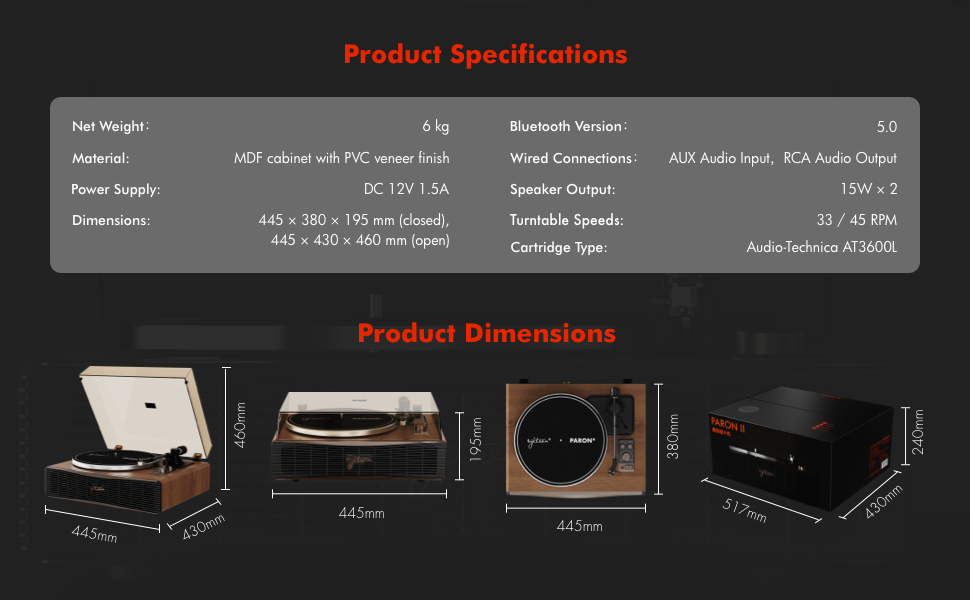
8. Specifikace
| Funkce | Detail |
|---|---|
| Název modelu | PARON II |
| Číslo modelu položky | SN13 |
| Rozměry produktu | 17.4 x 14.96 x 7.48 inches (445 x 380 x 195 mm closed) |
| Hmotnost položky | 16 libry (6 kg) |
| Materiál | MDF cabinet with PVC veneer finish (Wood, Metal, Plastic) |
| Rychlosti gramofonu | 33 1/3, 45 ot./min |
| Typ kazety | Audio-Technica AT3600L (Magnet-type) |
| Verze Bluetooth | 5.0 |
| Kabelová připojení | AUX Audio Input, RCA Audio Output |
| Výstup reproduktoru | 15W x 2 (Built-in 2.5" woofer and 2" tweeter) |
| Napájení | DC 12V 1.5A |
| Speciální funkce | Adjustable Counterweight, Built-In Speaker, Built-In Bluetooth Receiver, RCA Output, Suspension Shock Absorption System, S5 Motor System |
9. Záruka a podpora
The syitren PARON II Record Player is designed for reliable performance. For warranty information or technical support, please refer to the contact details provided with your purchase documentation or visit the official syitren webmísto.
Uschovejte si prosím doklad o koupi pro případné reklamace.