
1. Úvod
Thank you for choosing the Cyrank Z73 Smart Watch. This manual provides essential information for setting up, operating, and maintaining your device. Please read it carefully to ensure proper use and to maximize your experience with the smart watch.

Obrázek 1.1: Přední strana view of the Cyrank Z73 Smart Watch, showcasing its elegant design with a floral pink watch face.
2. Obsah balení
Prosím, ověřte, zda jsou v balení přítomny všechny položky:
- Cyrank Z73 Smart Watch
- Datový kabel (nabíjecí kabel)
- Nastavovač řemínku
- Uživatelská příručka (tento dokument)

Image 2.1: The Cyrank Z73 Smart Watch displayed alongside its included data cable and strap adjuster tool.
3. Specifikace
Detailed technical specifications for the Cyrank Z73 Smart Watch:
| Funkce | Specifikace |
|---|---|
| Hlavní řídicí platforma | XC2806 |
| Paměť | 16+128M |
| Režim touch | G+F Single Touch |
| Velikost obrazovky | 1.09 palců (2.77 cm) |
| Rozlišení obrazovky | 240x240 pixelů |
| Průměr ciferníku | Přibližně 36 mm (1.4 palce) |
| Tloušťka ciferníku | Přibližně 11.5 mm (0.5 palce) |
| Délka popruhu | Přibližně 220x16 mm (8.7x0.6 palce) |
| Vestavěná baterie | Lithiová baterie 200mAh |
| Doba normálního použití | O dnech 7 |
| Pohotovostní doba | O dnech 15 |
| Konektivita | Bluetooth, USB, GPS (via smartphone) |
| Hmotnost položky | Cca. 180 g (6.3 oz) |
| Rozměry produktu | 0.39 x 0.39 x 0.39 palce |

Image 3.1: Diagram illustrating the dimensions of the Cyrank Z73 Smart Watch, including dial diameter and thickness.

Image 3.2: Visual representation of the Cyrank Z73 Smart Watch strap length, measuring approximately 220mm (8.7 inches).
4. Nastavení
4.1. Nabíjení chytrých hodinek
Before first use, fully charge your smart watch. Connect the provided data cable to the charging port on the watch and plug the USB end into a compatible power adapter (not included) or a computer's USB port. The watch display will indicate charging status.
4.2. Instalace aplikace
To unlock the full functionality of your Cyrank Z73 Smart Watch, you need to install the companion application on your smartphone. Scan the QR code provided in the quick start guide (if available) or search for the recommended app name in your smartphone's app store (e.g., Google Play Store for Android, Apple App Store for iOS).
4.3. Párování s vaším smartphonem
The Cyrank Z73 Smart Watch utilizes Dual Bluetooth (BT) connectivity. One BT connection (Z73) is for data transmission, and the other (Z73 Audio) is for audio transmission (calls, music playback).
- Ujistěte se, že jsou vaše chytré hodinky nabité a zapnuté.
- Povolte na svém smartphonu Bluetooth.
- Otevřete doprovodnou aplikaci ve smartphonu a podle pokynů na obrazovce přidejte nové zařízení.
- The app will search for available devices. Select 'Z73' from the list to establish the data connection.
- Once the data connection is established, go to your smartphone's Bluetooth settings and manually pair with 'Z73 Audio' for call and music functions.
- Confirm any pairing requests on both your watch and smartphone.
5. Návod k obsluze
5.1. Základní navigace
- Dotyková obrazovka: Swipe left, right, up, or down to navigate through menus and functions. Tap to select an item.
- Boční tlačítko: Obvykle se používá k probuzení obrazovky, návratu na domovskou obrazovku nebo přístupu do hlavní nabídky.
5.2. Funkce monitorování stavu
The smart watch offers various health tracking features:
- Více režimů cvičení: Track different sports activities.
- kroky: Počítá denní počet kroků.
- Monitorování spánku: Analyzuje spánkové vzorce.
- Srdeční frekvence: Monitors heart rate throughout the day.
- GPS Running: Utilizes smartphone GPS for tracking outdoor runs.
5.3. Reminder Functions
Stay informed with timely reminders:
- Budík: Nastavte si budíky přímo na hodinkách nebo přes aplikaci.
- Sedavé připomenutí: Upozorní vás na pohyb po obdobích nečinnosti.
- Připomenutí pití: Nabádá vás k pití vody.
- Odeslání zprávy: Receives notifications for calls, SMS, WeChat, QQ, Messenger, and other apps.
5.4. Daily Functions
Convenient features for everyday use:
- Volání: Volejte a přijímejte hovory přímo z hodinek.
- Kontakty: Access your phone's contacts.
- Záznamy hovorů: View vaši historii hovorů.
- Přehrávání hudby: Ovládejte přehrávání hudby na svém smartphonu.
- Vlastní číselník: Přizpůsobte si ciferník hodinek.
- Podpora více jazyků: Vyberte preferovaný jazyk.
- Záznam: Use the watch as a voice recorder.
- Hlasové ovládání: Interact with the watch using voice commands.
- Počasí: Získejte aktuální informace o počasí.
- Kalkulačka: Proveďte základní výpočty.
- Stopky a odpočítávání: Timing functions.
- Vzdálená kamera: Ovládejte fotoaparát svého smartphonu na dálku.
- Najít mobilní telefon: Vyhledejte spárovaný smartphone.
- Nastavení: Adjust watch settings like brightness, screen time, and themes.
- Pro rozjasnění obrazovky zvedněte zápěstí: Automatically illuminates the screen when you raise your wrist.
- Režim Nerušit: Ztišit oznámení.

Image 5.1: The Cyrank Z73 Smart Watch screen showing an incoming call notification, demonstrating its call answering capability.
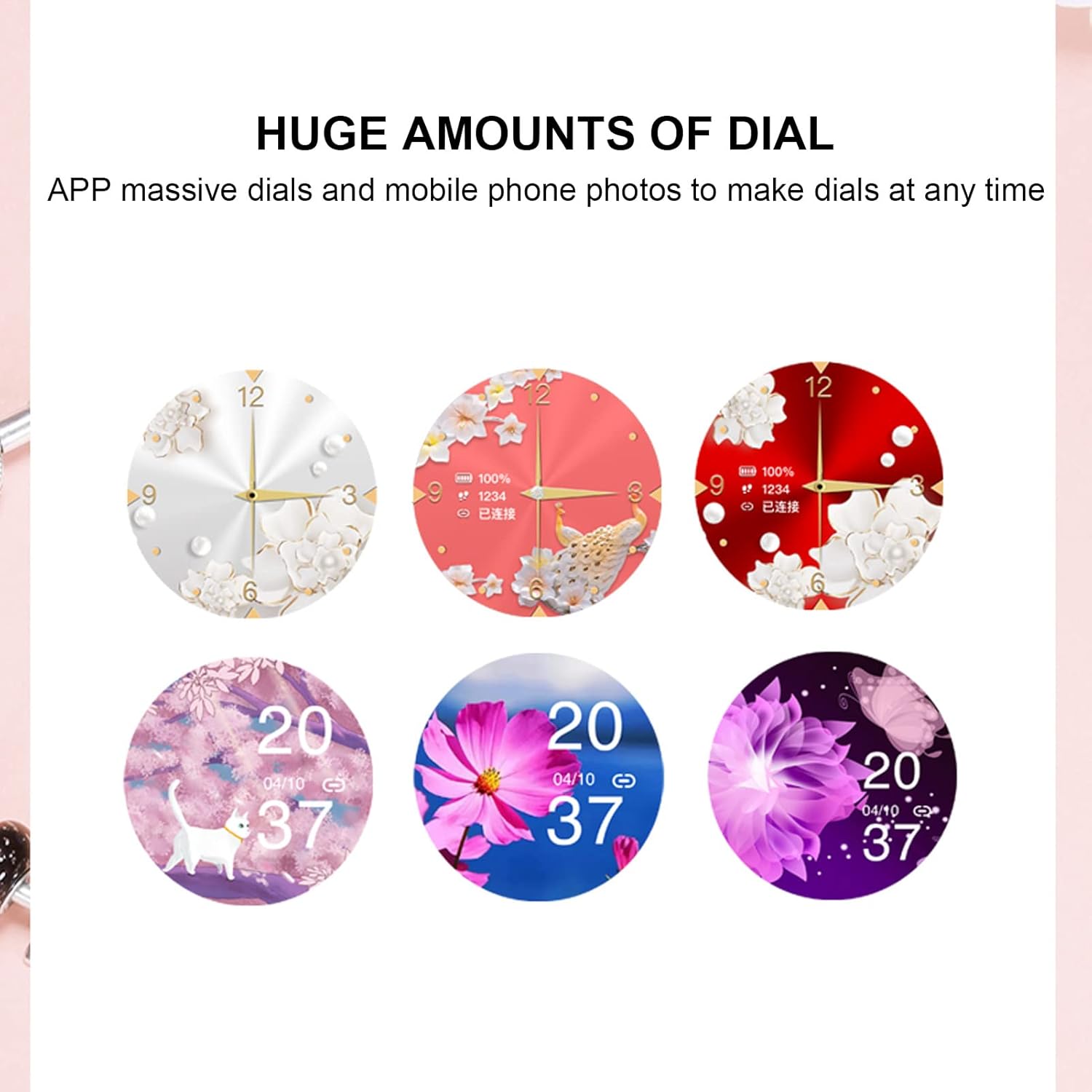
Image 5.2: A selection of diverse custom watch faces available for the Cyrank Z73 Smart Watch, allowing for personalization.
5.5. Special Purpose Functions
The Cyrank Z73 Smart Watch includes specific features for women's health:
- Feminine Functions: Prediction of menstrual period, ovulation period, ovulation day, and safe period.
6. Údržba
To ensure the longevity and optimal performance of your smart watch, follow these maintenance guidelines:
- Čištění: Pravidelně otírejte displej a řemínek hodinek měkkým, suchým hadříkem. V případě odolných nečistot použijte lehceamp Lze použít hadřík, ale vyhněte se nadměrné vlhkosti.
- Vyhněte se extrémním teplotám: Nevystavujte hodinky extrémnímu horku nebo chladu, mohlo by dojít k poškození baterie a vnitřních součástí.
- Voděodolnost: Refer to the product specifications for water resistance ratings. Avoid submerging the watch beyond its rated depth or exposing it to hot water, steam, or chemicals.
- Nabíjení: Use only the provided data cable for charging. Avoid using damaged cables or chargers.
- Skladování: Pokud hodinky delší dobu nepoužíváte, skladujte je na chladném a suchém místě.
7. Řešení problémů
If you encounter issues with your Cyrank Z73 Smart Watch, try the following steps:
- Hodinky se nezapínají: Ujistěte se, že jsou hodinky plně nabité. Připojte je k nabíječce alespoň na 30 minut.
- Nelze spárovat s telefonem:
- Ujistěte se, že máte v telefonu i hodinkách zapnutou funkci Bluetooth.
- Ujistěte se, že jsou hodinky v dosahu vašeho telefonu.
- Restartujte telefon i hodinky.
- Vymažte mezipaměť Bluetooth v telefonu (pokud je k dispozici) a zkuste spárování zopakovat.
- Ujistěte se, že je doprovodná aplikace nainstalována a spuštěna.
- Nepřijatá oznámení:
- Check if the watch is properly paired and connected to the app.
- Verify notification permissions are granted to the app on your phone.
- Ensure 'Do Not Disturb' mode is not active on the watch or phone.
- Nepřesné zdravotní údaje: Ensure the watch is worn snugly on your wrist, but not too tight. Clean the sensor on the back of the watch.
- Krátká výdrž baterie: Snižte jas obrazovky, deaktivujte nepotřebné funkce a zajistěte, aby bylo v telefonu optimalizováno používání aplikací na pozadí.
- Obnovit tovární nastavení: If issues persist, you may try restoring the watch to factory settings via the watch's menu or the companion app. Note that this will erase all data on the watch.
8. Záruka a podpora
The Cyrank Z73 Smart Watch comes with a standard manufacturer's warranty. Please refer to the warranty card included in your package or contact your retailer for specific warranty terms and conditions. For technical support or further assistance, please reach out to Cyrank customer service through the contact information provided with your purchase or on the official Cyrank webmísto.