1. Úvod
This manual provides detailed instructions for the setup, operation, and maintenance of your eufy Security SoloCam S340 wireless solar security camera system, integrated with the eufy Security HomeBase S380 (HomeBase 3). Please read this manual thoroughly before using the product to ensure correct installation and optimal performance.
2. Obsah balení
Verify that all items listed below are present in your package. If any items are missing or damaged, please contact eufy Security support.
- eufy Security SoloCam S340 Camera(s) with integrated solar panel
- eufy Security HomeBase S380 (HomeBase 3)
- Mounting Bracket(s) and Screw Kit(s)
- USB nabíjecí kabel
- Ethernetový kabel
- Napájecí adaptér pro HomeBase
- Rychlý průvodce
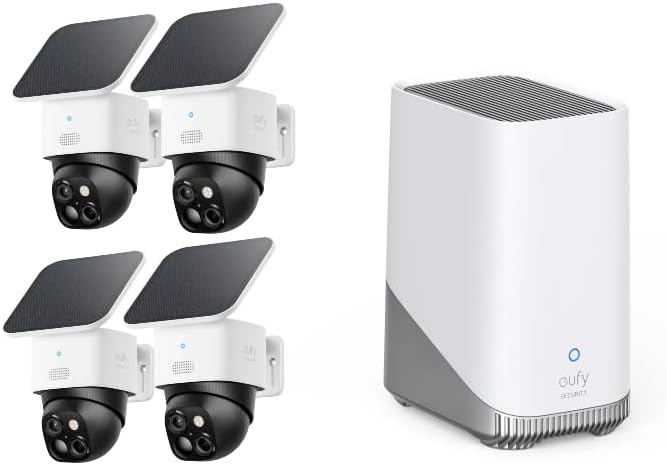
3. Konec produktuview
3.1 SoloCam S340 Camera
The SoloCam S340 is a wireless outdoor security camera featuring a dual-camera system and an integrated solar panel for continuous power. It offers comprehensive surveillance with advanced AI capabilities.
- Systém duálního fotoaparátu: Equipped with a 3K wide-angle lens (135° field of view, f/1.6 aperture) and a 2K telephoto lens (f/1.6 aperture) for up to 8x hybrid zoom.
- SolarPlus™ Technology: Integrated solar panel provides continuous power with just 2 hours of direct sunlight per day, ensuring all-day operation.
- 360° otáčení a naklápění: Offers full horizontal and vertical control to eliminate blind spots, allowing for comprehensive area coverage.
- On-Device AI Tracking: Utilizes AI to automatically track subjects, providing 95% alert accuracy.


3.2 HomeBase S380 (HomeBase 3)
The HomeBase S380 serves as the central hub for your eufy Security system, connecting all compatible devices and managing data storage and AI processing.
- BionicMind™ AI: Enhances security with 99.9% facial recognition accuracy, distinguishing between familiar faces and unknown individuals.
- Expandable Local Storage: Features 16GB of built-in storage, expandable via an HDD or SSD (not included) for extensive local video storage without monthly fees.
- Seamless Ecosystem: Integrates with other eufy Security devices through the eufy Security app for a unified home security experience.


4. Nastavení
4.1 Download the eufy Security App
Before beginning installation, download the eufy Security app from the App Store (iOS devices) or Google Play (Android devices). Create an account or log in if you already have one.
4.2 HomeBase S380 Installation
- Connect the HomeBase S380 to power using the provided power adapter.
- Connect the HomeBase S380 to your router using the provided Ethernet cable.
- Wait for the LED indicator on the HomeBase to turn solid blue, indicating it is ready for setup.
- Open the eufy Security app, tap 'Add Device', and follow the on-screen instructions to add your HomeBase.
4.3 SoloCam S340 Installation and Pairing
- Nabíjení: Fully charge the SoloCam S340 using the USB charging cable before initial installation.
- Místo montáže: Vyberte místo pro montáž, které zajišťuje optimální sluneční záření pro solární panel a jasný view of the area you wish to monitor. Ensure the camera is within Wi-Fi range of your HomeBase.
- Montáž: Use the provided mounting bracket and screws to securely attach the camera to a wall or ceiling. Adjust the camera angle for desired coverage.
- Párování: In the eufy Security app, tap 'Add Device', select SoloCam S340, and follow the instructions to pair it with your HomeBase S380. This typically involves pressing the SYNC button on the camera.
- Orientace solárního panelu: Ensure the solar panel is oriented to receive maximum direct sunlight throughout the day for continuous charging.
5. Návod k obsluze
5.1 Živě View a Nahrávání
- Open the eufy Security app and select your SoloCam S340 to access the live view.
- Use the on-screen controls to pan, tilt, and zoom the camera.
- Manually record video or take screenshots from the live view.
5.2 Detekce pohybu a upozornění
- Configure motion detection sensitivity and activity zones within the app settings for each camera.
- Enable push notifications to receive instant alerts on your smartphone when motion is detected.
- The SoloCam S340's AI tracking will follow detected subjects within its field of view.
5.3 BionicMind™ Facial Recognition
- Access the BionicMind™ settings in the eufy Security app.
- You can teach the system to recognize family members and friends by uploading photos or confirming identified faces from recorded events.
- Customize alerts to differentiate between recognized individuals and unknown persons.
5.4 Správa úložiště
- All recorded events are stored locally on the HomeBase S380's built-in 16GB storage.
- To expand storage, install a compatible 2.5-inch HDD or SSD into the HomeBase. Refer to the HomeBase S380 manual for specific installation instructions.
- View and manage recorded videos through the 'Events' tab in the eufy Security app.
6. Údržba
6.1 Čištění
- Regularly clean the camera lenses and the solar panel with a soft, damp cloth to ensure optimal image quality and charging efficiency.
- Avoid using harsh chemicals or abrasive materials that could damage the surfaces.
6.2 Nabíjení baterie a solární energie
- Monitor the battery level of your SoloCam S340 via the eufy Security app.
- Ensure the solar panel is free from obstructions (e.g., leaves, dirt) to maximize charging.
- In periods of prolonged low sunlight, the camera may require manual charging via the USB port.
7. Řešení problémů
| Problém | Možná příčina | Řešení |
|---|---|---|
| Kamera se nepřipojuje k HomeBase | Out of range, HomeBase offline, pairing failed | Move camera closer to HomeBase. Check HomeBase internet connection. Re-attempt pairing via the app. |
| Špatná kvalita videa | Dirty lens, low light, weak Wi-Fi signal | Clean the camera lens. Ensure adequate lighting. Improve Wi-Fi signal strength or relocate camera. |
| Solární panel se nenabíjí | Insufficient sunlight, panel obstruction, faulty connection | Relocate camera/panel for direct sunlight. Clear any obstructions. Check cable connection. |
| Upozornění na falešný pohyb | High sensitivity, environmental factors | Adjust motion detection sensitivity and activity zones in the app. Utilize AI detection features. |
8. Specifikace
- SoloCam S340 Resolution: 3K (Wide-angle), 2K (Telephoto)
- Lupa: Up to 8x Hybrid Zoom
- Pole View: 135° (širokoúhlý)
- Pan & Tilt: 360° horizontálně, 60° vertikálně
- Moc: Integrated Solar Panel, Rechargeable Battery
- Noční vidění: Barevné noční vidění
- Vlastnosti AI: On-Device AI Tracking, BionicMind™ Facial Recognition
- HomeBase S380 Storage: 16GB Built-in, Expandable via 2.5-inch HDD/SSD
- Konektivita: Wi-Fi (2.4 GHz only), Ethernet
- Provozní teplota: -4 °F až 122 °F (-20 °C až 50 °C)
- Odolnost vůči počasí: IP67 (SoloCam S340)
9. Bezpečnostní informace
- Nepokoušejte se zařízení rozebírat ani opravovat sami. Požádejte o pomoc kvalifikovaný servisní personál.
- Avoid exposing the device to extreme temperatures, direct sunlight for prolonged periods (beyond normal operation), or corrosive environments.
- Ensure all cables are properly connected and secured to prevent tripping hazards or damage.
- Používejte pouze příslušenství doporučené výrobcem.
10. Záruka a podpora
eufy Security products typically come with a limited warranty. For detailed warranty information, product support, FAQs, and contact options, please visit the official eufy Security website or refer to the warranty card included with your product. You can also access support through the eufy Security app.
Online podpora: support.eufylife.com