
GOOJODOQ M06 Bluetooth Keyboard and Mouse
Uživatelská příručka
Zavedení
Thank you for choosing the GOOJODOQ M06 Bluetooth Keyboard and Mouse. This 3-in-1 device is designed to enhance your productivity across multiple platforms. This manual provides detailed instructions on how to set up, operate, and maintain your new device. Please read this manual carefully before use and keep it for future reference.
Obsah balení
- Klávesnice 1 x Bluetooth
- 1 x Bluetooth myš
- 1 x nabíjecí kabel (USB typu C)
- 1 x Uživatelská příručka
Konec produktuview
The GOOJODOQ M06 is a versatile input solution featuring a 10-inch keyboard and a compact mouse, both utilizing Bluetooth connectivity. The keyboard supports simultaneous connection to up to three devices and is compatible with Android, iOS, and Windows operating systems. It features silent scissor-switch keys for a comfortable typing experience.
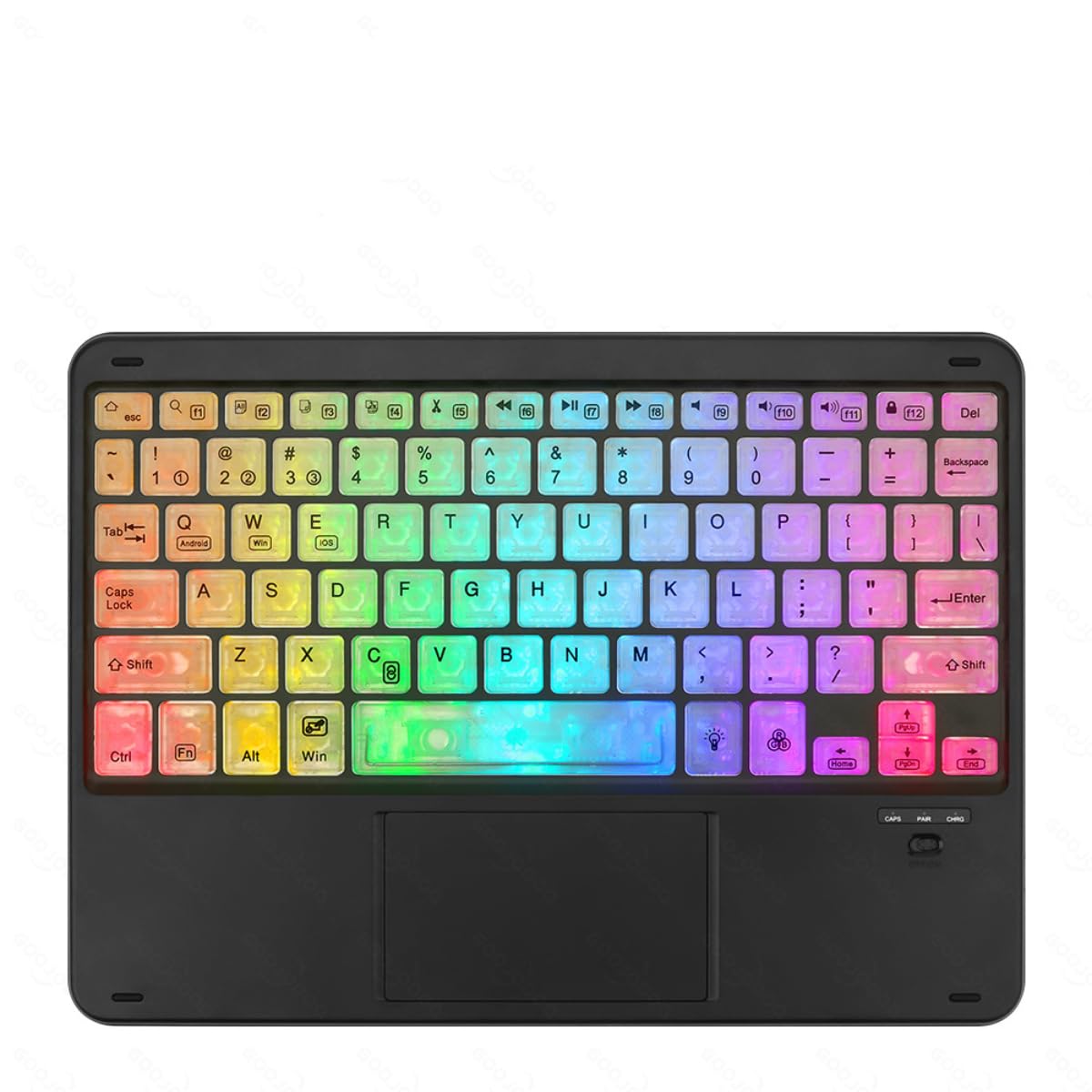
Image showing the GOOJODOQ M06 Bluetooth Keyboard and the accompanying mouse, both in black.
Setup: Bluetooth Connection
Follow these steps to connect your GOOJODOQ M06 Keyboard and Mouse via Bluetooth:
- Zapnutí: Turn on the power switch located on the keyboard and mouse. The Bluetooth indicator light on the keyboard will illuminate.
- Vstupte do režimu párování:
- For the first device, press FN + 1. The Bluetooth light will blink, indicating it's ready for pairing.
- For the second device, press FN + 2.
- For the third device, press FN + 3.
- Connect on Your Device: On your device (e.g., tablet, smartphone, computer), go to Bluetooth settings and search for available devices. Select "Bluetooth Keyboard" from the list to connect.
- Vyberte operační systém: After successful connection, press the corresponding key combination to select your device's operating system:
- For Android devices, press FN+Q.
- For Windows devices, press FN + W.
- For iOS devices, press FN + E.
- Automatické opětovné připojení: Once successfully paired, the keyboard will automatically reconnect to the last used device when powered on.
Návod k obsluze
Přepínání mezi připojenými zařízeními
If you have paired the keyboard with multiple devices, you can easily switch between them by pressing the corresponding FN key combination:
- Stiskněte FN + 1 to switch to the first paired device.
- Stiskněte FN + 2 to switch to the second paired device.
- Stiskněte FN + 3 to switch to the third paired device.
Ensure the target device's Bluetooth is enabled and within range for a successful switch.
Obecné použití
The keyboard features a standard QWERTY layout. The mouse operates like a conventional Bluetooth mouse. Ensure both devices are charged for optimal performance.
Údržba
- Čištění: K čištění povrchu klávesnice a myši použijte měkký, suchý hadřík. V případě odolných nečistot použijte lehceamp Lze použít hadřík s jemným mýdlem, ale dbejte na to, aby se do zařízení nedostala žádná tekutina.
- Skladování: Přístroj skladujte na chladném a suchém místě mimo dosah přímého slunečního záření a extrémních teplot.
- Nabíjení: Charge the devices using the provided USB Type-C cable. Avoid using damaged cables or chargers.
- Vyhněte se tekutinám: Do not expose the keyboard or mouse to water or other liquids.
Odstraňování problémů
- Zařízení se nepřipojuje:
- Ujistěte se, že jsou klávesnice i myš zapnuté a plně nabité.
- Make sure Bluetooth is enabled on your host device.
- Try re-entering pairing mode (FN + 1/2/3) and re-pairing with your device.
- Ensure the correct operating system mode is selected (FN + Q/W/E).
- Přesuňte zařízení blíže k sobě, abyste se ujistili, že jsou v dosahu Bluetooth.
- Klávesy nereagují:
- Check if the keyboard is connected to the correct device (FN + 1/2/3).
- Nabijte klávesnici.
- Restartujte hostitelské zařízení.
- Myš nereaguje:
- Recharge the mouse.
- Ujistěte se, že je myš zapnutá.
- Re-pair the mouse with your device if necessary.
Specifikace
- Model: M06
- Materiál: ABS + kov
- Barva: Černý
- Velikost: 10 inches (Keyboard)
- Nabíjecí port: USB Type-C
- Konektivita: Bluetooth (supports 3 devices simultaneously)
- Kompatibilita: Android, iOS, Windows
- Vlastnosti klávesnice: Scissor-switch keys, Silent operation
Záruka a podpora
GOOJODOQ products are designed for reliability and performance. For warranty information, please refer to the warranty card included with your purchase or visit the official GOOJODOQ website. For technical support or further assistance, please contact GOOJODOQ customer service through the contact information provided on our webweb nebo vaše nákupní platforma.