
CZI GL60 Mini
Uživatelská příručka k mini stabilizovanému světlometu CZI GL60
Model: GL60 Mini
1. Úvod
The CZI GL60 mini Gimbal Searchlight is a compact yet powerful lighting solution designed for integration with DJI Matrice M30 series drones. Weighing only 240g, it delivers a central brightness of 6000 lumens with a rated power of 70W. Its advanced optical design allows it to emit a sharp beam at 13 degrees, providing an effective search distance of up to 150 meters. This searchlight enhances night operations for various applications, including inspections, warnings, power line checks, and search and rescue missions.
The GL60 mini features integrated AI algorithm smart technology, enabling the light spot to automatically center on the camera screen, ensuring the light beam precisely follows the drone's view. It seamlessly adapts to the DJI Matrice M30 drone via the DJI SkyPort V2.0 interface.
2. Bezpečnostní informace
- Always operate the searchlight in accordance with local aviation regulations and drone operation guidelines.
- Do not look directly into the light beam when it is active, as it can cause eye damage.
- Ensure the searchlight is securely mounted to the drone before flight.
- Avoid operating the searchlight in extreme weather conditions that could affect drone stability or performance.
- Keep the searchlight clean and free from obstructions to ensure optimal performance and heat dissipation.
- Refer to the DJI Matrice M30 user manual for drone-specific safety instructions.
3. Konec produktuview
The GL60 mini Gimbal Searchlight is engineered for high performance and seamless integration. Key components include the LED light array, the three-axis stabilized gimbal, and the DJI SkyPort V2.0 interface for drone attachment.
Klíčové vlastnosti:
- Built-in Micro Gimbal: Features three-axis stability augmentation and anti-shake capabilities, with an accuracy of 0.005°, compensating for shaking in real-time.
- High-Power LED Light Source: Equipped with a 60W LED for white light, providing 6000lm high brightness.
- Focused Illumination: Irradiates from a 13° angle using image optical technique, creating a sharp beam.
- Intelligent Integration: Utilizes AI algorithm intelligent technique for automatically centering the light spot, ensuring the light beam changes with the camera's angle.
- Red and Blue Flashing Light: For identification purposes.

Obrázek 3.1: Přední strana view of the CZI GL60 mini Gimbal Searchlight. This image shows the compact design of the searchlight with its six LED lenses and the gimbal mechanism below.

Figure 3.2: The GL60 mini searchlight mounted on a DJI Matrice M30 drone. This image illustrates the searchlight's integration with the drone, showcasing its position on top of the aircraft.
4. Nastavení
- Rozbalení: Carefully remove the GL60 mini searchlight from its packaging. Verify all components are present, including the searchlight unit and any included accessories.
- Mounting to Drone:
- Ensure your DJI Matrice M30 drone is powered off and the propellers are removed for safety.
- Align the DJI SkyPort V2.0 interface on the GL60 mini with the corresponding port on the top of the DJI Matrice M30 drone.
- Gently push the searchlight down until it clicks securely into place. Ensure the connection is firm and there is no wobble.
- Connect the power and data cable from the searchlight to the drone's port.

Obrázek 4.1: Detail view of the GL60 mini searchlight being mounted onto the DJI Matrice M30 drone. This image highlights the quick and convenient mounting process.
- Zapnutí: Power on the DJI Matrice M30 drone. The GL60 mini searchlight will initialize automatically with the drone's system.
- Softwarová integrace: Ensure your DJI remote controller and drone firmware are up to date. The GL60 mini's functions will be accessible through the DJI Pilot app or equivalent control software.
5. Návod k obsluze
The GL60 mini is designed for intuitive operation through the DJI Matrice M30's control interface.
5.1 Základní obsluha
- Activating the Searchlight: Once the drone is powered on and connected, navigate to the payload control section within the DJI Pilot app. You will find controls to turn the searchlight on/off and adjust its intensity.
- Nastavení jasu: Use the dedicated slider or buttons in the app to adjust the brightness level of the searchlight.
- Red and Blue Flashing Lights: The GL60 mini features red and blue flashing lights for identification, especially useful during night operations. These can typically be toggled on/off via the drone's control interface.

Figure 5.1: The DJI Matrice M30 drone equipped with the GL60 mini searchlight, demonstrating its powerful illumination capabilities in a dark environment.
5.2 Gimbal Control and AI Following
The integrated gimbal allows for precise control over the light beam's direction, and the AI algorithm enhances targeting.
- Manual Gimbal Control: Use the gimbal controls on your remote controller or within the DJI Pilot app to manually adjust the pitching and yawing of the searchlight.
- Pitching Range: -60° to +120°
- Yaw Range: ±90°
- AI Gimbal Following: Activate the AI following feature in the DJI Pilot app. This intelligent function automatically centers the light beam on the object or area visible in the drone's camera feed, ensuring the light follows your target as the drone moves.
Video 5.1: Demonstration of the CZI GL60 mini's features, including quick mounting, red and blue flashing lights for identification, three-axis gimbal stabilization, synchronization of gimbals, pitching and yawing ranges, effective illumination area (917 M²), effective illumination distance (150M), and AI gimbal following.
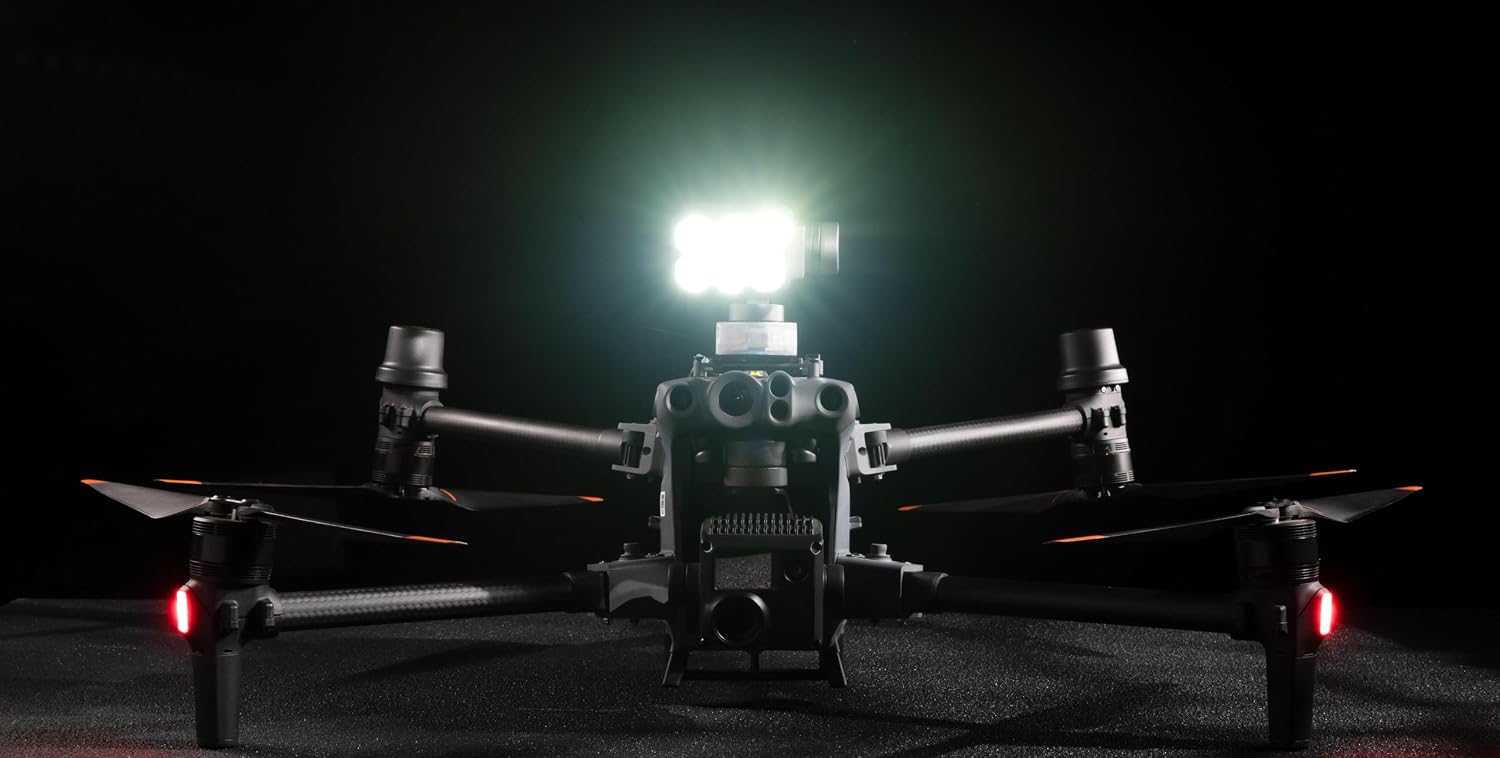
Figure 5.2: The GL60 mini searchlight mounted on a drone, casting a powerful beam forward, demonstrating its effective illumination.
6. Údržba
- Čištění: Regularly clean the lens and housing of the searchlight with a soft, dry, lint-free cloth. For stubborn dirt, use a slightly damp hadříkem a poté důkladně osušte. Nepoužívejte abrazivní čisticí prostředky ani rozpouštědla.
- Inspekce: Before each flight, inspect the searchlight for any signs of damage, loose connections, or debris. Ensure the gimbal moves freely without obstruction.
- Skladování: When not in use, store the GL60 mini in a cool, dry place, away from direct sunlight and extreme temperatures. It is recommended to store it in its original packaging or a protective case.
- Aktualizace firmwaru: Periodically check the CZI and DJI websites for firmware updates for the GL60 mini and your DJI Matrice M30 drone. Keeping firmware updated ensures optimal performance and compatibility.
7. Řešení problémů
| Problém | Možná příčina | Řešení |
|---|---|---|
| Searchlight does not turn on. | Not properly mounted or connected; Drone not powered on; Firmware issue. | Ensure the searchlight is securely mounted and the cable is fully inserted. Power on the drone. Check for and perform firmware updates. |
| Gimbal not responding or moving erratically. | Obstruction; Software glitch; Damage to gimbal. | Check for any physical obstructions around the gimbal. Restart the drone and remote controller. If the issue persists, contact CZI support. |
| Light beam is not centered or following correctly. | AI following feature not activated; Calibration needed; Environmental interference. | Ensure AI gimbal following is enabled in the app. Perform gimbal calibration if available in the drone's settings. Avoid strong electromagnetic interference. |
| Reduced brightness or flickering. | Dirty lens; Overheating; Power supply issue. | Clean the lens. Ensure proper airflow around the searchlight. Check drone battery level. If flickering persists, contact support. |
8. Specifikace
| Funkce | Specifikace |
|---|---|
| Název modelu | czi GL60 mini |
| Značka | CZI |
| Kompatibilita | DJI Matrice M30 series drones (via DJI SkyPort V2.0) |
| Hmotnost | 240 g |
| Jmenovitý výkon | 70W |
| Central Brightness | 6000lm |
| Úhel paprsku | 13° |
| Effective Search Distance | 150 metrů |
| Kardanová stabilizace | Three-axis |
| Gimbal Accuracy | 0.005° |
| Pitching Range | -60° až +120° |
| Yaw Range | ±90° |
| Illumination Area (at optimal distance) | 917 m² |
| Technologie připojení | OSDK |
9. Záruka a podpora
CZI products are manufactured to the highest quality standards. For specific warranty terms and conditions, please refer to the warranty card included with your product or visit the official CZI webUschovejte si doklad o koupi pro případ reklamace.
For technical support, troubleshooting assistance, or service requests, please contact CZI customer support through their official website or the contact information provided in your product packaging. When contacting support, please have your product model number (GL60 Mini) and purchase details ready.
Official CZI Webmísto: www.czi.net (Note: This is a placeholder link, please refer to actual CZI webstránky pro podporu)
Ask a question about this manual
Ask about setup, troubleshooting, compatibility, parts, safety, or missing instructions. Manuals+ will review the question and use this page’s manual context to help answer it.