
Maxcom FW58
Uživatelská příručka chytrých hodinek Maxcom FW58 Vanad Pro
Model: FW58
1. Úvod
Thank you for choosing the Maxcom FW58 Vanad Pro Smartwatch. This manual provides essential information for setting up, operating, and maintaining your device. The FW58 Vanad Pro is designed to enhance your daily life by offering comprehensive health monitoring, seamless communication, and robust activity tracking capabilities. Its lightweight design and customizable features make it an ideal companion for both busy individuals and active sports enthusiasts.
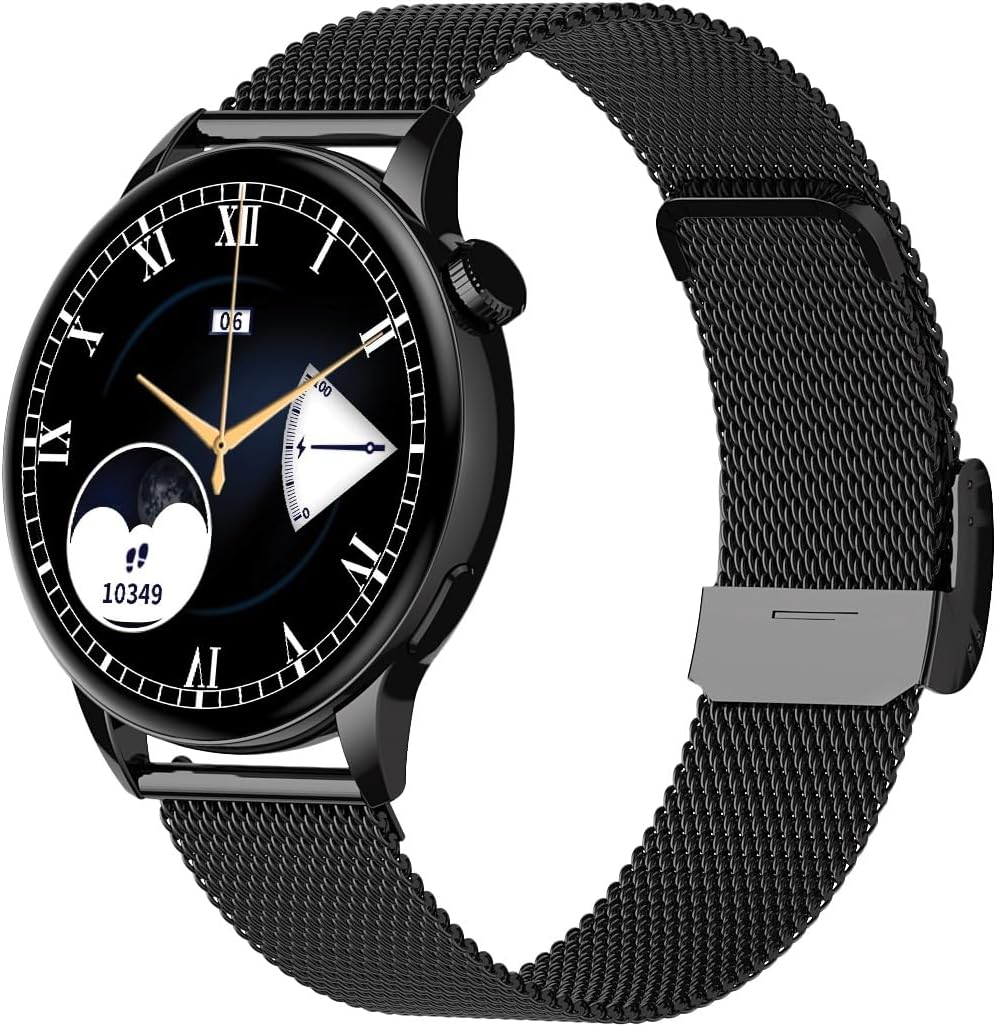
Image 1.1: Maxcom FW58 Vanad Pro Smartwatch, showcasing its elegant design with a black mesh strap and a classic watch face.
2. Nastavení
2.1. Obsah balení
Než začnete, ujistěte se, že máte v balení všechny položky:
- Maxcom FW58 Vanad Pro Smartwatch
- Magnetický nabíjecí kabel
- Additional Silicone Strap
- Uživatelská příručka (tento dokument)
2.2. Nabíjení chytrých hodinek
Pro optimální výkon chytré hodinky před prvním použitím plně nabijte.
- Připojte magnetický nabíjecí kabel k nabíjecím kontaktům na zadní straně chytrých hodinek. Ujistěte se, že jsou piny správně zarovnány.
- Zapojte USB konec kabelu do standardního USB napájecího adaptéru (doporučeno 5V/1A) nebo do USB portu počítače.
- Displej hodinek bude ukazovat stav nabíjení. Úplné nabití obvykle trvá přibližně 2 hodiny.

Obrázek 2.1: Zadní strana view of the Maxcom FW58 Smartwatch, highlighting the optical sensor for health monitoring and the magnetic charging contacts.
2.3. Párování s vaším smartphonem
To unlock all features, pair your smartwatch with the dedicated Maxcom smartwatch application on your smartphone.
- Download the official Maxcom smartwatch application from your smartphone's app store (e.g., Google Play Store or Apple App Store). Hledat "Maxcom Smartwatch" or refer to the QR code in the quick start guide if provided.
- Ujistěte se, že je na vašem smartphonu povoleno Bluetooth.
- Open the Maxcom app and follow the on-screen instructions to add a new device.
- Select "FW58" from the list of available devices. Confirm the pairing request on both your phone and the smartwatch.
3. Ovládání chytrých hodinek
3.1. Základní navigace
The Maxcom FW58 features a responsive touchscreen and a side button/crown for navigation.
- Dotyková obrazovka: Přejetím prstem doleva/doprava, nahoru/dolů procházejte nabídkami a funkcemi. Klepnutím vyberete.
- Boční tlačítko/korunka: Press to wake the screen, return to the home screen, or access the app menu. Rotate the crown (if applicable) to scroll through lists or adjust settings.

Obrázek 3.1: Boční profesionálfile of the Maxcom FW58 Smartwatch, illustrating the physical crown and button for intuitive control and navigation.
3.2. Komunikační funkce
- Uskutečňování/přijímání hovorů: Once paired, you can answer incoming calls directly from your smartwatch. You can also initiate calls from your watch's call log or contacts (synced via the app).
- Oznámení: Receive real-time notifications for SMS messages, app alerts, emails, social media updates, and news directly on your wrist. Manage notification settings through the Maxcom app.
3.3. Monitorování zdraví
The smartwatch provides various health metrics to help you monitor your well-being.
- Srdeční frekvence: Nepřetržité nebo dle potřeby monitorování tepové frekvence.
- Krevní tlak: Measure your blood pressure (for reference only, not a medical device).
- Kyslík v krvi (SpO2): Sledujte hladinu saturace krve kyslíkem.
- Sledování spánku: Automatically monitors your sleep patterns, including deep sleep, light sleep, and awake times.
3.4. Sledování aktivity a sportovní režimy
Sledujte svou denní aktivitu a specifické tréninky.
- Denní aktivita: Records steps taken, calories burned, and distance traveled (mileage).
- Sportovní režimy: Select from various sports modes such as fitness, hiking, running, badminton, cycling, and football to track specific workout data.
3.5. Ovládání hudby
Control music playback on your connected smartphone directly from your smartwatch. Play, pause, skip tracks, and adjust volume without needing to access your phone.
3.6. Přizpůsobení
Personalize your smartwatch experience.
- Ciferníky: Choose from over 100 pre-installed watch face models or download more via the Maxcom app to match your style or mood.
- Styl menu: Customize the layout and appearance of your smartwatch menu.
- Výměna řemínku: Easily change between the included mesh and silicone straps to suit different occasions or activities.

Image 3.2: A digital watch face on the Maxcom FW58 Smartwatch, showing steps and heart rate data.

Image 3.3: The Maxcom FW58 Smartwatch showcasing a dynamic and colorful digital watch face option.
4. Údržba
4.1. Čištění chytrých hodinek
Pravidelné čištění pomáhá udržovat vzhled a funkčnost zařízení.
- Otřete obrazovku a tělo měkkým hadříkem, který nepouští vlákna.
- Na odolné šmouhy lehce otřeteamphadřík vodou. Nepoužívejte agresivní chemikálie ani abrazivní materiály.
- Clean the sensor area on the back of the watch regularly to ensure accurate readings.
4.2. Péče o baterie
Chcete -li prodloužit životnost baterie:
- Vyhněte se extrémním teplotám.
- Nenechávejte hodinky delší dobu zcela vybité.
- Charge the device using only the provided charging cable.
4.3. Voděodolnost (IP67)
The Maxcom FW58 Vanad Pro Smartwatch is rated IP67, meaning it is protected against dust ingress and can withstand immersion in water up to 1 meter for up to 30 minutes. While it is suitable for daily use and splashes, it is not recommended for swimming, diving, or high-pressure water activities.
5. Řešení problémů
Pokud máte s chytrými hodinkami problémy, vyzkoušejte následující řešení:
| Problém | Řešení |
|---|---|
| Hodinky se nezapínají | Ensure the watch is fully charged. Press and hold the side button for 5-10 seconds. |
| Nelze spárovat se smartphonem | Ensure Bluetooth is on. Restart both the watch and phone. Clear app cache/data. Try pairing again. |
| Nepřesné údaje o zdraví | Ensure the watch is worn snugly on your wrist. Clean the sensor area. Remain still during measurements. |
| Oznámení nebyla přijata | Check app notification permissions on your phone. Ensure the watch is connected via Bluetooth. Verify notification settings within the Maxcom app. |
5.1. Obnovení továrního nastavení
If problems persist, you may need to perform a factory reset. This will erase all data on the smartwatch and restore it to its original settings. Navigate to 'Settings' on your smartwatch, then look for 'System' or 'Reset' options.
6. Specifikace
| Funkce | Detail |
|---|---|
| Číslo modelu | FW58 |
| Velikost displeje | 1.5 palců |
| Životnost baterie | 6-10 days (intensive use) |
| Hmotnost | 46 g |
| Rozměry pouzdra | 44 x 38 x 10 mm |
| Velikost popruhu | 255 x 20 mm |
| Voděodolnost | IP67 (až 1 metr po dobu 30 minut) |
| Konektivita | Bluetooth |
| Součástí balení jsou popruhy | Mesh and Silicone |
7. Záruka a podpora
7.1. Informace o záruce
Maxcom products are manufactured to the highest quality standards. For detailed warranty terms and conditions, please refer to the warranty card included with your purchase or visit the official Maxcom webUschovejte si doklad o koupi pro případ reklamace.
7.2. Zákaznická podpora
If you require further assistance or have questions not covered in this manual, please contact Maxcom customer support:
- Webmísto: Visit the official Maxcom support website for FAQs, software updates, and contact forms.
- E-mail/Telefon: Refer to the contact information provided on the Maxcom webwebu nebo obalu vašeho produktu.
Ask a question about this manual
Ask about setup, troubleshooting, compatibility, parts, safety, or missing instructions. Manuals+ will review the question and use this page’s manual context to help answer it.