
1. Úvod
This manual provides detailed instructions for the installation, operation, and maintenance of your Rraycom 3-Pack 5G/2.4G Wireless 2K Security Cameras. Please read this manual thoroughly before using the product to ensure proper functionality and safety. Keep this manual for future reference.

Image: The Rraycom 3-Pack 5G/2.4G Wireless 2K Security Cameras.
2. Konec produktuview
2.1 Klíčové vlastnosti
- Dvoupásmové připojení: Supports both 5GHz and 2.4GHz Wi-Fi for stable and fast connections.
- Rozlišení 2K UHD: Zachycuje jasné a podrobné video footage.
- Barevné noční vidění: Poskytuje plnobarevné video i za zhoršených světelných podmínek.
- IP65 Odolnost proti povětrnostním vlivům: Designed for reliable indoor and outdoor use, resistant to rain and dust.
- Detekce AI: Features human detection and advanced bird recognition (subscription may be required for bird recognition).
- Siréna a reflektor: Integrované odstrašující prvky pro zvýšenou bezpečnost.
- Obousměrný zvuk: Umožňuje komunikaci v reálném čase prostřednictvím kamery.
- Integrace Alexa: Compatible with Amazon Alexa for voice control and live feed viewIng.
- Flexibilní úložiště: Supports local storage via Micro SD card (up to 256GB, not included) and offers 1-day complimentary cloud storage.
- Napájení z baterie: Built-in 5200mAh battery for true wireless installation.
2.2 Obsah balení
- 3 x Rraycom 5G/2.4G Wireless 2K Security Cameras
- 3 x montážní držáky
- 3 x USB nabíjecí kabely
- 1 x Uživatelská příručka
- Montážní šrouby a kotvy
3. Nastavení
3.1 Nabíjení fotoaparátu
Before initial use, fully charge each camera using the provided USB charging cable. Connect the cable to the camera's charging port and a standard 5V/2A USB power adapter (not included). The charging indicator light will show the charging status.

Obrázek: Interní view s důrazem na baterii s kapacitou 11 000 mAh.
3.2 Instalace aplikace a vytvoření účtu
- Download the companion app from your smartphone's app store (search for "O-KAM Pro" or refer to the QR code in the quick start guide).
- Zaregistrujte si nový účet nebo se přihlaste, pokud již nějaký máte.
3.3 Připojení fotoaparátu k Wi-Fi
- Ensure your smartphone is connected to a 2.4GHz or 5GHz Wi-Fi network. The camera supports both bands.
- In the app, tap "Add Device" and follow the on-screen instructions.
- Use the 1-tap Bluetooth pairing feature for a quicker connection process.
- Po zobrazení výzvy naskenujte QR kód zobrazený na telefonu objektivem fotoaparátu.
- Počkejte, až se kamera připojí k vaší Wi-Fi síti. Úspěšné připojení potvrdí hlasový pokyn.

Image: Dual-band Wi-Fi support for stable connectivity.
3.4 Montáž fotoaparátu
The cameras are IP65 weatherproof, suitable for both indoor and outdoor installation. Choose a location with good Wi-Fi signal and a clear view oblasti, kterou chcete monitorovat.
- Označte si otvory pro vrtání pomocí montážního držáku jako šablony.
- Drill holes and insert wall anchors if mounting on masonry or drywall.
- Připevněte montážní držák k povrchu pomocí šroubů.
- Připevněte kameru k montážnímu držáku a podle potřeby upravte úhel.

Image: IP65 weather resistance for year-round outdoor use.
4. Návod k obsluze
4.1 Živě View a přehrávání
- Otevřete aplikaci pro view živé přenosy z vašich kamer.
- Přístup zaznamenán footage from the cloud or local SD card storage via the playback function.
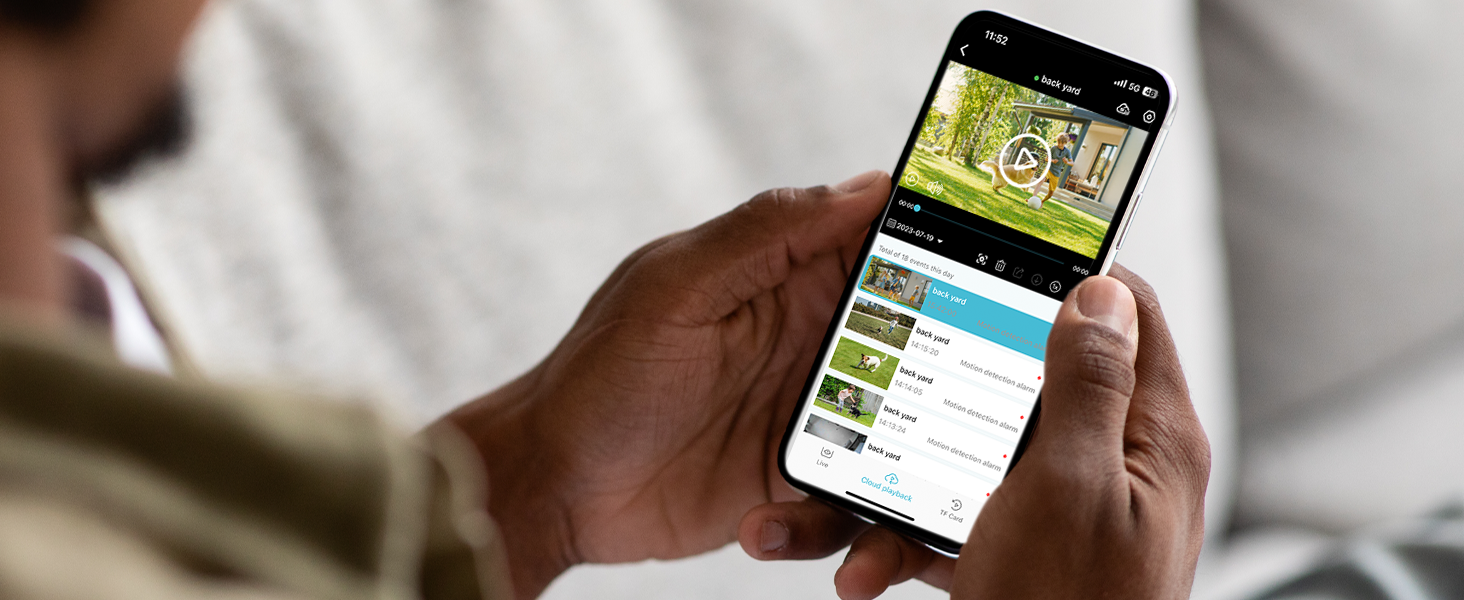
Image: App interface for live viewpřehrávání a přehrávání.
4.2 Obousměrný zvuk
Použití funkce obousměrného zvuku:
- V přímém přenosu view, tap the microphone icon.
- Speak into your phone to communicate through the camera's speaker.
- Tap the icon again to end communication.

Image: Two-way audio functionality.
4.3 Detekce pohybu a upozornění
- The camera detects motion and sends instant notifications to your smartphone.
- Customize detection zones within the app to focus on specific areas and reduce false alarms (e.g., ignoring pets or passing cars).
- When motion is detected, the camera can automatically activate a siren and spotlight to deter intruders.

Image: Customizing detection zones for precise monitoring.

Image: AI detection for security and bird recognition.
4.4 Barevné noční vidění
The camera utilizes starlight color night vision technology to provide clear, full-color images even in very low light conditions. This enhances detail and identification compared to traditional black and white night vision.

Image: 2K Color Night Vision in action.
4.5 Integrace s Alexou
Integrace s Amazon Alexou:
- Enable the Rraycom skill in the Alexa app.
- Link your Rraycom account.
- Use voice commands like "Alexa, show me the front door camera" to view live feeds on compatible Alexa devices (e.g., Echo Show).

Image: Alexa integration for voice control and viewIng.
5. Údržba
5.1 Správa baterie
- Monitor battery levels regularly through the app.
- Recharge cameras promptly when battery levels are low to ensure continuous operation.
- For optimal battery life, avoid extreme temperatures.
5.2 Čištění
- Pravidelně čistěte objektiv a kryt fotoaparátu měkkým hadříkemamp hadříkem k odstranění prachu a nečistot.
- Nepoužívejte drsné chemikálie ani abrazivní čisticí prostředky.
5.3 Správa úložiště
- If using a Micro SD card, ensure it is properly inserted and formatted via the app.
- Pravidelně znovuview a zálohovat důležité potravinytagz SD karty nebo cloudového úložiště.
- The camera supports up to 256GB Micro SD cards (not included).

Obrázek: Možnosti lokálního a cloudového úložiště.
6. Řešení problémů
6.1 Problémy s připojením
- Fotoaparát offline: Ensure the camera is charged and within Wi-Fi range. Restart your router and the camera.
- Failed to connect to Wi-Fi: Verify your Wi-Fi password. Ensure your router supports 2.4GHz or 5GHz and that your phone is connected to the correct band during setup.
6.2 Problémy s detekcí pohybu
- No motion detected: Check the camera's sensitivity settings in the app. Ensure detection zones are correctly configured.
- Příliš mnoho falešných poplachů: Adjust detection zones to exclude high-traffic areas or objects that cause unwanted triggers (e.g., trees swaying). Lower the sensitivity setting.
6.3 Obavy ohledně výdrže baterie
- Krátká výdrž baterie: Časté události detekce pohybu, živé viewing, or two-way audio use can drain the battery faster. Reduce detection sensitivity or frequency of live viewing. Ensure the camera is fully charged.
6.4 Problémy s kvalitou videa
- Rozmazané nebo nejasné video: Clean the camera lens. Ensure there are no obstructions in front of the lens. Check your Wi-Fi signal strength.
- Špatné noční vidění: Ensure the camera's spotlight is enabled if you desire color night vision. Check for any light sources that might interfere with the camera's infrared sensors.
7. Specifikace
| Funkce | Specifikace |
|---|---|
| Model | B0CMDH1P1L |
| Značka | Rraycom |
| Technologie připojení | Bezdrátové (Wi-Fi) |
| Technologie bezdrátové komunikace | Wi-Fi (5G/2.4G dvoupásmové) |
| Rozlišení záznamu videa | 2K, 1080p |
| Zdroj napájení | Battery (5200mAh Lithium Ion, included) |
| Hodnocení mezinárodní ochrany | IP65 |
| Vnitřní/venkovní použití | Venkovní (vhodné i pro vnitřní použití) |
| Speciální funkce | 2-Way Audio, 2K QHD Resolution, Color Night Vision, Local Recording, Built-In Light, Motion Sensor, Portable |
| Kompatibilní zařízení | Android, iOS, Amazon Alexa |
| Typ montáže | Držák na zeď |
| Místní úložiště | Micro SD karta (až 256 GB, není součástí balení) |
| Cloudové úložiště | 1-day complimentary playback |
| Hmotnost položky | 1.92 liber (0.87 kilogramů) |
| Rozměry balení | 12.56 x 4.45 x 2.91 palce |
| Barva | Šedá |
| Počet položek | 3 |
8. Záruka a podpora
For warranty information and technical support, please contact Rraycom customer service directly. Details are typically provided with your product packaging or on the official Rraycom webmísto.
You may also reach out via email:
- E-mail: aftersale@rraycom.com

Image: Rraycom Customer Service contact information.