
1. Úvod
This manual provides detailed instructions for the installation, operation, and maintenance of your ViaBecs 10.2-inch Android 12 Car Stereo, Model CAN005-X. Please read this manual thoroughly before using the product to ensure proper function and to maximize your user experience. This unit is specifically designed for Toyota Tundra (2007-2013) and Toyota Sequoia (2008-2018) vehicles equipped with the JBL sound system.
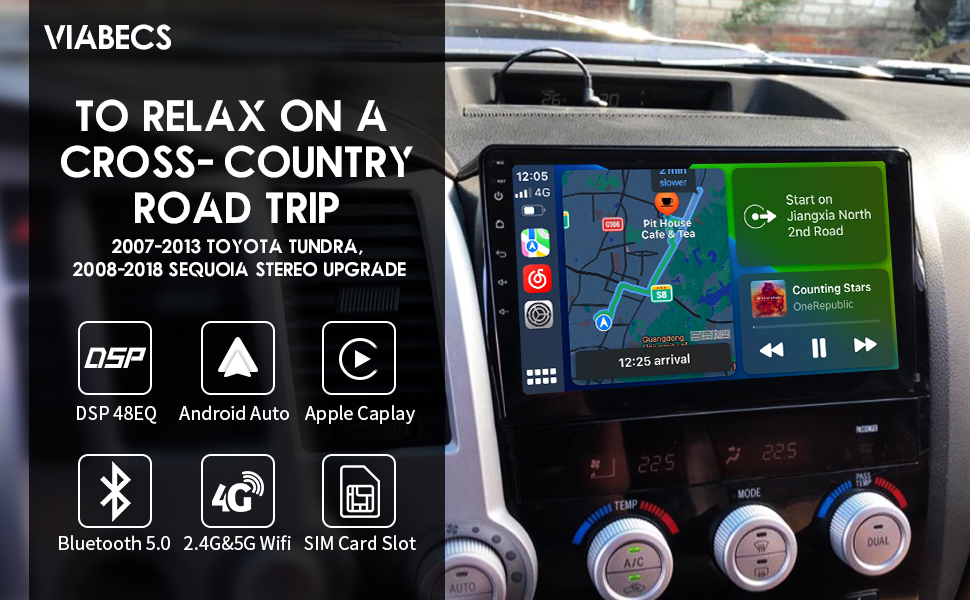
The ViaBecs 10.2-inch car stereo seamlessly integrated into the dashboard of a Toyota Tundra, showcasing its large display and modern interface within the vehicle's interior.
2. Konec produktuview
Klíčové vlastnosti
- Operační systém: Android 12.0
- Procesor: UIS7862 Octa-core, up to 2.0GHz frequency
- Paměť a úložiště: 6 GB RAM, 128 GB interní paměť
- Zobrazit: 10.2-inch QLED Touchscreen, 1280x720 resolution, 1080P HD video support, 178° Full View Angle, Capacitive Touch, 2.5D Multi-touch
- Konektivita: Wireless Apple CarPlay, Wireless/Wired Android Auto, Mirror Link, Built-in GPS, 2.4GHz & 5GHz WiFi, 4G, Bluetooth 5.0, AM/FM Radio
- Zvuk: Built-in DSP (Digital Sound Processor), 48-band Equalizer (EQ), Bass Boost, Bass Filter, Immersive Surround Sound
- Integrace vozidla: Plug-and-Play harness (CAN005-X) retains factory steering wheel controls, JBL ampzáchranář a couvací kamera.
- Aktualizace: Online System Update capability
Included Components (What's in the Box)
- 1x Car Play Stereo Unit
- 1x Plug and Play Harness (CAN005-X)
- 1x 4P USB Cable
- 1x 6P USB Cable
- 1x 20P Audio Cable
- 1x 10P Camera Cable & Wi-Fi Antenna
- 1x GPS anténa
- 1x 4G Antenna
- 1x externí mikrofon
- 2x Uživatelská příručka
- 1x Záruční list

Detailní view of the CAN005-X Plug-and-Play wiring harness, including various connectors and the CAN bus decoder module, designed for seamless integration with compatible vehicles.
3. Nastavení a instalace
The ViaBecs CAN005-X car stereo is designed for a plug-and-play installation in compatible Toyota Tundra (2007-2013) and Sequoia (2008-2018) models with the JBL sound system. A dedicated dash frame and wiring harness are included to simplify the process.
Kontrola kompatibility
Ensure your vehicle is a Toyota Tundra (2007-2013) or Toyota Sequoia (2008-2018) and is equipped with the JBL factory sound system. The CAN005-X harness is specifically designed to integrate with these configurations, retaining factory steering wheel controls, the JBL amplifier, and the original backup camera functionality.
An image demonstrating the ViaBecs 10.2-inch car stereo installed in a Toyota Tundra dashboard. It highlights compatibility for 2007-2013 Tundra and 2008-2018 Sequoia, with specific notes for JBL and non-JBL factory radio configurations.
Kroky instalace (obecné pokyny)
- Příprava: Před zahájením jakýchkoli elektrických prací odpojte baterii vozidla.
- Odstraňte tovární jednotku: Carefully remove the existing factory radio and dashboard trim. Refer to your vehicle's service manual or online resources for specific trim removal instructions.
- Připojení kabelového svazku: Connect the provided CAN005-X Plug-and-Play harness to the vehicle's wiring and the new ViaBecs stereo unit. Ensure all connections are secure.
- Připojení antény: Connect the GPS antenna, 4G antenna, and Wi-Fi antenna to the corresponding ports on the stereo unit. Position the antennas in locations that provide optimal signal reception.
- Externí mikrofon: Connect the external microphone and route it to a suitable location for clear voice pickup (e.g., near the rearview mirror or steering column).
- Test funkčnosti: Before fully reassembling the dashboard, reconnect the battery and perform a basic test of the stereo's functions, including power, audio, steering wheel controls, and backup camera.
- Zabezpečená jednotka: Mount the new stereo unit into the dashboard using the provided dash frame and secure it.
- Znovu sestavit: Znovu nainstalujte všechny ozdobné díly palubní desky.
For detailed, step-by-step installation instructions, please refer to the dedicated Installation Manual (PDF) provided with your product or available online.
4. Návod k obsluze
Your ViaBecs car stereo runs on Android 12.0, offering a familiar and intuitive interface. The 10.2-inch QLED touchscreen supports multi-touch gestures for easy navigation.
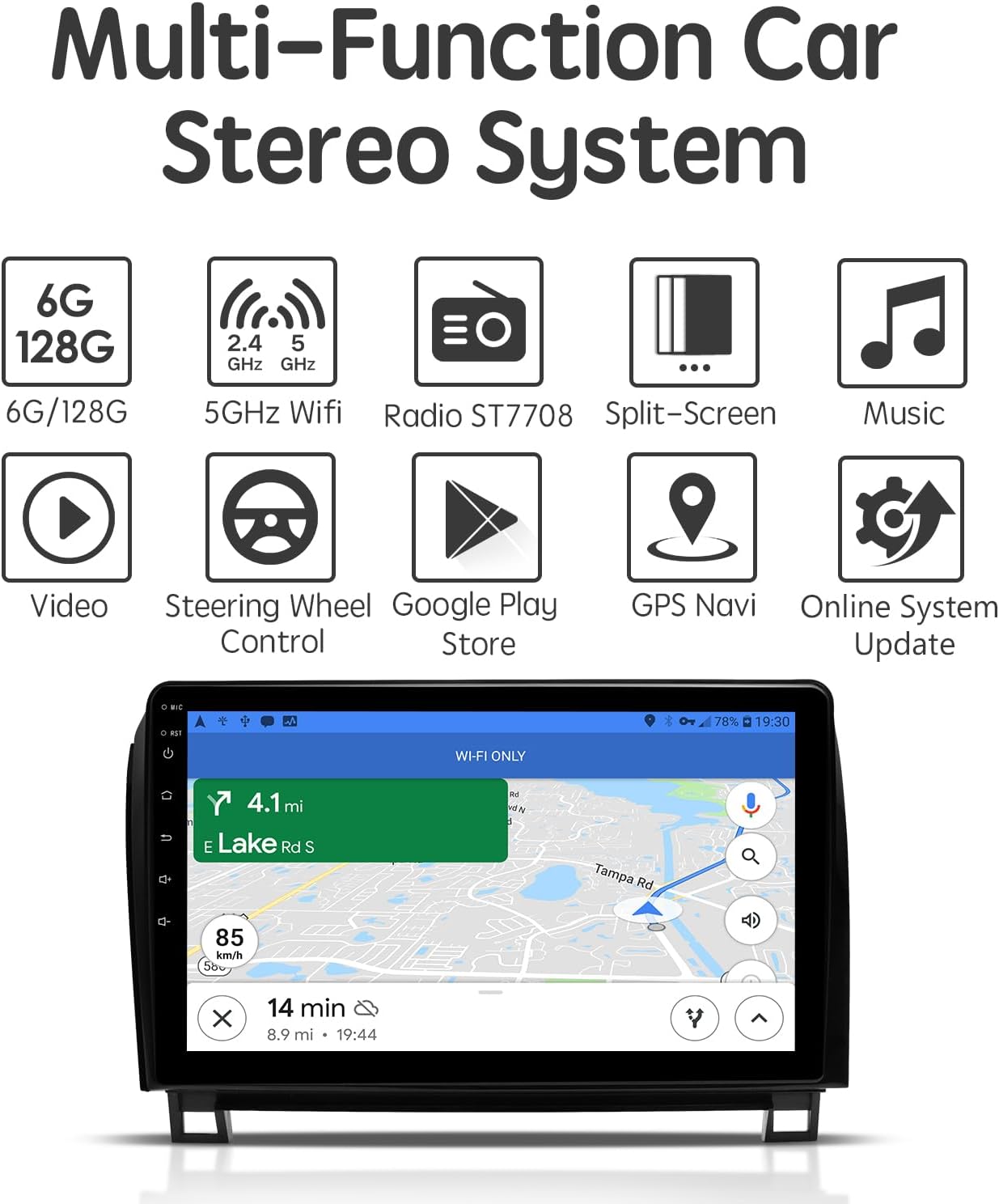
A graphic illustrating the multi-functional capabilities of the car stereo, including 6GB RAM/128GB ROM, 5GHz WiFi, Radio (ST7708), Split-Screen, Music playback, Video playback, Steering Wheel Control, Google Play Store access, GPS Navigation, and Online System Updates.
4.1 Základní operace
- Zapnutí/vypnutí: The unit typically powers on with the vehicle's ignition. A long press on the power button (if available) can turn the unit off or put it into standby.
- Navigace na dotykové obrazovce: Swipe, tap, and pinch-to-zoom gestures are supported, similar to a smartphone or tablet.
- Domovská obrazovka: Access frequently used apps and widgets from the customizable home screen.
- Zásuvka aplikace: Swipe up or tap the app icon to view všechny nainstalované aplikace.
- Nastavení: Access system settings for display, sound, network, and vehicle-specific configurations.
4.2 Smartphone Connectivity (CarPlay, Android Auto, Mirror Link)
The stereo supports seamless integration with your smartphone for navigation, music, and communication.
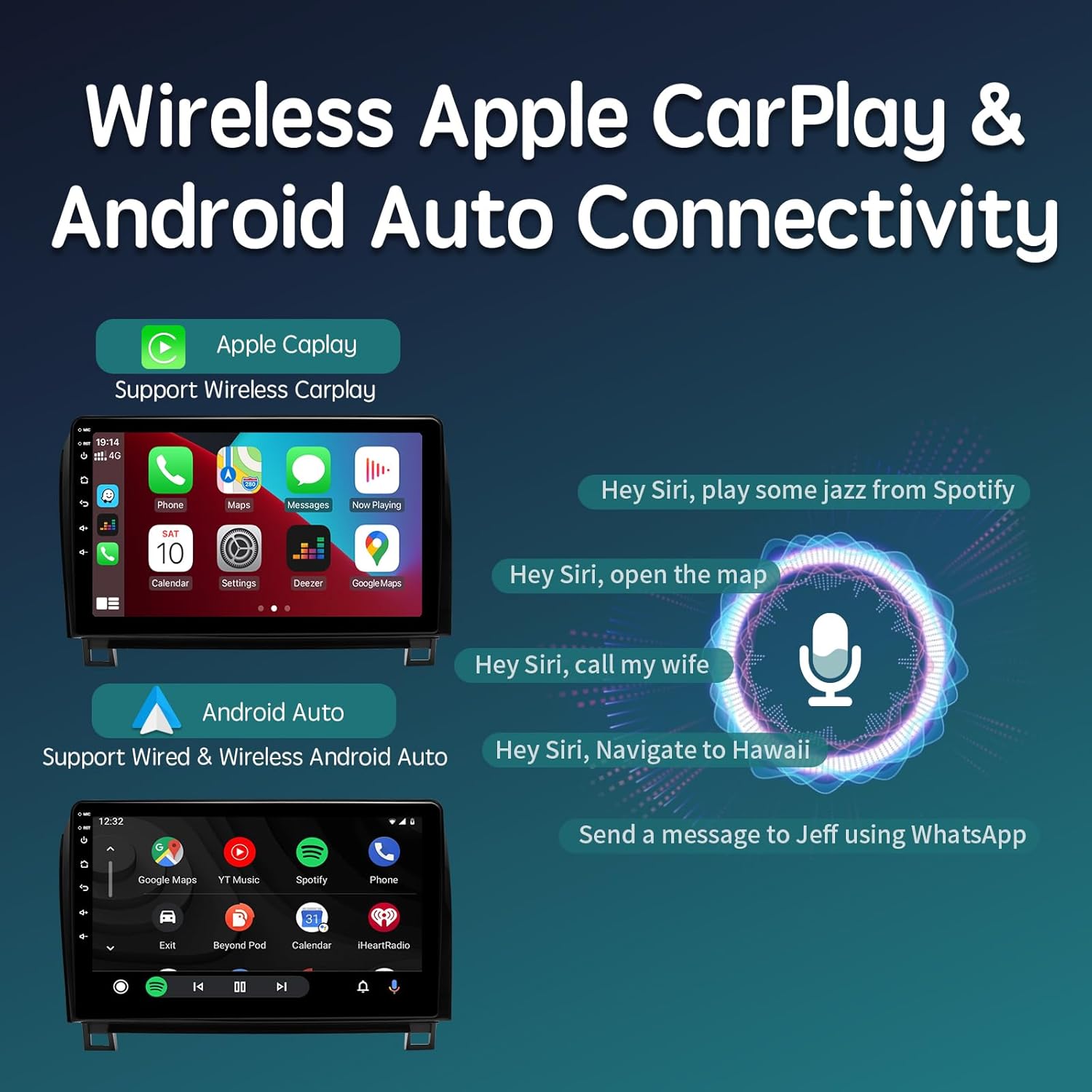
- Bezdrátové Apple CarPlay: Connect your iPhone wirelessly to access CarPlay features directly on the stereo's screen.
- Bezdrátové/kabelové Android Auto: Connect your Android phone wirelessly or via USB to use Android Auto.
- Zrcadlový odkaz: Use the Tlink5 app to mirror your smartphone's screen onto the stereo display.

Screenshots showing the wireless Apple CarPlay and wired/wireless Android Auto interfaces. Examples of voice commands for Siri are also displayed, demonstrating hands-free operation.
4.3 Navigace
The unit features a built-in GPS module and supports various navigation applications.
- GPS anténa: Pro přesné určení polohy se ujistěte, že je anténa GPS správně nainstalována.
- Navigační aplikace: Utilize pre-installed navigation apps or download your preferred apps (e.g., Google Maps, Waze) from the Google Play Store.
- Offline mapy: Stáhněte si offline mapy pro navigaci bez připojení k internetu.
4.4 Audio Customization (DSP & EQ)
Enhance your audio experience with the integrated Digital Sound Processor (DSP) and 48-band Equalizer.
- 48pásmový EQ: Adjust individual frequency bands to fine-tune the sound output to your preference.
- Nastavení DSP: Access advanced DSP controls for Subwoofer Frequency, Bass Boost, Bass Filter, and Immersive Surround Sound to optimize audio for your vehicle's acoustics.

A visual representation of the built-in Digital Sound Processor (DSP) and 48-band Equalizer (EQ) interface, demonstrating options for sound customization, including bass filters and audio delay settings for an optimized listening experience.
4.5 Bluetooth 5.0
Připojte svůj smartphone přes Bluetooth pro handsfree volání a streamování hudby.
- Párování: Enable Bluetooth on your phone and search for the stereo unit. Select the unit and confirm pairing.
- Hands-free volání: Make and receive calls directly from the stereo screen using the external microphone.
- Streamování zvuku: Play music and other audio from your phone through the car's speakers.
- Synchronizace telefonního seznamu: Synchronizujte kontakty v telefonu pro snadný přístup.
5. Údržba
To ensure the longevity and optimal performance of your ViaBecs car stereo, follow these maintenance guidelines:
- Čištění obrazovky: Use a soft, lint-free cloth specifically designed for electronics to clean the QLED touchscreen. Avoid abrasive materials or harsh chemical cleaners.
- Aktualizace softwaru: Regularly check for and install system updates to ensure the latest features, security patches, and performance improvements. The unit supports online system updates.
- Podmínky prostředí: Nevystavujte jednotku extrémním teplotám, delšímu přímému slunečnímu záření nebo nadměrné vlhkosti.
- Připojení kabelů: Pravidelně kontrolujte všechna kabelová připojení, abyste se ujistili, že jsou bezpečná a nepoškozená.
6. Řešení problémů
If you encounter issues with your ViaBecs car stereo, refer to the following common troubleshooting steps:
- Bez napájení:
- Check vehicle's fuse box for blown fuses related to the stereo or accessory power.
- Ensure all power cables are securely connected to the stereo and vehicle harness.
- Žádný zvuk:
- Verify volume levels are not muted or set too low.
- Check speaker connections and ensure the JBL amplifier is receiving power and signal.
- Confirm audio output settings in the stereo's menu.
- Nezobrazuje se couvací kamera:
- Ensure the camera input cable is correctly connected to the stereo.
- Verify the reverse trigger wire is properly connected to the vehicle's reverse light circuit.
- Check camera settings within the stereo's menu.
- Problémy s připojením k CarPlay/Android Auto:
- Pro bezdrátové připojení se ujistěte, že máte v telefonu a stereo systému povoleny funkce Bluetooth a Wi-Fi.
- Pro kabelové připojení zkuste jiný USB kabel.
- Restart both your phone and the stereo unit.
- Ztráta signálu GPS:
- Ujistěte se, že je anténa GPS bezpečně připojena a umístěna s volným view z nebe.
- Avoid placing the antenna under metal objects that could obstruct the signal.
- Špatná kvalita mikrofonu:
- Ensure the external microphone is securely connected.
- Reposition the microphone to a location with less ambient noise and closer to the driver.
- Check microphone input settings in the stereo's menu.
If these steps do not resolve the issue, please contact ViaBecs technical support for further assistance.
7. Specifikace
| Funkce | Specifikace |
|---|---|
| Číslo modelu | CAN005-X |
| Operační systém | Android 12.0 |
| Procesor | UIS7862 Octa-core, up to 2.0GHz |
| BERAN | 6 GB |
| Interní úložiště | 128 GB |
| Velikost obrazovky | 10.2 palce |
| Typ obrazovky | Dotyková obrazovka QLED |
| Rozlišení obrazovky | 1280x720 |
| Technologie připojení | 5GHz WiFi / 4G / Wireless Android Auto / AM/FM / Bluetooth 5.0 |
| Speciální funkce | Built-in DSP, 48EQ, Online Update System, Wireless Carplay & IOS Mirror Link, Wireless and Wired Android Auto & Android Mirror Link |
| Režim zvukového výstupu | Stereo |
| Typ montáže | Držák na palubní desku |
| Rozměry produktu | 10.2 x 10.2 x 10.2 palce |
| Hmotnost položky | 4.4 libry |

An image highlighting the specifications of the 10.2-inch 1280x720 QLED touchscreen, including its 178° full view angle, capacitive touch technology, and 2.5D multi-touch capabilities, with a scenic background.
8. Záruka a podpora
Your ViaBecs car stereo is backed by a 1-letá záruka od data nákupu. Tato záruka se vztahuje na výrobní vady a zajišťuje, že výrobek splňuje stanovené výkonnostní standardy.
ViaBecs provides professional technical support for assistance with setup, connectivity issues, troubleshooting, and general inquiries. For support, please refer to the contact information provided on your warranty card or the official ViaBecs webmísto.
Uschovejte si prosím doklad o koupi pro uplatnění záruky.