
Rfiver MT5003
Rfiver Heavy Duty Mobile TV Stand User Manual
Model: MT5003
Značka: Rfiver
1. Úvod
Thank you for choosing the Rfiver Heavy Duty Mobile TV Stand. This product is engineered to provide a robust, versatile, and convenient solution for displaying large televisions in various settings. Its durable alloy steel construction ensures stability for TVs from 50 to 92 inches, weighing up to 200 lbs. With its height-adjustable design, smooth-rolling lockable wheels, and integrated AV shelf, this stand offers optimal viewing flexibility and efficient space utilization.

Image 1.1: The Rfiver Heavy Duty Mobile TV Stand, showcasing its sturdy design and integrated AV shelf.
2. Bezpečnostní informace
Please read all safety warnings and instructions carefully before assembly and use. Failure to follow these instructions may result in property damage, serious injury, or death.
- Nosnost: Do not exceed the maximum weight capacity of 200 lbs (90.7 kg) for the TV and 44 lbs (20 kg) for the AV shelf. Overloading can cause instability and tip-over.
- Kompatibilita velikosti TV: This stand is designed for TVs between 50 and 92 inches. Ensure your TV's VESA mounting pattern is compatible (up to 800x600mm).
- Stabilita: Always ensure the stand is placed on a flat, stable, and level surface. Lock the wheels when the stand is stationary to prevent accidental movement.
- Děti a domácí mazlíčci: Keep children and pets away from the stand during assembly and when moving the unit. Do not allow children to climb on or play with the stand.
- Shromáždění: Assemble the stand strictly according to the instructions. Do not use power tools for assembly unless specified, as overtightening screws can cause damage.
- Přesun stojanu: When moving the stand, ensure the TV is securely mounted and all cables are managed to prevent snagging. Move slowly and carefully, especially over uneven surfaces.
3. Obsah balení
Před zahájením montáže ověřte, zda jsou všechny níže uvedené komponenty přítomny a nepoškozené. Pokud některé díly chybí nebo jsou poškozené, kontaktujte zákaznickou podporu.
| Část | Popis | Množství |
|---|---|---|
| A | Základní nohy | 2 |
| B | Vertikální podpěrné sloupy | 2 |
| C | Držáky na TV | 2 |
| D | AV police | 1 |
| E | Lockable Casters (Wheels) | 4 |
| F | Hardware Kit (Screws, Washers, Spacers, Allen Wrench, Spanner) | 1 sada |
| G | Cable Management Straps | V ceně |

Obrázek 3.1: Konecview of the stand's main components, highlighting its quality construction.
4. Nastavení a montáž
Assembly is designed to be straightforward and can typically be completed within 20 minutes. All necessary tools and clearly numbered parts are included. Follow the steps below carefully.
- Attach Casters to Base Legs: Securely screw the four lockable casters (E) into the designated holes on the bottom of the base legs (A). Ensure they are tightened firmly.
- Assemble Vertical Support Poles: Connect the vertical support poles (B) to the base legs (A) using the appropriate screws from the hardware kit (F). Ensure the poles are aligned correctly and tightened for stability.
- Install AV Shelf: Slide the AV shelf (D) onto the vertical support poles (B) at your desired height. Secure it in place using the provided fasteners. The shelf is height-adjustable.
- Připevnění držáků pro montáž televizoru: Secure the TV mounting brackets (C) to the back of your television using the appropriate VESA screws, washers, and spacers from the hardware kit (F). Refer to your TV's manual for specific VESA pattern requirements. Ensure the brackets are centered and level.
- Upevnění televizoru na stojan: Carefully lift the television with the attached brackets and hook them onto the vertical support poles (B). Ensure the TV is securely seated on the stand. Use the safety screws or locking mechanisms on the brackets to prevent accidental dislodgement.
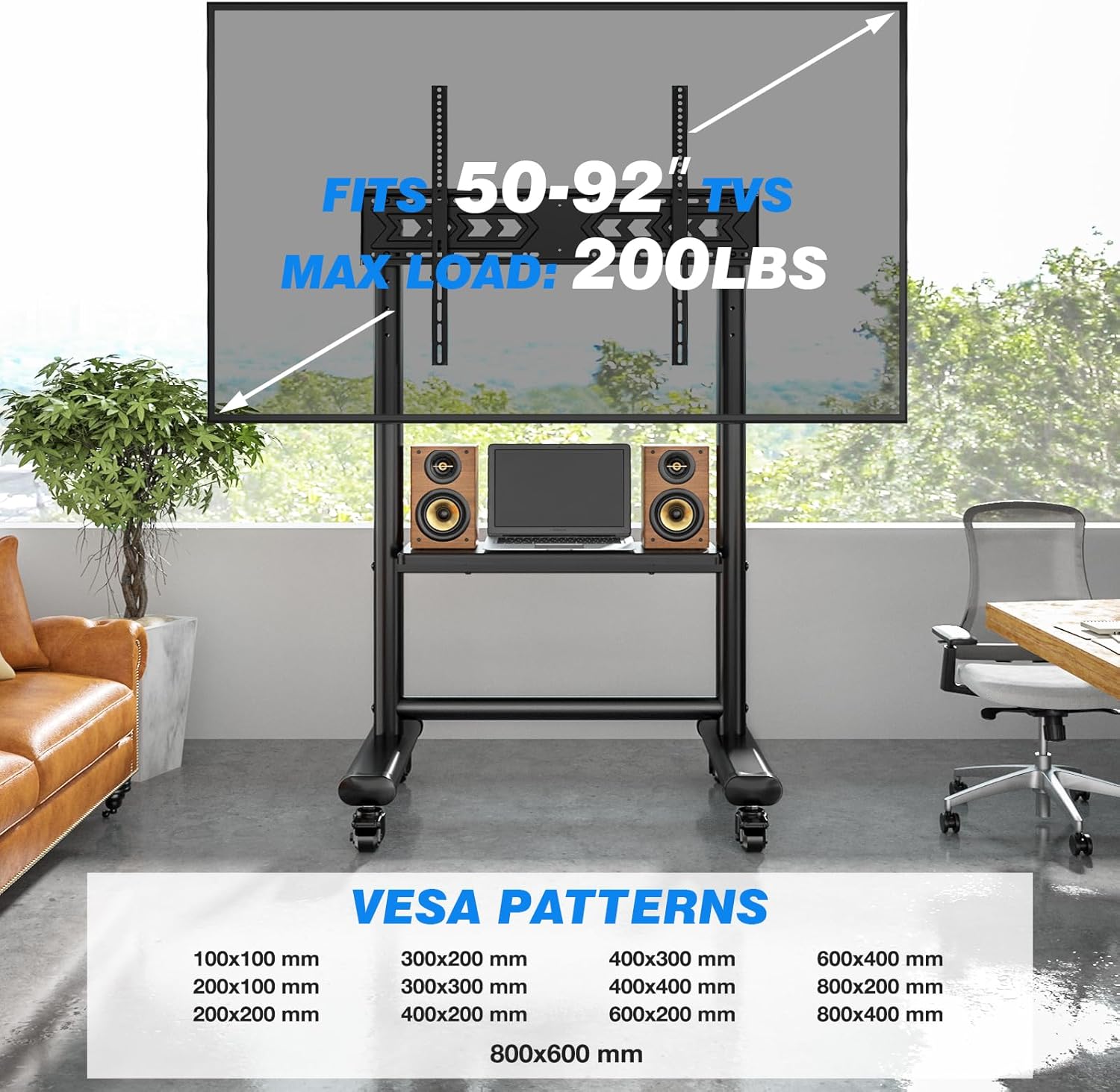
Image 4.1: VESA compatibility and maximum load capacity details for TV mounting.
5. Návod k obsluze
5.1 Mobility and Locking
The stand is equipped with four sturdy, silent lockable wheels for effortless mobility. To move the stand, unlock all four casters by flipping their levers upwards. Once the stand is in the desired position, push the levers downwards to lock the wheels and prevent movement.

Image 5.1: Detail of the 360-degree rotating and lockable casters for easy movement and secure positioning.
Video 5.1: Demonstrates the mobility and locking features of the Rfiver Heavy Duty Mobile TV Stand, showcasing its versatility in various environments.
5.2 Nastavení výšky
The TV mounting height can be adjusted to optimize your viewing experience. The stand offers a floor-to-screen-center height adjustment range of 63.5" to 70.6". To adjust the height, loosen the securing bolts on the vertical support poles, carefully raise or lower the TV to the desired level, and then re-tighten the bolts firmly to secure the position.
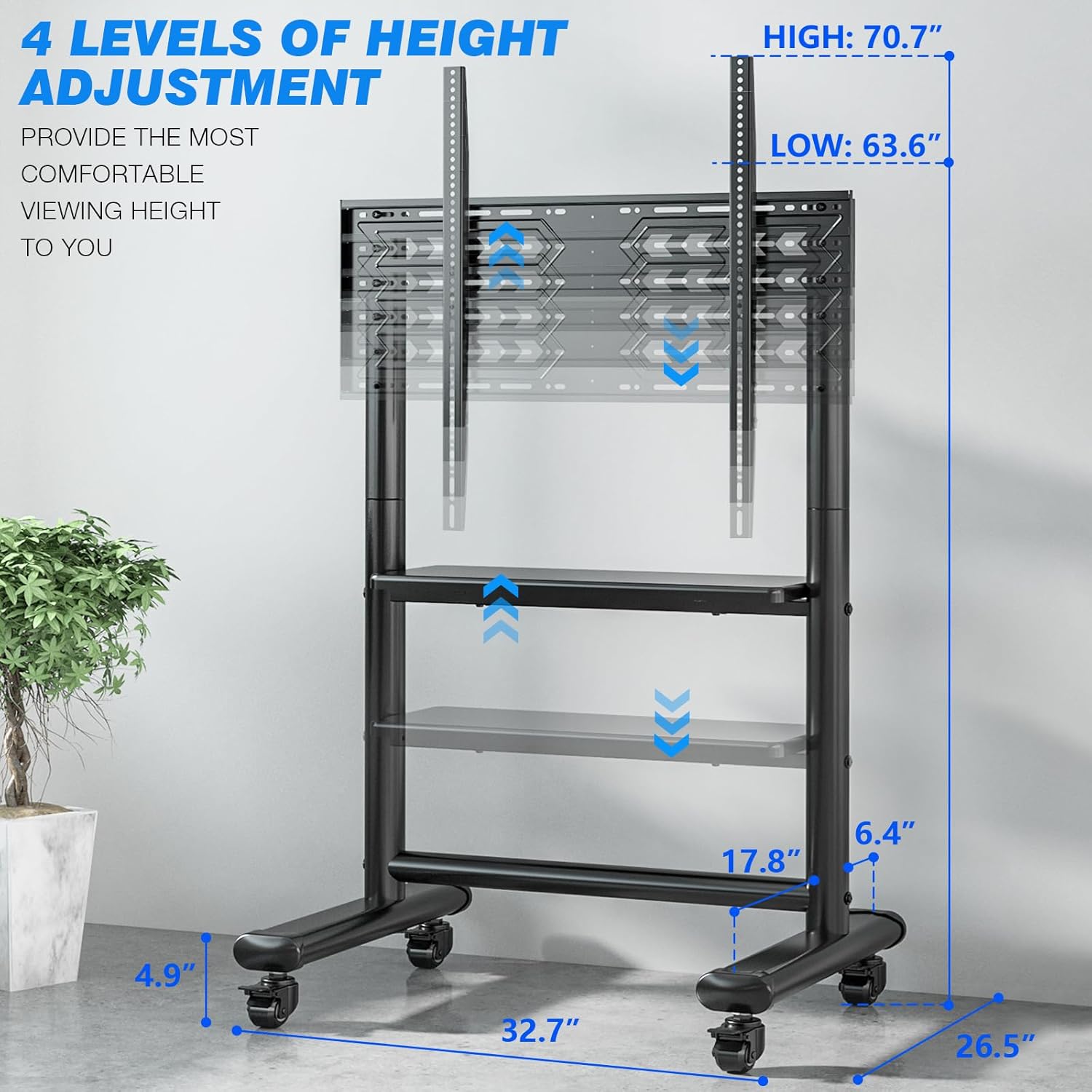
Image 5.2: Visual representation of the adjustable height settings, providing a comfortable viewzkušenosti.
5.3 AV Shelf Usage
The integrated MDF AV shelf provides convenient storage for media components such as modems, routers, DVRs, subwoofers, PCs, or gaming consoles. The shelf has a load capacity of 44 lbs (20 kg) and is also height-adjustable. Position it at a height that best suits your equipment and viewnastavení.

Image 5.3: The spacious AV shelf, demonstrating its capacity for various entertainment equipment.
5.4 Správa kabelů
Utilize the integrated cable management system to keep your cables organized and out of sight. Route power cords and AV cables along the vertical support poles and secure them with the provided cable management straps. This helps maintain a clean and tidy appearance and prevents tripping hazards.
6. Údržba
Pravidelná údržba zajistí dlouhou životnost a bezpečný provoz vašeho televizního stolku.
- Čištění: Otřete stojan měkkým hadříkemamp cloth to remove dust and dirt. Avoid using harsh chemicals or abrasive cleaners, as they may damage the finish.
- Kontrola hardwaru: Periodically check all screws and bolts to ensure they remain tight. Re-tighten any loose fasteners to maintain stability.
- Kontrola koleček: Inspect the wheels regularly for any accumulated debris (hair, lint, etc.) that might hinder smooth rolling. Clean as necessary.
7. Řešení problémů
If you encounter any issues with your Rfiver TV stand, refer to the common problems and solutions below. If the problem persists, please contact customer support.
| Problém | Možná příčina | Řešení |
|---|---|---|
| Stand is shaky or unstable. | Volné spoje; nerovný povrch; přetížení. | Ensure all screws are tightened. Move to a flat, level surface. Verify TV and shelf weight do not exceed limits. |
| TV slides in brackets. | Improperly tightened VESA screws; incorrect VESA screw length. | Ensure VESA screws are securely tightened. Use appropriate screw length and spacers for your TV. |
| Kola se neotáčejí hladce. | Kolečka jsou zablokovaná; v kolečkách jsou nečistoty. | Unlock all casters. Remove any hair or debris from the wheels. |
| Obtížnost s montáží. | Missing or misidentified parts; unclear instructions. | Double-check all parts against the package contents list. Refer to the numbered diagrams in the full instruction manual. Contact customer support if parts are defective or missing. |
8. Specifikace
| Funkce | Detail |
|---|---|
| Značka | Rfiver |
| Číslo modelu | MT5003 |
| Materiál | Alloy Steel (Frame), MDF (Shelf) |
| Barva | Černý |
| Kompatibilní velikosti TV | 50 - 92 palců |
| Maximum TV Load Capacity | 200 lb (90.7 kg) |
| Maximum AV Shelf Load Capacity | 44 lb (20 kg) |
| Kompatibilita VESA | Up to 800x600mm (Min: 100x100mm) |
| Height Adjustment Range (Floor to Screen Center) | 63.5" - 70.6" |
| Mobilita | 4 Lockable Casters |
| Hmotnost položky | 42.5 libry (19.3 kg) |
| Rozměry balení | 36.75 x 12.75 x 7.5 palce |
9. Záruka a podpora
Rfiver is committed to providing high-quality products and excellent customer service. If you have any questions, concerns, or require assistance with your TV stand, please do not hesitate to contact our friendly customer support team. We aim to respond to all inquiries within 12 hours.
For warranty information or to report any issues, please refer to the contact details provided with your purchase or visit the official Rfiver webmísto.
Ask a question about this manual
Ask about setup, troubleshooting, compatibility, parts, safety, or missing instructions. Manuals+ will review the question and use this page’s manual context to help answer it.