
Zavedení
The M-Vave Cube Baby Bass is a portable and user-friendly multi-effects processor designed for bass guitarists. It offers a range of classic amplifier emulations and essential effects to enhance your bass sound. This manual provides instructions for setting up, operating, and maintaining your Cube Baby Bass pedal.
Klíčové vlastnosti
- 8 klasických amplifier emulations
- 5 essential effects: Chorus, Vibrato, Compressor, Delay, and Reverb
- Support for third-party Impulse Responses (IRs)
- Built-in precise tuner
- Integrated rechargeable battery for portable use
- USB charging via power bank or mobile phone adapter
- Kompaktní a robustní design
Obsah balení
Zkontrolujte prosím, zda jsou v balení přítomny všechny položky:
- M-Vave Cube Baby Bass Multi-Effects Pedal
- USB nabíjecí kabel
- Uživatelská příručka (tento dokument)

Image: M-Vave Cube Baby Bass pedal, USB cables, and user manual as included in the package.
Ovládací prvky a připojení
Familiarize yourself with the controls and connection points on your Cube Baby Bass pedal.
Horní panel
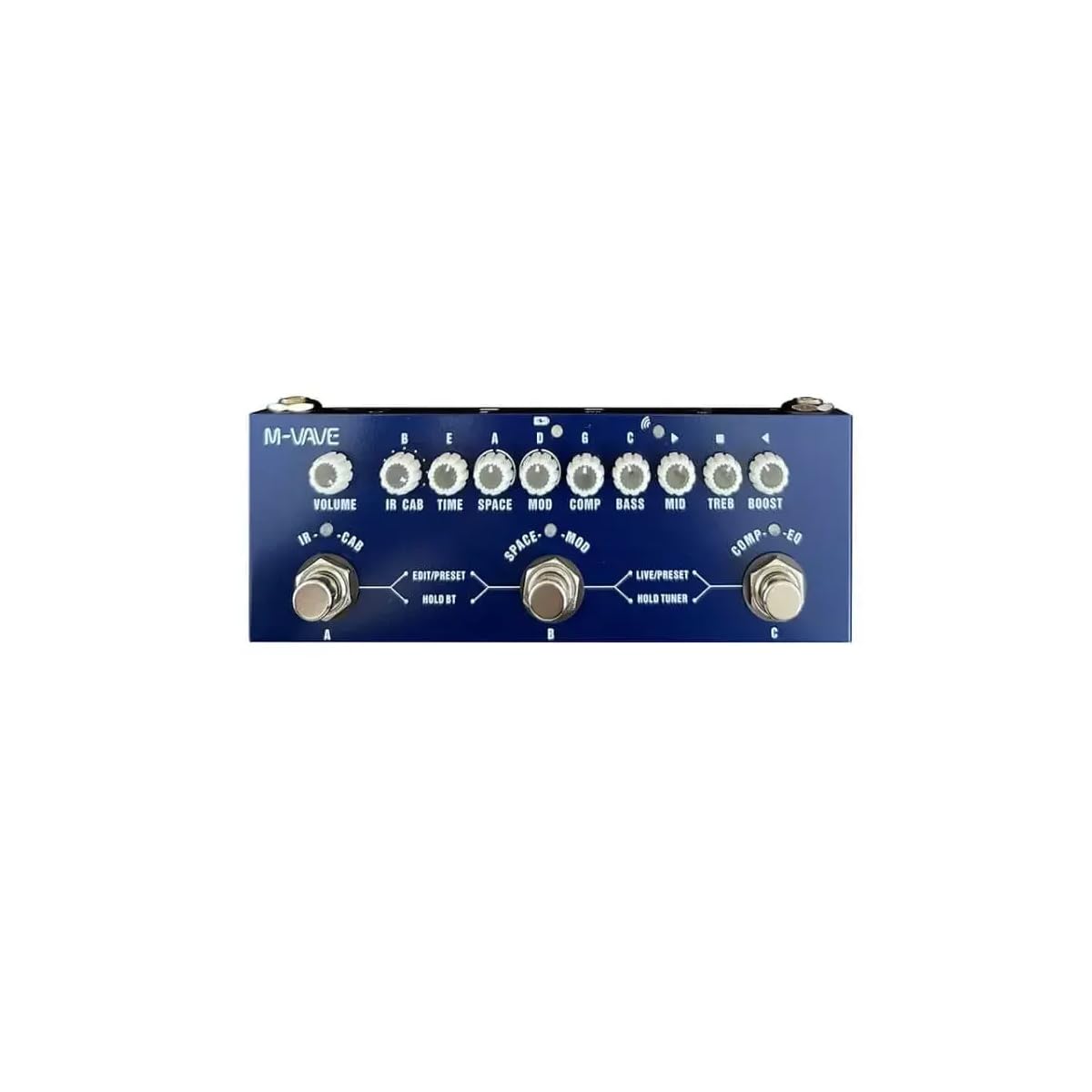
Obrázek: Nahoře view of the M-Vave Cube Baby Bass pedal. It features multiple control knobs for various effects and two footswitches for preset selection and tuner activation.
- Knoflík VOLUME: Upravuje celkovou výstupní hlasitost.
- CAB Knob: Selects and adjusts cabinet simulations.
- Knoflík TIME: Controls the delay time or other time-based effect parameters.
- Knoflík MEZERNÍK: Adjusts reverb parameters.
- Knoflík MOD: Controls modulation effects like Chorus or Vibrato.
- Knoflík COMP: Adjusts the compressor effect.
- Knoflík BASS: Adjusts the low-frequency equalization.
- Knoflík MID: Adjusts the mid-frequency equalization.
- TREB Knob: Adjusts the high-frequency equalization.
- Knoflík BOOST: Ovládá úroveň zesílení.
- LEFT Footswitch (PRESET): Toggles between presets or modes.
- RIGHT Footswitch (TUNER/BOOST): Activates the tuner or boost function.
Zadní panel

Obrázek: Zadní view of the M-Vave Cube Baby Bass pedal. From left to right, it shows the IN (input) jack, a power button, a USB-C port for charging and data, a micro-USB port (likely for OTG/external device), a headphone output, and the OUT (output) jack.
- IN Jack (1/4-inch): Zde připojte svou basovou kytaru.
- Vypínač: Zapíná nebo vypíná jednotku.
- Port USB-C: For charging the internal battery and connecting to a computer for IR loading or software updates.
- Micro-USB port: (Likely for OTG or specific data functions, refer to software manual for details).
- Headphone Jack (1/8-inch): Pro tiché cvičení si můžete připojit sluchátka.
- OUT Jack (1/4-inch): Připojte se k vašemu amppřehrávač zvuku, audio rozhraní nebo mixážní pult.
Nastavení
- Nabíjení baterie: Connect the USB charging cable to the USB-C port on the pedal and to a USB power adapter (not included) or a power bank. The pedal takes approximately 2 hours to fully charge and provides 6-8 hours of operation.
- Připojení nástroje: Zapojte baskytaru do IN jack pomocí standardního 1/4palcového nástrojového kabelu.
- Připojení k an AmpMixér/Pecka: Připojte VEN jack pro tvou basu amplifier, audio interface, or mixer using a standard 1/4-inch instrument cable.
- Připojení sluchátek: For silent practice, plug your headphones into the Jack pro sluchátka.
- Zapnutí: Press and hold the Power Button to turn on the Cube Baby Bass.
Návod k obsluze
Základní operace
- Výběr předvoleb: Použijte LEFT Footswitch (PRESET) to cycle through available presets. The LED indicator will show the currently selected preset.
- Adjusting Effects: Turn the corresponding knobs (VOLUME, CAB, TIME, SPACE, MOD, COMP, BASS, MID, TREB, BOOST) to adjust the parameters of the active effects.
- Použití tuneru: Stiskněte a podržte RIGHT Footswitch (TUNER/BOOST) to activate the built-in tuner. Play a single note on your bass, and the display will indicate the note and tuning accuracy. Press the footswitch again to exit tuner mode.
- Activating Boost: A quick press of the RIGHT Footswitch (TUNER/BOOST) will engage or disengage the boost function, controlled by the BOOST knob.
Advanced Features (IR Loading)
The Cube Baby Bass supports loading third-party Impulse Responses (IRs) to expand its cabinet simulation capabilities.
- Připojení k počítači: Use the USB-C cable to connect the pedal to your computer.
- Software: Download and install the dedicated M-Vave software (available from the M-Vave official webstránky).
- Load IRs: Follow the software instructions to load your desired IR files into the pedal's memory.
Údržba
- Čištění: Otřete pedál měkkým, suchým hadříkem. Nepoužívejte abrazivní čisticí prostředky ani rozpouštědla.
- Skladování: Pedál skladujte na chladném a suchém místě mimo dosah přímého slunečního záření a extrémních teplot.
- Péče o baterie: To prolong battery life, avoid fully discharging the battery frequently. Charge the pedal regularly, even if not in use for extended periods.
- Aktualizace firmwaru: Check the M-Vave official webpravidelně aktualizujte firmware na webu, abyste zajistili optimální výkon a přístup k novým funkcím.
Odstraňování problémů
- Žádný zvukový výstup:
- Ujistěte se, že je pedál zapnutý a plně nabitý.
- Zkontrolujte všechna kabelová připojení (přístroj k IN, OUT k ampmixážní pult/mixážní pult, sluchátka).
- Verify that the VOLUME knob is turned up.
- Bypass the pedal to check if the issue is with the instrument or ampživější.
- Zkreslený zvuk:
- Reduce the input level from your bass or the gain settings on the pedal.
- Zkontrolujte vadné kabely.
- Zajistěte ampVstup zprostředkovatele není přebuzen.
- Pedál se nenabíjí:
- Ensure the USB-C cable is securely connected to both the pedal and the power source.
- Try a different USB power adapter or power bank.
- Zkontrolujte, zda není poškozen kabel USB-C.
- Efekty nefungují:
- Ensure the specific effect is enabled within the selected preset.
- Adjust the effect's corresponding knob to hear its impact.
- If using custom IRs, ensure they are loaded correctly.
Specifikace
| Funkce | Specifikace |
|---|---|
| Model | MVA-CBB |
| Rozměry | 19 x 13.5 x 3.7 cm (7.5 x 5.3 x 1.5 palce) |
| Hmotnost | 340 g (0.75 lb) |
| Efekty | 8 Amp Emulations, Chorus, Vibrato, Compressor, Delay, Reverb |
| IR podpora | Yes, third-party IR loading |
| Tuner | Built-in precise tuner |
| Zdroj napájení | Vestavěná dobíjecí baterie |
| Doba nabíjení | Přibl. 2 hodin |
| Provozní doba | 6-8 hodin |
| Vstup | 1/4palcový audio konektor |
| Výstup | 1/4palcový audio konektor |
| Výstup pro sluchátka | 1/8palcový audio konektor |
| Rozhraní USB | USB-C (charging, data), Micro-USB |
Záruka a podpora
Záruka: This product comes with a 2-year manufacturer's warranty from the date of purchase. Please retain your proof of purchase for warranty claims. The warranty covers defects in materials and workmanship under normal use. It does not cover damage caused by misuse, accidents, unauthorized modifications, or normal wear and tear.
Podpora: For technical support, troubleshooting assistance, or warranty inquiries, please contact M-Vave customer service through their official webwebu nebo místního distributora.