
aonus A7
Uživatelská příručka k bezdrátovému vysavači aonus A7 480W
Model: A7
1. Konec produktuview
The aonus A7 480W Cordless Vacuum Cleaner is designed for efficient and versatile cleaning of various surfaces, including carpets and hard floors. It features a powerful brushless motor, intelligent dust detection, and a user-friendly touchscreen display.

Image: The aonus A7 vacuum cleaner showcasing its main unit, extension wand, floor brush, and various attachments, along with a detailed view of its intelligent touchscreen display.
2. Bezpečnostní pokyny
Před použitím spotřebiče si pečlivě přečtěte všechny bezpečnostní pokyny. Nedodržení těchto pokynů může vést k úrazu elektrickým proudem, požáru nebo vážnému zranění.
- Nepoužívejte vysavač venku nebo na mokrém povrchu.
- Nedovolte dětem obsluhovat vysavač. Při používání v blízkosti dětí je nutný pečlivý dohled.
- Nevysávejte hořlavé nebo vznětlivé materiály, jako je benzín, ani je nepoužívejte v oblastech, kde se mohou nacházet.
- Nesbírejte nic, co hoří nebo kouří, jako jsou cigarety, zápalky nebo horký popel.
- Ensure the filter is properly installed before use.
- Používejte pouze tak, jak je popsáno v tomto návodu. Používejte pouze příslušenství doporučené výrobcem.
- Před prováděním jakýchkoli úprav, výměnou příslušenství nebo uložením vysavače jej vypněte.
3. Obsah balení
Ověřte, zda jsou v balení přítomny všechny komponenty:
- Hlavní vakuová jednotka
- Prodlužovací hůlka
- Floor Brush with Anti-Tangle Roller
- Dlouhá plochá tryska
- Kartáč 2 v 1
- Nástěnná nabíječka
- Držák na zeď
- Uživatelská příručka

Image: All components of the aonus A7 vacuum cleaner, including the main unit, various attachments, wall mount, and charger, laid out with the product packaging.
4. Montáž a nastavení
4.1 Montáž
- Zasuňte prodlužovací tyč do hlavní vysavací jednotky, dokud nezacvakne na místo.
- Attach the floor brush to the other end of the extension wand, ensuring it locks securely.
- For handheld use, attach desired accessories (long flat nozzle or 2-in-1 brush) directly to the main vacuum unit.
4.2 Nabíjení baterie
Before first use, fully charge the vacuum cleaner's battery. The battery can be charged while attached to the main unit or separately.
- Connect the wall charger to a power outlet and to the charging port on the main vacuum unit or the wall mount.
- The touchscreen display will indicate the charging status. A full charge typically takes approximately 4-5 hours.

Image: The aonus A7 vacuum cleaner mounted on its wall charging station, illustrating the charging process and battery capacity details.
5. Návod k obsluze
5.1 Zapnutí/vypnutí a výběr režimu
- Stisknutím tlačítka napájení na rukojeti vysavač zapnete nebo vypnete.
- Use the touchscreen display to switch between different suction modes (e.g., Eco, Standard, Max) or activate the Automatic Mode.

Obrázek: Detail view of the aonus A7's all-in-one LED touchscreen, displaying battery level, current mode, and warnings for blockages.
5.2 Automatic Dust Detection
In Automatic Mode, the intelligent dust sensor automatically adjusts the suction power based on the amount and size of dust detected on the surface, optimizing cleaning efficiency and battery life.

Image: Illustration of the aonus A7's automatic mode, showing how the vacuum adjusts suction power (20KPa, 30KPa, 40KPa) based on the detected dust level on the floor.
5.3 Použití různých příloh
The aonus A7 comes with various attachments for different cleaning needs:
- Kartáč na podlahu: Ideal for both hard floors and carpets, featuring an anti-tangle roller and LED lights to illuminate dust.
- Long Flat Nozzle: Perfect for reaching narrow gaps, corners, and tight spaces.
- Štětec 2 v 1: Suitable for cleaning upholstery, keyboards, car interiors, and delicate surfaces.

Image: A collage demonstrating the versatility of the aonus A7, showing it used with the extension wand for high areas, as a floor vacuum, and with handheld attachments for furniture and electronics.
6. Údržba
6.1 Vyprázdnění odpadkového koše
Empty the dustbin regularly to maintain optimal suction power. The dustbin features a one-click release mechanism.
- Držte hlavní jednotku nad odpadkovým košem.
- Stiskněte tlačítko pro uvolnění prachového koše, abyste otevřeli spodní klapku a vyprázdnili jeho obsah.
- Po vyprázdnění bezpečně zavřete klapku.

Image: A hand demonstrating the one-click dust removal feature of the aonus A7, showing the dustbin being emptied directly into a trash can.
6.2 Čištění filtrů
The aonus A7 features a multi-stage filtration system, including a HEPA filter, for 99.9% filtration efficiency. Regular cleaning of filters is crucial for performance.
- Twist and pull to remove the dustbin from the main unit.
- Remove the internal filters (cyclone, steel mesh, HEPA, and foam filters).
- Tap off loose dust. For washable filters, rinse under cold running water until the water runs clear.
- Před opětovnou montáží nechte všechny součásti filtru alespoň 24 hodin zcela vyschnout na vzduchu. Nepoužívejte fén ani přímé teplo.
- Reassemble the filters and dustbin in reverse order.
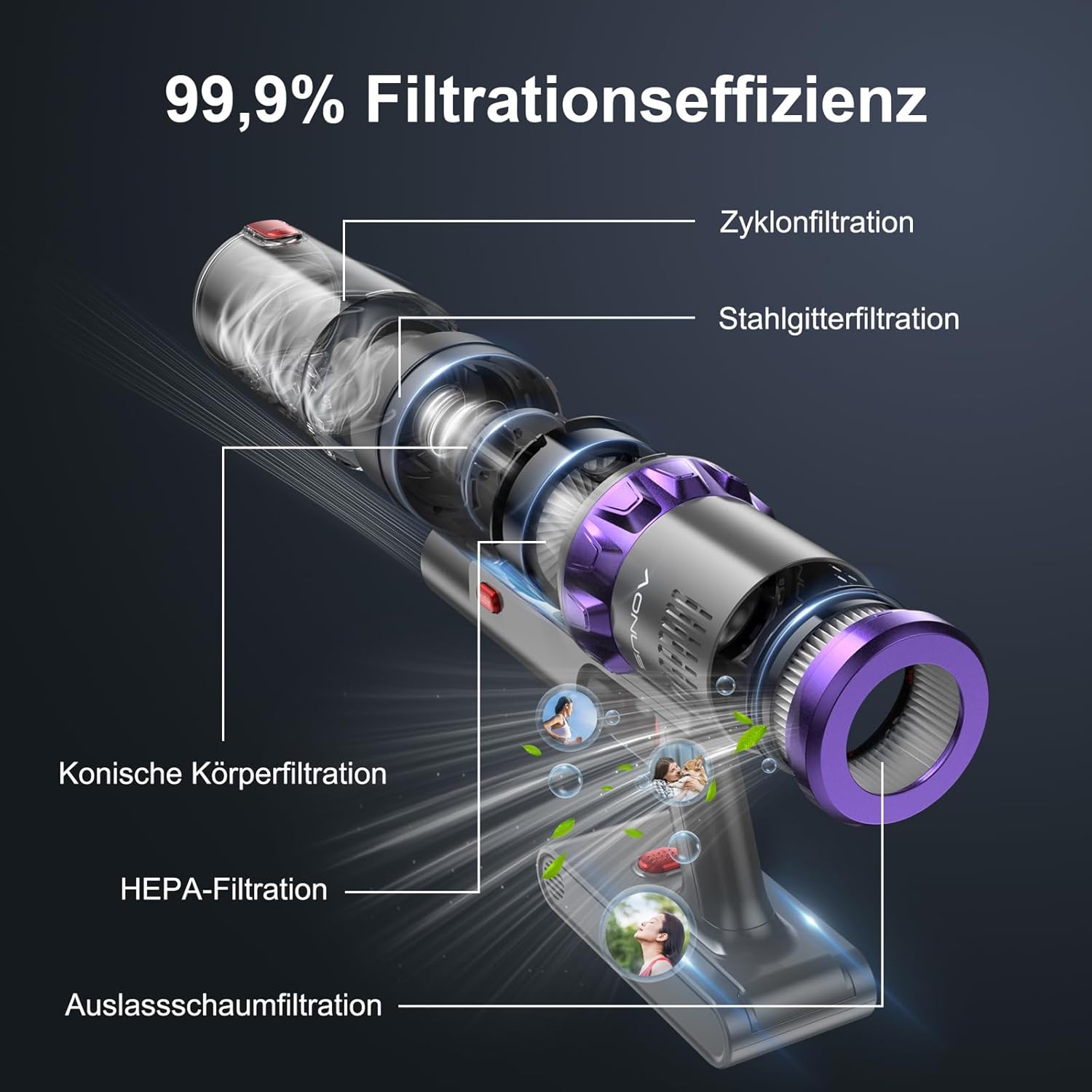
Obrázek: Explodoval view of the aonus A7's multi-stage filtration system, highlighting the cyclone, steel mesh, conical, HEPA, and outlet foam filters, designed for 99.9% filtration efficiency.
6.3 Čištění kartáčového válce
Periodically check the brush roll for tangled hair or debris. While the brush roll is designed to be anti-tangle, occasional cleaning may be necessary.
- Vypněte vysavač a odpojte podlahový kartáč.
- Locate the brush roll release mechanism (may require unscrewing a few screws as mentioned in a review, but the image doesn't show this, so I'll keep it general).
- Sejměte kartáčový váleček a opatrně odstřihněte všechny zamotané vlasy nebo vlákna pomocí nůžek.
- Vyčistěte kryt kartáčového válce od veškerých nečistot.
- Znovu vložte kartáčový válec a zajistěte jej.

Image: The innovative floor brush of the aonus A7, designed to prevent hair tangles, shown cleaning a floor with debris, alongside a small dog.
7. Řešení problémů
| Problém | Možná příčina | Řešení |
|---|---|---|
| Vakuum se nezapíná | Baterie je slabá nebo vybitá. | Baterii plně nabijte. |
| Nízký sací výkon | Dustbin is full; Filters are clogged; Brush roll is tangled or blocked. | Empty the dustbin; Clean or replace filters; Clean the brush roll. |
| Válec kartáče se neotáčí | Brush roll is blocked by debris or hair. | Vypněte vysavač a odstraňte všechny překážky z kartáčového válce. |
| Neobvyklý hluk | Překážka v cestě vzduchu nebo v kartáčovém válci. | Check for and remove any blockages in the nozzle, wand, or brush head. |
| Baterie se nenabíjí | Nabíječka není správně připojena; Vadná nabíječka nebo baterie. | Ensure charger is securely plugged in; Contact customer support if issue persists. |
8. Specifikace
| Funkce | Detail |
|---|---|
| Značka | aonus |
| Číslo modelu | A7 |
| Výkon motoru | 480W bezkomutátorový motor |
| Sací výkon | Až 40 kPa |
| Doba běhu | Up to 60 minutes (in Mode 1) |
| Kapacita baterie | 7*2500mAh High-Capacity Batteries |
| Filtrační systém | Multi-filtration with HEPA filter (99.9% efficiency) |
| Speciální funkce | Intelligent Touchscreen, Automatic Dust Detection, Anti-Tangle Brush Roll, Cordless |
| Rozměry produktu | 29 x 19 x 40 cm |
| Hmotnost položky | 3.67 kg |
9. Záruka a podpora
aonus products are manufactured to the highest quality standards. For warranty information, technical support, or any questions regarding your aonus A7 Cordless Vacuum Cleaner, please refer to the warranty card included in your package or contact aonus customer service directly.
You can often find contact information on the official aonus webwebu nebo prostřednictvím prodejce, u kterého jste produkt zakoupili.
Ask a question about this manual
Ask about setup, troubleshooting, compatibility, parts, safety, or missing instructions. Manuals+ will review the question and use this page’s manual context to help answer it.