
SD-508
SDRD SD-508 Wireless Bluetooth Karaoke Speaker User Manual
Model: SD-508
Zavedení
Děkuji za nákupasing the SDRD SD-508 Wireless Bluetooth Karaoke Speaker. This portable karaoke machine is designed to provide high-quality audio and an enjoyable karaoke experience with its integrated speaker and two wireless microphones. Featuring Bluetooth 5.0 connectivity, a long-lasting rechargeable battery, and versatile input options, the SD-508 is perfect for music playback and vocal performances anywhere.
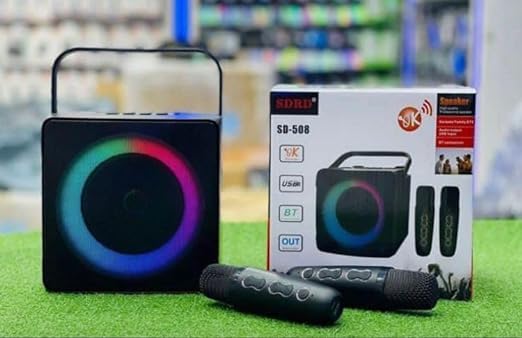
Image: The SDRD SD-508 speaker, its retail box, and two wireless microphones. The speaker features a colorful LED ring around its front grille.
Bezpečnostní informace
- Nevystavujte zařízení vodě ani nadměrné vlhkosti.
- Vyhněte se extrémním teplotám.
- Nerozebírejte ani se nepokoušejte o opravu zařízení sami. Obraťte se na kvalifikovaný servisní personál.
- Používejte pouze specifikovaný nabíjecí objemtage (5 V), aby nedošlo k poškození.
- Uchovávejte mimo dosah dětí.
Obsah balení
Zkontrolujte prosím balení, zda neobsahuje následující položky:
- SDRD SD-508 Wireless Bluetooth Karaoke Speaker (1 unit)
- Bezdrátové mikrofony (2 jednotky)
- Nabíjecí kabel (1 kus)
- Audio kabel (1 kus)
- Uživatelská příručka (tento dokument)
Konec produktuview
The SDRD SD-508 features a compact design with intuitive controls and multiple connectivity options, making it highly portable.
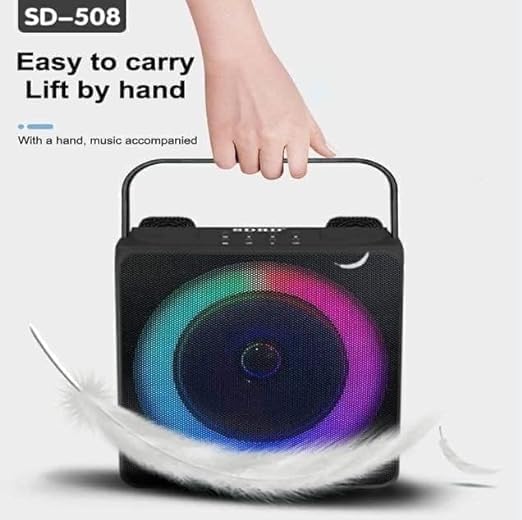
Image: A hand lifting the SDRD SD-508 speaker by its integrated handle, emphasizing its lightweight and portable design for easy transport.
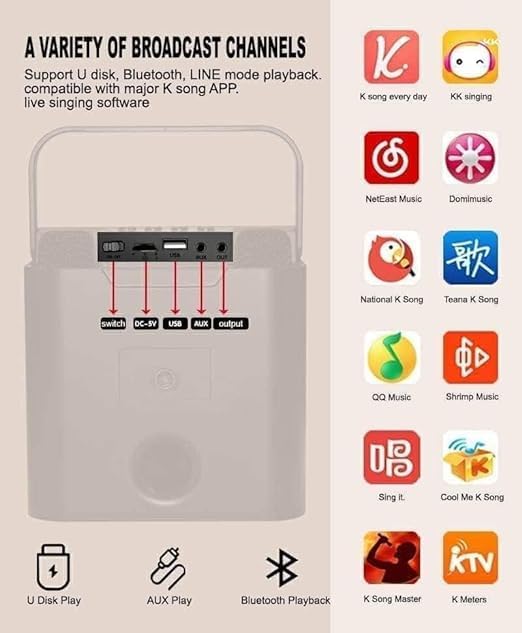
Obrázek: Podrobný view of the speaker's rear panel, highlighting the power switch, DC-5V charging port, USB port, AUX input, and AUX output. Red arrows point to each port for clarity.
Ovládací prvky a porty:
- Vypínač: Zapíná/vypíná reproduktor.
- Nabíjecí port DC-5V: Pro nabíjení interní baterie reproduktoru.
- USB port: For U-disk playback.
- Vstup AUX: Připojte externí audio zařízení pomocí 3.5mm audio kabelu.
- AUX výstup: Connect to other audio systems.
- Ovládání hlasitosti mikrofonu: Adjust microphone volume (on microphones).
- Speaker Volume Controls: Adjust main speaker volume (on speaker).
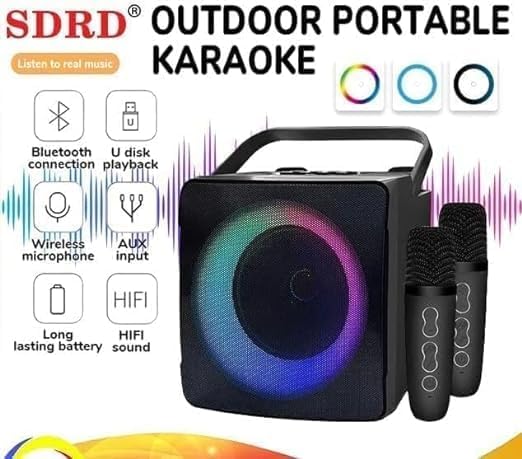
Image: The SDRD SD-508 speaker with two microphones, accompanied by icons illustrating its key features: Bluetooth connectivity, U-disk playback, wireless microphone support, AUX input, long-lasting battery, and HIFI sound quality.
Nastavení
1. Nabíjení reproduktoru:
- Connect the provided charging cable to the DC-5V port on the speaker.
- Druhý konec kabelu připojte k 5V USB napájecímu adaptéru (není součástí balení).
- The charging indicator will illuminate. Allow 2-3 hours for a full charge.
- A full charge provides approximately 3-5 hours of continuous use.
2. Charging the Microphones:
The wireless microphones are typically powered by internal rechargeable batteries or standard AA/AAA batteries. Refer to the microphone's specific instructions for charging or battery replacement.
3. Počáteční zapnutí:
Flip the power switch on the speaker to the "ON" position. The speaker will power on and indicate its current mode.
Návod k obsluze
1. Bluetooth připojení:

Image: The SDRD SD-508 speaker with two microphones, illustrating its Bluetooth 5.0 compatibility across Android, Windows, and iOS devices. The image emphasizes a 10-meter wireless connection range.
- Ensure the speaker is powered on and in Bluetooth mode (it usually defaults to this or announces "Bluetooth Mode").
- Na smartphonu, tabletu nebo počítači povolte Bluetooth a vyhledejte dostupná zařízení.
- Select "SD-508" from the list of devices.
- Once connected, the speaker will confirm the connection, and you can play audio from your device.
- The Bluetooth connection range is approximately 10 meters.
2. U-Disk Playback:
- Insert a USB flash drive (U-disk) containing MP3 audio filedo USB portu na reproduktoru.
- The speaker will automatically switch to U-disk mode and begin playing music.
- Use the speaker's controls to navigate tracks (if available).
3. Vstup AUX:
- Připojte jeden konec dodaného audio kabelu ke vstupnímu portu AUX na reproduktoru.
- Connect the other end to the headphone jack or audio output of your external device (e.g., MP3 player, computer).
- The speaker will switch to AUX mode, and audio from your device will play through the speaker.
4. Using the Wireless Microphones:
- Ensure the microphones are charged and powered on. They should automatically pair with the speaker.
- Adjust the microphone volume using the controls on the microphone itself.
- For karaoke, play music via Bluetooth, U-disk, or AUX, and sing along through the microphones.
- The speaker has dedicated slots to store the microphones when not in use, preventing loss or damage.
5. Karaoke Functionality:
The SD-508 supports various karaoke applications and platforms. You can use popular K-song apps on your connected device (phone, tablet) and output the audio to the speaker while using the wireless microphones for vocals.
Image: The SDRD SD-508 speaker's rear panel with input/output ports, alongside a grid of popular karaoke application icons, indicating compatibility with various K-song apps for live singing software.
Údržba
- Čištění: K čištění reproduktoru a mikrofonů používejte měkký, suchý hadřík. Nepoužívejte abrazivní čisticí prostředky ani rozpouštědla.
- Skladování: Přístroj skladujte na chladném a suchém místě mimo dosah přímého slunečního záření a extrémních teplot.
- Péče o baterie: Pro prodloužení životnosti baterie reproduktor pravidelně nabíjejte, i když jej nepoužíváte často. Nevystavujte baterii úplnému vybíjení po delší dobu.
- Úložiště mikrofonu: Utilize the designated microphone placements on the speaker to securely store the microphones when not in use, preventing damage or loss.
Odstraňování problémů
| Problém | Možná příčina | Řešení |
|---|---|---|
| Žádná síla | Baterie je vybitá. | Plně nabijte reproduktor. |
| Žádný zvuk z reproduktoru | Příliš nízká hlasitost; nesprávný režim; zařízení není připojeno. | Increase volume; ensure correct input mode (Bluetooth, AUX, USB); re-pair Bluetooth device. |
| Mikrofony nefungují | Microphones not powered on or charged; out of range. | Ensure microphones are charged and turned on. Keep them within range of the speaker. |
| Nestabilní připojení Bluetooth | Too far from speaker; interference. | Přesuňte zařízení blíže k reproduktoru; vyhněte se překážkám nebo jiným bezdrátovým zařízením. |
Specifikace

Image: A detailed specification table for the SDRD SD-508, including product name, Bluetooth version, speaker power, battery size, charging mode, material, microphone charging time, package size, and main functions. It also lists available colors (Black, White, Gold).
| Funkce | Detail |
|---|---|
| Název produktu | SD-508 |
| Verze Bluetooth | Bluetooth 5.0 |
| Výkon reproduktoru | 10W |
| Velikost baterie | 3.7V / 2400 mAh (Speaker) |
| Režim nabíjení | Charger (5V-2A) |
| Materiál | ABS plast |
| Doba nabíjení mikrofonu | 1-2 hodin |
| Doba běhu | 2-3 hours (Microphone), 3-5 hours (Speaker) |
| Vzdálenost Bluetooth | 10 metrů |
| Vzdálenost mikrofonu | 10 metrů |
| Rozměry produktu | 10 x 12 x 10 cm |
| Hmotnost | 1.3 kg |
| Zahrnuté komponenty | Speaker, 2 Wireless Microphones, Data Cable, Audio Cable, Manual |
| Hlavní funkce | Bluetooth, Line-in, U-disk, K Song mode |
Záruka a podpora
This product comes with a standard manufacturer's warranty. Please retain your purchase receipt for warranty claims. For technical support, troubleshooting assistance, or warranty inquiries, please contact your retailer or the manufacturer's customer service.
For more information, you may visit the official product page or contact the seller through the platform where you purchased the item.
Ask a question about this manual
Ask about setup, troubleshooting, compatibility, parts, safety, or missing instructions. Manuals+ will review the question and use this page’s manual context to help answer it.