
1. Úvod
Děkuji za nákupasing the JVC XS-N1123PB Party Bluetooth Speaker. This manual provides essential information for the safe and efficient operation of your speaker. Please read it thoroughly before use and retain it for future reference.
2. Bezpečnostní informace
- Nevystavujte reproduktor extrémním teplotám, přímému slunečnímu záření ani vysoké vlhkosti.
- Vyvarujte se pádu reproduktoru nebo jej nevystavujte silným nárazům.
- Nerozebírejte ani se nepokoušejte o opravu reproduktoru sami. Veškerý servis svěřte kvalifikovanému personálu.
- Chraňte reproduktor před vodou a jinými kapalinami, abyste předešli úrazu elektrickým proudem nebo poškození.
- Používejte pouze specifikovaný nabíjecí objemtage (5 Volts) and compatible charger.
3. Obsah balení
Ověřte, zda jsou v balení přítomny všechny položky:
- JVC XS-N1123PB Party Bluetooth Speaker
- USB nabíjecí kabel
- Uživatelská příručka
4. Konec produktuview
4.1 Přední View

The front of the speaker features the main speaker grille with integrated RGB lighting, displaying various color patterns.
4.2 Strana View

Strana view shows the compact and portable design of the speaker, suitable for easy transport.
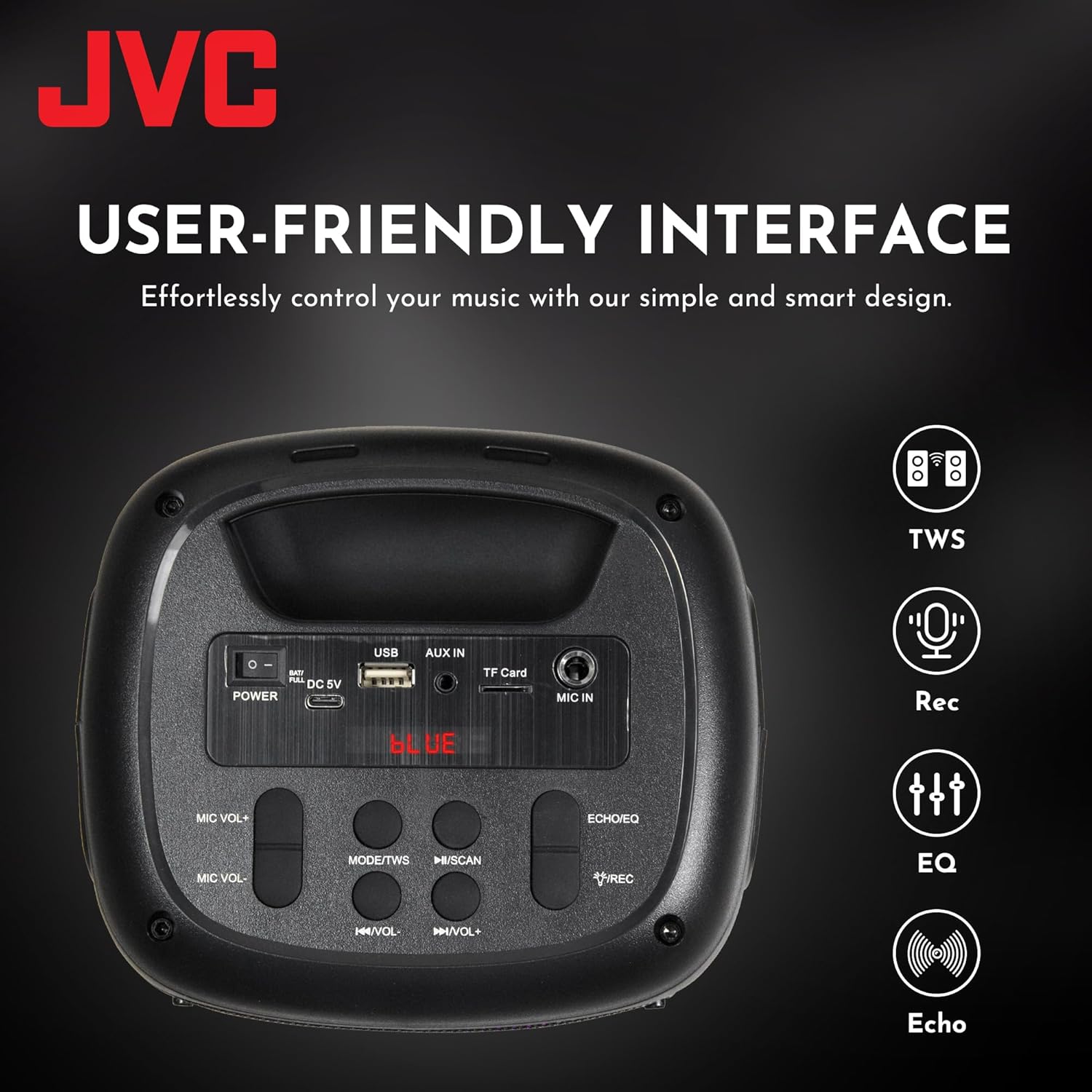
4.3 Ovládací prvky a porty na horním panelu

This image displays the top control panel, including buttons for power, mode selection, volume, track control, and recording. It also shows the USB, AUX IN, TF Card, and MIC IN ports.
4.4 Zadní View

Zadní část view of the speaker, highlighting its robust enclosure and design.
5. Nastavení
5.1 Nabíjení reproduktoru
Před prvním použitím reproduktor plně nabijte. Připojte dodaný nabíjecí kabel USB k portu DC 5V na reproduktoru a druhý konec k napájecímu adaptéru USB (není součástí balení) nebo k portu USB počítače.
- Během nabíjení bude svítit kontrolka nabíjení.
- The light will turn off or change color when charging is complete.
The speaker features a 1500 mAh dual battery system for extended playback.
5.2 Zapnutí/vypnutí
To power on the speaker, press and hold the Power button located on the top panel. To power off, press and hold the Power button again.
5.3 Párování Bluetooth
- Zapněte reproduktor. Automaticky se přepne do režimu párování Bluetooth, což bude signalizováno blikající LED kontrolkou.
- Povolte Bluetooth na svém mobilním zařízení (chytrém telefonu, tabletu atd.).
- Hledat available Bluetooth devices and select "JVC XS-N1123PB" from the list.
- Po spárování reproduktor vydá potvrzovací zvuk a LED kontrolka přestane blikat.
5.4 Párování s pravým bezdrátovým stereo (TWS) systémem
TWS allows you to connect two JVC XS-N1123PB speakers for a stereo sound experience.

Pair two speakers wirelessly for a dynamic stereo sound experience.
- Ujistěte se, že jsou oba reproduktory zapnuté a nejsou připojeny k žádnému jinému zařízení Bluetooth.
- On one speaker (this will be the primary speaker), press and hold the TWS button (if available, or a designated pairing button) until you hear a pairing tone.
- Oba reproduktory se automaticky propojí. Po úspěšném spárování TWS zazní potvrzovací tón.
- Nyní připojte mobilní zařízení k primárnímu reproduktoru přes Bluetooth, jak je popsáno v části 5.3. Oba reproduktory budou přehrávat zvuk stereo.
6. Návod k obsluze
6.1 Výběr režimu
Press the 'MODE' button on the top panel to switch between different input modes: Bluetooth, USB, TF Card, AUX, and FM Radio.
6.2 Přehrávání zvuku
- Režim Bluetooth: Po úspěšném spárování přehrajte zvuk z připojeného zařízení.
- Režim USB/TF karty: Insert a USB drive or TF card into the respective port. The speaker will automatically detect and play audio files.
- Režim AUX: Connect an external audio device using a 3.5mm audio cable to the AUX IN port.
- Režim rádia FM: In FM mode, press the Play/Pause button to auto-scan and save available radio stations. Use the Previous/Next buttons to navigate between saved stations.
6.3 Ovládání hlasitosti
Use the 'VOL-' and 'VOL+' buttons on the top panel to decrease or increase the volume.
6.4 Ovládání trati
- Press the 'Previous Track' button to go to the beginning of the current track or the previous track.
- Press the 'Next Track' button to skip to the next track.
- Press the 'Play/Pause' button to play or pause audio.
6.5 Ovládání světelné show
The speaker features built-in RGB lights. Specific controls for the light show (e.g., changing patterns, turning on/off) may be integrated with the 'MODE' button or a dedicated light button if available. Refer to the quick start guide for specific light control functions.
6.6 Microphone and Guitar Input (Karaoke Function)

Connect a microphone or guitar to the respective input ports for karaoke or live performance. Adjust microphone volume using the MIC VOL+/- buttons.
7. Údržba
7.1 Čištění
Reproduktor otřete měkkým, suchým hadříkem. Nepoužívejte abrazivní čisticí prostředky, vosky ani rozpouštědla, protože by mohly poškodit povrchovou úpravu.
7.2 Skladování
Pokud reproduktor delší dobu nepoužíváte, skladujte jej na chladném a suchém místě mimo dosah přímého slunečního záření a extrémních teplot. Pro zachování životnosti doporučujeme baterii pravidelně nabíjet.
8. Řešení problémů
| Problém | Možná příčina | Řešení |
|---|---|---|
| Reproduktor se nezapne | Slabá baterie; Tlačítko napájení nebylo správně stisknuto | Nabijte reproduktor; Stiskněte a několik sekund podržte tlačítko napájení |
| Žádný zvuk | Příliš nízká hlasitost; Nesprávný režim vstupu; Zařízení není připojeno | Increase volume; Select correct input mode; Reconnect Bluetooth device or AUX cable |
| Párování Bluetooth se nezdařilo | Reproduktor není v režimu párování; Zařízení je příliš daleko; Rušení | Ujistěte se, že je reproduktor v režimu párování; Přesuňte zařízení blíže; Vypněte ostatní zařízení Bluetooth |
| Párování TWS se nezdařilo | Reproduktory jsou příliš daleko od sebe; Jeden reproduktor je již připojen k zařízení | Ensure speakers are within range; Disconnect any Bluetooth devices from both speakers before TWS pairing |
| Příjem FM rádia je špatný | Slabý signál; Rušení | Relocate the speaker; Extend the antenna (if applicable) |
9. Specifikace
| Funkce | Specifikace |
|---|---|
| Číslo modelu | XS-N1123PB (AP-W113Y) |
| Výstupní výkon | 15W RMS (40 Watts Peak) |
| Velikost reproduktoru | 4 palce |
| Konektivita | Bluetooth, USB, TF karta, AUX-in, FM rádio |
| Režim zvukového výstupu | Stereo |
| Vstupní objemtage | 5 voltů |
| Baterie | 1 lithium-iontová baterie (součástí balení) |
| Materiál | Plast |
| Rozměry (D x Š x V) | 15.7 H x 13.3 Š x 21.8 V cm |
| Speciální funkce | Bass Boost, RGB Light Show, TWS Function, Microphone Input |
| Země původu | Čína |

Product dimensions for the JVC XS-N1123PB speaker.
10. Záruka a podpora
10.1 Informace o záruce
This JVC XS-N1123PB Party Bluetooth Speaker comes with a 1 rok záruka from the date of purchase. Please retain your proof of purchase for warranty claims. The warranty covers manufacturing defects but does not cover damage caused by misuse, accidents, unauthorized modifications, or normal wear and tear.
10.2 Zákaznická podpora
For technical assistance, warranty claims, or further information, please contact JVC customer support through their official webwebu nebo prodejce, u kterého byl produkt zakoupen. Před kontaktováním podpory si prosím připravte číslo modelu (XS-N1123PB) a doklad o koupi.