
Zavedení
This manual provides essential information for the safe and efficient use of your Tera EV Type 2 Wallbox 11kW 3-Phase Electric Vehicle Charging Station. Please read this manual thoroughly before installation and operation to ensure proper functionality and safety.
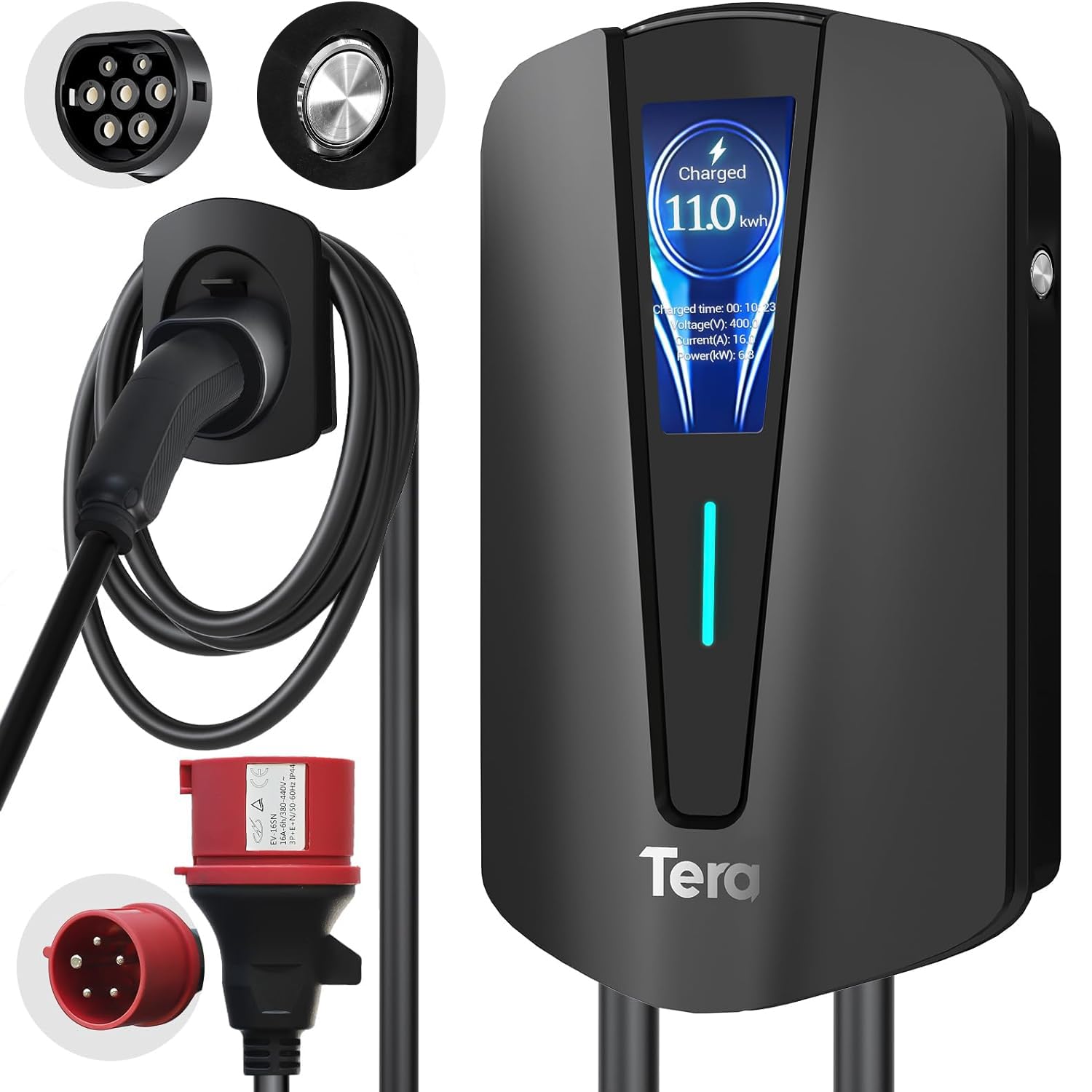
Image: The Tera EV Type 2 Wallbox charging station, featuring a sleek black design and integrated display.
The Tera EV charger is designed for electric vehicles (EVs) and plug-in hybrid electric vehicles (PHEVs), offering a maximum power output of 11 kW, 16A current, and 400V voltage. It complies with the European standard IEC 62196-2 and features advanced safety protections.

Image: The Tera EV charger in use, demonstrating its Type 2 and 3-phase CEE plug compatibility and plug-and-play operation.
Key features include a 7-meter charging cable, an integrated digital display for monitoring charging status, and an IP54 waterproof rating for outdoor use in various weather conditions. The pure copper charging cables ensure excellent conductivity and minimal heat generation.

Image: The Tera EV charger features a Type 2 connector and a CEE 3-phase plug, highlighting multiple safety protections.
Nastavení a instalace
Professional installation by a qualified electrician is recommended for this 3-phase EV charging station to ensure compliance with local electrical codes and safety standards.
Obsah balení:

Image: The package includes the EV charger unit, user manual, mounting plate, screw set, and a CEE 3-phase plug.
- EV Charger Type 2 Unit
- Uživatelská příručka
- Montážní deska
- Sada šroubů
- CEE 3-Phase Plug
- Držák kabelu
Montážní kroky:
- Vyberte umístění: Choose a suitable wall location for the charging station, ensuring it is within reach of your vehicle's charging port and a compatible power source. The location should be protected from direct sunlight and heavy rain if possible, despite its IP54 rating.
- Vrtací otvory: Use the mounting plate as a template to mark and drill holes on the wall.
- Bezpečná montážní deska: Upevněte montážní desku na stěnu pomocí dodaných šroubů a hmoždinek.
- Mount Charger: Carefully place the EV charger unit onto the mounting plate.
- Secure Charger: Fasten the anti-theft screw (if applicable) to secure the charger to the mounting plate.
- Install Cable Holder: Mount the cable holder near the charging station for convenient cable management.

Image: Visual guide for mounting the EV charger: drilling holes, attaching the mounting plate, securing the charger, and final assembly.
Elektrické připojení: Connect the CEE 3-phase plug to a compatible 400V, 16A 3-phase power outlet. Ensure the electrical circuit is properly protected with a residual current device (RCD) and circuit breaker as per local regulations.
Návod k obsluze
Zahájení nabíjení:
- Ensure the charging station is properly connected to the power supply. The LED indicator on the unit should be lit.
- Take the Type 2 charging cable from the holder.
- Insert the Type 2 connector firmly into your electric vehicle's charging port.
- The charging process will begin automatically. The digital display will show charging progress, current power, and duration.

Image: The digital display provides real-time charging information, including energy delivered and charging speed.
Stopping a Charge:
- Once charging is complete, or if you need to stop it prematurely, unlock your vehicle's charging port (if applicable).
- Remove the Type 2 connector from your vehicle.
- Return the charging cable to its holder on the wallbox.
Indikátory stavu:
The LED indicators and digital display provide visual feedback on the charger's status:
- Svítí zelená: Power on, no load (ready to charge).
- Blikající zelená: Plug inserted, not charging (waiting for vehicle to initiate).
- Svítí modře: Nabíjení dokončeno.
- Blikající modře: Probíhá nabíjení.

Image: Visual representation of the charger's status lights, indicating power, charging activity, and error states.
Adaptive Power Adjustment:
The charger features adaptive power adjustment to prevent overcharging and protect the vehicle's battery. The charging power may decrease as the battery approaches full capacity, ranging from 11 kW down to 1 kW, depending on the vehicle's requirements.

Image: The charger intelligently adjusts power output to optimize battery health and prevent overcharging.
Režimy nabíjení:
The charger supports both three-phase and single-phase charging, adapting to the vehicle's capabilities.

Image: Comparison of three-phase and single-phase charging capabilities, showing how the charger adapts to different power inputs.
Údržba
- Pravidelný úklid: Otřete vnější povrch nabíjecí stanice měkkým hadříkemamp tkanina. Nepoužívejte abrazivní čisticí prostředky nebo rozpouštědla.
- Kontrola kabelů: Periodically inspect the charging cable and connectors for any signs of wear, damage, or corrosion. If any damage is found, discontinue use and contact customer support.
- Ochrana životního prostředí: The unit is IP54 rated for water and dust resistance. Ensure the cover is properly closed when not in use to maintain this protection.
- Žádné díly opravitelné uživatelem: The internal components of the charging station are not user-serviceable. Do not attempt to open or repair the unit yourself.

Image: The IP54 rating ensures the charger's durability and functionality in various weather conditions, requiring minimal external maintenance.
Odstraňování problémů
If you encounter issues, refer to the following common problems and their solutions. For persistent problems, contact customer support.
| Problém | Možná příčina | Řešení |
|---|---|---|
| Nabíječka se nezapíná. | No power from the outlet, faulty connection. | Check the CEE 3-phase plug connection and the power supply. Ensure the circuit breaker is on. |
| Nabíjení se nespustí. | Vehicle not ready, connector not fully inserted, or vehicle communication error. | Ensure the Type 2 connector is fully inserted. Check vehicle's charging settings. Re-plug the connector. |
| Pomalá rychlost nabíjení. | Vehicle's battery management system limiting power, or external factors (e.g., grid load). | This may be normal due to adaptive power adjustment. Check vehicle's charging status. |
| Red LED indicator flashing. | Error detected (e.g., overcurrent, ground fault, overvoltagE). | Refer to the error code on the digital display or the manual's error indicator section. Disconnect and reconnect. If persistent, contact support. |
Error Indicators (Red LED Flashing):
- 1 Flash: Ground fault protection.
- 2 XNUMX záblesků: Nadproudová ochrana.
- 3 XNUMX záblesků: Earth leakage (ungrounded).
- 4 XNUMX záblesků: Under/Overvoltage alarm.
- 5 XNUMX záblesků: Porucha relé.
- 6 XNUMX záblesků: CP/CC fault.
If any red LED error occurs, disconnect the charger from the vehicle and power source, wait a few minutes, then reconnect. If the error persists, contact customer support.
Technické specifikace
| Funkce | Specifikace |
|---|---|
| Číslo modelu | Q8-Schwarz |
| Značka | Tera |
| Typ konektoru | Type 2, CEE 16A 5-pin |
| Kompatibilní zařízení | Electric Vehicles (EVs) and Plug-in Hybrid Electric Vehicles (PHEVs) |
| Vstupní objemtage | 400 voltů |
| Ampvymazat | 16 A |
| Výkon | 11 kW |
| Výstupní proud | 16 A |
| Výstupní objemtage | 400 voltů |
| Frekvenční rozsah | 50 Hz |
| Zdroj napájení | AC |
| Speciální funkce | Držák kabelu |
| Barva | Černý |
| Hmotnost | 4.6 kg |
| Hodnocení ochrany proti vniknutí (IP). | IP54 |
| Provozní teplota | -30 °C až 50 °C |
| Certifikace | CE, UKCA, RoHS |
Kompatibilita:
This charger is compatible with all Type 2 electric vehicles. Exampsoubory zahrnují, ale nejsou omezeny na:
- Tesla (Model S, 3, X, Y)
- Volkswagen (e-Golf, ID4)
- Jeep (Grand Cherokee 4xe, Wrangler 4xe)
- Toyota (Prius Prime, RAV4 EV, C-HR EV)
- Honda (EV Plus, Clarity Electric)
- Fiat (500e, 500e 3+1)
- Hyundai (Ioniq Electric, Kona Electric, Santa Fe Hybrid)
- Nissan (LEAF, LEAF S, LEAF S PLUS, Altra EV)
- Chevrolet (EV1, Bolt Volt)

Image: The Type 2 connector ensures broad compatibility with a wide range of electric vehicle models.
Informace o záruce
Tera products are manufactured to high-quality standards. For specific warranty terms and conditions, please refer to the warranty card included with your product or visit the official Tera webUschovejte si doklad o koupi pro případ reklamace.
Zákaznická podpora
For technical assistance, troubleshooting, or warranty inquiries, please contact Tera customer support through the following channels:
- Webmísto: Visit the official Tera webweb s podpůrnými zdroji a kontaktními formuláři.
- E-mail: Viz obal produktu nebo oficiální webweb s e-mailovými adresami zákaznického servisu.
- Telefon: Kontaktní čísla mohou být k dispozici na oficiálních stránkách webwebu nebo v dokumentaci k produktu.
When contacting support, please have your product model number (Q8-Schwarz) and proof of purchase readily available.


