
1. Úvod a konecview
Thank you for choosing the TecTake Foldable Exercise Bike. This manual provides essential information for the safe and efficient use of your new fitness equipment. Designed for cardio training at home, this elliptical ergometer features a robust construction, an LCD computer, and a space-saving foldable design. Please read this manual thoroughly before assembly and use, and keep it for future reference.
Klíčové vlastnosti:
- Prostorově úsporný design: Easily foldable for convenient storage without cluttering your living space.
- Odolná konstrukce: Features a robust X-shaped frame made of epoxy-lacquered steel and a magnetic brake system for long-lasting performance.
- Nastavitelný odpor: 8 levels of resistance, adjustable via a knob, to customize your workout intensity.
- Comfortable and Secure: Adjustable seat with 7 height positions, padded handlebars with pulse sensors, and anti-slip pedals with adjustable foot straps.
- Integrated LCD Computer: Tracks time, speed, distance, calories burned, and pulse rate to monitor your progress.
2. Bezpečnostní pokyny
Před použitím rotopedu dodržujte následující bezpečnostní opatření:
- Před zahájením jakéhokoli nového cvičebního programu se poraďte s lékařem, zejména pokud máte již existující zdravotní problémy.
- Ensure the exercise bike is placed on a flat, stable surface. Use a protective mat to prevent damage to your floor.
- Během používání udržujte děti a domácí zvířata mimo dosah zařízení.
- Maximální nosnost uživatele pro toto zařízení je 100 kg (220 lb)Nepřekračujte tento limit.
- Noste vhodné sportovní oblečení a obuv. Vyhněte se volnému oblečení, které by se mohlo zachytit o pohyblivé části.
- Check all bolts and connections regularly to ensure they are securely tightened.
- Pokud pocítíte mdloby, závratě nebo bolest, okamžitě přestaňte cvičit.
- Do not attempt to modify the equipment. Use only original replacement parts if necessary.
3. Obsah balení
Please verify that all components are present and undamaged before assembly. Refer to the packing list provided with your product for a detailed inventory. Typically, the package includes:
- Hlavní komponenty rámu
- Sedlo a sedlovka
- Handlebars with pulse sensors and LCD computer
- Pedals with foot straps
- Stabilizační tyče
- Montážní materiál (šrouby, matice, podložky, nářadí)
- Uživatelská příručka
4. Montáž a nastavení
The TecTake Foldable Exercise Bike is designed for quick and easy assembly. Follow the step-by-step instructions provided in the separate assembly guide included in your package. Ensure all parts are correctly aligned and securely fastened.

Obrázek 1: Konecview of the TecTake Foldable Exercise Bike, illustrating its main components and features such as the training computer, adjustable resistance, 7-level adjustable seat, and foldable design.
4.1. Nastavení výšky sedadla
The seat can be adjusted to 7 different height positions to accommodate various user heights. To adjust:
- Loosen the adjustment knob located on the seat post.
- Raise or lower the seat to your desired height. Ensure your leg has a slight bend at the knee when the pedal is at its lowest point.
- Tighten the adjustment knob firmly to secure the seat in place.
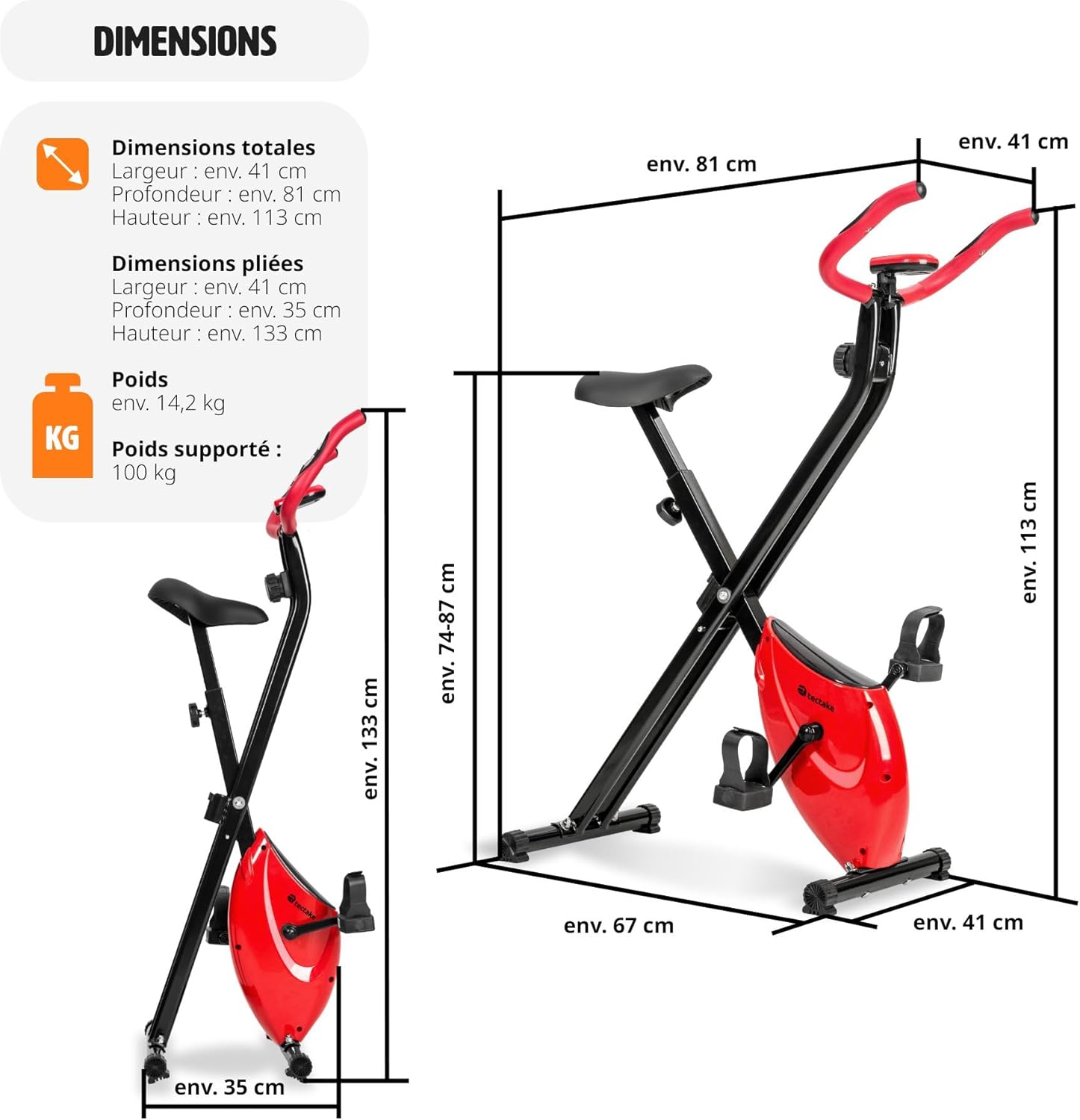
Image 2: Detailed dimensions of the exercise bike, showing both its unfolded state (approx. 81 x 41 x 113 cm) and folded state (approx. 35 x 41 x 133 cm), highlighting its compact storage capability.
4.2. Skládání a skladování
To fold the exercise bike for storage:
- Locate the folding pin or mechanism on the main frame.
- Pull the pin or release the mechanism to unlock the frame.
- Carefully fold the bike until it is in its compact position.
- Secure the folding mechanism to prevent accidental unfolding.
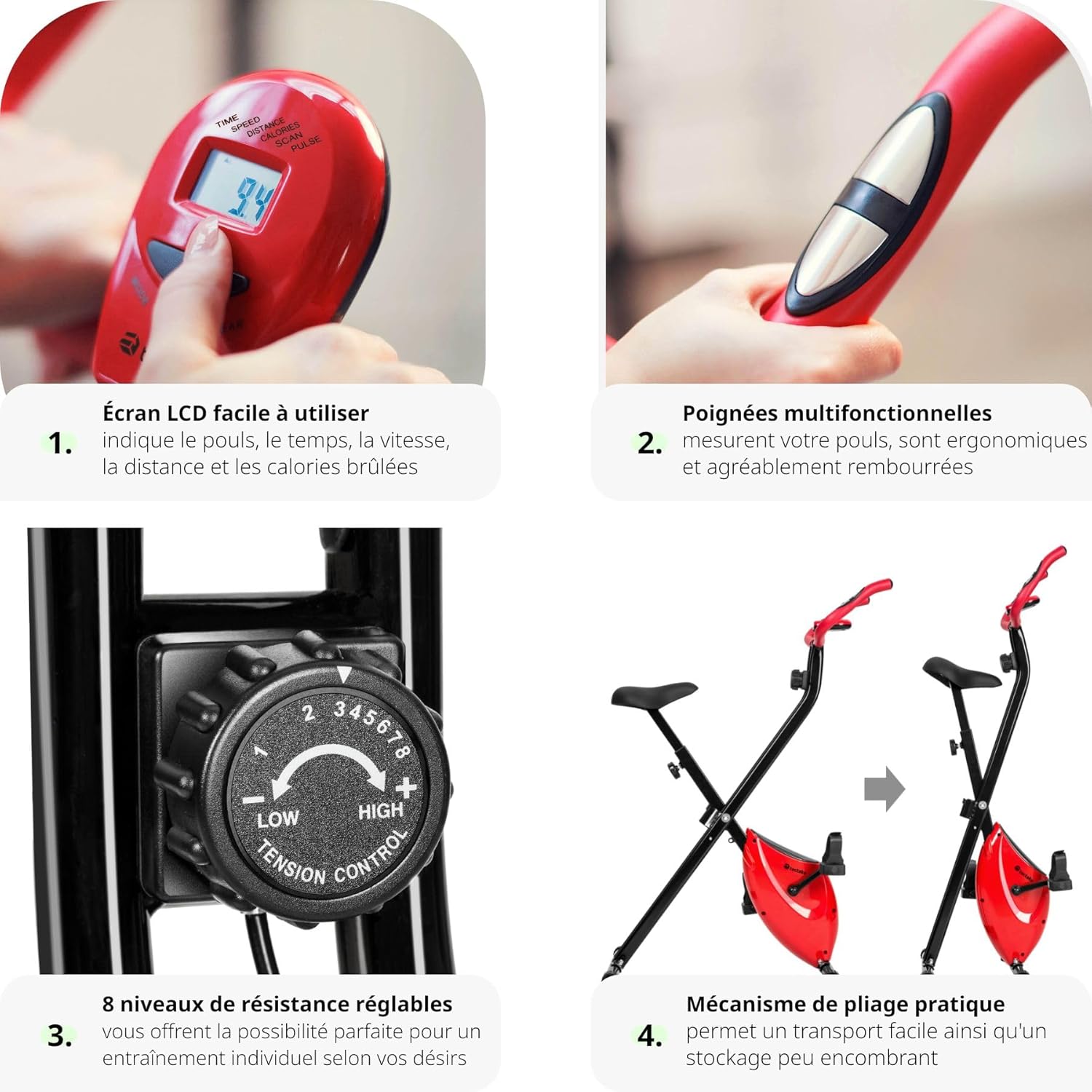
Image 3: A composite image showcasing four key features: 1. Easy-to-use LCD screen displaying pulse, time, speed, distance, and calories. 2. Multifunctional padded handles with pulse sensors. 3. 8 levels of adjustable resistance. 4. Practical folding mechanism for space-saving storage.
5. Návod k obsluze
5.1. Using the LCD Computer
The integrated LCD computer helps you track your workout progress. It displays the following metrics:
- ČAS: Délka vašeho tréninku.
- RYCHLOST: Aktuální rychlost jízdy na kole.
- VZDÁLENOST: Vzdálenost uražená během vaší lekce.
- KALORIE: Odhad spálených kalorií.
- PULS: Your heart rate, measured via the handlebar sensors.
- SKENOVAT: Automaticky prochází všemi metrikami.
To operate the computer:
- Press the 'MODE' button to select the desired display function.
- To reset values, press and hold the 'MODE' button for a few seconds.
- The computer automatically turns on when you start pedaling or press any button. It will turn off automatically after a period of inactivity.
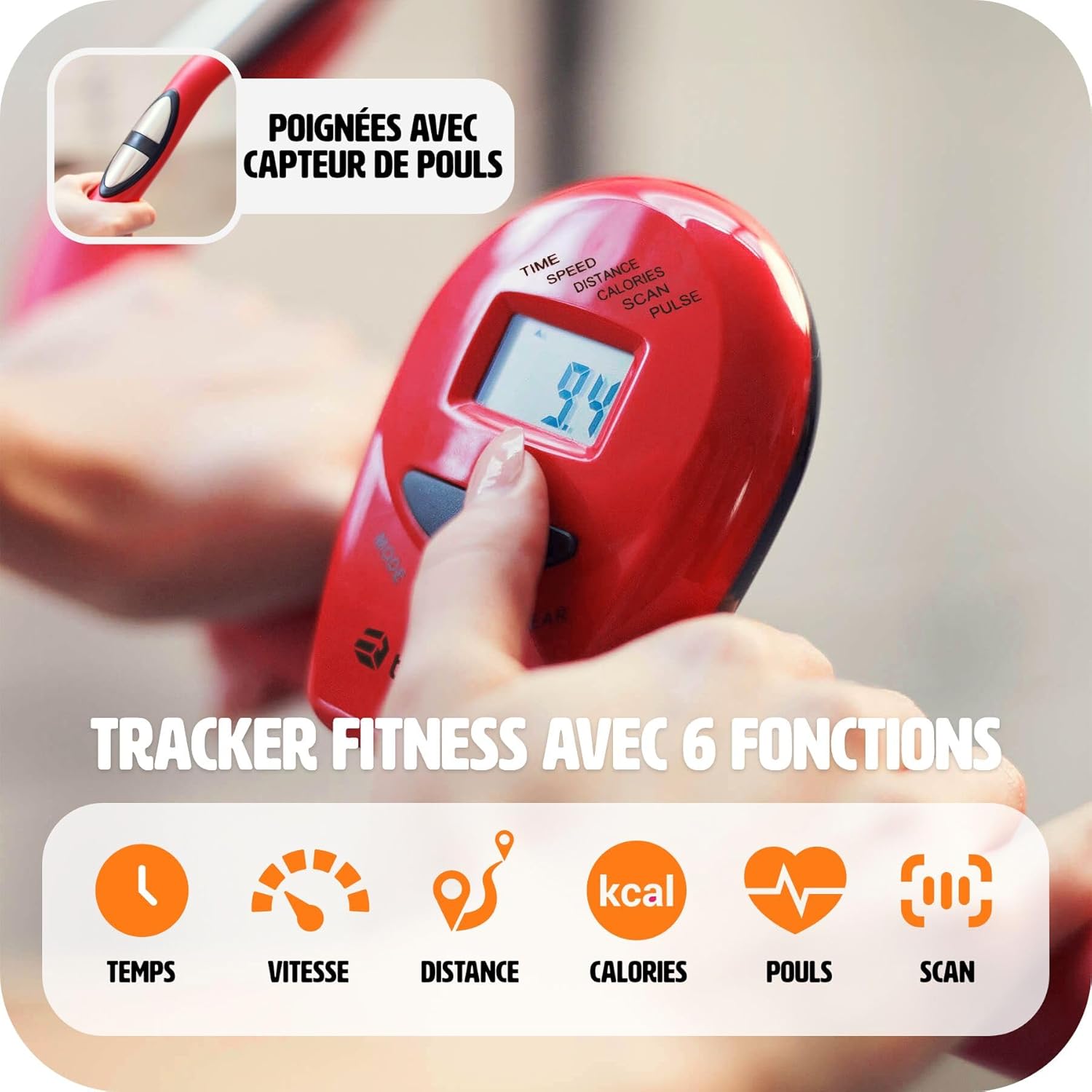
Obrázek 4: Podrobný view of the LCD training computer, showing the display of time, speed, distance, calories, pulse, and scan functions. A hand is shown pressing the mode button.
5.2. Nastavení odporu
The exercise bike offers 8 levels of magnetic resistance. To adjust the intensity of your workout:
- Locate the tension control knob on the front post of the bike.
- Turn the knob clockwise to increase resistance (higher numbers for more intense workouts).
- Turn the knob counter-clockwise to decrease resistance (lower numbers for easier workouts).

Image 5: A close-up of the resistance knob, indicating 8 adjustable levels. Levels 1-3 are suggested for easy exercises, 4-6 for cardio training, and 7-8 for muscle strengthening.
5.3. Monitorování srdeční frekvence
The handlebars are equipped with pulse sensors. To measure your heart rate:
- Grip both pulse sensors firmly with your hands during your workout.
- Your heart rate will be displayed on the LCD computer after a few seconds.

Image 6: A close-up image showing a hand properly gripping the pulse sensor integrated into the handlebar, demonstrating how to measure heart rate during exercise.

Image 7: This image highlights the comfortable seat and the 100% anti-slip rubber feet, ensuring stability and floor protection during use.
6. Údržba
Pravidelná údržba zajistí dlouhou životnost a bezpečný provoz vašeho rotopedu.
- Čištění: Otřete kolo reklamouamp Po každém použití setřete hadříkem, abyste odstranili pot a prach. Nepoužívejte abrazivní čisticí prostředky.
- Inspekce: Periodically check all moving parts, bolts, and connections for tightness and wear. Tighten any loose fasteners.
- Mazání: The magnetic brake system is designed to be maintenance-free. No lubrication is required for the internal mechanism.
- Skladování: When not in use, fold the bike and store it in a dry, cool place away from direct sunlight and extreme temperatures.
7. Řešení problémů
If you encounter issues with your TecTake Exercise Bike, refer to the following common problems and solutions:
- LCD displej nefunguje:
- Check if the batteries are correctly installed or need replacement. (The product specifications state 'Piles incluses ? Non', so batteries are not included and need to be purchased separately).
- Ensure all cable connections to the computer are secure. - No Resistance or Incorrect Resistance:
- Verify that the resistance knob is properly engaged and turning freely.
- Ensure the magnetic brake system is correctly assembled according to the instructions. - Neobvyklé zvuky během provozu:
- Check all bolts and nuts for tightness. Loose parts can cause rattling or squeaking.
- Inspect pedals and crank arms for any signs of damage or looseness. - Unstable Bike:
- Ensure the bike is on a level surface. Adjust the leveling caps on the stabilizer bars if present.
- Confirm all frame connections are securely tightened.
If the problem persists, please contact TecTake customer support.
8. Specifikace
| Funkce | Detail |
|---|---|
| Značka | TecTake |
| Číslo modelu | 404950 |
| Barva | Černý |
| Materiál | Epoxy-lacquered Steel, Plastic |
| Systém pohonu | Pás |
| Mechanismus odporu | Magnetický |
| Úrovně odporu | 8 (nastavitelné) |
| Nastavení sedadla | 7 Height Positions |
| Vlastnosti | Foldable, Adjustable Seat, Pulse Sensors |
| Zdroj napájení | Napájeno bateriemi (baterie nejsou součástí balení) |
| Rozměry v rozloženém stavu (D x Š x V) | Cca. 81 x 41 x 113 cm |
| Rozměry ve složeném stavu (D x Š x V) | Cca. 35 x 41 x 133 cm |
| Hmotnost položky | 14.2 kg |
| Maximální nosnost | 100 kg |
| Doporučené použití | Krytý |
9. Produktová videa
9.1. Ffitness FLC201BN Exercise Bike Overview
Video 1: Toto video poskytuje celkový pohledview of the Ffitness FLC201BN exercise bike, demonstrating its features and use for home cardio and fitness workouts. (Note: This video is for a similar product, Ffitness FLC201BN, and is provided by a seller.)
9.2. F-Bike Foldable Exercise Bike Features
Video 2: This video showcases the features of an F-Bike foldable exercise bike, including its adjustable seat, multifunctional handles, LCD display, anti-slip pedals, magnetic resistance, and space-saving foldable design. (Note: This video is for a similar product, F-Bike, and is provided by a seller.)
10. Záruka a podpora
For warranty information, please refer to the documentation included with your purchase or contact the retailer. For technical support, spare parts, or any questions not covered in this manual, please contact TecTake customer service directly. Have your model number (404950) and purchase date ready when contacting support.