
1. Úvod
Thank you for choosing the MAIRDI M890DBTC Wireless Headset. This manual provides detailed instructions for setting up, operating, and maintaining your headset to ensure optimal performance and longevity. Please read this manual thoroughly before use.

Detailní přední strana view of the MAIRDI M890DBTC Wireless Headset, showcasing its over-ear design, adjustable headband, and microphone boom.
2. Obsah balení
Ověřte, zda jsou v balení přítomny všechny položky:
- MAIRDI M890DBTC Bluetooth Headset x1
- Nabíjecí kabel USB x1
- Uživatelská příručka x1
3. Konec produktuview
3.1 Součásti náhlavní soupravy
- Nastavitelná čelenka
- Padded Earmuffs
- Rotatable Microphone Boom (330-degree)
- Tlačítko napájení
- Tlačítka pro zvýšení/snížení hlasitosti
- Multifunkční tlačítko (MFB)
- Tlačítko ztlumení
- LED kontrolka
- Charging Port (Mini USB)
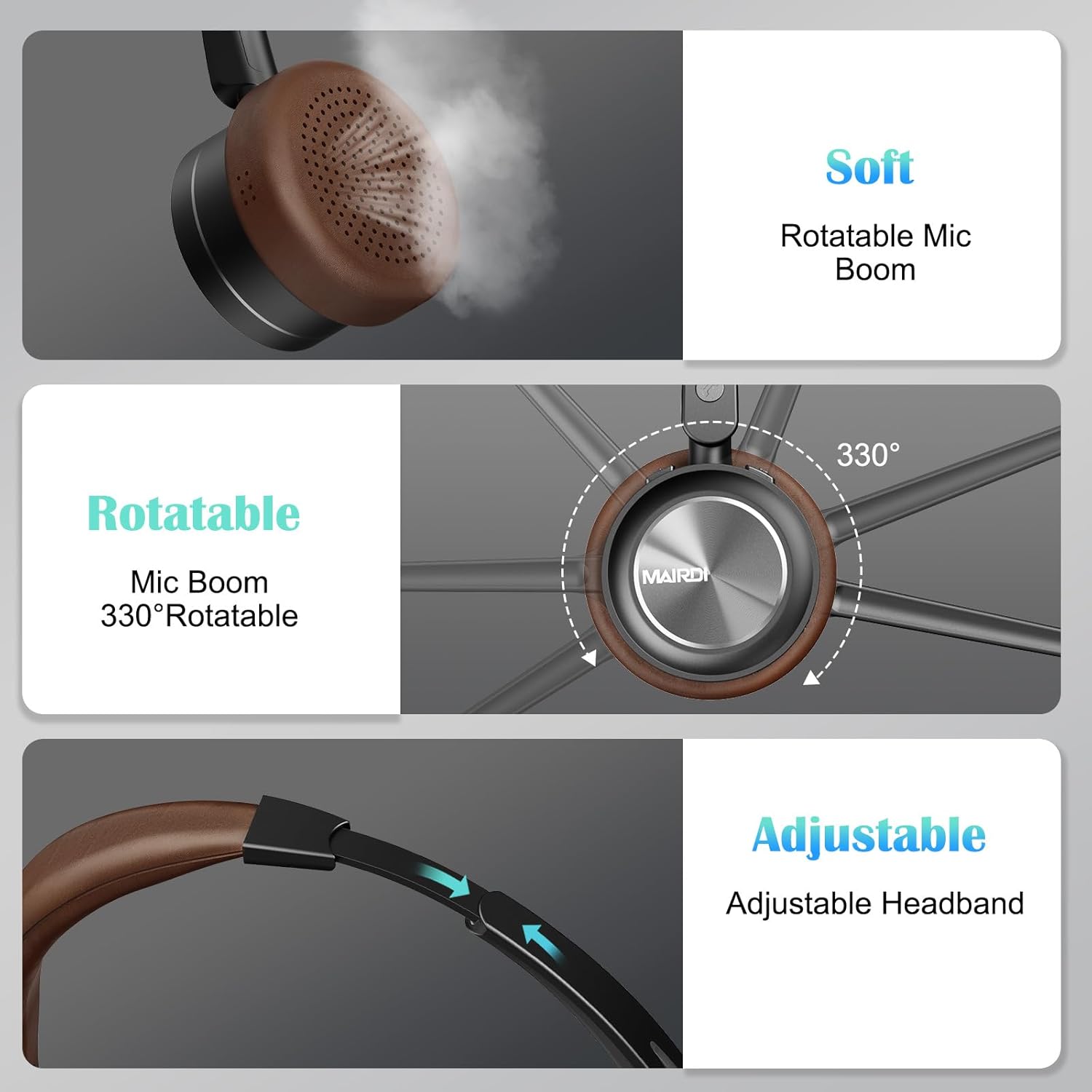
A visual breakdown of the MAIRDI M890DBTC headset's comfort features, including soft earpads, a 330-degree rotatable microphone boom, and an adjustable stainless steel headband.
4. Nastavení a nabíjení
4.1 Počáteční poplatek
Before first use, fully charge the headset. Connect the provided USB charging cable to the headset's Mini USB port and a power source (e.g., computer USB port or USB wall adapter). The LED indicator will show charging status and turn off or change color when fully charged (approximately 2 hours).
4.2 Zapnutí/vypnutí
- Zapnutí: Stiskněte a podržte tlačítko napájení po dobu 3 sekund, dokud LED indikátor nezačne modře blikat.
- Vypnout: Stiskněte a podržte tlačítko napájení po dobu 3 sekund, dokud LED indikátor nezačne blikat červeně a poté nezhasne.
5. Návod k obsluze
5.1 Párování Bluetooth
- Zkontrolujte, zda je náhlavní souprava vypnutá.
- Stiskněte a podržte tlačítko napájení po dobu přibližně 5–7 sekund, dokud LED indikátor nezačne střídavě blikat červeně a modře. To signalizuje režim párování.
- On your device (smartphone, PC, laptop), enable Bluetooth and search for available devices.
- Select "MAIRDI M890DBTC" from the list of found devices.
- Po připojení bude LED indikátor pomalu blikat modře.
5.2 Vícebodové připojení
The MAIRDI M890DBTC supports connecting to two Bluetooth devices simultaneously.
- Pair the headset with the first device (e.g., smartphone) as described in Section 5.1.
- Disable Bluetooth on the first device. The headset will re-enter pairing mode.
- Pair the headset with the second device (e.g., laptop).
- Znovu povolte Bluetooth na prvním zařízení. Sluchátka by se měla automaticky připojit k oběma zařízením.

The MAIRDI M890DBTC headset connected simultaneously to a smartphone and a laptop, illustrating its multipoint pairing capability for stable connection with two devices.
5.3 Správa hovorů
- Přijmout/ukončit hovor: Stiskněte jednou multifunkční tlačítko (MFB).
- Odmítnout hovor: Stiskněte a podržte MFB po dobu 2 sekund.
- Znovu vytočit poslední číslo: Dvakrát stiskněte MFB.
- Ztlumit/zapnout mikrofon: Press the Mute Button once during a call. The LED indicator on the microphone will illuminate when muted.

An image depicting a person wearing the MAIRDI M890DBTC headset, highlighting the noise-canceling microphone feature and the mute button functionality. Visual representation of sound waves before and after noise cancellation is included.
5.4 Ovládání hlasitosti
- Zvýšit hlasitost: Stiskněte tlačítko pro zvýšení hlasitosti (+).
- Snížit hlasitost: Stiskněte tlačítko pro snížení hlasitosti (-).
6. Údržba
- Pravidelně čistěte sluchátka s mikrofonem měkkým, suchým hadříkem.
- Nevystavujte sluchátka extrémním teplotám, vlhkosti nebo korozivním látkám.
- Pokud sluchátka nepoužíváte, skladujte je na chladném a suchém místě.
- Nepokoušejte se sluchátka rozebírat ani opravovat sami, jinak by došlo ke ztrátě záruky.
7. Řešení problémů
7.1 Sluchátka se nezapínají
- Ujistěte se, že jsou sluchátka plně nabitá. Připojte je ke zdroji napájení a nechte je nabíjet alespoň 30 minut, než se je pokusíte znovu zapnout.
7.2 Nelze spárovat se zařízením
- Ensure the headset is in pairing mode (LED flashing red and blue alternately).
- Make sure Bluetooth is enabled on your device and it is within 10 meters (33 feet) of the headset.
- Zkuste restartovat headset i zařízení.
- Clear the Bluetooth pairing list on your device and attempt to pair again.
7.3 Žádný zvuk nebo špatná kvalita zvuku
- Zkontrolujte úroveň hlasitosti na sluchátkách i na připojeném zařízení.
- Ensure the headset is properly connected to your device. Re-pair if necessary.
- Přesuňte se blíže k zařízení, abyste předešli rušení nebo problémům s dosahem.
- If using with a PC, ensure the MAIRDI M890DBTC is selected as the default audio input/output device in your sound settings.
7.4 Mikrofon nefunguje
- Ensure the microphone is not muted (check the LED indicator on the microphone boom).
- Verify that the microphone boom is positioned correctly towards your mouth.
- Zkontrolujte nastavení zvuku zařízení a ujistěte se, že je jako vstupní zařízení vybrán mikrofon sluchátek.
8. Specifikace
| Model | M890DBTC |
| Technologie připojení | Bezdrátové připojení (Bluetooth 5.1) |
| Dosah Bluetooth | Až 20 metrů (60 stop) |
| Výdrž baterie (doba hovoru) | Až 30 hodin |
| Výdrž baterie (pohotovostní režim) | Až 200 hodin |
| Doba nabíjení | Přibližně 2 hodiny |
| Mikrofon | Advanced Noise-Canceling |
| Velikost ovladače reproduktoru | 40 mm |
| Frekvenční rozsah | 20 Hz - 20,000 XNUMX Hz |
| Hmotnost | 0.21 kilogramů (7.4 uncí) |
| Materiál | Kůže, Plast, Nerezová ocel |

The MAIRDI M890DBTC headset positioned over a circuit board, illustrating its advanced Bluetooth 5.1 technology and 40mm speaker drivers for high-definition audio.
9. Záruka a podpora
MAIRDI products are designed for reliability and performance. For warranty information or technical support, please refer to the contact details provided on the MAIRDI official webnebo v dokumentaci k nákupu. Uschovejte si doklad o koupi pro případ reklamace.
Pro další pomoc prosím navštivte MAIRDI Store on Amazon.