
TEYES CC3 2K
TEYES CC3 2K Car Radio Multimedia Video Player Navigation Stereo GPS Headunit User Manual
Model: CC3 2K
1. Úvod
This manual provides comprehensive instructions for the installation, operation, and maintenance of your TEYES CC3 2K Car Radio Multimedia Video Player Navigation Stereo GPS Headunit. Please read this manual thoroughly before using the product to ensure proper functionality and safety.

Obrázek: Přední strana view of the TEYES CC3 2K Headunit displaying its user interface.
2. Bezpečnostní informace
Vždy dodržujte následující bezpečnostní opatření, abyste předešli zranění nebo poškození zařízení:
- Nepokoušejte se jednotku rozebírat ani upravovat. Mohlo by dojít k jejímu poškození a zrušení platnosti záruky.
- Ujistěte se, že všechna kabelová připojení jsou bezpečná a správně izolovaná, aby se zabránilo zkratu.
- Nepoužívejte zařízení v extrémních teplotách nebo při vysoké vlhkosti.
- Neblokujte ventilační otvory na jednotce.
- Pokud si nejste jisti některým krokem instalace, poraďte se s odborníkem.
3. Obsah balení
Ověřte, zda jsou v balení přítomny všechny níže uvedené položky:
- 1x Head unit (TEYES CC3 2K)
- 1x napájecí kabel
- 1x USB kabel
- 1x GPS anténa
- 1x AUX kabel
- 1x 4G WiFi antenna
- 1x E-book (digital manual)
- 1x Frame (for BMW X5 E39 E53 1999-2006)
- 1x AHD 1080p rear camera
- 1x Čisticí hadřík
- 1x Wiring diagram

Image: Visual representation of the TEYES CC3 2K Headunit and its included accessories.
4. Instalační příručka
This section outlines the general steps for installing the TEYES CC3 2K head unit in compatible BMW X5 E39/E53 models (1999-2006). Professional installation is recommended.
4.1 Kontroly před instalací
- Před nastartováním se ujistěte, že je vypnuté zapalování vozidla a odpojen akumulátor.
- Verify compatibility with your specific BMW X5 model and year.
- Familiarize yourself with the vehicle's existing dashboard layout and wiring.

Image: Comparison of a BMW X5 dashboard before and after installation of the TEYES CC3 2K head unit.
4.2 Removal of Existing Unit
- Carefully remove the trim pieces surrounding the factory radio.
- Unscrew and pull out the existing head unit.
- Disconnect all wiring harnesses and antenna cables from the old unit.
4.3 Instalace hlavní jednotky
- Attach the provided frame to the TEYES CC3 2K head unit.
- Connect the power cable, USB cables, GPS antenna, 4G WiFi antenna, and AUX cable to the corresponding ports on the new head unit. Refer to the included wiring diagram for detailed connections.
- Route the GPS and 4G WiFi antennas to an optimal location for signal reception, typically on the dashboard or under the windshield.
- If installing the rear camera, route its cable from the rear of the vehicle to the head unit and connect it to the designated input.
- Carefully slide the TEYES CC3 2K head unit with the frame into the dashboard opening.
- Secure the unit using the appropriate screws.
- Reattach the dashboard trim pieces.

Image: The OEM panel designed for integrating the TEYES CC3 2K head unit into the vehicle's dashboard.
4.4 Po instalaci
- Znovu připojte akumulátor vozidla.
- Zapněte zapalování a hlavní jednotku.
- Perform initial setup, including language, time, and network settings.
- Test all functions: radio, navigation, Bluetooth, USB, and rear camera.
5. Návod k obsluze
The TEYES CC3 2K operates on an Android system, offering a user-friendly interface. Navigate using the touchscreen and physical buttons (if applicable).
5.1 Základní obsluha
- Zapnutí/vypnutí: Stiskněte a podržte tlačítko napájení.
- Ovládání hlasitosti: Adjust using the on-screen controls or steering wheel buttons.
- Domovská obrazovka: Klepnutím na ikonu Domů se vrátíte do hlavního rozhraní.
- Zásuvka aplikace: Přejetím prstem nahoru nebo klepnutím na ikonu aplikace zobrazíte všechny nainstalované aplikace.

Image: Illustration of the head unit's compatibility with vehicle steering wheel controls for convenient operation.
5.2 Navigace
- Access the pre-installed navigation application from the home screen or app drawer.
- Zadejte cíl pomocí klávesnice na obrazovce nebo hlasového příkazu.
- The system supports various map types, including North America.
5.3 Přehrávání multimédií
- Rádio: Select the "Radio" application to tune into FM/AM stations. Supports RDS.
- USB přehrávání: Connect USB devices to the available USB ports for audio and video playback. The unit features 3 USB outputs for data transfer.
- Bluetooth audio: Pair your smartphone via Bluetooth to stream music.
- Přehrávání videa: Podporuje různé video formáty.

Image: Screenshot of the premium local radio interface on the TEYES CC3 2K head unit.
5.4 Konektivita
- Wi-Fi/Hotspot: Connect to a Wi-Fi network or use your phone's hotspot for internet access.
- 4G Internet: The unit supports 4G internet connectivity.
- Bluetooth: For hands-free calling and audio streaming, featuring an upgraded QCC3031QFN Qualcomm module.
- Bezdrátové CarPlay a Android Auto: Built-in support for seamless smartphone integration.

Image: Close-up of the three USB output ports provided for data transfer and device connectivity.
5.5 Pokročilé funkce
- Režim rozdělené obrazovky: Utilize the "Freestyle Combination Split Screen Mode" to run two applications simultaneously.
- Zpracování zvuku DSP: Features 2*DSP ADAU1701 + ROHM32107 for enhanced audio quality, including a 27-segment EQ, sound filtering, and optical/coaxial digital audio output.
- Zadní View Fotoaparát: V reálném čase viewing of the vehicle's rear view and support for video recording with the included AHD 1080p rear camera.
- TEYES Vision & TEYES Yahu: Explore creative 3D software applications.

Image: The head unit displaying two applications simultaneously in split-screen mode.

Image: User interface for the DSP audio processing, highlighting the dual DSP chips.

Image: Display showing real-time rear view camera feed with video recording functionality.
6. Údržba
Proper maintenance ensures the longevity and optimal performance of your TEYES CC3 2K head unit.
- Čištění: Use the provided cleaning cloth or a soft, dry cloth to wipe the screen and unit exterior. Avoid abrasive cleaners or solvents.
- Aktualizace softwaru: Periodically check for and install software updates to ensure the latest features and bug fixes.
- Teplota: Nevystavujte jednotku delšímu přímému slunečnímu záření nebo extrémním teplotám.
7. Řešení problémů
V této části naleznete běžné problémy a jejich řešení. Pokud problém přetrvává, kontaktujte zákaznickou podporu.
| Problém | Možná příčina | Řešení |
|---|---|---|
| Jednotka se nezapne. | Uvolněné připojení napájení, spálená pojistka, odpojená baterie vozidla. | Check power cable connections. Inspect vehicle fuses. Ensure battery is connected. |
| Žádný zvukový výstup. | Volume too low, audio cables disconnected, incorrect audio source selected. | Increase volume. Verify speaker wire connections. Select correct audio source (e.g., Radio, USB, Bluetooth). |
| Slabý nebo ztracený signál GPS. | GPS anténa je nesprávně umístěna nebo odpojena. | Ensure GPS antenna is securely connected and placed in an unobstructed location. |
| Problémy s připojením Bluetooth. | Zařízení není spárované, Bluetooth na telefonu/jednotce vypnutý, rušení. | Ujistěte se, že je na obou zařízeních povoleno Bluetooth. Znovu spárujte zařízení. Přesuňte se blíže k jednotce. |

Image: An icon representing the Frequently Asked Questions (FAQ) section, indicating support resources.
8. Specifikace
| Funkce | Detail |
|---|---|
| Číslo modelu | CC3 2K |
| Velikost displeje | 9.5 palce |
| Technologie displeje | 2K In-cell Display, Gamut Coverage 157% |
| Operační systém | Android 10 |
| Procesor | 8 cores 2.0GHz |
| BERAN | 6 GB |
| ROM | 128 GB |
| Konektivita | Bluetooth (QCC3031QFN Qualcomm), USB, Wi-Fi, Hotspot, 4G Internet |
| Režim zvukového výstupu | Stereo |
| DSP | 2*DSP ADAU1701 + ROHM32107 |
| Zvukový výstup | Optical and coaxial digital audio output |
| Speciální funkce | Touchscreen, Built-in wireless CARPLAY and ANDROID AUTO, RDS support, TEYES Vision & TEYES Yahu software, Real-time rear view with recording. |
| Included Rear Camera | AHD 1080p |
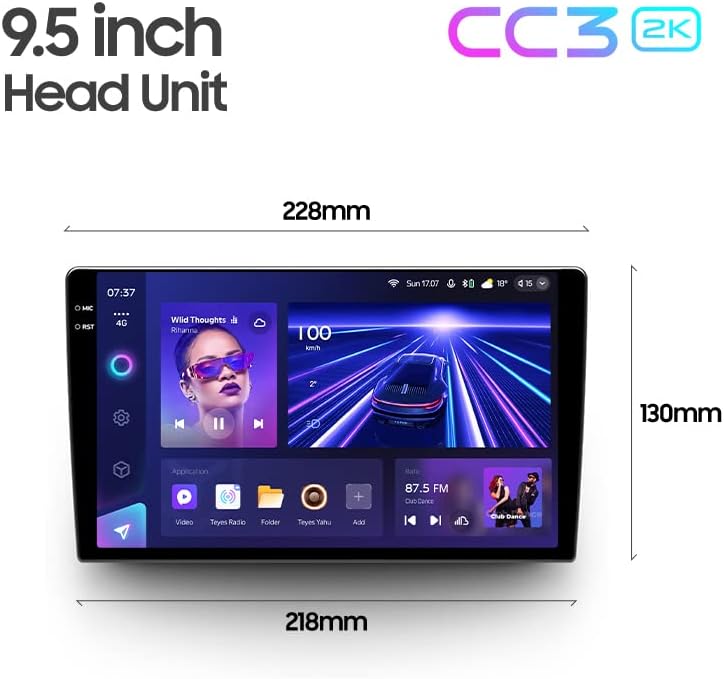
Image: Diagram showing the dimensions of the TEYES CC3 2K Headunit.
9. Záruka a podpora
The TEYES CC3 2K Headunit comes with a 1-letá záruka od data nákupu.
For technical support, warranty claims, or further assistance, please contact TEYES customer service through their official webnebo prodejce, u kterého byl produkt zakoupen. Uschovejte si doklad o koupi pro ověření záruky.
Manufacturer: Shenzhen TEYES High tech Co., Ltd.
Ask a question about this manual
Ask about setup, troubleshooting, compatibility, parts, safety, or missing instructions. Manuals+ will review the question and use this page’s manual context to help answer it.