
1. Úvod
Welcome to the user manual for your new YISENCE 4K Underwater Camera. This compact and floatable digital camera is designed to capture high-quality photos and videos in various environments, including underwater up to 11 feet. Featuring 4K video recording, 48MP photo resolution, autofocus, and dual screens for easy selfies, this manual will guide you through its setup, operation, and maintenance to ensure optimal performance and longevity.
2. Bezpečnostní opatření
- Ensure the battery compartment and all ports are securely sealed before submerging the camera in water.
- Do not exceed the maximum waterproof depth of 11 feet (3.3 meters) or the maximum submersion time of one hour per use.
- Nevystavujte fotoaparát extrémním teplotám nebo přímému slunečnímu záření po delší dobu.
- Uchovávejte fotoaparát mimo dosah silných magnetických polí.
- Use only the specified battery and charging cable provided with the camera.
- Nepokoušejte se fotoaparát rozebírat ani opravovat sami. V případě problémů kontaktujte zákaznickou podporu.
- Uchovávejte mimo dosah malých dětí, aby nedošlo k náhodnému požití malých částí.
3. Obsah balení
Zaškrtněte prosím políčko, abyste se ujistili, že jsou přítomny všechny položky:
- 1 x YISENCE Digital Camera
- 1 x 32 GB karta Micro SD
- 1 x 1250mAh Li-ion baterie
- 1x Nabíječka
- 1 x kabel typu C
- 1 x Pouzdro
- 1 x String (Lanyard)
- 1 x Uživatelská příručka
4. Konec produktuview
Familiarize yourself with the camera's main components and controls.

Obrázek 4.1: Přední a zadní strana View of the YISENCE 4K Underwater Camera. The image displays the camera's dual screens, lens, flash, and control buttons, along with a separate 32GB MicroSD card.

Figure 4.2: The camera's compact size and dimensions (4.13in length, 2.5in height, 4.58oz weight) are highlighted, demonstrating its portability.
5. Nastavení
5.1 Instalace a nabíjení baterie
The camera uses a 1250mAh Li-ion battery. Ensure the battery is fully charged before first use.
- To open the battery compartment, firmly press the cover lock with one hand while pushing out the battery cover with the other. The battery compartment is sealed for waterproof protection.
- Insert the 1250mAh Li-ion battery into the compartment, ensuring the correct polarity.
- Kryt baterie bezpečně zavřete, dokud nezacvakne na místo.
- Connect the camera to the charger using the provided Type-C cable. The charging indicator light will illuminate.
- Once fully charged, the indicator light will change or turn off. Disconnect the charger.
5.2 Instalace a formátování paměťové karty
Kamera podporuje karty Micro SD s kapacitou až 128 GB. Součástí balení je karta s kapacitou 32 GB.
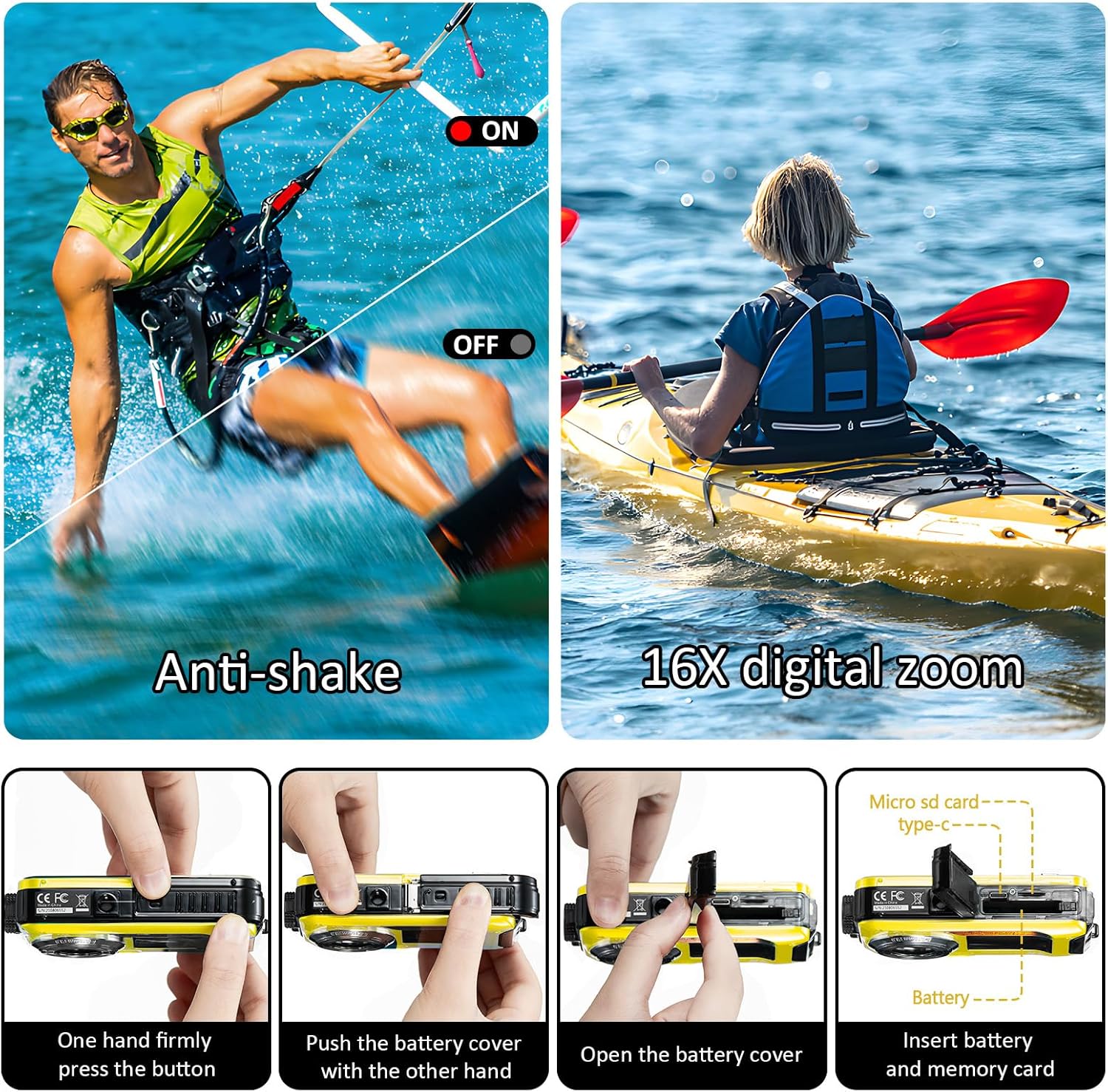
Figure 5.1: Steps for opening the battery cover and inserting the Micro SD card. This image illustrates the process of accessing the battery and memory card slots.
- Open the battery compartment as described in section 5.1.
- Locate the Micro SD card slot. Insert the Micro SD card with the gold contacts facing the correct direction until it clicks into place.
- Pevně zavřete kryt baterie.
- It is recommended to format the Micro SD card before first use to ensure compatibility and optimal performance. This can usually be done through the camera's menu settings (refer to section 6.6 Menu Settings).
6. Návod k obsluze
6.1 Zapnutí/vypnutí
- To power on the camera, press and hold the Power button.
- To power off the camera, press and hold the Power button again. The camera also features an auto power-off function (configurable in settings).
6.2 Přepínání režimů
Press the 'MODE' button to cycle through different modes: Photo, Video, and Playback.
6.3 Taking Photos (Autofocus)
The camera features a 48MP resolution with autofocus for clear images.

Figure 6.1: Autofocus in action. The image shows how the camera identifies and focuses on subjects, indicated by a green focus frame on the screen.
- Switch to Photo mode using the 'MODE' button.
- Namiřte fotoaparát na objekt.
- Half-press the Shutter button to activate autofocus. A green focus frame will appear on the screen when focus is achieved.
- Úplně stiskněte tlačítko spouště pro pořízení fotografie.
6.4 Nahrávání videí
Capture moments in 4K UHD (3840x2160P) or other resolutions.

Figure 6.2: The camera's screen displaying a scene, highlighting its 4K video recording feature.
- Switch to Video mode using the 'MODE' button.
- Stisknutím tlačítka spouště spusťte nahrávání. Na obrazovce se zobrazí indikátor nahrávání.
- Dalším stisknutím tlačítka spouště nahrávání zastavíte.
6.5 Dual-Screen Selfie Function
The camera features a 2.7-inch rear screen and a 1.8-inch front screen, ideal for selfies and group photos.

Figure 6.3: The camera's front screen in use for selfies, allowing users to frame themselves easily.
- When in Photo or Video mode, the front screen can be activated for self-portraits. Refer to the camera's on-screen prompts or specific button (if available) to switch between screens.
- Use the front screen to compose your selfie or group shot before pressing the Shutter button.
6.6 Digitální zoom
The camera supports 16X digital zoom.
- In Photo or Video mode, use the 'T' (Telephoto) button to zoom in and the 'W' (Wide) button to zoom out.
6.7 Anti-shake Function
The camera features electronic image stabilization to reduce blur from camera shake.
- This feature is typically enabled by default. Check the camera's menu settings to confirm or adjust.
6.8 Režim přehrávání
- Switch to Playback mode using the 'MODE' button.
- Use the navigation buttons to browse through your photos and videos.
- Press the 'OK' or Shutter button to view fotografii nebo přehrání videa.
6.9 Nastavení nabídky
Press the 'MENU/OK' button to access the camera's settings. Use the navigation buttons to scroll and 'MENU/OK' to select.
- Rozlišení statického obrázku: Adjust photo resolution (e.g., 48M, 30M, 24M).
- Rozlišení videa: Select video quality (e.g., 4K, 2.7K, 1080P).
- ISO: Adjust light sensitivity (Auto, 100, 200, 400).
- Vyvážení bílé: Set color balance (Auto, Sunny, Cloudy, Tungsten, Fluorescent).
- Samospoušť: Set a delay before taking a photo (2s, 5s, 10s).
- Automatické vypnutí: Configure automatic shutdown time (Close, 60sec, 180sec, 300sec).
- Formát: Vymažte všechna data na paměťové kartě.
- Datum/čas: Nastavte aktuální datum a čas.
7. Waterproof Usage Guidelines
The YISENCE 4K Underwater Camera is designed to be waterproof up to 11 feet (3.3 meters) for one hour per time.
- Before each underwater use, thoroughly inspect the battery compartment cover and all port covers to ensure they are clean and free of debris, and securely sealed.
- Do not open the battery compartment or any port covers while the camera is wet or submerged.
- After using the camera in saltwater, rinse it thoroughly with fresh water and allow it to air dry completely before opening any compartments.
- Avoid sudden temperature changes, which can cause condensation inside the camera.
8. Údržba
8.1 Čištění
- Otřete tělo fotoaparátu měkkým hadříkemamp tkanina. Nepoužívejte agresivní chemikálie nebo abrazivní čisticí prostředky.
- Na čočku použijte speciální hadřík a roztok na čištění čoček. Nedotýkejte se čočky přímo prsty.
8.2 Skladování
- Fotoaparát skladujte na chladném a suchém místě mimo dosah přímého slunečního záření a vysoké vlhkosti.
- Pokud skladujete po delší dobu, vyjměte baterii.
8.3 Péče o baterii
- Pravidelně nabíjejte baterii, i když ji nepoužíváte, abyste zachovali její životnost.
- Nevystavujte baterii ohni nebo extrémnímu teplu.
9. Řešení problémů
Pokud se s fotoaparátem setkáte s problémy, podívejte se na následující běžné problémy a jejich řešení:
| Problém | Možná příčina | Řešení |
|---|---|---|
| Fotoaparát se nezapne. | Baterie je slabá nebo vybitá. Baterie není správně vložena. | Charge the battery fully. Reinsert the battery, ensuring correct polarity. |
| Nelze pořizovat fotografie/videa. | Memory card is full. Memory card is not inserted or formatted. Incorrect mode selected. | Smazat nepotřebné files or insert a new card. Insert and format the memory card. Switch to Photo or Video mode. |
| Obrázky/videa jsou rozmazané. | Lens is dirty. Camera shake. Subject too close/far for autofocus. | Clean the lens. Hold the camera steady. Ensure subject is within focal distance (0.3ft~infinity). Half-press shutter for autofocus. |
| Camera stops working after getting wet. | Battery compartment or ports not sealed properly. Exceeded depth/time limit. | Ensure all seals are clean and securely closed before water exposure. Do not exceed 11ft depth or 1 hour submersion. Allow camera to dry completely if moisture is detected. |
| Poor photo quality (e.g., yellow tint). | Incorrect White Balance setting. Low light conditions. | Adjust White Balance settings (Auto/Sunny/Cloudy/Tungsten/Fluorescent). Ensure adequate lighting. |
If the problem persists after trying these solutions, please contact YISENCE customer support.
10. Specifikace
Detailed technical specifications for the YISENCE 4K Underwater Camera:
| Funkce | Specifikace |
|---|---|
| Název modelu | 4 k 806 |
| Rozlišení statických snímků | 48 mil., 30 mil., 24 mil., 20 mil., 16 mil., 12 mil., 8 mil., 7 mil., 5 mil., 2 mil. |
| Formáty obrázků | JPEG |
| Rozlišení videa | UHD 4K 3840x2160P, FHD 2.7K 2688x1520P/20FPS, FHD 1920x1080P/30FPS, HD 1280x720P/30fps, VGA, QVGA |
| Formát videa | AVI |
| Vodotěsná schopnost | 11 feet (3.3 meters) for one hour per time |
| Ohnisková vzdálenost | Autofocus (0.3ft~infinity) |
| Otvor | F/2.9 |
| ISO | Auto, 100, 200, 400 |
| Dual Screens | Rear: 2.7 inches TFT-LCD (4:3); Front: 1.8 inches TFT-LCD (4:3) |
| Externí paměťová karta | Micro SD card, Max 128GB (32GB card included) |
| Kapacita baterie | Li-ion baterie 1250mAh |
| Recording Time (Underwater) | Approx. 70 minutes at 11FT |
| Výstupní rozhraní | Micro USB 2.0 |
| Vstupní rozhraní | Typ-C |
| Rozměry | 4.13 x 2.5 x 0.97 palce |
| Hmotnost | 4.41 oz (125g) |
| Blesková světla | <4.9FT; Open/close; Automatic flash, no flash, mandatory flash |
| Stabilizace obrazu | Elektronická stabilizace obrazu |
| Nepřetržité fotografování | Ano |
| Detekce obličeje | Podpora |
11. Záruka a podpora
YISENCE products undergo rigorous testing to ensure safety and reliability. For any product inquiries, technical support, or warranty claims, please contact YISENCE customer service through the official channels or visit the YISENCE Store on Amazon.