
1. Průvodce nastavením
This section guides you through the initial setup and installation of your BIWIBON BCA-02 Smart Fingerprint Door Lock.
1.1 Obsah balení
Ověřte, zda jsou v balení přítomny všechny komponenty:
- Uživatelská příručka
- Přední rukojeť
- Zadní klika
- Jedna západka
- Úderová deska
- 2 mechanické klávesy
- 2 IC karty
- Square Cotter
- 2 Spiral Tubes
- Screws (Spare Package)
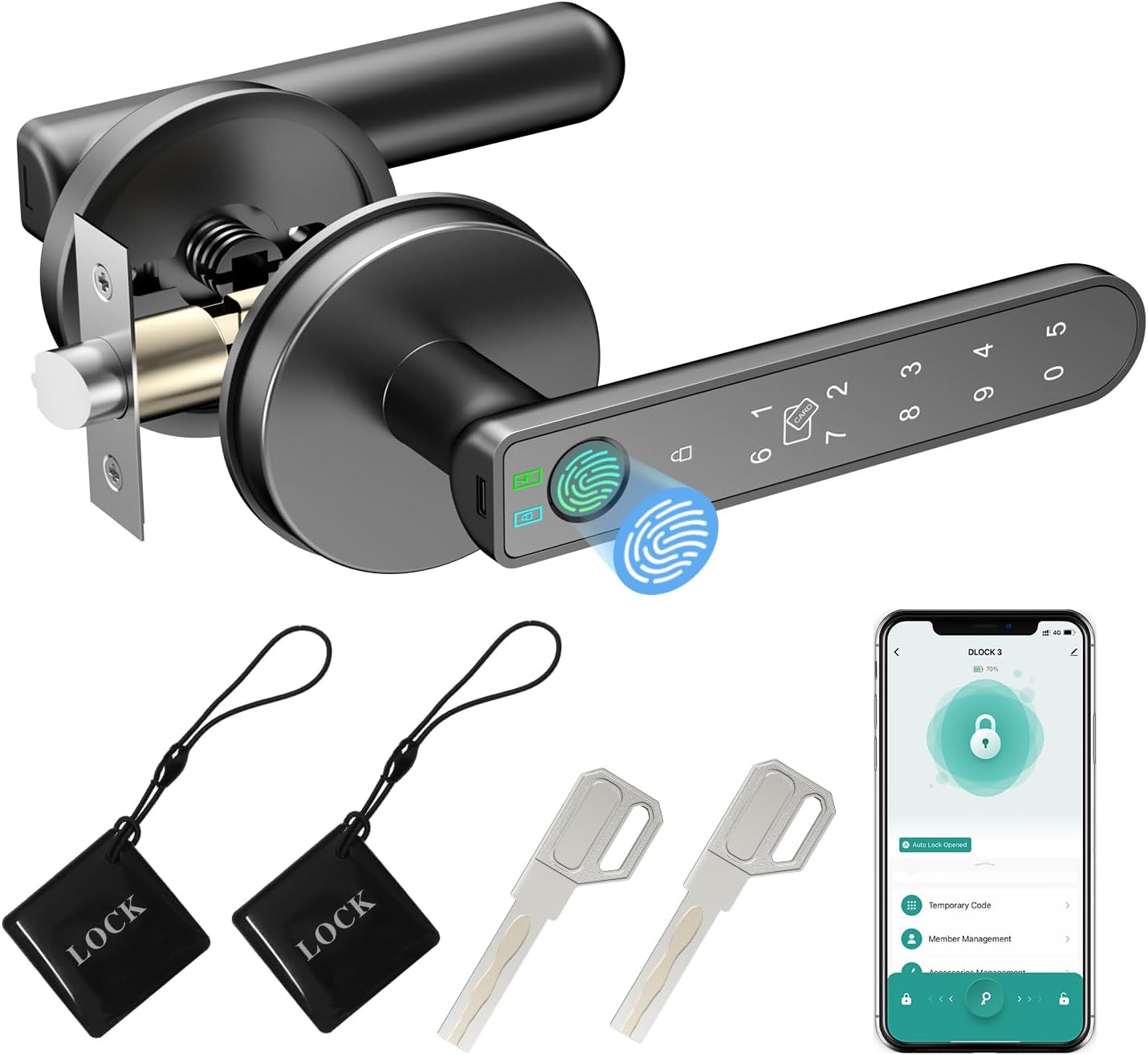
Image: All components included with the BIWIBON BCA-02 Smart Fingerprint Door Lock, including the front and back handles, latch, keys, and IC cards.
1.2 Potřebné nástroje
A basic screwdriver is typically sufficient for installation. No extra drilling or specialized tools are usually required.
1.3 Příprava dveří
Pro správnou instalaci se ujistěte, že vaše dveře splňují následující specifikace:
- Tloušťka dveří: 35 mm-55 mm (1.38-2.17 palců)
- Zadní část: Adjustable between 60mm (2-3/8 inches) and 70mm (2-3/4 inches)
- Průměr dveřního otvoru: 54 mm (2-1/8 palce)

Image: Diagram illustrating standard US door dimensions and how the lock components fit, including backset and hole diameter measurements.
1.4 kroky instalace
Follow these steps to install your smart door lock. For a visual guide, please refer to the installation video below.
- Adjust Latch Backset: The latch is initially set for 60mm (2-3/8 inches). Adjust it to 70mm (2-3/4 inches) if required by your door size. Ensure the latch is horizontal, not inclined.
- Install Latch: Insert the latch into the door edge and secure it with screw A. Ensure the slotted hole is centered in the door hole.
- Install Front Handle: Fix and tighten the spiral tubes onto the front handle. Route the wire through the square cotter and insert it into the latch hole, then fix the front panel. This lock is suitable for both left and right-handed doors without special adjustment for handle direction.
- Install Back Handle: Remove the battery cover from the back handle. Route the wire through the back panel. Connect the wire on the battery box and ensure a tight wire connection. Secure the back handle with screw B. When fixing screw B, press the handle down to insert the screw and tighten it through the hole in the back handle.
- Vložte baterie: Install 4 AAA alkaline batteries (not included) into the battery box.
- Testovací provoz: Po instalaci otestujte všechny metody odemykání, abyste se ujistili o správné funkčnosti.
Video: Official BIWIBON BCA-02 Fingerprint Door Lock Installation Guide. This video demonstrates the step-by-step process of installing the smart door lock, including latch adjustment, handle assembly, and wiring connections.
2. Návod k obsluze
Your BIWIBON BCA-02 Smart Fingerprint Door Lock offers multiple convenient ways to access your space.
2.1 Metody odemykání
The lock supports the following unlocking methods:
- Rozpoznávání otisků prstů: Place your registered finger on the sensor for quick access. The enhanced 508 DPI fingerprint sensor module provides a recognition rate of over 99% in 0.2 seconds.
- Chytré ovládání APP: Use the dedicated mobile application (Tuya Smart App) to unlock the door remotely via Bluetooth. With the optional BIWIBON Gateway (sold separately), you can control the lock from anywhere.
- IC karty: Tap a registered IC card on the designated area of the handle to unlock.
- Zadání hesla: Enter your programmed passcode on the touchscreen keypad. The anti-peeping feature allows you to input random digits before and after your actual code to protect your PIN.
- Mechanické klíče: For traditional backup, use the provided mechanical keys to unlock the door.

Image: Visual representation of the various unlocking methods available for the BIWIBON BCA-02 lock, including app, fingerprint, IC card, password, and backup key.

Image: Illustration of the smart app control features, such as keyless entry, share access, auto-lock, remote passcode generation, and access history viewIng.
2.2 Metody uzamčení
The lock can be secured in the following ways:
- Automatické zamykání: Zámek lze nakonfigurovat tak, aby se automaticky zamkl po uplynutí nastavené doby po zavření dveří.
- Ruční zamykání: Press the lock button on the handle or use the mobile app to manually lock the door.
2.3 Speciální funkce
- Režim průchodu: Activate Passage Mode to keep the door unlocked for extended periods, useful during gatherings or when frequent access is needed.
- Hlasové ovládání (volitelné): When paired with the BIWIBON Gateway (sold separately), the lock can be integrated with Alexa or Google Home for voice-activated unlocking.

Image: Highlights advanced features such as storage capacity for 100 fingerprints, 100 passwords, and 100 IC cards, along with optional voice control compatibility with Alexa and Google Assistant via the BIWIBON Gateway.
3. Údržba
Správná údržba zajišťuje dlouhou životnost a optimální výkon vašeho inteligentního dveřního zámku.
3.1 Správa baterie
- Typ baterie: The lock requires 4 AAA alkaline batteries (not included).
- Upozornění na vybitou baterii: The lock will provide a low battery warning signal when the batteries need replacement.
- Nouzové napájení: In case of a completely dead battery, you can use an external power bank connected via the emergency charge port (USB) to temporarily power the lock for unlocking. This port is for power only, not for charging the internal batteries.
- Záložní klíče: Always keep your spare mechanical keys within reach for emergency access.

Image: Details on how to manage battery life, including low battery alerts, emergency power bank usage, and the importance of keeping mechanical backup keys accessible.
3.2 Čištění
Povrch zámku otřete měkkým, suchým hadříkem. Nepoužívejte abrazivní čisticí prostředky ani rozpouštědla, která by mohla poškodit povrchovou úpravu nebo elektronické součástky.
4. Řešení problémů
If you encounter issues with your BIWIBON BCA-02 Smart Fingerprint Door Lock, refer to the following common problems and solutions:
- Otisk prstu nebyl rozpoznán: Ensure your finger is clean and dry. Try repositioning your finger on the sensor. Re-register your fingerprint if the issue persists.
- Zámek nereaguje: Check the battery level. If batteries are low or dead, replace them or use an emergency power bank. Ensure the wire connections are secure.
- Problémy s připojením aplikace: Ensure Bluetooth is enabled on your phone and you are within range of the lock. If using the BIWIBON Gateway, ensure it is properly connected to Wi-Fi and within range of both the lock and your router. Try restarting the app or your phone.
- Nesprávné zadání hesla: Ensure you are entering the correct password. Utilize the anti-peeping feature by entering random digits before and after your actual code.
- IC Card Not Working: Ensure the IC card is properly registered. Try tapping the card firmly on the sensor.
- Mechanický klíč nefunguje: Ujistěte se, že je klíč zcela zasunutý a správně otočený. Netlačte na klíč násilím.
5. Specifikace produktu
| Funkce | Specifikace |
|---|---|
| Značka | BIWIBON |
| Název modelu | BCA-02 |
| Typ zámku | Biometric, App Control, Touchscreen Keypad |
| Materiál | Kov |
| Barva | Černý |
| Rozměry položky (D x Š x V) | 5.7 x 2.75 x 2.35 palce |
| Hmotnost položky | 2.15 libry |
| Zdroj napájení | 4 baterie AAA (nutné, nejsou součástí balení) |
| Protokol připojení | Wi-Fi (with optional Gateway) |
| Speciální funkce | Smart Door Knob, Up to 100 Fingerprints, 100 IC Cards, 100 Passwords, Bluetooth Unlock, One Touch Unlock, Smart Control with app, Auto Lock, Passage Mode, Silent Mode, Easy Install, Emergency Charge |
6. Záruka a podpora
For warranty information, product support, or technical assistance, please refer to the warranty card included in your product packaging or contact BIWIBON customer service directly. Keep your purchase receipt as proof of purchase.
For further assistance, please visit the official BIWIBON store or contact their support channels.