
1. Úvod
Thank you for choosing the Devoko Computer Desk. This manual provides detailed instructions for the assembly, operation, maintenance, and troubleshooting of your new desk. Please read this manual carefully before assembly and retain it for future reference to ensure proper use and longevity of the product.

Image 1.1: The Devoko Computer Desk, showcasing its minimalist design and black finish.
2. Bezpečnostní informace
- Stůl vždy sestavujte na měkkém a čistém povrchu, abyste zabránili poškrábání.
- Před použitím se ujistěte, že jsou všechny šrouby a spojovací prvky bezpečně utažené. Pravidelně kontrolujte a v případě potřeby dotahujte.
- Nepřetěžujte stůl. Maximální nosnost naleznete ve specifikacích.
- Udržujte malé části a obalové materiály mimo dosah dětí, abyste předešli nebezpečí udušení.
- Nepokládejte horké předměty přímo na povrch stolu bez ochrany.
3. Obsah balení
Před zahájením montáže ověřte, zda jsou všechny níže uvedené komponenty přítomny a nepoškozené. Pokud některé díly chybí nebo jsou poškozené, kontaktujte zákaznickou podporu.
- Panely pro stolní počítače
- Desk Frame Components (legs, crossbars, X-braces)
- Installation Tool (Allen key)
- Uživatelská příručka
- Spare Screw Kit (contains one spare screw for each model)
4. Pokyny k instalaci a montáži
Assembly of the Devoko Computer Desk is designed to be straightforward and can typically be completed in under 30 minutes. All parts are numbered for easy identification. Follow these steps:
- Rozbalte komponenty: Carefully remove all parts from the packaging and lay them out on a clean, soft surface. Identify each part using the provided numbering.
- Sestavte rám: Attach the main frame components (legs and crossbars) using the provided screws and Allen key. Ensure all connections are firm.
- Instalace X-výztuh: Secure the X-shaped support bars to the frame. These braces enhance the desk's stability.
- Připojení panelů plochy: Place the desktop panels onto the assembled frame and secure them with the remaining screws.
- Upravte nohy: Once the desk is fully assembled, place it in its desired location. Adjust the leveling feet at the bottom of each leg to ensure the desk is stable and level on uneven surfaces.

Image 4.1: Illustration of the robust frame design, highlighting the reinforced X-bar and metal frame for reliable support and a maximum load capacity of 300 lbs (approximately 136 kg).

Obrázek 4.2: Podrobný view of the corner bracket, demonstrating its role in enhancing the desk's structural stability.

Image 4.3: Close-up of an adjustable foot pad, which allows for leveling the desk on uneven floor surfaces.
5. Provoz a použití
The Devoko Computer Desk is designed for versatile use in various environments, including home offices, study areas, or gaming setups. Its generous 100 cm tabletop accommodates extended configurations, such as a 32-inch monitor, keyboard, and mouse, providing ample space for your work or leisure activities.

Image 5.1: The Devoko Computer Desk integrated into a modern office environment, featuring a monitor and various desk accessories.
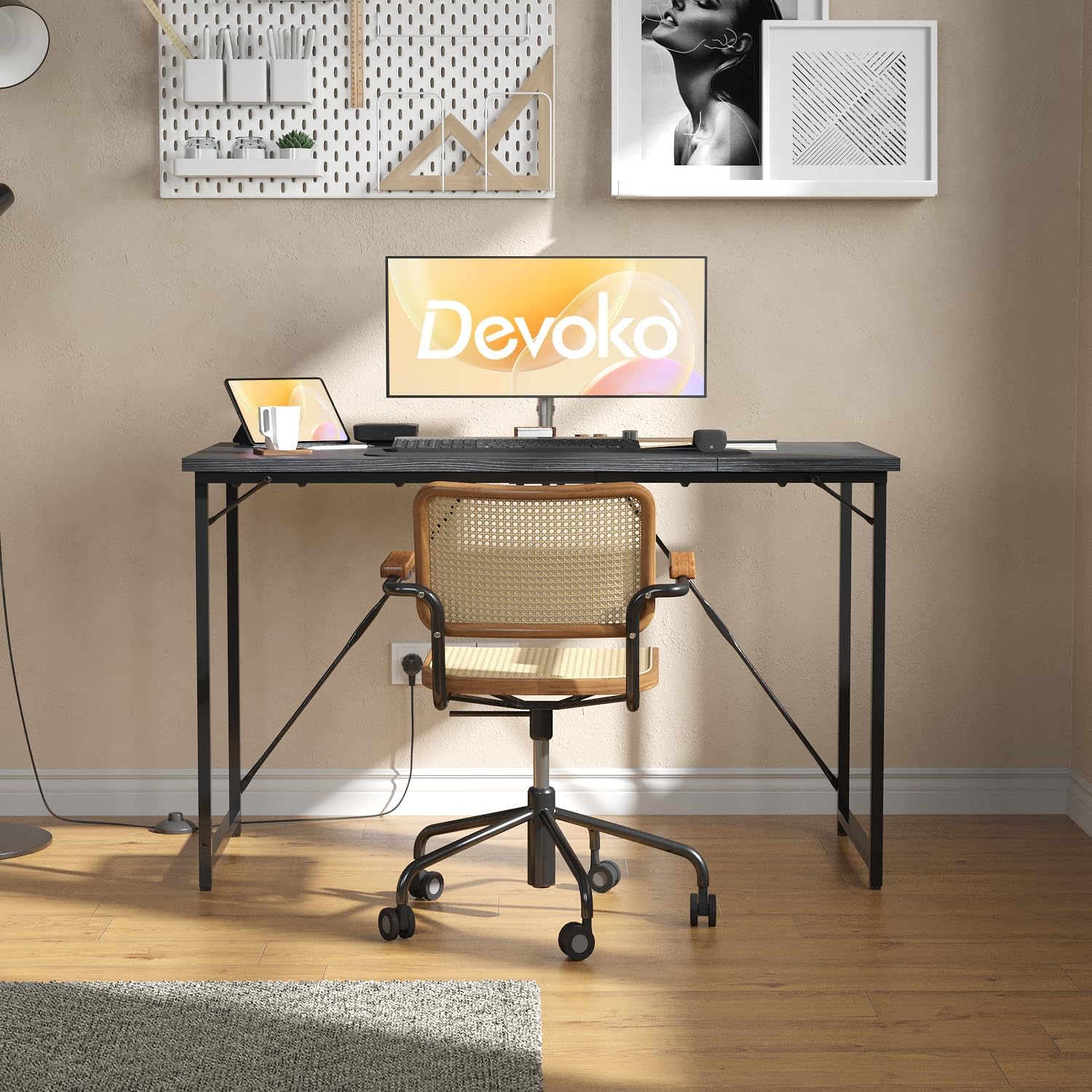
Obrázek 5.2: Přední strana view of the Devoko Computer Desk, set up with a monitor, keyboard, and mouse, demonstrating its functional workspace.
6. Údržba
The desk features a waterproof surface, making it easy to clean and maintain. Follow these guidelines to keep your desk in optimal condition:
- Čištění: Otřete povrch reklamouamp hadříkem a jemným čisticím prostředkem. Nepoužívejte abrazivní čisticí prostředky ani agresivní chemikálie, které by mohly poškodit povrchovou úpravu.
- Rozlití: Promptly wipe up any spills to prevent potential damage, although the surface is designed to be waterproof.
- Ochrana: Use coasters for drinks and protective pads for hot items to further preserve the desk's surface.
- Inspekce: Pravidelně kontrolujte utažení všech šroubů a spojů a v případě potřeby je dotáhněte, aby byla zachována stabilita.

Image 6.1: An illustration highlighting the waterproof nature of the desk surface, indicating its durability and ease of maintenance.

Obrázek 6.2: Detailní záběr view of the desk's textured surface, emphasizing its waterproof quality and ease of cleaning.
7. Řešení problémů
- Stůl se kymácí: Ensure all screws are tightened. Adjust the leveling feet at the bottom of each leg to compensate for uneven floor surfaces.
- Díly nepasují: Double-check the part numbers against the assembly instructions. Ensure components are oriented correctly. Do not force parts together.
- Chybějící části: Refer to the package contents list. If parts are missing, contact customer support for assistance.
8. Specifikace
| Funkce | Detail |
|---|---|
| Značka | Devoko |
| Číslo modelu | G-0266-100-BK |
| Barva | Černý |
| Rozměry (D x Š x V) | 100 x 50 x 75 cm |
| Materiál | Metal (frame), Engineered Wood (desktop) |
| Tloušťka plochy | 12 mm |
| Hmotnostní kapacita | Up to 80 kg (approx. 176 lbs) / 300 lbs (approx. 136 kg) |
| Speciální funkce | Adjustable leveling feet, Reinforced X-braces, Waterproof surface |
| Doba montáže | Méně než 30 minut |

Image 8.1: A diagram illustrating the precise dimensions of the Devoko Computer Desk: 100 cm length, 50 cm width, and 73.5 cm height.

Image 8.2: A visual representation highlighting the 12mm thickness of the desk's high-quality desktop material.
9. Podpora
Your satisfaction is important to us. If you encounter any issues during the use of your Devoko Computer Desk or have any questions, please do not hesitate to contact our customer support team for assistance. We are committed to providing a comfortable and reliable experience with our products.