
LS VISION LS-MS2
LS VISION 4K 180-Degree Ultra-Wide Angle 4G Solar-Powered Outdoor Security Camera
Model: LS-MS2
Značka: LS VISION
1. Úvod
This user manual provides detailed instructions for the installation, operation, and maintenance of your LS VISION 4K 180-Degree Ultra-Wide Angle 4G Solar-Powered Outdoor Security Camera. Please read this manual thoroughly before using the product to ensure proper functionality and safety.
2. Konec produktuview
2.1 Klíčové vlastnosti
- 4K/8MP Resolution for clear video capture.
- 180-Degree Ultra-Wide Angle Dual Lens for comprehensive coverage without distortion.
- Integrated 4G Module for connectivity without Wi-Fi, ideal for remote locations.
- Solar-Powered with 6W solar panel and built-in 18000 mAh batteries for continuous operation. Supports integrated and separate solar panel installation.
- Obousměrný zvuk pro komunikaci v reálném čase.
- Cloud Storage and local TF card storage (up to 128GB, TF card not included).
- Vzdálený Viewing and Playback via Niview app (Android/iOS).
- PIR + Human Detection with automatic human tracking, wake-up video recording, and push notifications.
- Multiple Recording Modes: 24-hour continuous recording, 24-hour + trigger recording, and three trigger recording modes.
- Dual Light Source Design: Full-color night vision up to 20 meters and infrared night vision up to 40 meters.
- IP66 Waterproof Rating for outdoor durability.
2.2 Schéma produktu
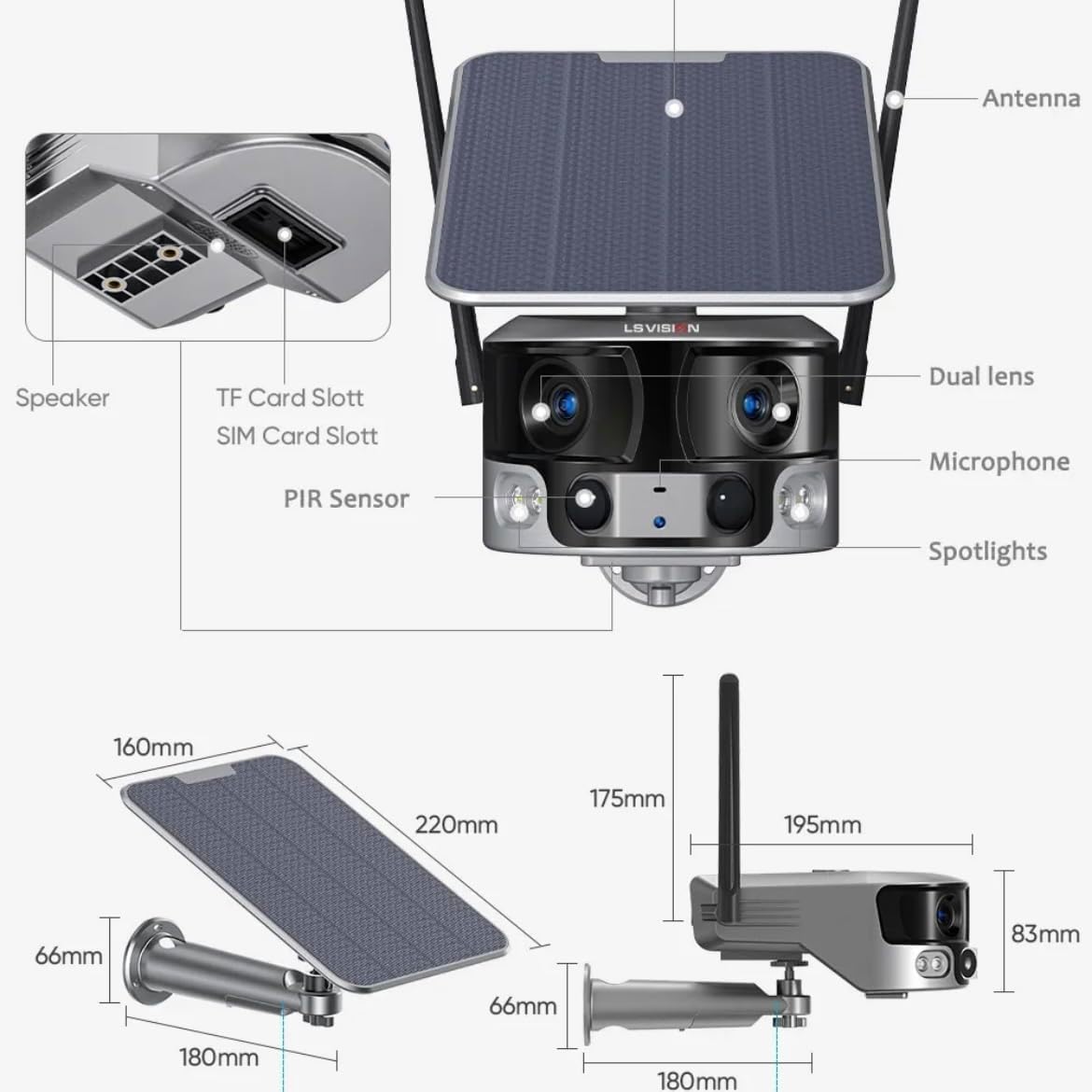
Figure 2.1: Product components and dimensions. Key parts include the solar panel, antennas, dual lens, microphone, spotlights, PIR sensor, speaker, TF card slot, and SIM card slot.
3. Obsah balení
Po otevření zkontrolujte obsah balení, abyste se ujistili, že jsou všechny položky přítomny a nepoškozené:
- 1 x LS VISION 4K 180-Degree Ultra-Wide Angle 4G Solar-Powered Outdoor Security Camera
- 1 x Solar Panel (6W)
- 1 x sada montážních držáků
- 1x 4G anténa
- 1 x Sada šroubů a hmoždinek
- 1 x 2-meter Extension Cable for Solar Panel
4. Průvodce nastavením
4.1 Počáteční nabíjení
Although the camera is solar-powered, it is recommended to fully charge the built-in batteries before the first use. Connect the camera to a 5V/2A USB power adapter (not included) using a standard USB cable for initial charging. The charging indicator will show the status.
4.2 Instalace SIM karty a TF karty
Locate the SIM card slot and TF card slot on the camera (refer to Figure 2.1). Ensure the camera is powered off before inserting or removing cards.
- Open the protective cover of the card slots.
- Insert a standard 4G SIM card into the SIM card slot with the gold contacts facing down. Ensure it clicks into place.
- Insert a TF (microSD) card (up to 128GB, not included) into the TF card slot with the gold contacts facing down. Ensure it clicks into place.
- Close the protective cover firmly to maintain the IP66 waterproof rating.
4.3 Montáž fotoaparátu
The camera is designed for wall mounting and outdoor use. Consider the following for optimal placement:
- Vyberte umístění s amppřímé sluneční světlo pro solární panel.
- Ujistěte se, že kamera je čistá view oblasti, kterou chcete monitorovat.
- Mount the camera at a height that provides good coverage and deters tampering.

Figure 4.1: The LS VISION camera shown with its solar panel and mounting bracket, ready for outdoor installation.

Figure 4.2: The camera operates on a 4G network, eliminating the need for a Wi-Fi router, making it suitable for locations without existing Wi-Fi infrastructure.
The solar panel can be installed integrated with the camera or separately using the 2-meter extension cable for optimal sun exposure.
4.4 Instalace a připojení aplikace
To access and control your camera, download the Niview aplikaci z obchodu s aplikacemi ve vašem chytrém telefonu (k dispozici pro Android a iOS).
- Hledat "Niview" in the App Store or Google Play Store and install it.
- Zaregistrujte si nový účet nebo se přihlaste, pokud již nějaký máte.
- Postupujte podle pokynů v aplikaci a přidejte kameru. Obvykle to zahrnuje naskenování QR kódu na kameře nebo ruční zadání jejího ID.
- Po připojení můžete view živé footage, access recordings, and configure settings.
5. Návod k obsluze
5.1 Živě View & Přehrávání
Access the Niview app on your smartphone or tablet to view live video streams from your camera anytime, anywhere. The app also allows you to review zaznamenané footage.

Figure 5.1: The Niview app interface demonstrating real-time monitoring and timeline playback, ensuring no moment is missed.
5.2 Detekce pohybu a upozornění
The camera features advanced PIR and human detection capabilities. When motion or a human figure is detected, the camera will:
- Automatically begin recording a wake-up video.
- Send instant push notifications to your connected smartphone.
- Initiate automatic human tracking to follow the detected subject.

Figure 5.2: The camera's human tracking feature automatically follows detected individuals, ensuring continuous monitoring of their movement.
5.3 Noční vidění
The camera is equipped with a dual light source design for enhanced night vision:
- Plně barevné noční vidění: Provides clear, colored images up to 20 meters in low-light conditions when spotlights are activated.
- Infračervené (IR) noční vidění: Offers black and white vision up to 40 meters using infrared LEDs.
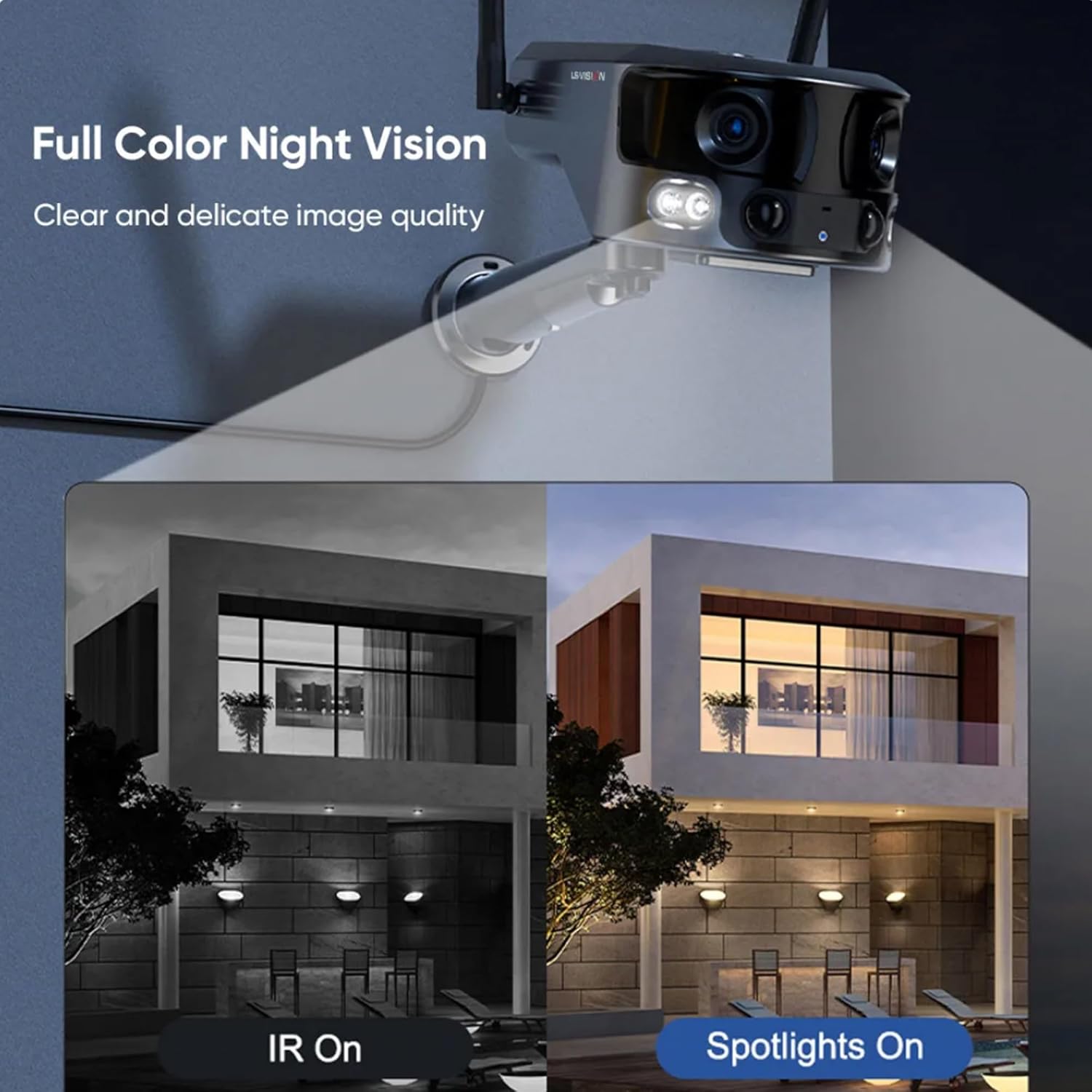
Figure 5.3: Comparison illustrating the difference between standard IR night vision and full-color night vision when the camera's spotlights are active.
5.4 Obousměrný zvuk
Utilize the built-in microphone and speaker for two-way audio communication through the Niview app. This allows you to listen in on the camera's surroundings and speak through the camera.
5.5 Režimy nahrávání
The camera supports various recording modes to suit your needs:
- 24hodinové nepřetržité nahrávání: Nahrává nepřetržitě po celý den.
- Trigger Recording: Records only when motion or human detection is triggered. This mode has three sub-options for customization.
6. Údržba
Pravidelná údržba zajišťuje optimální výkon a dlouhou životnost vašeho fotoaparátu:
- Čištění: Pravidelně otírejte objektiv fotoaparátu a solární panel měkkým hadříkem.amp hadříkem odstraňte prach a nečistoty. Nepoužívejte agresivní chemikálie.
- Péče o baterie: Ensure the solar panel is exposed to sufficient sunlight to keep the built-in batteries charged. In prolonged periods of low sunlight, consider manually charging the camera.
- Aktualizace firmwaru: Check the Niview app regularly for firmware updates. Keeping the firmware updated ensures the latest features and security patches.
- Ochrana životního prostředí: While IP66 rated, avoid exposing the camera to extreme weather conditions beyond its specified operating range if possible.

Figure 6.1: The camera's IP66 industrial-grade waterproof design ensures reliable operation even in adverse outdoor weather conditions like rain.
7. Řešení problémů
Pokud narazíte na problémy s fotoaparátem, podívejte se na následující běžné problémy a jejich řešení:
| Problém | Možná příčina | Řešení |
|---|---|---|
| Fotoaparát je offline | Žádný 4G signál; Vybitá baterie; Problém se SIM kartou. | Check 4G signal strength; Recharge battery; Reinsert SIM card or try a different one. |
| Špatná kvalita obrazu | Dirty lens; Insufficient light; Network bandwidth. | Clean the lens; Ensure adequate lighting or enable night vision; Check 4G network speed. |
| Detekce pohybu nefunguje | Detection sensitivity too low; Incorrect settings; Obstructions. | Adjust sensitivity in app; Verify detection zone settings; Clear any obstructions. |
| Baterie se nenabíjí | Insufficient sunlight; Dirty solar panel; Faulty connection. | Relocate solar panel to direct sunlight; Clean solar panel; Check cable connections. |
Pokud problém přetrvává, kontaktujte prosím zákaznickou podporu.
8. Specifikace
| Funkce | Specifikace |
|---|---|
| Název modelu | LS-MS2 |
| Rozlišení záznamu videa | 4K |
| Viewúhel | 180 Degrees (Ultra-Wide) |
| Technologie připojení | 4G Cellular Network (also supports Wi-Fi) |
| Zdroj napájení | Solární napájení (6W solární panel) |
| Kapacita baterie | 18000 mAh (vestavěný) |
| Dosah nočního vidění (barevný) | Až 20 metrů |
| Dosah nočního vidění (IR) | Až 40 metrů |
| Skladování | Cloud Storage, TF Card (Max 128GB, not included) |
| Hodnocení voděodolnosti | IP66 |
| Materiál | Acrylonitrile Butadiene Styrene (ABS) and Metal |
| Typ instalace | Držák na zeď |
| Kompatibilní zařízení | Tablet, Smartphone (Android/iOS) |
| Rozměry produktu | 18 x 18 x 15 cm |
| Hmotnost položky | 1.25 kg |
9. Informace o záruce
This product comes with a standard manufacturer's warranty. For specific warranty terms, duration, and claim procedures, please refer to the warranty card included in your product packaging or contact the retailer/manufacturer directly. Keep your purchase receipt as proof of purchase.
10. Zákaznická podpora
For technical assistance, product inquiries, or troubleshooting beyond this manual, please contact LS VISION customer support. Contact details can typically be found on the product packaging, the manufacturer's official webna vašem webu nebo prostřednictvím vašeho prodejního místa.
Ask a question about this manual
Ask about setup, troubleshooting, compatibility, parts, safety, or missing instructions. Manuals+ will review the question and use this page’s manual context to help answer it.