
Waytronic M14Black
Uživatelská příručka
Infrared Motion Sensor Activated Sound Speaker
Značka: Waytronic | Model: M14Black
1. Úvod
This manual provides detailed instructions for the setup, operation, and maintenance of your Waytronic Infrared Motion Sensor Activated Sound Speaker. This device is designed to detect motion and play a pre-recorded or custom voice message, serving various purposes such as greeting visitors, providing security alerts, or acting as a reminder.
2. Vlastnosti produktu
The Waytronic Infrared Motion Sensor Activated Sound Speaker offers the following key functionalities:
- Customizable Voice Recording: Equipped with a built-in microphone, allowing users to record and customize their own voice messages. Recording is initiated by pressing a button.
- Rozšířená kapacita nahrávání: Supports recording up to 130 seconds, with the ability to segment recordings.
- Wide Motion Detection: Features a detection range with a 120-degree horizontal and 60-degree vertical angle.
- Nastavitelná hlasitost: Provides two distinct volume levels for clear audio output.
- Flexibilní možnosti napájení: Can be powered by three AAA dry batteries or a DC5V USB power supply.
- Easy Re-recording: Messages can be re-recorded as many times as needed, simply by pressing a button.
3. Obsah balení
Prosím, ověřte, zda jsou v balení přítomny všechny položky:
- Infrared Motion Sensor Activated Sound Speaker (Black)
- Montážní šrouby
- Ball Mounting Accessories
- Uživatelská příručka (tento dokument)
4. Konec produktuview

Obrázek 4.1: Přední a boční view of the Waytronic Infrared Motion Sensor Activated Sound Speaker. The front features the PIR sensor and speaker grille, while the side shows the mounting bracket.
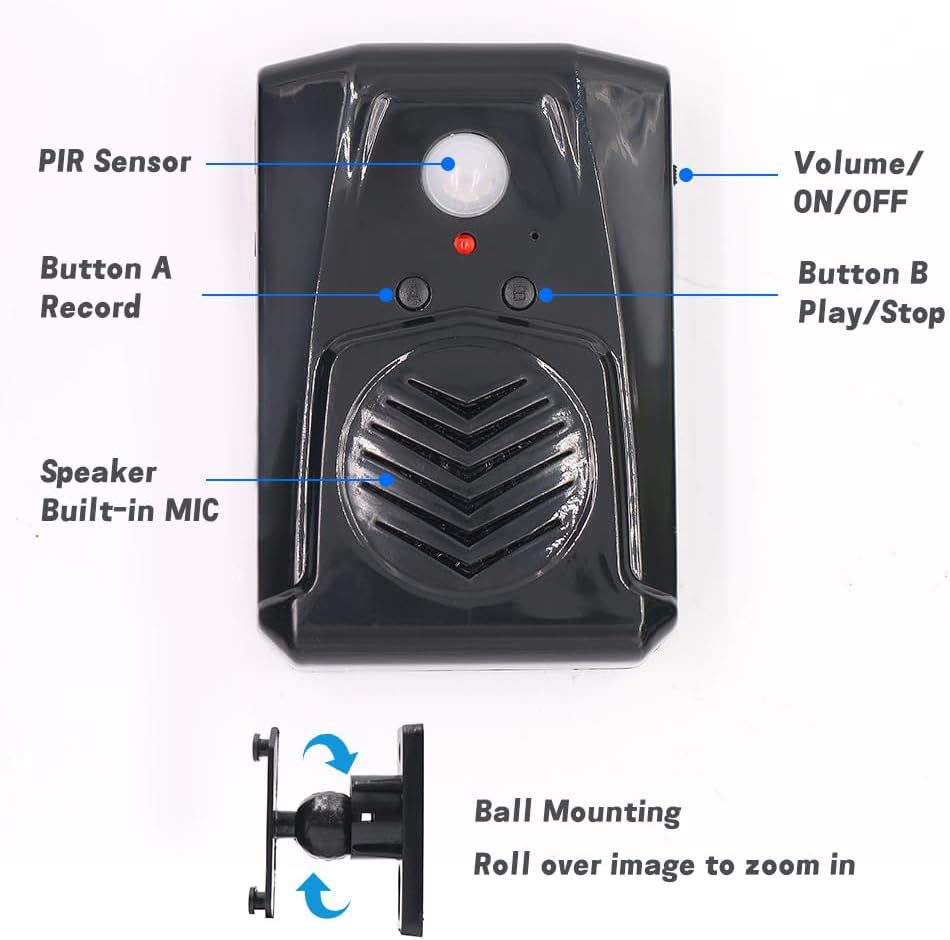
Obrázek 4.2: Detailní přední strana view of the speaker with key components labeled: PIR Sensor, Volume/ON/OFF switch, Button A (Record), Button B (Play/Stop), and the built-in speaker/microphone. The ball mounting accessory is also shown.

Obrázek 4.3: Zadní view of the speaker showing the Screw Mounting Hole, Bracket Mounting points, and the Battery Case for three AAA batteries.

Obrázek 4.4: Strana view illustrating the USB port for power supply (DC5V) and the 360-degree rotatable mounting bracket.
5. Instalace
- Napájení:
- Insert three AAA batteries into the battery case located on the back of the device (refer to Figure 4.3). Ensure correct polarity.
- Alternatively, power the device using a DC5V USB cable connected to the USB port on the side (refer to Figure 4.4).
- Místo montáže:
- Choose an indoor location such as a front door, corridor, or shop entrance.
- For optimal performance and to prevent false triggers, avoid areas with direct sunlight, significant temperature variations, or proximity to air conditioners and heaters.
- Montáž zařízení:
- Use the provided mounting screws and ball mounting accessories to secure the speaker to a wall or surface. The ball mounting allows for 360-degree rotation to adjust the detection angle.
- Ensure the PIR sensor (Figure 4.2) faces the area where motion detection is desired.
6. Provoz
6.1. Recording a Message
- Ensure the device is powered on using the Volume/ON/OFF switch (Figure 4.2).
- Stiskněte a podržte Button A (Record). The indicator light may change to confirm recording mode.
- Speak clearly into the built-in microphone (located near the speaker grille, Figure 4.2). The maximum recording time is 130 seconds.
- Uvolnění Tlačítko A to stop recording. A successful recording typically requires more than 3 seconds of audio.
- To re-record, simply repeat the process. The new recording will overwrite the previous one.
6.2. Playing a Message
- After recording, the device is ready to play the message upon motion detection.
- To manually play the current message, press Button B (Play/Stop). Press again to stop playback.
6.3. Nastavení hlasitosti
Použijte Volume/ON/OFF switch (Figure 4.2) to select between two volume levels. Slide the switch to the desired position.
6.4. Detekce pohybu
Once powered on and a message is recorded, the device will automatically play the message when motion is detected within its 120-degree horizontal and 60-degree vertical detection range.

Obrázek 6.1: This diagram illustrates that audio files are changed via button recording, not through USB data cable or TF card.
7. Aplikace
The Waytronic Motion Sensor Speaker can be utilized in various scenarios:
- Greeting Visitors: Place at an entrance to play a welcoming message.
- Security Reminder: Record a warning message to deter intruders or remind individuals of security protocols.
- Daily Audio Reminders: Use for personal reminders in homes or offices.
- Sale Advertising: Play promotional messages in retail environments.
- Animal Deterrent: Record sounds to discourage animals from entering certain areas.
- Event Enhancement: Integrate into festive displays or haunted house setups for interactive sound effects.
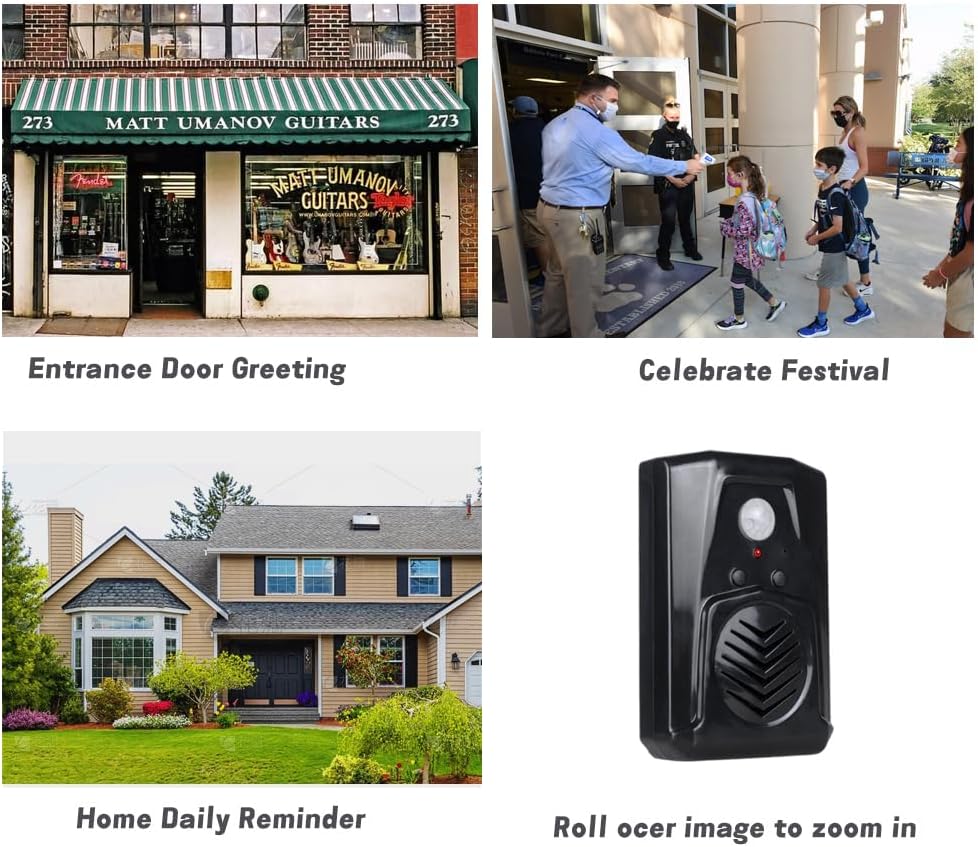
Obrázek 7.1: Examples of applications including entrance door greeting, celebrating festivals, and home daily reminders.

Obrázek 7.2: The speaker used to greet visitors upon entry.

Obrázek 7.3: The speaker playing a security message to an approaching individual.

Obrázek 7.4: The speaker used to deter animals, such as a lemur, with an audible message.
8. Řešení problémů
| Problém | Možná příčina | Řešení |
|---|---|---|
| Zařízení se nezapne. | Baterie jsou vybité nebo nesprávně vložené; USB kabel není připojen nebo je vadný. | Zkontrolujte polaritu baterie a v případě potřeby ji vyměňte. Ujistěte se, že je kabel USB bezpečně připojen a funkční. |
| Cannot record a message. | Button A not held long enough; recording time too short (less than 3 seconds). | Press and hold Button A for the entire duration of your message. Ensure the recording is at least 3 seconds long. |
| Pohybový senzor nedetekuje. | Obstruction in detection path; incorrect placement; sensor malfunction. | Ensure a clear line of sight for the PIR sensor. Reposition the device to avoid direct sunlight or heat sources. Verify the device is powered on. |
| Kvalita zvuku je špatná nebo zkreslená. | Low battery power; volume set too high; microphone too far during recording. | Replace batteries or use USB power. Adjust volume to a lower setting. Ensure you speak close to the microphone during recording. |
| Device triggers falsely. | Placed in an area with direct sunlight, large temperature variations, or near air conditioners/heaters. | Relocate the device to an area free from environmental factors that can cause false triggers. |
9. Specifikace
| Funkce | Detail |
|---|---|
| Značka | Waytronic |
| Číslo modelu | M14Black |
| Barva | Černý |
| Zdroj napájení | Battery Powered (3x AAA) or DC5V USB |
| Hmotnost položky | 0.11 kilogramů (3.84 uncí) |
| Maximum Range (Motion Detection) | 13 stop (4 metrů) |
| Detection Angle (Horizontal) | 120 stupňů |
| Detection Angle (Vertical) | 60 stupňů |
| Doba nahrávání | Až 130 sekund |
| Typ montáže | Door Mount (with included accessories) |
| Provozní teplota | 60 stupňů Fahrenheita |
| Rozměry balení | 5.28 x 3.66 x 2.6 palce |
10. Bezpečnostní informace
- Nevystavujte zařízení extrémním teplotám, přímému slunečnímu záření nebo vysoké vlhkosti.
- Udržujte zařízení mimo dosah vody a jiných kapalin.
- Nepokoušejte se zařízení sami otevírat ani opravovat. O servis se obraťte na kvalifikovaný personál.
- Baterie zlikvidujte v souladu s místními předpisy. Nekombinujte staré a nové baterie ani různé typy baterií.
- Uchovávejte mimo dosah dětí, aby nedošlo k náhodnému požití malých částí nebo baterií.
11. Zákaznická podpora
If you have any questions or encounter issues with your Waytronic Infrared Motion Sensor Activated Sound Speaker, please contact our customer support team. We are committed to assisting you within 24 hours.
Pro podporu prosím navštivte Waytronic Store on Amazon nebo se podívejte na kontaktní informace uvedené při nákupu.
Ask a question about this manual
Ask about setup, troubleshooting, compatibility, parts, safety, or missing instructions. Manuals+ will review the question and use this page’s manual context to help answer it.