
1. Úvod
This user manual provides detailed instructions for the Tuwei TDL401 Thermal Label Printer. It covers the setup, operation, maintenance, and troubleshooting of your device. Please read this manual thoroughly before using the printer to ensure proper function and to maximize its lifespan.
The Tuwei TDL401 is a high-speed thermal label printer designed for efficient and clear printing. It features a 203dpi resolution, a print speed of 180mm/s, and supports thermal adhesive label paper with widths ranging from 40mm to 80mm. Connectivity options include USB and Bluetooth, allowing for flexible integration with various devices.
2. Obsah balení
Ověřte prosím, zda jsou ve vašem balení obsaženy všechny níže uvedené položky:
- 1 x Tuwei TDL401 Thermal Label Printer
- 1 x Uživatelská příručka (tento dokument)
- 1 x Power Adapter (US plug 100-240V)
- 1 x USB kabel
3. Konec produktuview
Familiarize yourself with the main components and interfaces of your Tuwei TDL401 printer.

Obrázek 3.1: Přední view of the Tuwei TDL401 Thermal Label Printer, showing the sleek white casing and paper output slot.

Obrázek 3.2: Zadní view of the printer indicating the cover opening button, power interface, and data interface (USB/Bluetooth). Dimensions are also shown: 149mm (length), 79mm (width), 72mm (height).
4. Nastavení
4.1 Vybalení a umístění
- Opatrně vyjměte tiskárnu a veškeré příslušenství z obalu.
- Umístěte tiskárnu na stabilní, rovný povrch s dostatečným větráním.
- Ensure there is enough space around the printer for paper loading and operation.
4.2 Připojení napájení
- Connect the power adapter to the printer's power interface (refer to Figure 3.2).
- Zapojte napájecí adaptér do vhodné elektrické zásuvky (100–240 V).
- The printer will typically power on automatically or indicate readiness with an LED light.
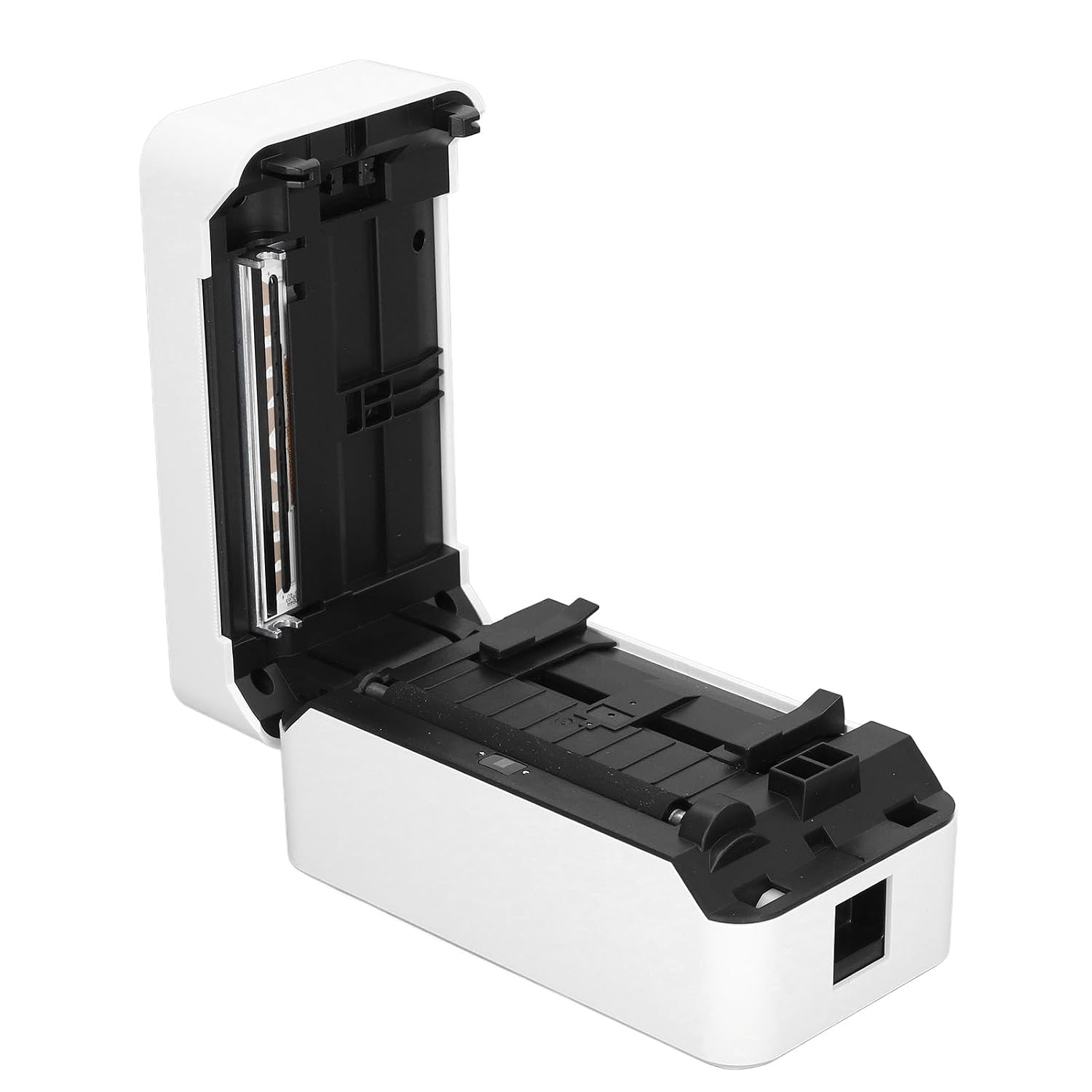
4.3 Vkládání štítků
The printer supports thermal adhesive label paper with a roll width of 40mm to 80mm.
- Stisknutím tlačítka pro otevření krytu otevřete kryt tiskárny.
- Insert the label roll into the paper compartment, ensuring the printable side of the labels faces upwards.
- Adjust the paper guides to fit the width of your label roll snugly, allowing for free movement but preventing excessive side-to-side play.
- Pull a small length of labels out past the print head and close the printer cover firmly until it latches.

Obrázek 4.1: Printer with the top cover open, revealing the paper compartment and internal mechanisms for loading labels.
Obrázek 4.2: Detailní view of the incisive paper cutting edge and the adjustable guides for setting the printing width.
4.4 Connecting to a Device (USB/Bluetooth)
4.4.1 Připojení USB
- Connect one end of the provided USB cable to the printer's USB port and the other end to your computer.
- Your operating system may automatically detect the printer and install basic drivers. For full functionality, it is recommended to install the official drivers from the manufacturer's webstránky (je -li k dispozici).
4.4.2 Připojení Bluetooth
- Ensure Bluetooth is enabled on your mobile device or computer.
- Turn on the printer. The Bluetooth indicator light (if present) should be blinking or solid, indicating it's ready for pairing.
- On your device, search for available Bluetooth devices and select 'TDL401' or a similar name.
- Follow any on-screen prompts to complete the pairing process. A PIN (e.g., 0000 or 1234) may be required.
- Once paired, you can print directly from compatible applications on your device.
5. Návod k obsluze
5.1 Základní tisk
- Ensure the printer is powered on and connected to your device via USB or Bluetooth.
- Open the document or label design software on your computer or mobile device.
- Vyberte možnost tisku v aplikaci.
- Choose the 'Tuwei TDL401' printer from the list of available printers.
- Adjust print settings such as label size, orientation, and number of copies as needed.
- Kliknutím na tlačítko „Tisk“ odešlete úlohu do tiskárny.
5.2 Rychlost a kvalita tisku
- The TDL401 printer offers a high print speed of 180 mm/s, allowing for rapid completion of printing tasks.
- With a print resolution of 203 dpi, the printer produces clear images and fine text, ensuring excellent label quality.
5.3 Podporovaná média
The printer is designed for use with thermosensitive adhesive label paper. It supports roll widths from 40mm to 80mm, with a maximum paper width of 80 ± 0.5 mm.
6. Údržba
Pravidelná údržba zajišťuje optimální výkon a prodlužuje životnost vaší tiskárny.
6.1 Čištění tiskové hlavy
Tisková hlava je kritickou součástí a měla by být pravidelně čištěna, zejména pokud se zhorší kvalita tisku.
- Vypněte tiskárnu a odpojte napájecí kabel.
- Otevřete kryt tiskárny.
- Použijte vatový tampon lehceampened with isopropyl alcohol (70% or higher) to gently wipe the print head surface. Avoid touching the print head with bare hands.
- Před zavřením krytu a opětovným připojením napájení nechte tiskovou hlavu zcela vyschnout.

Obrázek 6.1: Detailní záběr view of the thermal print head, which requires careful cleaning to maintain print quality.
6.2 Obecné čištění
- Otřete vnější povrch tiskárny měkkým,amp tkanina. Nepoužívejte agresivní chemikálie nebo abrazivní čisticí prostředky.
- Remove any dust or paper debris from the paper compartment using a soft brush or compressed air.
7. Řešení problémů
This section addresses common issues you might encounter with your Tuwei TDL401 printer.
| Problém | Možná příčina | Řešení |
|---|---|---|
| Tiskárna se nezapne | No power supply; Faulty power adapter/cable | Ensure power cable is securely connected to printer and outlet. Test outlet with another device. Check power adapter for damage. |
| Poor print quality (faint, blank lines) | Dirty print head; Incorrect paper type; Low quality labels | Clean the print head as described in Section 6.1. Ensure you are using high-quality thermal adhesive label paper. |
| Printer not detected via USB | Loose USB cable; Driver not installed; Faulty USB port | Ensure USB cable is securely connected. Install the correct printer drivers. Try a different USB port on your computer. |
| Nelze se připojit přes Bluetooth | Bluetooth off on device; Printer not in pairing mode; Incorrect PIN | Ensure Bluetooth is enabled on your device. Restart the printer. Re-attempt pairing and ensure the correct PIN (e.g., 0000 or 1234) is entered. |
| Zaseknutý papír | Improper paper loading; Damaged labels | Turn off the printer and open the cover. Carefully remove any jammed paper. Reload paper correctly, ensuring it's aligned and not wrinkled. |
8. Specifikace
Detailed technical specifications for the Tuwei TDL401 Thermal Label Printer.
| Funkce | Specifikace |
|---|---|
| Model | TDL401 |
| Značka | Tuwei |
| Technologie tisku | Tepelný |
| Rozlišení tisku | 203 dpi (203 x 203 dpi) |
| Rychlost tisku | 180 mm/s |
| Šířka tisku | Approx. 72mm / 2.83 inches |
| Šířka role papíru | 40 až 80 mm / 1.57 až 3.15 palce |
| Maximum Paper Width | 80 ± 0.5 mm |
| Printing Medium | Thermosensitive Adhesive Label Paper |
| Konektivita | USB, Bluetooth (BT) |
| Instrukční sada | TSPL |
| Materiál | ABS |
| Vstup napájení | 100-240V (US plug specification) |
| Tiskový výstup | Monochromatický |
| Kompatibilní zařízení | Computers, Smartphones |
| Země původu | USA |
9. Záruka a podpora
Informace o záruce a technickou podporu naleznete v dokumentaci dodané s vaším nákupem nebo se obraťte na svého prodejce. Uschovejte si účtenku jako doklad o koupi pro případ reklamace.