
1. Úvod
Thank you for choosing the Devoko 120x60cm Electric Standing Desk. This desk is designed to enhance your workspace by allowing seamless transitions between sitting and standing positions, promoting better posture, reducing fatigue, and increasing productivity. This manual provides essential information for the safe assembly, operation, and maintenance of your new desk.

Image 1: The Devoko 120x60cm Electric Standing Desk in a typical setup, showcasing its spacious design and monitor support.
2. Bezpečnostní upozornění
- Maximální nosnost: Nepřekračujte maximální nosnost 70 kg (154 lb)Přetížení stolu může způsobit poškození nebo zranění.
- Bezpečná montáž: Ensure all components are securely mounted and tightened according to the assembly instructions before use.
- Movement and Adjustment: Exercise caution when moving or adjusting the desk due to its metal structure and electrical components. Keep hands and objects clear of moving parts.
- Děti a domácí mazlíčci: Během provozu držte děti a domácí zvířata v dostatečné vzdálenosti od stolu, abyste předešli nehodám.
- Napájení: Use only the provided power adapter and ensure it is connected to a grounded outlet. Do not operate the desk with a damaged power cord or plug.
- Rozlití kapaliny: Avoid spilling liquids on the control panel or motor components. In case of a spill, immediately unplug the desk and allow it to dry completely before reconnecting power.
3. Nastavení a montáž
Detailed installation instructions are included in the product packaging. Please follow these instructions carefully for proper assembly. The desk features a robust metal frame and a multi-part wooden tabletop designed for stability.
Klíčové tipy pro montáž:
- Pracovní prostor: Ujistěte se, že máte ample prostor pro montáž.
- Tabletop Alignment: The tabletop consists of multiple wooden parts. Take time to align them properly during assembly to ensure a smooth and even surface.
- Správa kabelů: Utilize the integrated cable pass-throughs to keep your workspace tidy.

Image 2: Integrated design features such as cable management, rounded corners, and a convenient hook for headphones or bags.
4. Návod k obsluze
Your Devoko electric standing desk is equipped with an intuitive control panel for easy height adjustment and memory functions.
4.1. Nastavení výšky
- Adjusting Up: Stiskněte a podržte NAHORU (▲) tlačítko pro zvednutí stolu do požadované výšky pro stání.
- Adjusting Down: Stiskněte a podržte DOLŮ (▼) tlačítko pro snížení stolu do požadované výšky sezení.
- The desk height can be adjusted smoothly and quietly between 73 cm a 118 cm. Release the button once the desired height is reached.
4.2. Předvolby paměti
The control panel allows you to save two preferred height settings for quick recall.
- Uložení předvolby:
- Adjust the desk to your desired height (e.g., sitting height).
- Stiskněte tlačítko M button (or similar memory button, if present). The LED display may flash.
- Immediately press either 1 or 2 to save the current height to that memory slot.
- Vyvolání presetu: Jednoduše stiskněte 1 or 2 button corresponding to your saved height. The desk will automatically move to that position.
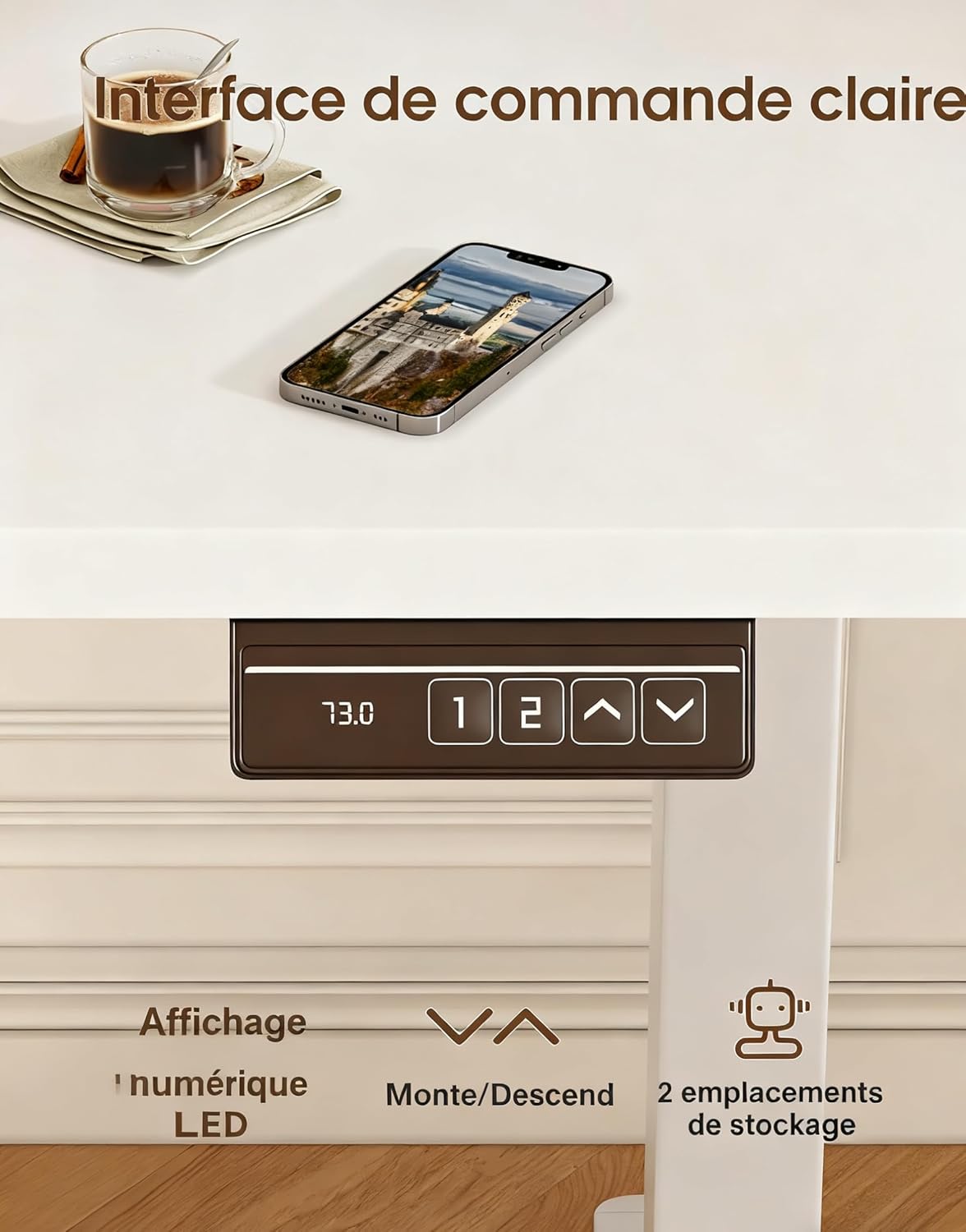
Image 3: The desk's control panel, featuring an LED display for current height, up/down adjustment buttons, and two memory preset buttons.

Image 4: Visual guide demonstrating proper ergonomic posture when using the desk in both sitting and standing positions, highlighting the benefit of the monitor support.
5. Údržba
- Čištění: Otřete povrch stolu měkkým hadříkemamp hadříkem. Nepoužívejte abrazivní čisticí prostředky ani agresivní chemikálie, které by mohly poškodit povrchovou úpravu.
- Zkontrolujte připojení: Pravidelně kontrolujte všechny šrouby a vruty, zda jsou pevně utažené. V případě potřeby je dotáhněte.
- Kontrola kabelů: Inspect the power cord and motor cables for any signs of wear or damage. Replace immediately if damage is found.
- Péče o motor: The desk's motors are designed for durability (tested over 20,000 cycles). Avoid continuous operation for extended periods without rest to prevent overheating.
6. Řešení problémů
| Problém | Možná příčina | Řešení |
|---|---|---|
| Stůl se nehýbe. | Odpojený napájecí kabel; Přetížení; Chyba motoru. | Check power connections. Reduce weight on desk. Unplug for 10 minutes, then reconnect. |
| Stůl se pohybuje nerovnoměrně nebo vydává neobvyklé zvuky. | Nerovnoměrné zatížení; Uvolněné spoje; Překážka. | Distribute weight evenly. Check all assembly screws. Ensure no objects are obstructing the legs. |
| Předvolby paměti nefungují. | Předvolby nebyly správně uloženy. | Re-save the memory presets following the instructions in Section 4.2. |
| Stůl se kymácí. | Loose connections; Uneven floor. | Ensure all screws are tightened. Adjust leveling feet if your floor is uneven. |
Pokud narazíte na problémy, které zde nejsou uvedeny, nebo pokud problém přetrvává i po vyzkoušení řešení, kontaktujte zákaznickou podporu.
7. Specifikace

Image 5: Key specifications and dimensions of the Devoko Electric Standing Desk.
| Funkce | Detail |
|---|---|
| Číslo modelu | 0463 |
| Značka | Devoko |
| Barva | Bílý |
| Rozměry stolní desky (D x Š) | 120 cm x 60 cm (47.2 palce x 23.6 palce) |
| Rozsah nastavení výšky | 73 cm - 118 cm (28.7 palce - 46.5 palců) |
| Product Dimensions (L x W x H at lowest) | 60 x 120 x 72 cm |
| Hmotnostní kapacita | 70 kg (154 lb) |
| Hmotnost produktu | 22 kg (48.5 lb) |
| Materiál | Wood (Tabletop), Metal (Base) |
| Vlastnosti | Adjustable, Electric, 2 Memory Presets, Monitor Support |
| Úroveň hluku | <60 dB |
8. Záruka a podpora
For warranty information, please refer to the documentation included with your purchase or contact the seller directly. Devoko is committed to providing quality products and customer satisfaction.
If you have any questions, require assistance with assembly, or need troubleshooting support, please contact the Devoko customer service team or the retailer from whom you purchased the product. Please have your model number (0463) and purchase details ready when contacting support.