
Zavedení
This manual provides detailed instructions for the SHIDU X1 Portable Bluetooth Speaker with Wireless Microphone. Please read this manual thoroughly before using the product to ensure proper operation and to maximize your user experience. This device is designed to deliver high-quality audio with versatile connectivity and entertainment features.
Obsah balení
Po vybalení se prosím ujistěte, že jsou všechny níže uvedené položky přítomny a v dobrém stavu:
- 1 x SHIDU X1 Portable Bluetooth Speaker
- 1 x Wireless UHF Microphone
- 1 x Type-C Charging Plug
- Kabel 1 x AUX
- 1 x Live Stream Cable
- 1 x Uživatelská příručka
Konec produktuview
Ovládání reproduktorů
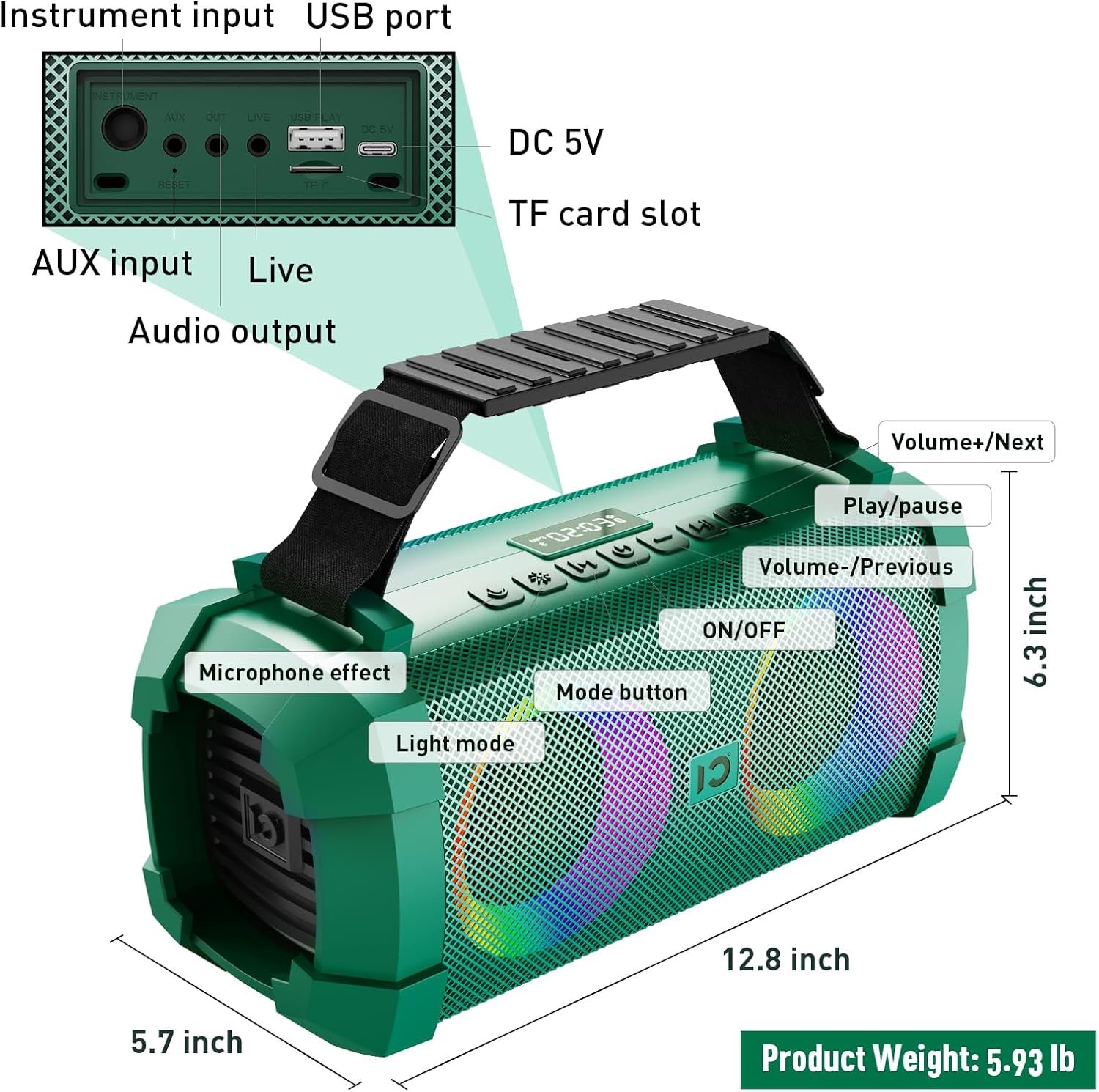
Image: SHIDU X1 Portable Bluetooth Speaker Control Panel Diagram
The speaker features a top-mounted control panel for easy access to various functions:
- Tlačítko ON/OFF: Long press to power the speaker on or off.
- Tlačítko režimu: Short press to cycle through input modes (Bluetooth, AUX, TF Card, U-Disk).
- Tlačítko světelného režimu: Short press to switch between 5 dynamic LED light modes. Long press to turn the lights off.
- Microphone Effect Button: Short press to cycle through 3 sound effects (Popular, Professional, Original) for the microphone.
- Tlačítko Hlasitost - / Předchozí skladba: Krátké stisknutí pro předchozí skladbu. Dlouhé stisknutí pro snížení hlasitosti.
- Tlačítko Přehrát/Pozastavit: Krátkým stisknutím přehrajete nebo pozastavíte zvuk.
- Tlačítko pro zvýšení hlasitosti / další skladbu: Krátkým stisknutím přejdete na další skladbu. Dlouhým stisknutím zvýšíte hlasitost.
Ovládání bezdrátového mikrofonu
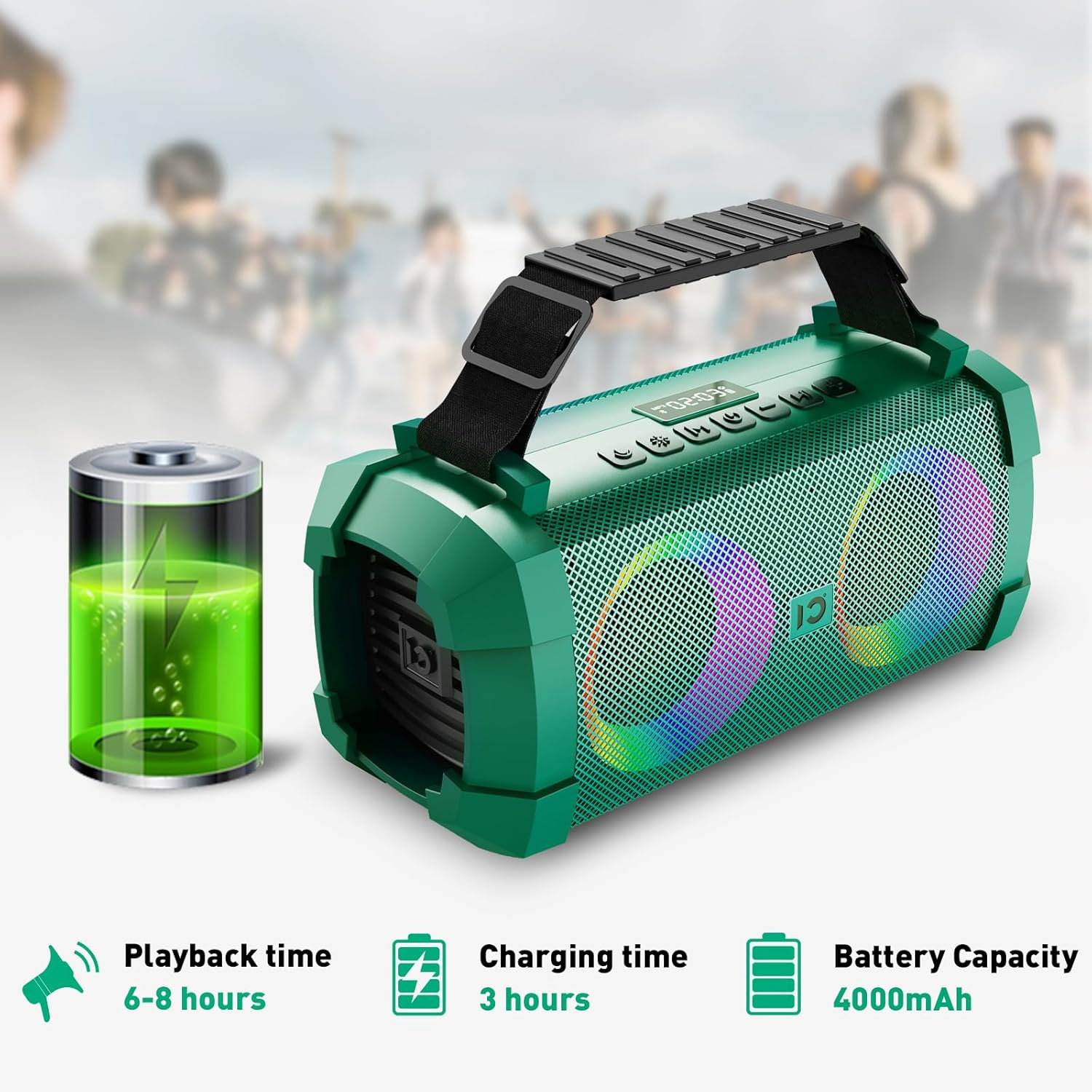
Image: SHIDU X1 Wireless Microphone Controls
The wireless microphone includes the following controls:
- Vypínač: Dlouhým stisknutím zapnete nebo vypnete mikrofon.
- Frequency + Button: Short press to increase the microphone's frequency.
- Frequency - Button: Short press to decrease the microphone's frequency.
- Tlačítko hlasitosti +: Long press to increase microphone volume.
- Tlačítko hlasitosti: Long press to decrease microphone volume.
- LED obrazovka: Zobrazuje aktuální frekvenci a stav baterie.
Nastavení
Nabíjení reproduktoru
Before first use, fully charge the speaker. Connect the provided Type-C charging plug to the DC 5V port on the speaker and plug it into a power source. The charging indicator will show the charging status. A full charge takes approximately 3 hours.

Image: SHIDU X1 Portable Bluetooth Speaker battery life details: 6-8 hours playback, 3 hours charging, 4000mAh capacity.
Zapnutí/vypnutí
Dlouze stiskněte ON/OFF button on the speaker's control panel to power it on or off.
Párování pomocí Bluetooth
- Ensure the speaker is powered on and in Bluetooth mode (indicated by a flashing Bluetooth icon or voice prompt). If not, short press the Režim tlačítko pro přepnutí do režimu Bluetooth.
- Povolte Bluetooth na svém mobilním zařízení (chytrém telefonu, tabletu atd.).
- Hledat available Bluetooth devices and select "SHIDU X1" from the list.
- Once connected, the speaker will indicate successful pairing, and the Bluetooth icon will stop flashing.
Párování mikrofonu
The UHF wireless microphone is factory-paired with the speaker. Simply power on both the speaker and the microphone, and they should connect automatically. If pairing is lost, refer to the troubleshooting section.
Návod k obsluze
Přepínání vstupních režimů
Krátce stiskněte Režim button on the speaker to cycle through available input sources: Bluetooth, AUX, TF Card, and U-Disk (USB flash drive).
Adjusting Volume and Tracks
- Ovládání hlasitosti: Dlouze stiskněte Hlasitost + button to increase volume, and long press the Hlasitost - tlačítko pro snížení hlasitosti.
- Navigace po trati: Krátce stiskněte Další stopa button to skip to the next song, and short press the Předchozí stopa button to go to the beginning of the current song or the previous song.
- Přehrát/pozastavit: Krátce stiskněte Přehrát/Pozastavit tlačítko pro pozastavení nebo obnovení přehrávání.
Using Sound Effects
The speaker offers three distinct sound effects for the wireless microphone:

Image: SHIDU X1 Portable Bluetooth Speaker demonstrating Original, Popular, and Professional sound modes.
- Původní režim: Standard vocal output.
- Popular Mode: Enhances vocals for a more vibrant sound.
- Profesionální režim: Provides a refined vocal output suitable for performances.
Krátce stiskněte Efekt mikrofonu button on the speaker to cycle through these effects.
Controlling LED Lights
The speaker features 5 dynamic LED light modes to enhance the atmosphere.

Image: SHIDU X1 Portable Bluetooth Speaker showcasing 5 types of lighting modes.
Krátce stiskněte Světelný režim button to cycle through the different lighting patterns. Long press the Světelný režim button to turn the LED lights off.
Live Streaming Function
The SHIDU X1 includes a professional live streaming interface. Connect your device using the provided Live Stream Cable to enable karaoke live streaming functionality.

Image: SHIDU X1 Portable Bluetooth Speaker with professional live broadcast interface for karaoke.
Vlastnosti produktu Overview
The SHIDU X1 is designed for versatile use, offering powerful sound and engaging features for various occasions.

Image: SHIDU X1 Portable Bluetooth Speaker with 60W output, Monstrous Bass, 3 Sound Effects, 5 Party Lights, Bluetooth 5.0, TF Card, 6.5mm Instrument Port, Live Streaming, UHF Wireless Mic, USB Flash Drive.
Experience deep bass and clear highs with 60W high-power stereo sound, suitable for both indoor and outdoor environments.

Image: SHIDU X1 Portable Bluetooth Speaker illustrating high-quality three-dimensional sound and overweight bass.
The speaker is ideal for various scenarios, including family karaoke, parties, band performances, and outdoor campIng.

Image: SHIDU X1 Portable Bluetooth Speaker suitable for multiple scenarios: family karaoke, party interaction, band performance, outdoor campIng.
Oficiální video produktu
Video: Official SHIDU X1 Wireless Bluetooth Speaker with Wireless Microphone 60W Portable Karaoke Machine overview. This video demonstrates the product's features and functionality.
Specifikace
| Značka | SHIDU |
| Číslo modelu | X1 |
| Výstupní Wattage | 60 W (špička) / 40 W (RMS) |
| Technologie připojení | Bluetooth 5.0, AUX, USB, TF karta |
| Rozměry položky (D x Š x V) | 12.8 x 5.7 x 6.3 palce |
| Hmotnost položky | 5.6 libry |
| Kapacita baterie | 4000 XNUMX mAh |
| Doba přehrávání | 6-8 hours (at medium volume) |
| Doba nabíjení | 3 hodin |
| Vestavěná média | Mikrofon |
Odstraňování problémů
If you encounter any issues with your SHIDU X1 speaker, please refer to the following common solutions:
- Bez napájení: Ujistěte se, že je reproduktor plně nabitý. Připojte nabíjecí kabel a nechte jej nabíjet alespoň 30 minut, než se jej pokusíte znovu zapnout.
- Žádný zvuk: Check the volume levels on both the speaker and your connected device. Ensure the correct input mode is selected. If using Bluetooth, verify successful pairing.
- Problémy s párováním Bluetooth: Turn off Bluetooth on your device and the speaker, then restart both. Clear the speaker from your device's Bluetooth history and attempt to pair again. Ensure no other devices are actively connected to the speaker.
- Mikrofon nefunguje: Ensure the microphone is powered on and fully charged. Check the microphone's frequency settings and adjust if necessary. Re-pair the microphone if connection is lost (usually automatic).
- Zkreslený zvuk: Snižte hlasitost reproduktoru i připojeného zařízení. Ujistěte se, že zdroj zvuku má dobrou kvalitu.
Údržba
To ensure the longevity and optimal performance of your SHIDU X1 speaker, follow these maintenance guidelines:
- Čištění: K čištění vnější strany reproduktoru používejte měkký, suchý hadřík. Nepoužívejte abrazivní čisticí prostředky ani rozpouštědla.
- Skladování: Reproduktor skladujte na chladném a suchém místě mimo dosah přímého slunečního záření a extrémních teplot.
- Péče o baterie: For optimal battery life, avoid fully discharging the battery frequently. Charge the speaker regularly, even if not in use, to maintain battery health.
- Voděodolnost: Přestože je reproduktor určen pro venkovní použití, vyvarujte se ponořování reproduktoru do vody ani jeho vystavení silnému dešti.
Záruka a podpora
The SHIDU X1 Portable Bluetooth Speaker comes with a standard manufacturer's warranty. Please refer to the warranty card included in your package for specific terms and conditions.
For technical support, troubleshooting assistance, or warranty claims, please contact SHIDU customer service through the retailer where you purchased the product or visit the official SHIDU webstránky pro kontaktní informace.


