
Zavedení
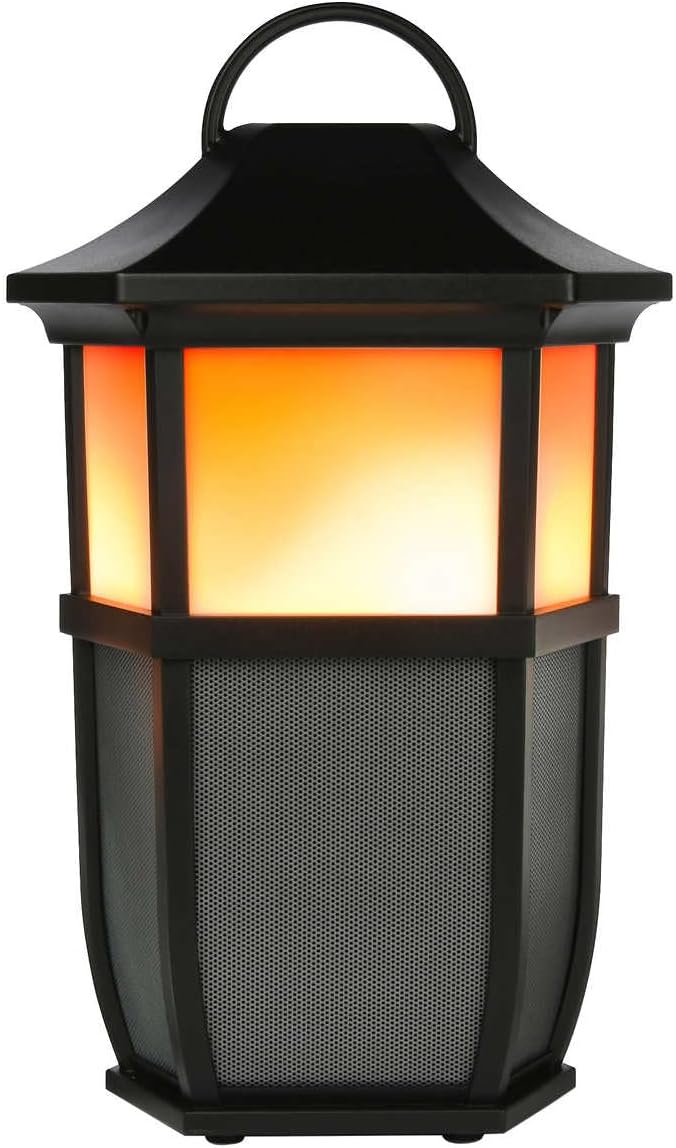
The Acoustic Research Portable Outdoor Wireless Speaker with LED Flickering Flame Light is designed to provide high-quality audio and ambient lighting for various indoor and outdoor settings. This rechargeable speaker features multiple light modes, including a realistic flickering flame, and is built with an IPX5 water-resistant rating, making it suitable for outdoor use. It also includes built-in nature sounds for relaxation and can be stereo-paired with another compatible AR speaker for an enhanced audio experience.
Obsah balení
- Acoustic Research Portable Outdoor Wireless Speaker (Model: AWSF9R)
- USB nabíjecí kabel
- Uživatelská příručka
Vlastnosti produktu
- 7 světelné režimy: Soft White, Bright White, Flicker Flame, Soft Glow, Candlelight, Aurora. Separate controls for light and speaker.
- Prodloužená hrací doba: Až 12 hodin přehrávání hudby na jedno nabití.
- Voděodolnost: IPX5 rated for protection against splashing water.
- Zvuky přírody: Includes Forest, Waves, Running Stream, and Rain.
- Přenosný design: Attractive lantern style with a handle for easy carrying or hanging.
- Bluetooth připojení: Bezproblémové bezdrátové streamování zvuku z kompatibilních zařízení.
- Stereo párování: Connect two AWSF9R speakers for true wireless stereo sound (second speaker sold separately).
Ovládací prvky a indikátory

Obrázek 1: Speaker Control Panel. This image shows a close-up of the speaker's control buttons, including power, volume, track skip, light mode, and nature sound buttons, along with the DC charging port.
| Tlačítko/Indikátor | Funkce |
|---|---|
| Tlačítko napájení (⏻) | Press and hold to power the speaker ON or OFF. Press briefly to Play/Pause music. |
| Snížení hlasitosti / Předchozí skladba (− / ⏮) | Krátkým stisknutím snížíte hlasitost. Dlouhým stisknutím přejdete na předchozí skladbu. |
| Zvýšení hlasitosti / další stopa (+ / ⏭) | Krátkým stisknutím zvýšíte hlasitost. Dlouhým stisknutím přejdete na další skladbu. |
| Tlačítko světelného režimu (💡) | Press to cycle through 7 light modes: Soft White, Bright White, Flicker Flame, Soft Glow, Candlelight, Aurora, and OFF. |
| Tlačítko Zvuk přírody (♫) | Press to cycle through 4 nature sounds: Forest, Waves, Running Stream, Rain, and OFF. |
| DC nabíjecí port | Connect the USB charging cable here to recharge the speaker's battery. |
| LED indikátor | Indikuje stav nabíjení a stav párování Bluetooth. |
Nastavení
Nabíjení reproduktoru
- Locate the DC charging port on the speaker's control panel.
- Connect the small end of the provided USB charging cable to the speaker's DC port.
- Připojte větší konec kabelu USB k napájecímu adaptéru USB (není součástí balení) nebo k portu USB počítače.
- The LED indicator will illuminate to show charging status. Allow approximately 3-4 hours for a full charge. The indicator will change or turn off when charging is complete.
Poznámka: Fully charge the speaker before first use to maximize battery life.
Návod k obsluze
Zapnutí/vypnutí
- Pro zapnutí stiskněte a podržte tlačítko ⏻ Power button for 2-3 seconds until you hear an audible prompt.
- Pro vypnutí stiskněte a podržte tlačítko ⏻ Power button for 2-3 seconds until you hear an audible prompt.
Párování pomocí Bluetooth
- Ensure the speaker is powered ON and within 10 meters (33 feet) of your Bluetooth device (smartphone, tablet, etc.).
- The speaker will automatically enter Bluetooth pairing mode when powered on for the first time or if no device is connected. The LED indicator will flash, indicating it's ready to pair.
- On your Bluetooth device, go to the Bluetooth settings and enable Bluetooth.
- Hledat available devices and select "AR Speaker" (or similar name) from the list.
- Po spárování přestane LED indikátor blikat a zůstane svítit nepřerušovaně a uslyšíte potvrzovací zvuk.
- Nyní můžete přehrávat hudbu ze zařízení přes reproduktor.
Poznámka: Reproduktor se po zapnutí automaticky pokusí znovu připojit k poslednímu spárovanému zařízení.
Controlling Light Modes

Obrázek 2: Speaker Light Modes. The left image shows the speaker with a warm, flickering flame light, while the right image shows it with a bright white light, demonstrating two of the available light modes.
Stiskněte tlačítko 💡 Light Mode button repeatedly to cycle through the 7 available light modes:
- Blikající plamen
- Měkká bílá
- Světle bílá
- Měkká záře
- Světlo svíček
- Aurora
- Světlo VYPNUTO
Playing Nature Sounds
Stiskněte tlačítko ♫ Nature Sound button repeatedly to cycle through the 4 built-in nature sounds:
- Les
- Vlny
- Running Stream
- Déšť
- Nature Sound OFF
Párování s True Wireless Stereo (TWS) (volitelné)
To achieve a true stereo sound experience, you can pair two Acoustic Research AWSF9R speakers together. (Second speaker sold separately).
- Ensure both speakers are powered ON and not connected to any Bluetooth device.
- Na jednom reproduktoru (to bude váš primární reproduktor) stiskněte a podržte tlačítko ⏻ Power button for 5 seconds until you hear a distinct pairing tone.
- The primary speaker will now search for the second speaker.
- Once connected, you will hear a confirmation tone, and the LED indicators on both speakers will change to indicate a successful TWS connection.
- Nyní připojte zařízení Bluetooth k primárnímu reproduktoru, jak je popsáno v části „Párování Bluetooth“. Zvuk bude přehráván stereofonně z obou reproduktorů.
Poznámka: TWS pairing only works with two identical AWSF9R speakers.
Údržba
- Čištění: K čištění vnější strany reproduktoru používejte měkký, suchý hadřík. Nepoužívejte abrazivní čisticí prostředky ani rozpouštědla.
- Vystavení vodě: While IPX5 water-resistant, do not submerge the speaker in water. Ensure the charging port cover is securely closed when exposed to water.
- Skladování: Pokud reproduktor delší dobu nepoužíváte, skladujte jej na chladném a suchém místě mimo dosah přímého slunečního záření a extrémních teplot.
- Péče o baterie: Pro prodloužení životnosti baterie reproduktor plně nabijte alespoň jednou za tři měsíce, i když jej nepoužíváte pravidelně.
Odstraňování problémů
| Problém | Možné řešení |
|---|---|
| Reproduktor se nezapne. | Ensure the battery is charged. Connect the speaker to a power source using the USB cable and allow it to charge for at least 30 minutes before attempting to power on again. |
| Nelze spárovat se zařízením Bluetooth. |
|
| Žádný zvuk nebo nízká hlasitost. |
|
| Light modes are not working. | Press the Light Mode button repeatedly to cycle through all modes. Ensure the speaker has sufficient battery charge. |
| Nature sounds are not working. | Press the Nature Sound button repeatedly to cycle through all sounds. |
Specifikace

Obrázek 3: Product Dimensions. This image illustrates the height (9.76 inches), width (7.2 inches), and depth (6.54 inches) of the speaker.
| Funkce | Detail |
|---|---|
| Název modelu | AWSF9R |
| Značka | Akustický výzkum |
| Typ reproduktoru | Venkovní, Přenosné |
| Konektivita | Bluetooth (bezdrátové) |
| Dosah Bluetooth | Až 10 metrů (33 stop) |
| Voděodolnost | IPX5 (voděodolný) |
| Výkon | 30 wattů |
| Režim zvukového výstupu | Stereo (s párováním TWS) |
| Životnost baterie | Až 12 hodin |
| Zdroj napájení | Napájení z baterie |
| Rozměry produktu (D x Š x V) | 6.54 cm x 7.2 cm x 9.76 cm |
| Hmotnost položky | 5 libry |
| UPC | 044476151811 |
Záruka a podpora
This Acoustic Research product comes with a Omezená záruka. For detailed warranty information, technical support, or service inquiries, please refer to the warranty card included with your product or visit the official Acoustic Research webstránky. Uschovejte si prosím doklad o koupi pro případ reklamace.
For further assistance, you may contact Acoustic Research customer support through their official channels.